
订单的处理流程分为两种:
* 物流快递
* 到店自提
## **一、物流快递**
1. 会员商城下单,选择的方式为【商家配送】;
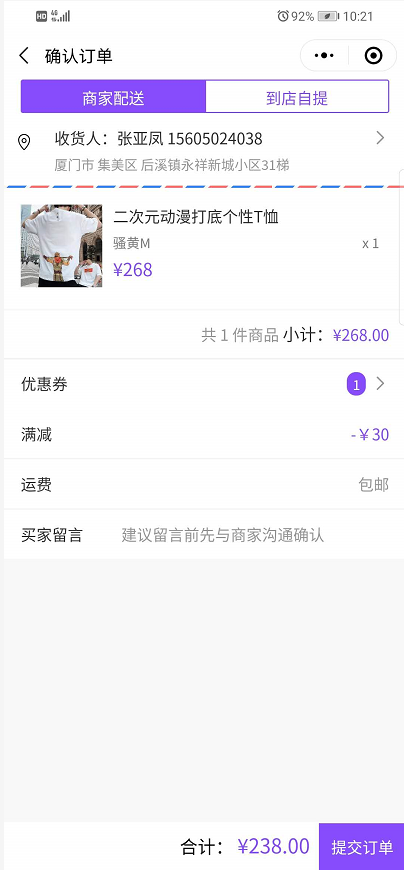
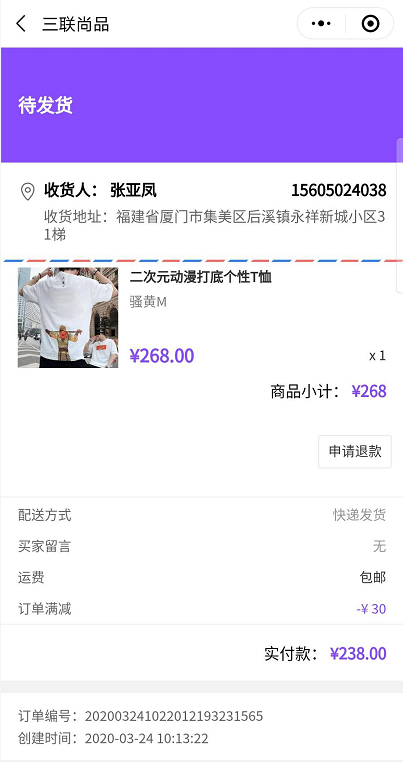
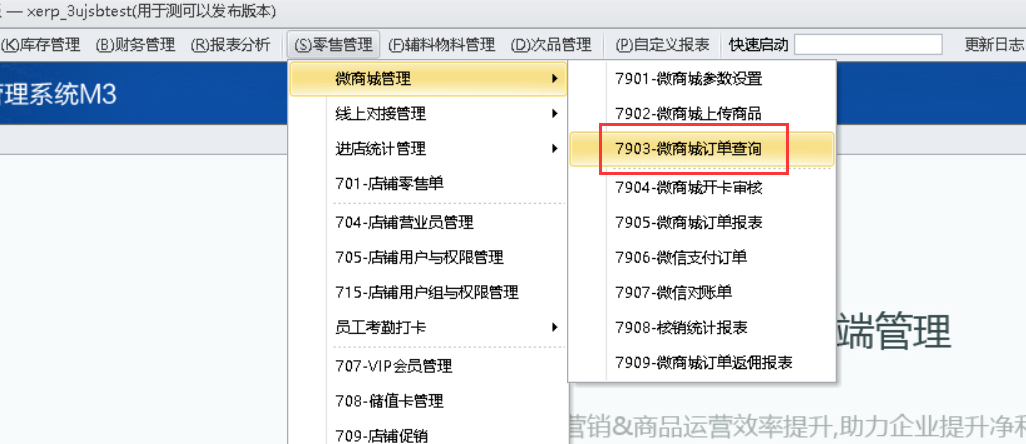
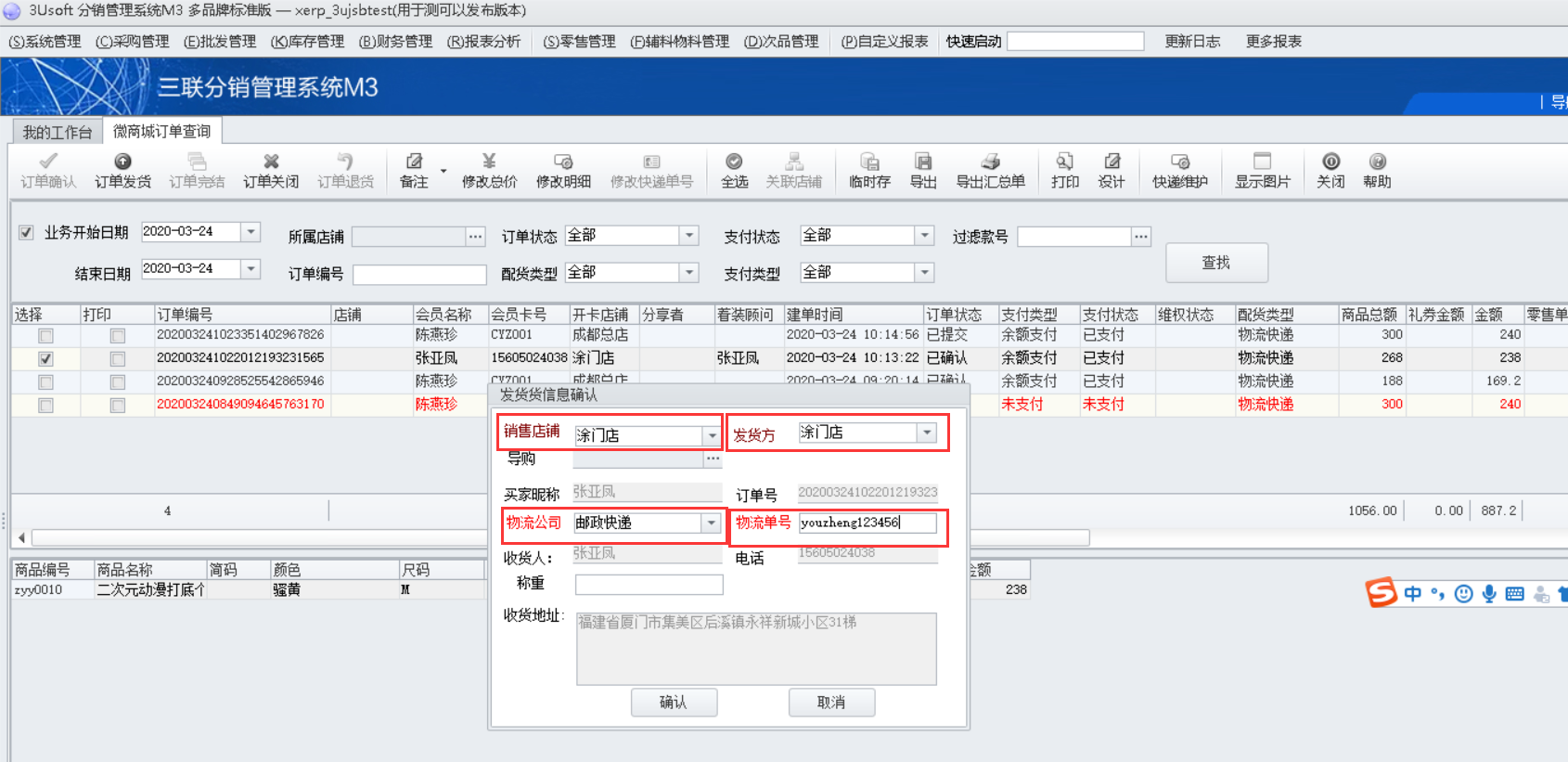
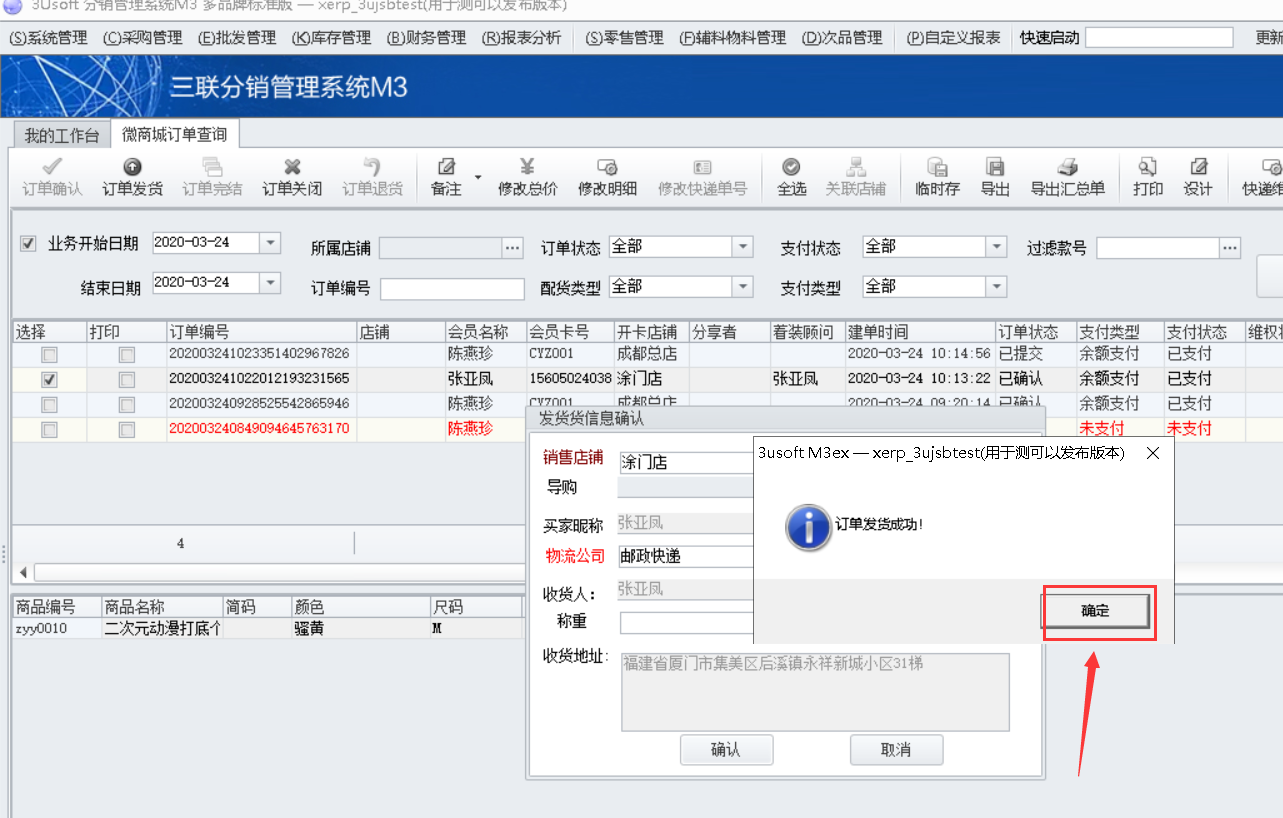
2. 商家确认订单,并且发货。路径:零售管理——微商城管理——微商城订单查询
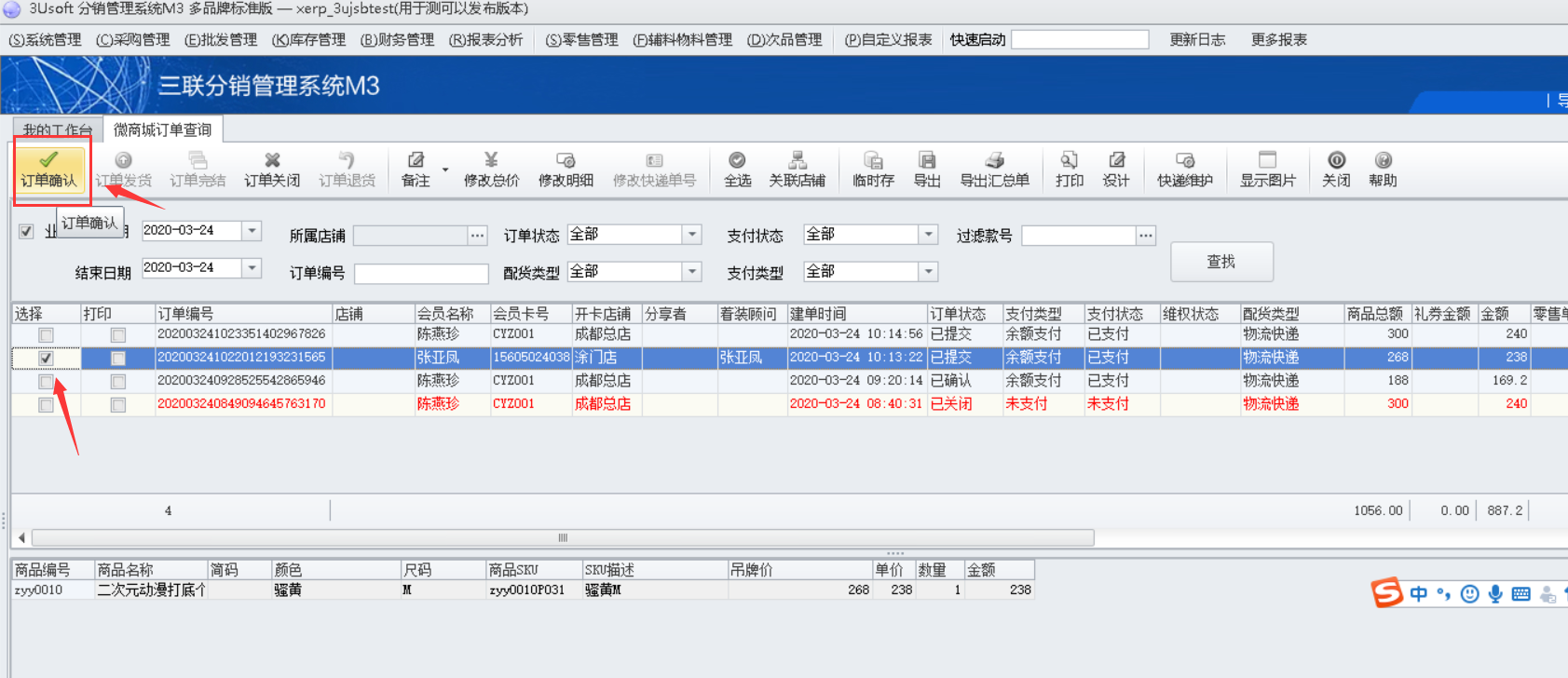
选中订单,依次点击订单确认、订单发货,填写必填项目
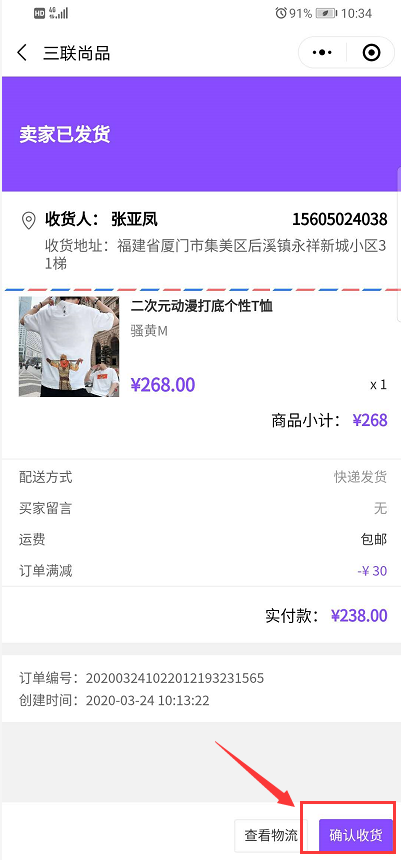
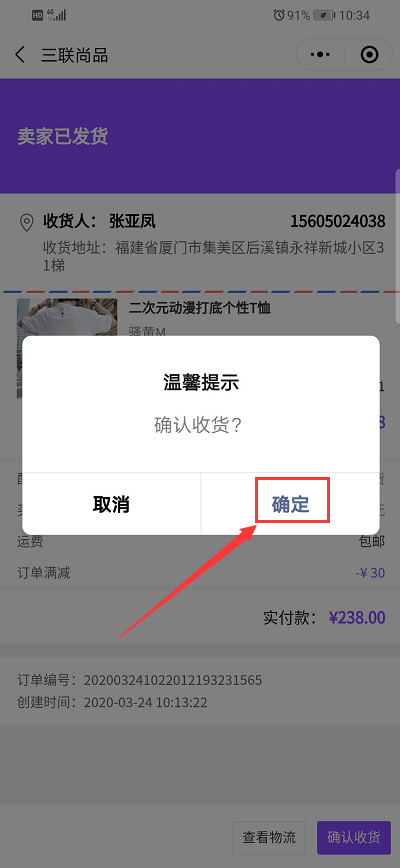
3. 会员手机端收货。
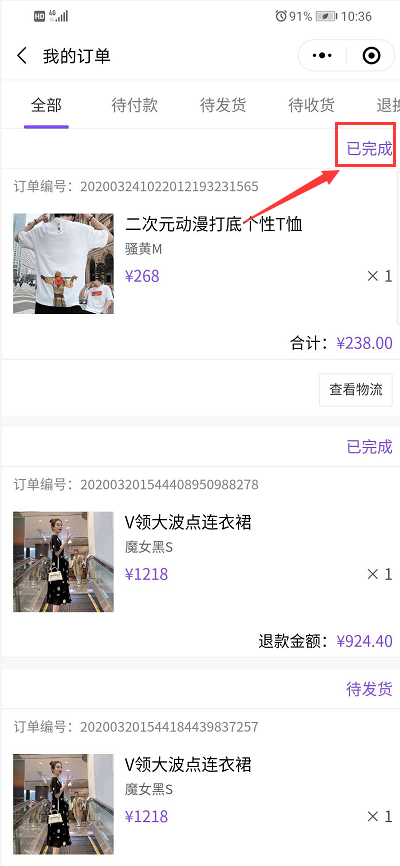
4、会员可以在会员中心——我的订单 里面查询各类订单状态
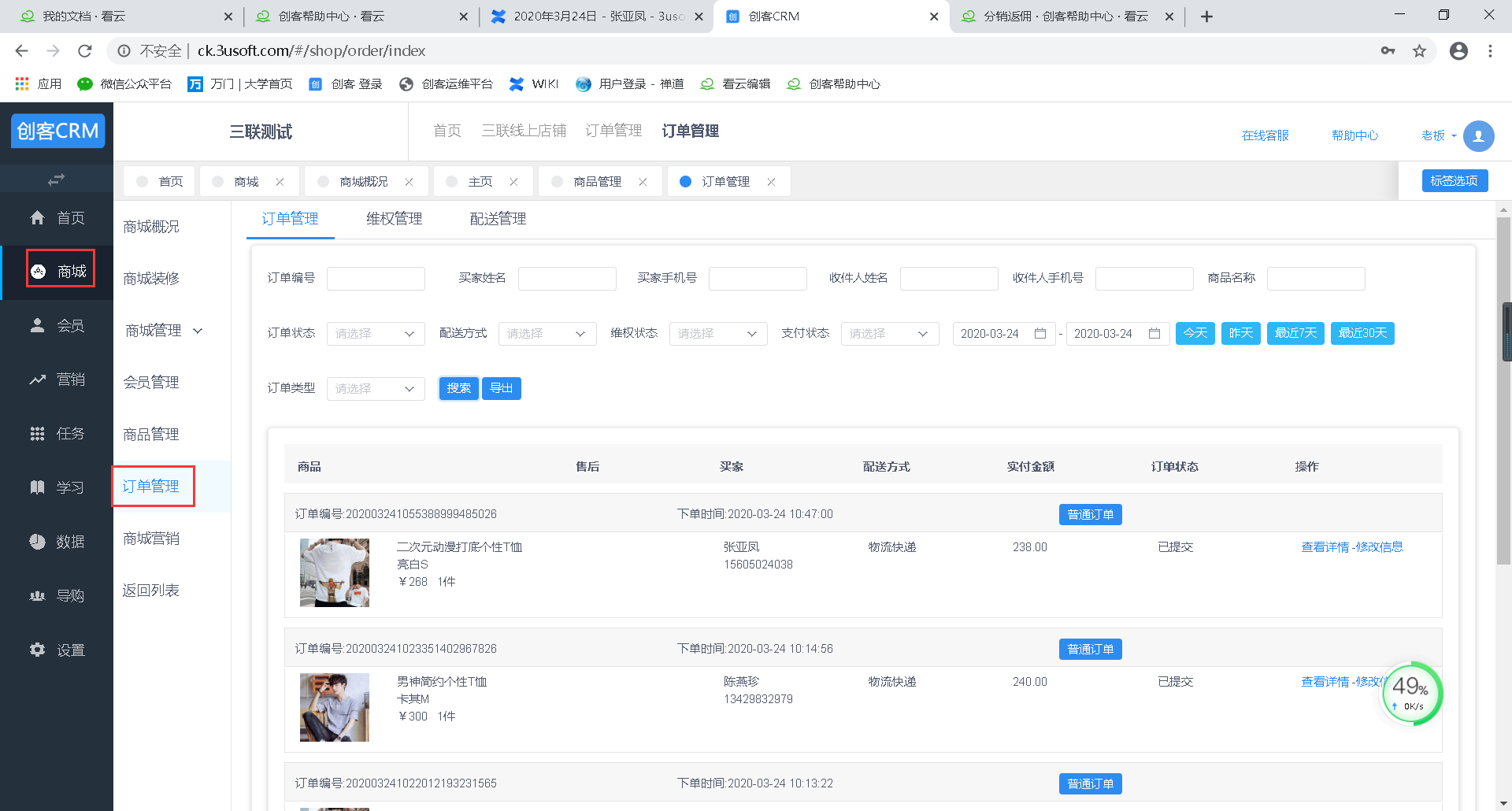
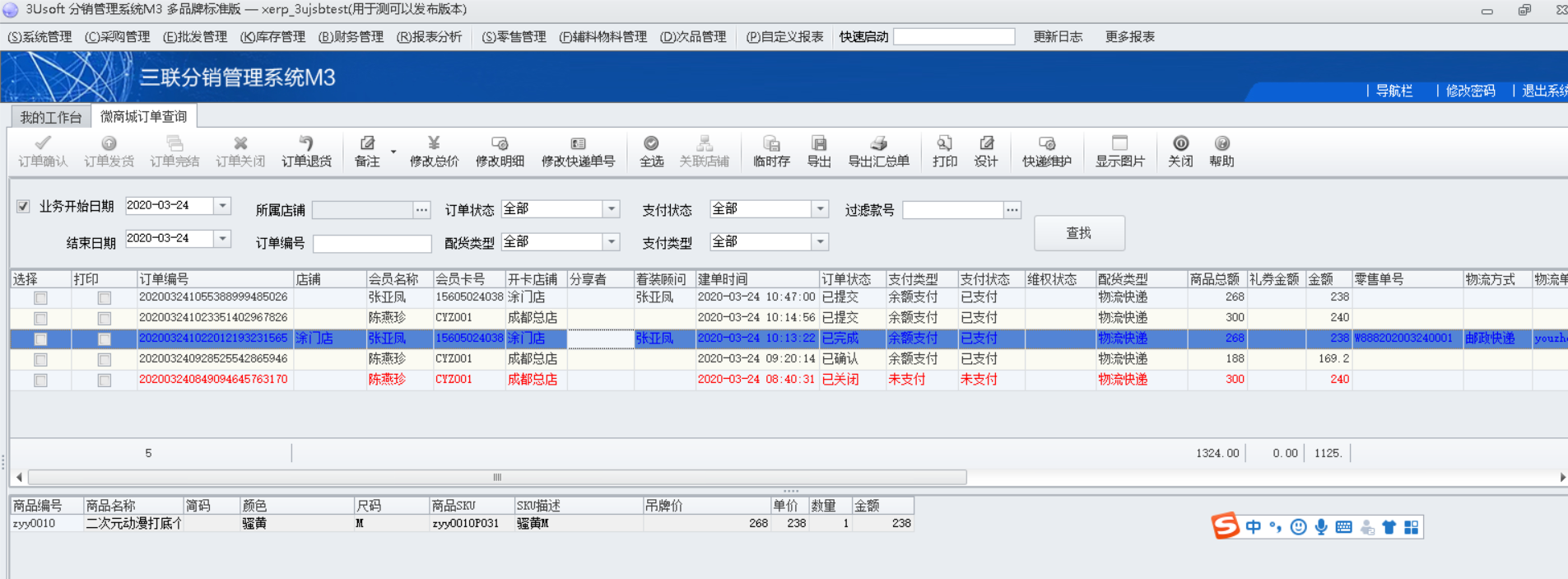
商家可以在创客以及分销后台查看订单状态
### **二、到店自提**
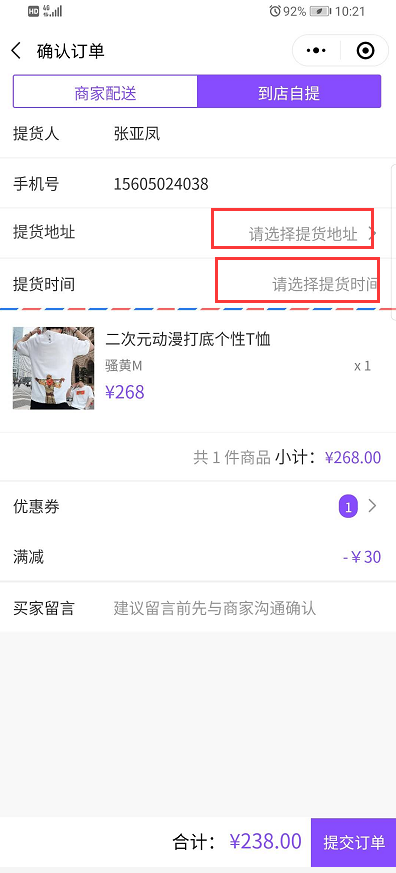
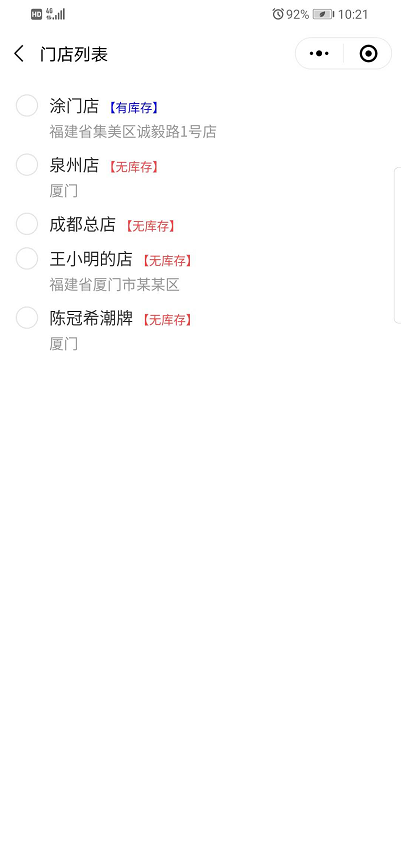
1. 会员商城下单,选择配送方式为【到店自提】;提交时候各个店铺是否有库存会显示
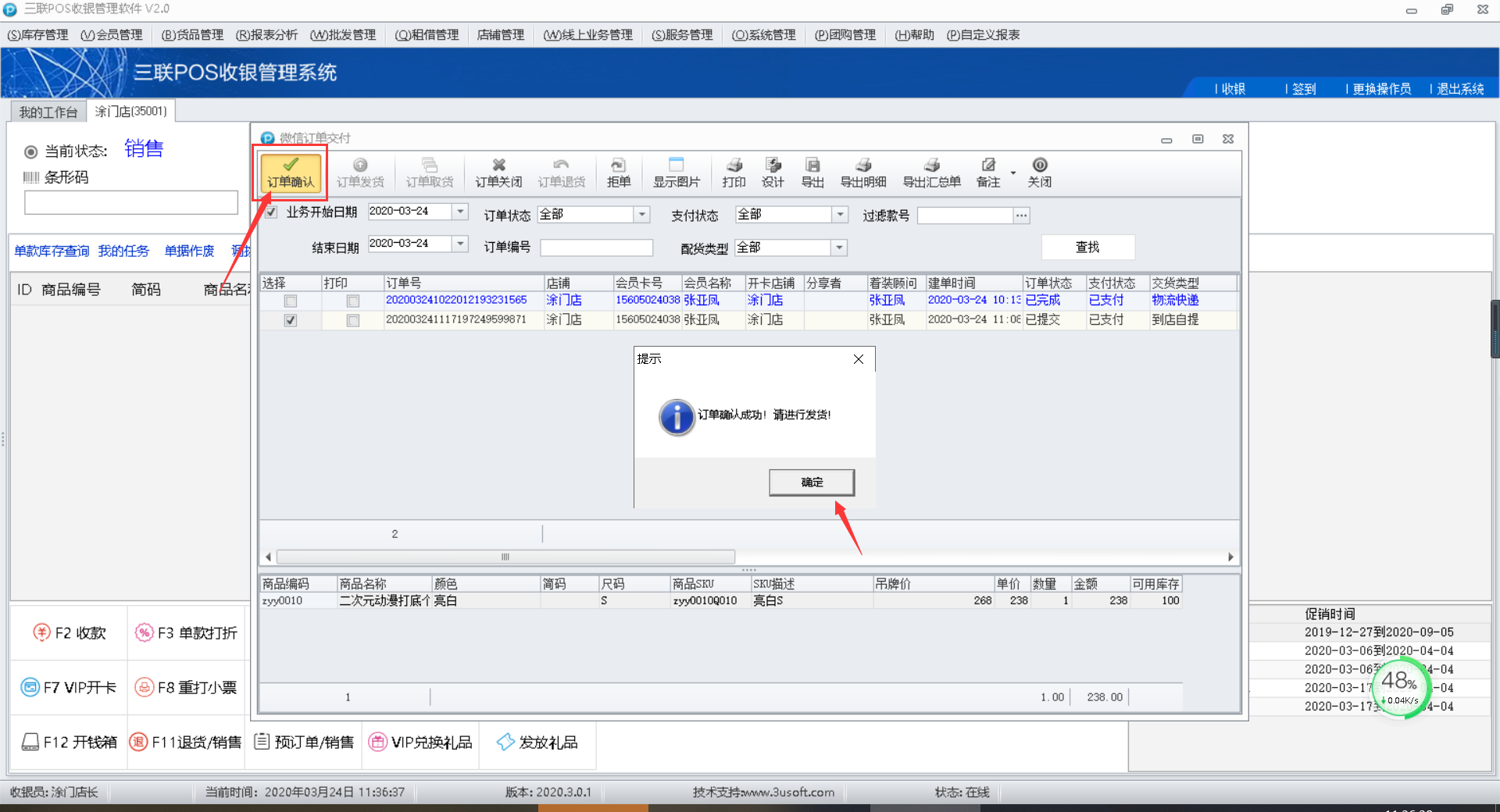
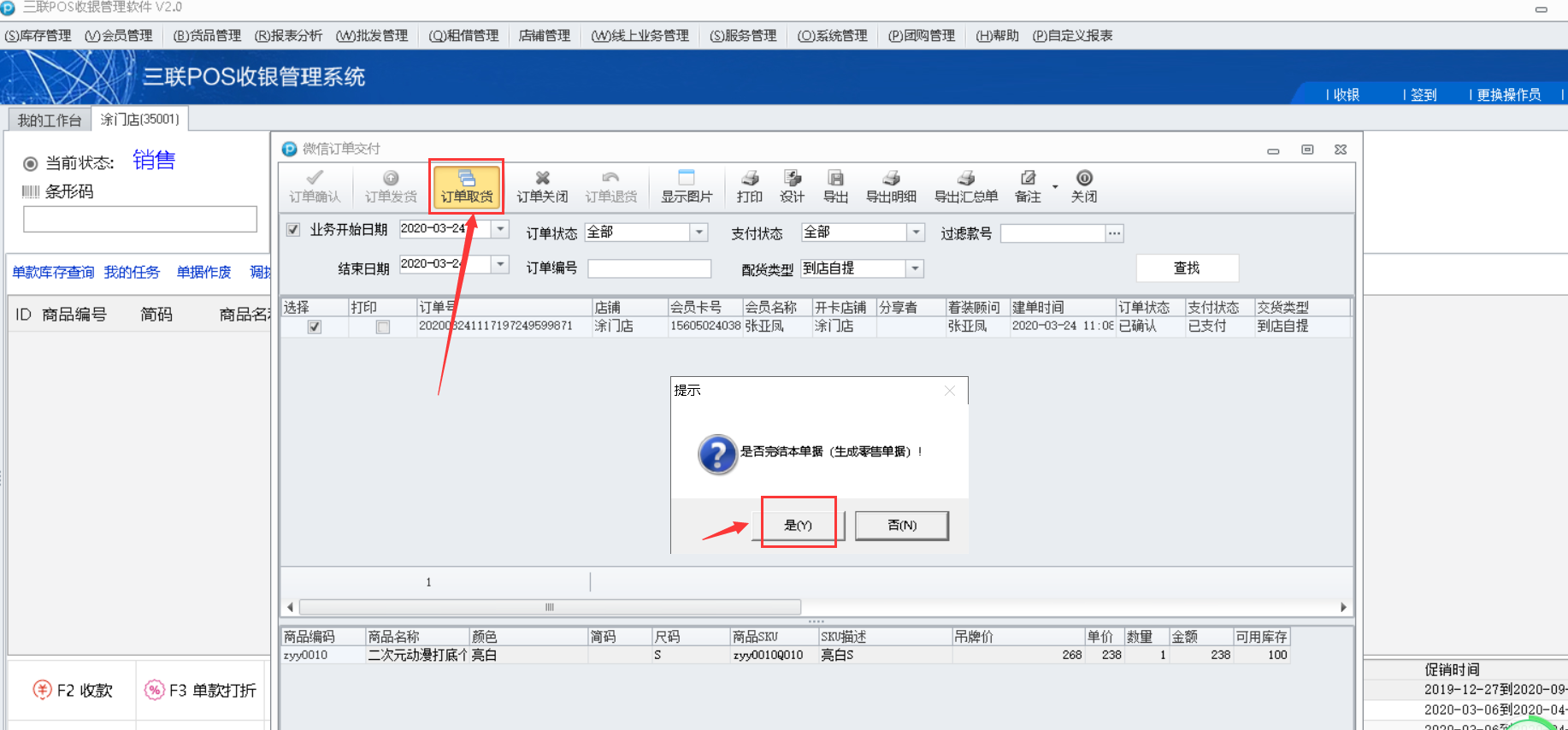
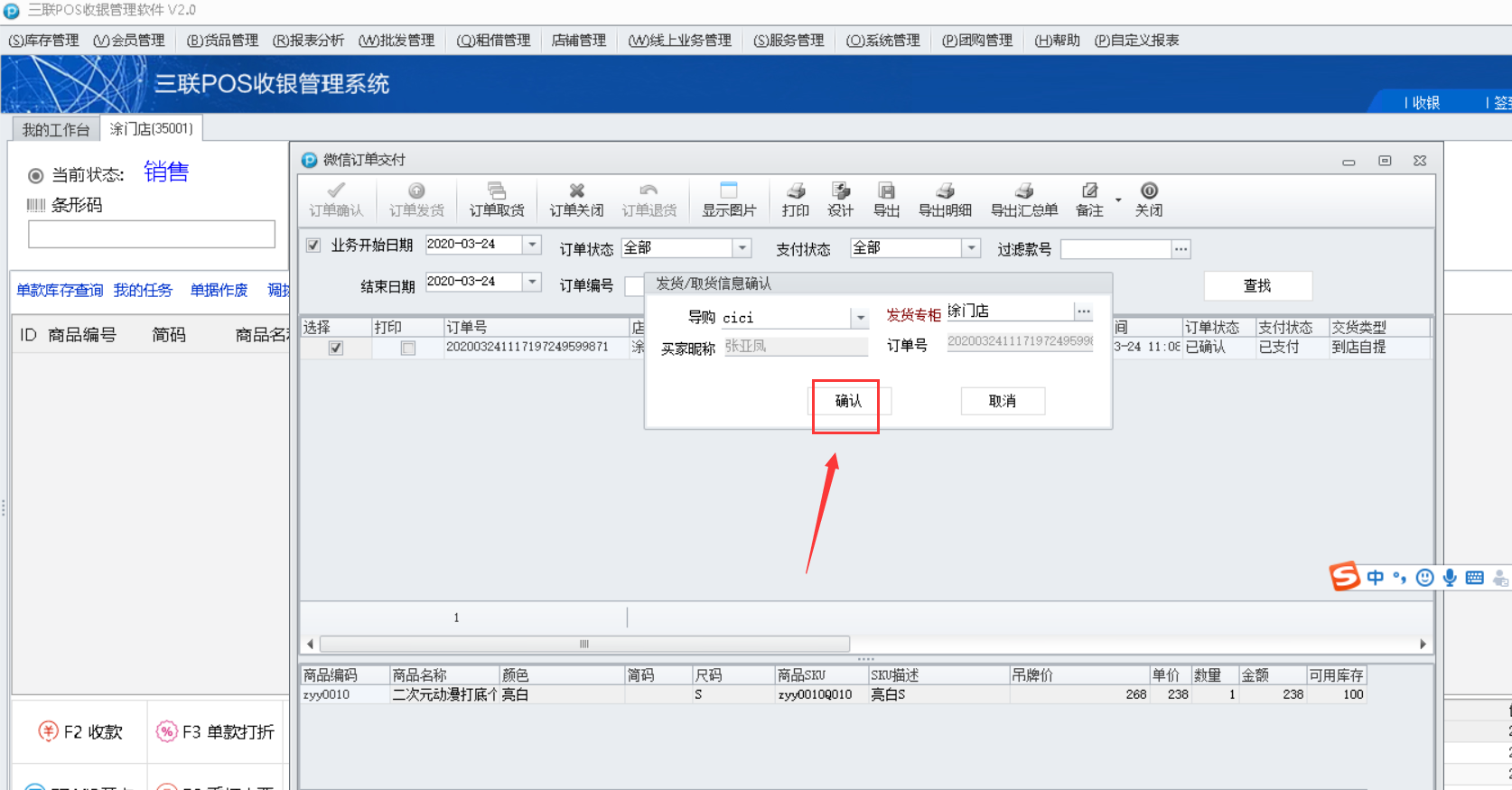
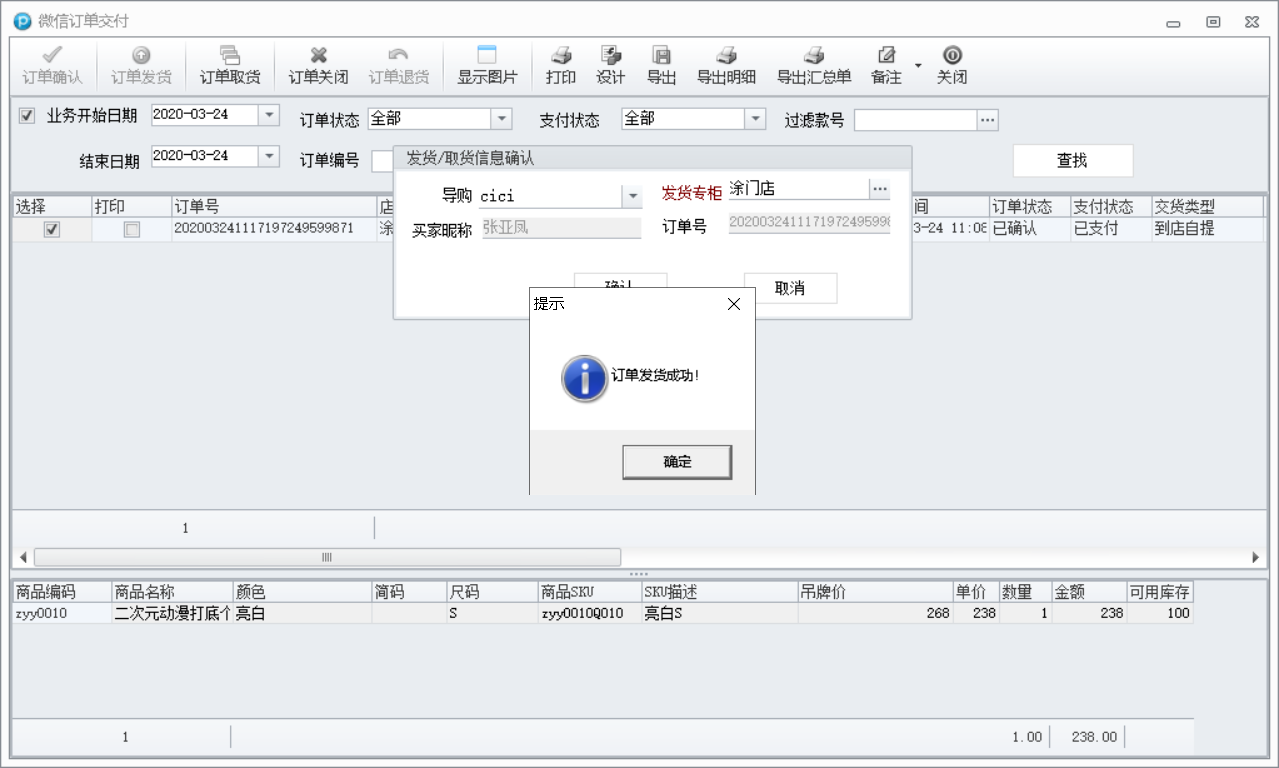
2. 会员到所选的提货店铺进行提货。
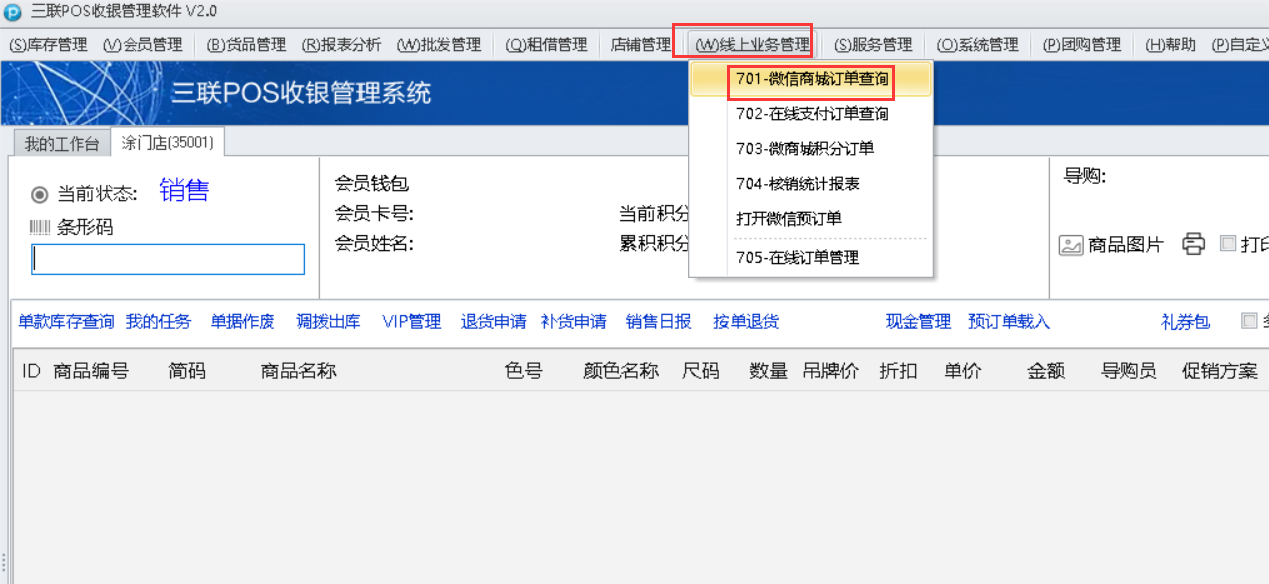
门店操作路径:线上业务管理——微信商城订单查询
- 版本说明
- 小程序指南
- 注意事项
- 小程序确认
- 服务号确认
- 创客确认
- 分销系统操作
- 小程序功能开通
- 微信支付商户号开通
- 微信支付账号开通指南
- 查看商户号和获取支付秘钥
- 证书下载
- 商户号关联小程序
- 小程序发布说明
- 客服设置
- 小程序接入指南
- 升级说明(图文)
- 新手入门
- 商城目录
- 首页
- 线上商城
- 线上商城
- 商城概况
- 商城装修
- 主页
- 导航
- 会员中心
- 微页面
- 素材中心
- 主题
- 悬浮窗
- 公共路径
- 功能扩展
- 如何设置附近门店
- 如何设置一键拨号、一键导航、门店信息?
- 小程序保存图片组、生成海报
- 会员中心装修分销中心
- 图片广告如何设置热区关联链接
- 商城装修如何跳转到首页、会员中心、购物车、直播间等
- 图文和公众号自动回复跳转小程序
- 如何让顾客关注公众号后再领取小程序会员卡
- 后台页面优化
- 商城装修商品/商品分组增加排序
- 商城装修增加视频组件装修
- 商城装修主页二维码增加刷新功能
- 店铺装修微页面增加积分商品组件
- 会员中心增加修改卡支付密码
- 商城装修增加预售装修组件
- 商城装修导航优化
- 会员中心增加商品收藏功能
- 微页面导航优化增加背景色和文字颜色
- 微页面支持http、https 网络地址装修
- 会员中心装修增加联系服务顾问
- 小程序开卡绑卡说明
- 微页面分类模板优化
- 微页面装修增加秒杀组件装修
- 商城装修导航栏类型增加自定义功能
- 微页面增加背景色设置
- 会员中心九宫格UI、订单信息块优化
- 创客商城装修会员中心添加签到功能
- 小程序微页面添加分享图
- 创客微页面链接装修增加小程序链接装修
- 会员中心装修新增可隐藏积分的配置
- 创客会员中心卡余额增加显示与隐藏
- 创客会员中心,个人中心、我的订单、九宫格增加圆角样式
- 创客微页面装修添加链接界面添加视频号装修模块
- 会员中心添加卡升级到下一级别信息
- 会员中心消费记录增加实付额
- 小程序优惠券领取方式优化,无门槛优惠券可直接领取
- 积分商品组件添加排序
- 小程序会员中心新增一个推广码
- 创客分类模板增加是否显示下一分类设置
- 装修栏目组件新增一个“会员当前积分
- 小程序会员中心个人资料可修改昵称及头像
- 微页面增加会员栏组件
- 扩展
- 第三方小程序链接跳转
- 商城装修新增商品来源:最近浏览
- 海报模板
- 固定页装修
- 商城管理
- 通用设置
- 门店设置
- 支付设置
- 小程序设置
- 公众号设置
- 订阅通知
- 消息设置
- 图文素材
- 会员管理
- 开卡设置
- 会员等级
- 会员积分
- 会员储值
- 小程序会员中心
- 商城黑名单
- 商品管理
- 如何创建和发布商品?
- 商品分组有什么用?
- 如何设置个性化商品页?
- 商品库存说明
- 商品导入说明
- 如何设置商品组排序?
- 商品规格如何设置?
- 如何对商品进行批量改价
- 如何对商品进行批量修改会员折扣、商品分组等属性
- 如何对商品使用会员折扣
- 库存不足提示优化
- 添加商品增加商品上传控件
- 赠品设置
- 商品增加虚拟销量和虚拟评价
- 商品管理列表增加排序
- 商品详情增加正在参与的活动
- 商品分销导入小尺码组处理
- 商品分销导入增加吊牌价取值
- 商品海报增加秒杀价格和秒杀标识
- 商品分组增加商品排序功能
- 商品管理增加批量配制类目品牌和交易组件商品同步
- 商品详情页增加直播入口小图标
- 商品管理增加商品改价记录
- 商品详情图片上传添加拖拽排序
- 商品管理增加导出按钮
- 创客商品详情添加批量设置重量
- 商品管理增加按品牌筛选
- 创客商品管理商品规格可设置别名
- 创客商品管理商品分组支持多个分组筛选
- 创客商品管理商品详情添加类目显示及编辑
- 创客商品编辑单颜色批量设置价格
- 商品详情分享视频号链接推送新增是否推送二级提示
- 商品款号增加批量查询
- 商品详情新增联系服务顾问
- 创客商品管理增加支持指定微信客服
- 商品详情新增品牌编辑
- 创客商品管理批量设置增加可以批量设置到店自提
- 小程序商品规格颜色优先展示别名
- 创客商品管理支持指定商品刷新
- 商品图可以添加gif动态图
- 创客商品详情商品规格图片要求可以删除
- 商品管理新增一个excel表格导入的方式实现批量修改序号
- 分销后台吊牌价更改之后,小程序的价格需要同步吊牌价,新增一个批量同步价格按钮
- 商品详情-按照商品的条码对照5 同步到线上尺码别名
- 商品详情标题支持自定义
- 买家秀
- 订单管理
- 订单查看
- 订单运费设置
- 商品配送方式设置
- 订单处理流程说明
- 售后处理流程说明
- 订单优惠价格计算说明
- 评价管理
- 申请维权退款原因调整
- 维权原因管理
- 维权管理优化
- 维权管理退货增加是否导购原因退货
- 小程序余额支付显示卡余额
- 礼券包归属门店集合店优化
- 订单查看物流
- 订单价格计算优化
- 维权地址
- 小程序订单管理维权优化
- 自提提货明细(自提码核销)
- 商城营销
- 总览
- 会员互动
- 大转盘抽奖
- 收藏有礼
- 积分商城
- 问卷调查
- 签到
- 图片工具
- 广告弹窗
- 评价有礼
- 礼券分裂
- 贺卡
- 评分系统
- 邀请有礼
- 完善资料有礼
- 商品促销
- 限时折扣
- 满减
- 包邮
- 拼团
- 优惠套餐
- 全款预售
- 满x件打y折/满x件减y元
- 秒杀
- 支付有礼
- 限时特价
- 领券购买
- 砍价
- 发售抽签
- 满额换购
- 会员权益
- 优惠券
- 礼劵包
- 分销返佣
- V100
- 意见反馈
- 小程序笔记
- 浏览统计
- 视频号
- 腾讯直播开通流程
- 腾讯直播注册账号和开通权限
- 腾讯直播结合微店落地方案
- 腾讯直播结合三联小程序商城落地方案
- 腾讯直播结合导购卖货落地方案
- 小程序商城直播
- 微店、三联小程序对接ERP线上订单管理
- 快乐企鹅直播间推广
- 小程序直播增加删除按钮
- 视频号交易组件
- 分享员
- 纠纷列表
- 视频号直播说明(属于官方功能,三联仅做接入)
- 资金管理
- 品牌类目
- 短链接
- 资金流水
- 店中店模式
- 导购营销
- 任务中心
- 推广记录
- 营销中心
- 素材中心
- 微信客服
- 视频号小店
- 会员管理
- 会员管理
- 会员分组
- 潜客管理
- 批量打标
- 标签管理.
- 营销活动
- 营销活动
- 优惠券
- 礼券包
- 优惠券发放
- 发送记录
- 回购计划
- 自动化营销
- 自定义营销
- 短信发放
- 优惠券过期提醒
- 营销画布
- 我的任务
- 生日回访
- 消费回访
- 我关注的
- 意向到店
- 休眠唤醒
- 回访记录
- 学习成长
- 文章管理
- 任务管理
- 统计报表
- 搭配款式
- 数据分析
- vip结构
- 消费行为
- 客单价
- 物单价
- 新增vip
- 占比趋势
- 消费统计
- vip详情
- 消费详情
- 消费占比
- 年龄段分析
- 转化率
- 发展率
- 回购率
- 流失率
- 保留增长率
- 充值报表
- 服务顾问
- 导购积分
- 企业微信
- 企业员工
- 标签管理
- 通用配置
- 外部联系人
- 群发消息
- 图片管理
- 代客下单
- 打卡记录
- 企业话术
- 我的店务
- 接口许可
- 企业微信更新内容
- 同事圈
- 客户群
- 视频管理
- 系统设置
- 员工账号
- 角色管理
- 短信模板
- 报表维护
- 系统设置
- RFMID操作说明