
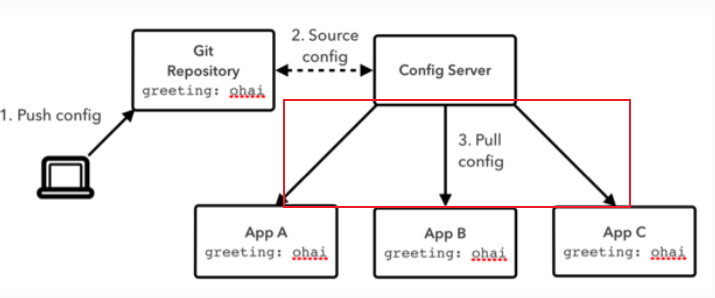
从上图中,通过前面章节的讲解,我们已经实现了如下内容
1. 建立Git Repository仓库,我们已经可以向仓库提交配置文件了
2. 搭建了Config Server做统一的配置管理,可以从配置仓库拉取配置文件。
本节就为大家讲解第三步:微服务(config 客户端)从config server获取配置的方法。
> 仍然以aservice-sms和aservice-rbac服务(springboot)使用Spring Cloud Config集中配置管理为需求,为大家讲解。
## 一、配置工作
在aservice-sms和aservice-rbac服务的pom.xml中引入spring-cloud-starter-config依赖:
~~~
<dependency>
<groupId>org.springframework.cloud</groupId>
<artifactId>spring-cloud-starter-config</artifactId>
</dependency>
~~~
src/main/resources/bootstrap.yml配置(以aservice-sms为例),来指定config server,例如:
~~~
spring:
application:
name: aservice-sms
cloud:
config:
uri: http://localhost:8771
label: master
profile: dev
~~~
* spring.cloud.config.profile:对应前配置文件中的{profile}部分
* spring.cloud.config.label:对应前配置文件的git分支
* spring.cloud.config.uri:config server配置中心的地址
> **这里需要格外注意:上面这些属性必须配置在`bootstrap.yml`或properties文件中,而不是application.yml中,config配置内容才能被正确加载。因为`bootstrap.yml`加载优先级高于`application.yml`,保证在应用一起动时就去加载配置,对于Spring 中一些自动装载类来说这很重要。**
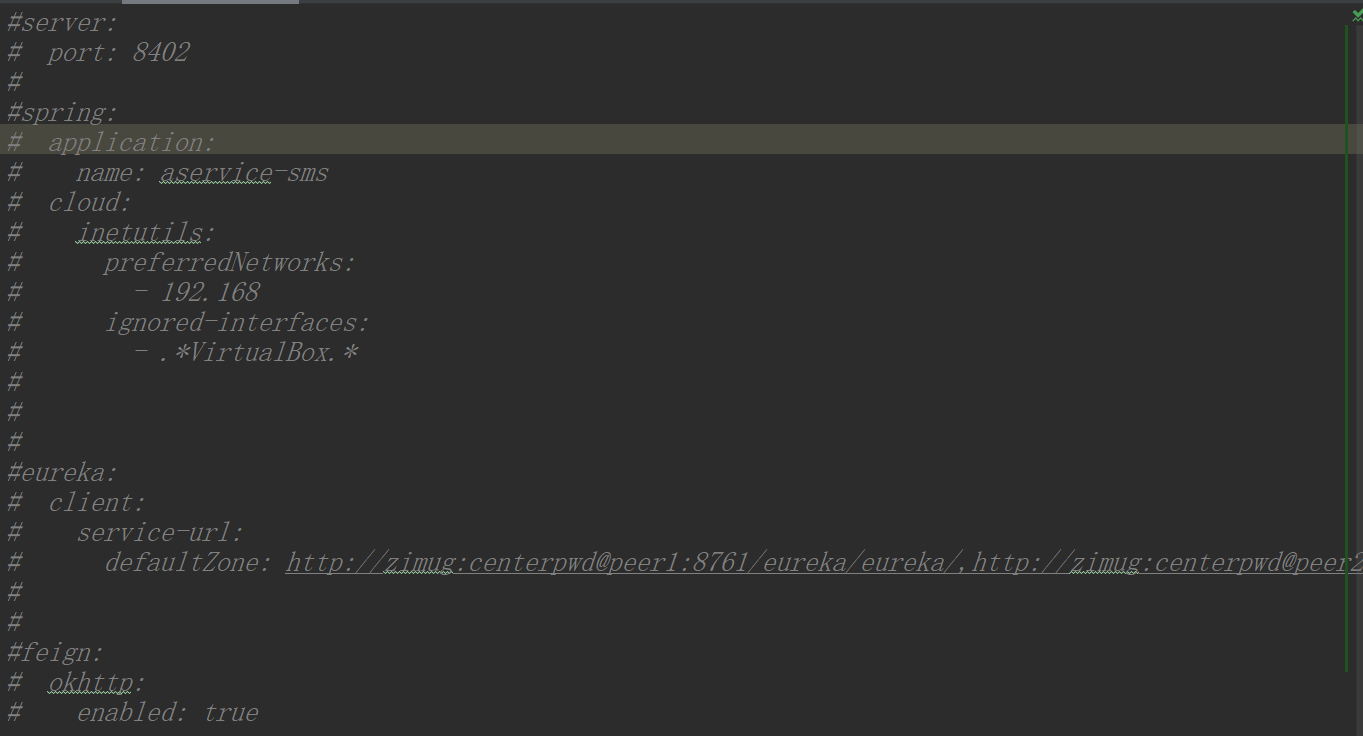
最后,我们把application.yml中的配置全部注释掉(如下图)。因为这部分配置,我们已经全都放到git 仓库中进行集中管理,我们的服务通过config server就可以获取到。
## 二、结果验证
* 首先启动日志,明确的输出:aservice-sms项目在启动的时候去config server:http://localhost:8771加载配置。加载的是aservice-sms的master分支的dev环境的配置文件,也就是:`https://gitee.com/hanxt/dongbb-cloud/zimug-server-config-repo/aservice-sms-dev.yml`,完全和我们的预期一致(和本文上面内容的配置一致)。

* 然后我们再看aservice-sms是否向eureka成功的进行了服务注册

**eureka相关的配置不是注释掉了么?**是本地应用注释掉了,但是我们已经把它转移到远程配置管理仓库中了(《config-git配置文件仓库》那一节中)。这也再次验证了,aservice-sms正确的应用了远程git仓库和config server进行集中的配置管理。
- 文档简介
- 模块与代码分支说明
- dongbb-cloud项目核心架构
- 微服务架构进化论
- SpringBoot与Cloud选型兼容
- Spring Cloud组件的选型
- 单体应用拆分微服务
- 单体应用与微服务对比
- 微服务设计拆分原则
- 新建父工程及子模块框架
- 通用微服务初始化模块构建
- 持久层模块单独拆分
- 拆分rbac权限管理微服务
- Hello-microservice
- 构建eureka服务注册中心
- 向服务注册中心注册服务
- 第一个微服务调用
- 远程服务调用
- HttpClient远程服务调用
- RestTemplate远程服务调用
- RestTemplate多实例负载均衡
- Ribbon调用流程源码解析
- Ribbon负载均衡策略源码解析
- Ribbon重试机制与饥饿加载
- Ribbon自定义负载均衡策略
- Feign与OpenFeign
- Feign设计原理源码解析
- Feign请求压缩与超时等配置
- 服务注册与发现
- 白话服务注册与发现
- DiscoveryClient服务发现
- Eureka集群环境构建(linux)
- Eureka集群多网卡环境ip设置
- Eureka集群服务注册与安全认证
- Eureka自我保护与健康检查
- 主流服务注册中心对比(含nacos)
- zookeeper概念及功能简介
- zookeeper-linux集群安装
- zookeeper服务注册与发现
- consul概念及功能介绍
- consul-linux集群安装
- consul服务注册与发现
- 通用-auatator导致401问题
- 分布式配置中心-apollo
- 服务配置中心概念及使用场景
- apollo概念功能简介
- apollo架构详解
- apollo分布式部署之Portal
- apollo分布式部署之环境区分
- apollo项目权限管理实战
- apollo-java客户端基础
- apollo与SpringCloud服务集成
- apollo实例配置热更新
- apollo命名空间与集群
- apollo灰度发布(日志热更新为例)
- SpringCloudConfig配置中心
- config-git配置文件仓库
- config配置中心搭建与测试
- config客户端基础
- config配置安全认证
- config客户端配置刷新
- config配置中心高可用
- BUS消息总线
- bus消息总线简介
- docker安装rabbitMQ
- 基于rabbitMQ的消息总线
- bus实现批量配置刷新
- alibaba-nacos
- nacos介绍与单机部署
- nacos集群部署方式(linux)
- nacos服务注册与发现
- nacos服务注册中心详解
- nacos客户端配置加载
- nacos客户端配置刷新
- nacos服务配置隔离与共享
- nacos配置Beta发布
- 服务熔断降级hystrix
- 服务降级&熔断&限流
- Hystrix集成并实现服务熔断
- Jemter模拟触发服务熔断
- Hystrix服务降级fallback
- Hystrix结合Feign服务降级
- 远程服务调用异常传递的问题
- Hystrix-Feign异常拦截与处理
- Hystrix-DashBoard单服务监控
- Hystrix-dashboard集群监控
- 分布式系统流量卫兵sentinel
- sentinel简介与安装
- 客户端集成与实时监控
- 实战流控规则-QPS限流
- 实战流控规则-线程数限流
- 实战流控规则-关联限流
- 实战流控规则-链路限流
- 实战流控效果-WarmUp
- 实战流控效果-匀速排队
- BlockException处理
- 实战熔断降级-RT
- 实战熔断降级-异常数与比例
- DegradeException处理
- 注解与异常的归纳总结
- Feign降级及异常传递拦截
- 动态规则nacos集中存储
- 热点参数限流
- 系统自适应限流
- 微服务网关-GateWay
- 还有必要学习Zuul么?
- 简介与非阻塞异步IO模型
- GateWay概念与流程
- 新建一个GateWay项目
- 通用Predicate的使用
- 自定义PredicateFactory
- 编码方式构建静态路由
- Filter过滤器介绍与使用
- 自定义过滤器Filter
- 网关请求转发负载均衡
- 结合nacos实现动态路由配置
- 整合Sentinel实现资源限流
- 跨域访问配置
- 网关层面全局异常处理
- 微服务网关安全认证-JWT篇
- Gateway-JWT认证鉴权流程
- 登录认证JWT令牌颁发
- 全局过滤器实现JWT鉴权
- 微服务自身内部的权限管理