
# :-: core文件设置
| 适用范围 | 适用版本 | 人员 | 发布时间 | 文档版本 |备注 |
| --- | --- | --- | --- | --- |--- |
| 服务器操作系统 | V7、V10、V10-SP1 | 王承林 |2022.3.4| V1.0|发布|
| 服务器操作系统 | V7、V10、V10-SP1 | 张志勇 |2022.3.4| V1.1|模板调整|
### 经测试,该方案有效可行
*****
## 在Linux中,一般当进程非正常退出时,会生成一个core文件,这个文件是进程猝死时内存的转储文件,也称为core dump
### 1. 查看是否开启core dump
`[root@ceph1 ~]# ulimit -c unlimited`
#只要这里显示的值不会0即开启, 为unlimited代表不限制最后的core文件大小.
### 2. 手动开启core dump
#### 2.1 手动开启
```
[root@ceph1 ~]# echo "ulimit -c unlimited" >> /etc/profile
[root@ceph1 ~]# source /etc/profile
[root@ceph1 ~]# ulimit -c
unlimited
```
#### 2.2 生成文件尾缀是否带pid,为0则不带,为1则带
```
[root@ceph1 ~]# sysctl -a | grep kernel.core_uses_pid
kernel.core_uses_pid = 1
```
#### 2.3 指定生成文件的路径
```
[root@ceph1 ~]# echo 'kernel.core_pattern=/var/crash/core.%e.%p.%t' >>
/etc/sysctl.conf && sysctl -p kernel.sysrq = 0
net.ipv4.ip_forward = 0
net.ipv4.conf.all.send_redirects = 0
net.ipv4.conf.default.send_redirects = 0
net.ipv4.conf.all.accept_source_route = 0
net.ipv4.conf.default.accept_source_route = 0
net.ipv4.conf.all.accept_redirects = 0
net.ipv4.conf.default.accept_redirects = 0
net.ipv4.conf.all.secure_redirects = 0
net.ipv4.conf.default.secure_redirects = 0
net.ipv4.icmp_echo_ignore_broadcasts = 1
net.ipv4.icmp_ignore_bogus_error_responses = 1
net.ipv4.conf.all.rp_filter = 1
net.ipv4.conf.default.rp_filter = 1
net.ipv4.tcp_syncookies = 1
kernel.dmesg_restrict = 1
net.ipv6.conf.all.accept_redirects = 0
net.ipv6.conf.default.accept_redirects = 0
net.ipv4.icmp_echo_ignore_all = 0
kernel.core_pattern = /var/crash/core.%e.%p.%t
```
#### 2.4 关键参数含义介绍
```
kernel.core_pattern #指定路径,其中的特殊变量为:
%p #– insert pid into filename --- 显示进程号
%u #– insert current uid into filename --- 用户ID
%g #– insert current gid into filename --- 组ID
%s #– insert signal that caused the coredump into the filename ---添加导致产生core的信号
%t #– insert UNIX time that the coredump occurred into filename --- 时 间
%h #– insert hostname where the coredump happened into filename --- 主机名
%e #– insert coredumping executable name into filename --- 名字
```
### 3. 手动生成core dump文件
#### 3.1 写入一个可以生成段错误的测试程序
`[root@ceph1 ~]# cat << EOF >> /root/a.c`
```
#include <stdio.h>
int func(int *p)
{
*p = 0;
}
int main()
{
func(NULL); return 0;
}
EOF
```
#### 3.2 编译,执行
```
[root@ceph1 ~]# gcc -o main a.c
[root@ceph1 ~]# ./main
Segmentation fault (core dumped)
```
#### 3.3 查看生成了core dump文件
```
[root@ceph1 ~]# ls
/var/crash/
core.main.10662.1643110445
```
### 4. 查询core dump文件内容
`[root@ceph1 ~]# yum install gdb -y`
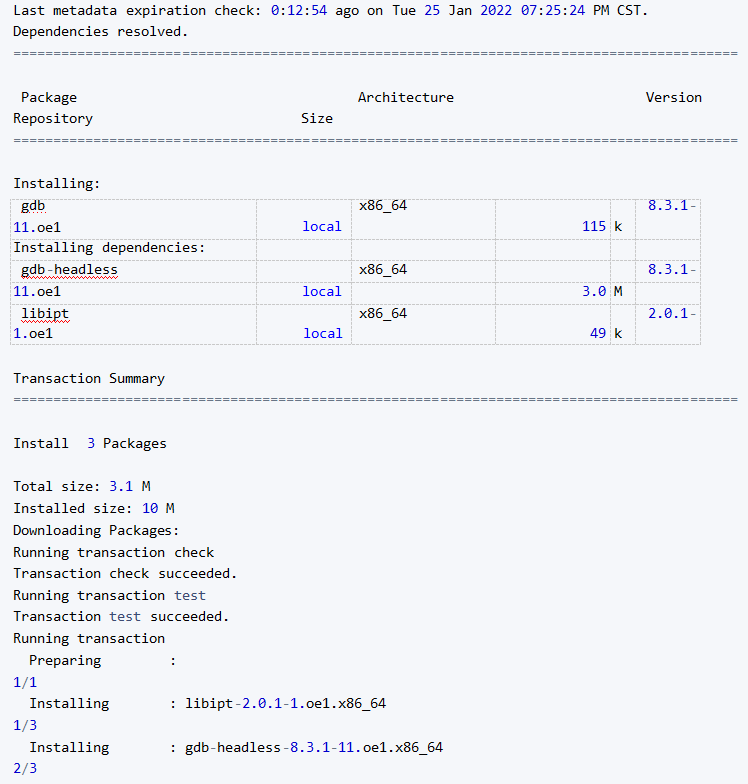
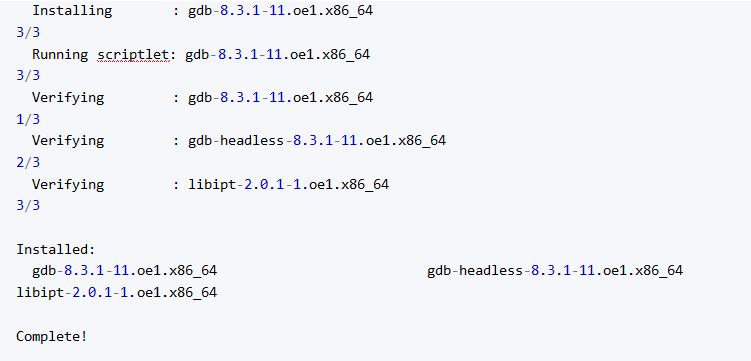
#### 3.2 执行命令查询定位分析程序
#定位分析发现是
```
[root@ceph1 ~]# gdb main /var/crash/core.main.10662.1643110445
GNU gdb (GDB) EulerOS 8.3.1-11.oe1
Copyright (C) 2019 Free Software Foundation, Inc.
License GPLv3+: GNU GPL version 3 or later <http://gnu.org/licenses/gpl.html>
This is free software: you are free to change and redistribute it.
There is NO WARRANTY, to the extent permitted by law.
Type "show copying" and "show warranty" for details.
This GDB was configured as "x86_64-openEuler-linux-gnu".
Type "show configuration" for configuration details.
For bug reporting instructions, please see:
<http://www.gnu.org/software/gdb/bugs/>.
Find the GDB manual and other documentation resources online at:
<http://www.gnu.org/software/gdb/documentation/>.
For help, type "help".
Type "apropos word" to search for commands related to "word"...
Reading symbols from main...
(No debugging symbols found in main)
[New LWP 10662]
Core was generated by `./main'
Program terminated with signal SIGSEGV, Segmentation fault.
#0 0x0000000000401126 in func () # ***这里定位到func()这个函数出现错误
#Missing separate debuginfos, use: dnf debuginfo-install glibc-2.28-36.oe1.x86_64
```
#### 3.3 补充,可以在编译程序时候加上-g 然后在gdb时候过程更加快速定位错误所在
```
[root@ceph1 ~]# rm -rf main
[root@ceph1 ~]# gcc -o main -g a.c
[root@ceph1 ~]# ./main
Segmentation fault (core dumped)
[root@ceph1 ~]# ls /var/crash/core.main.10
core.main.10662.1643110445 core.main.10885.1643111001
[root@ceph1 ~]# ls /var/crash/core.main.10885.1643111001
/var/crash/core.main.10885.1643111001
[root@ceph1 ~]# gdb main /var/crash/core.main.10885.1643111001
GNU gdb (GDB) EulerOS 8.3.1-11.oe1
Copyright (C) 2019 Free Software Foundation, Inc.
License GPLv3+: GNU GPL version 3 or later <http://gnu.org/licenses/gpl.html>
This is free software: you are free to change and redistribute it.
There is NO WARRANTY, to the extent permitted by law.
Type "show copying" and "show warranty" for details.
This GDB was configured as "x86_64-openEuler-linux-gnu".
Type "show configuration" for configuration details.
For bug reporting instructions, please see:
<http://www.gnu.org/software/gdb/bugs/>.
Find the GDB manual and other documentation resources online at:
<http://www.gnu.org/software/gdb/documentation/>.
For help, type "help".
Type "apropos word" to search for commands related to "word"...
Reading symbols from main...
[New LWP 10885]
Core was generated by `./main'.
Program terminated with signal SIGSEGV, Segmentation fault.
#0 0x0000000000401126 in func (p=0x0) at a.c:9
9 *p = 0;
Missing separate debuginfos, use: dnf debuginfo-install glibc-2.28-36.oe1.x86_64
```
- 常见问题
- 进入救援模式
- 进入单用户模式
- grub引导修复
- V10SP1-biosdevname解析
- 外设挂载和卸载
- audit关闭解决方案
- 终端无法切换
- 救援模式取数据
- 网卡更名操作
- 问题复现解决类
- xgboost复现解决步骤
- 激活类
- 麒麟服务器激活常用命令
- 服务器故障激活问题--须知
- 激活权限获得方式
- V10-SP系列服务器激活
- 银河麒麟高级服务器操作系统V7&V10激活手册
- shell脚本类
- 多网卡队列绑定CPU脚本
- 服务器健康检查脚本
- 服务安装配置类
- 银河麒麟高级服务器操作系统V10(sp1)安装手册
- LVM创建
- Chrony时间同步配置
- 搭建网络yum源
- PXE部署实施
- Man手册安装
- 部署VNC服务
- Kylin-Server-V10-SP1-0711-DNS服务单机部署文档
- 麒麟ks文件定制-封装iso文件
- iptables端口配置
- V10-SP1-aarch64安装jdk1.7
- 工具使用类
- cyclictest测试工具
- e2fsprogs工具介绍
- Logrotate工具说明
- nmon工具安装与使用
- 升、降级类
- rsyslog升级报告
- 性能优化类
- 日志轮转
- 大页内存与透明大页详解
- 优化磁盘IO调度方式
- core文件设置
- 分析报告类
- bond模式4协商不通排查
- audit内存泄露问题分析报告
- mate-indicators内核占用过高问题分析报告
- ansible问题-hostname以及lvol报错
- 关于Linux内存计算的说明
- 磁盘IO调度算法
- 硬件相关类
- 串口
- 网络相关类
- bond创建
- 在已配置好网络情况下添加路由
- 网卡配合网桥实现内网互通KVM虚拟机
- Bond模式4协商不通排查过程
- HA高可用
- kylin HA shell实践
- kylin HA概念性及shell使用
- 虚拟化
- KVM创建虚拟机(图形化操作)
- KVM创建虚拟机(命令操作)
- 容器类
- docker-runc升级
- docker基础镜像制作-服务器版
- 麒麟云平台
- USB3.0设备穿透方法(针对win10云主机穿透)
- 麒麟云平台开关机操作说明
- 技术演练