
# :-: USB3.0设备穿透方法(针对win10云主机穿透)
| 适用范围 | 适用版本 | 人员 | 发布时间 | 文档版本 |备注 |
| --- | --- | --- | --- | --- |--- |
| 服务器操作系统 | KylinCloud-5.0.2 | 张志勇 |2022.3.2| V1.0|发布|
| 服务器操作系统 | KylinCloud-5.0.2 | 张志勇 |2022.3.2| V1.1|模板调整|
### 经测试,该方案有效可行
## :-: 目录
1. 说明
2. 操作步骤
2.1 穿透USB设备
2.1.1 创建云主机
2.1.2 禁用compute1节点的nova_compute服务
2.1.3 查看插入的USB3.0设备“硬件ID”信息
2.1.4 修改USB透传配置文件usb3-0.xml
2.1.5 在云平台上查看云主机的ID并复制
2.1.6 退出容器,执行脚本virsh_attach_usb.sh
2.1.7 查看USB设备
2.2 卸载USB设备
3. 注意事项
*****
## 1. 说明
此穿透方法通过运行脚本完成。
### 穿透脚本:
```
#!/bin/bash
#########################################
#Name: virsh_attach_usb.sh
#Description: for kylincloud guest os to use usb1.0 or usb3.0
#Created time: 2021-01-28
#########################################
:<<EOF
"Usage: bash virsh_attach.sh_usb instance_id usb_type"
示例:
"bash virsh_attach.sh_usb 8df114d6-d6d9-4049-aefc-4aa203c35fb5 usb1"
"bash virsh_attach.sh_usb 8df114d6-d6d9-4049-aefc-4aa203c35fb5 usb3"
EOF
:<<EOF
#cat usb3-0.xml
<hostdev mode='subsystem' type='usb' managed='yes'>
<source>
<vendor id='0x058f'/>
<product id='0x6387'/>
</source>
</hostdev>
EOF
:<<EOF
#cat usb1-0.xml
<hostdev mode='subsystem' type='usb' managed='yes'>
<source>
<vendor id='0x058f'/>
<product id='0x6387'/>
</source>
</hostdev>
EOF
echo "##############################################"
echo "START..."
echo "##############################################"
ins_id=$1
usb_type=$2
controller_name="hero"
#check arguments is enough
if [ $# -ne 2 ]
then
echo "ERROR: No enough arguments supplied,please read the Usage."
echo -e "Usage: bash virsh_attach.sh instance_id usb1/usb3"
echo "##############################################"
echo "program exited..."
echo "##############################################"
exit 1
fi
#check the usb file is exist
if [ "$usb_type" == "usb1" ]
then
if [ -f usb1-0.xml ]
then
/usr/bin/docker cp usb1-0.xml nova_libvirt:/
else
result=$(docker exec -it nova_libvirt /bin/bash -c "ls usb1-0.xml | wc -l 2>&1")
num=${#result}
if [ $num -eq 2 ]
then
echo "the usb1-0.xml file in nova_libvirt,program continue."
else
echo "ERROR: the usb1-0.xml file not exist,Please provide it,then run the script."
echo "##############################################"
echo "program exited..."
echo "##############################################"
exit 1
fi
fi
elif [ "$usb_type" == "usb3" ]
then
if [ -f usb3-0.xml ]
then
/usr/bin/docker cp usb3-0.xml nova_libvirt:/
else
result=$(docker exec -it nova_libvirt /bin/bash -c "ls usb3-0.xml | wc -l 2>&1")
num=${#result}
if [ $num -eq 2 ]
then
echo "the usb3-0.xml file in nova_libvirt,program continue."
else
echo "ERROR: the usb3-0.xml file not exist,Please provide it,then run the script."
echo "##############################################"
exit 1
fi
fi
else
echo "ERROR: the program only support for usb1.0 or usb3.0 to attach,Please input the correct option."
echo -e "Usage: bash virsh_attach.sh instance_id usb1/usb3"
echo "##############################################"
echo "program exited..."
echo "##############################################"
exit 1
fi
#start to attach usb
index=5
while [ $index -ne 0 ]
do
index=$[$index-1]
read -n 1 -t 1 -p "${index}s Will attach device,Press n for CANCEL " input
echo
if [ ! -z $input ];
then
input=$(echo $input | tr [a-z] [A-z])
break
fi
done
if [ "$input" = N ];
then
echo "attach device CANCELLED."
echo "##############################################"
exit 1
else
echo "##############################################"
echo "start attach device..."
fi
#get instance_name use nova show command
ins_name_temp=$(ssh root@$controller_name "source /root/admin-openrc.sh;nova show $ins_id|grep instance_name")
ins_name=$(echo $ins_name_temp|awk '{print $4}')
if [ ! $ins_name ]
then
echo "get instance_name failed,please check the $ins_id is exist."
exit 1
else
echo "get the instance_name:$ins_name successful."
fi
#attach usb1.0 or usb3.0 for guest os
temp_name=$(docker exec -it nova_libvirt virsh list|grep $ins_name|awk '{print $2}')
if [ $ins_name == $temp_name ]
then
if [ $usb_type == "usb1" ]
then
#attach usb1.0
docker exec -it nova_libvirt /bin/bash -c "virsh attach-device $ins_name usb1-0.xml"
echo "attach usb1-0.xml for $ins_name successful."
else
#stop nova service
if [ $(/usr/bin/docker ps |grep nova_compute | wc -l) -eq 1 ]
then
/usr/bin/docker stop nova_compute 2>&1 >/dev/null
echo "docker stop nova service successful."
else
echo "nova service stopped,skip..."
fi
#dump xml for check
echo "dump $ins_name dumpxml"
docker exec -it nova_libvirt /bin/bash -c "virsh dumpxml $ins_name >$ins_name"
echo "dump $ins_name xml successful..."
#get usb controller model
temp=$(docker exec -it nova_libvirt /bin/bash -c "cat $ins_name|grep controller|grep usb")
type_temp=$(echo $temp |awk -F "model=" '{print $2}'|sed $'s/\'//g')
model_type=${type_temp::-2}
#check the usb controller model is nec-xhci
if [ $model_type == "nec-xhci" ]
then
echo "the usb controller model is nec-xhci..."
else
echo "the usb controller model is:$model_type,will modify to nec-xhci..."
#modify the nec-xhci for usb controller model
docker exec -it nova_libvirt /bin/bash -c "sed -i 's/piix3-uhci/nec-xhci/g' $ins_name"
echo "modify successfully..."
#create guest os for usb3.0
docker exec -it nova_libvirt /bin/bash -c "virsh destroy $ins_name"
docker exec -it nova_libvirt /bin/bash -c "virsh create $ins_name"
fi
#attach usb3.0
docker exec -it nova_libvirt /bin/bash -c "virsh attach-device $ins_name usb3-0.xml"
echo "attach usb3-0.xml for $ins_name successful."
fi
else
echo "ERROR: the $ins_name is not exist,program exit."
echo "##############################################"
exit 1
fi
echo "##############################################"
echo "DONE..."
echo "##############################################"
```
### 卸载脚本:
```
#!/bin/bash
#########################################
#Name: virsh_detach_usb.sh
#Description: for kylincloud guest os to use usb1.0 or usb3.0
#Created time: 2021-01-28
#########################################
:<<EOF
"Usage: bash virsh_detach.sh_usb instance_id usb_type"
示例:
"bash virsh_detach.sh_usb 8df114d6-d6d9-4049-aefc-4aa203c35fb5 usb1"
"bash virsh_detach.sh_usb 8df114d6-d6d9-4049-aefc-4aa203c35fb5 usb3"
EOF
:<<EOF
#cat usb3-0.xml
<hostdev mode='subsystem' type='usb' managed='yes'>
<source>
<vendor id='0x058f'/>
<product id='0x6387'/>
</source>
</hostdev>
EOF
:<<EOF
#cat usb1-0.xml
<hostdev mode='subsystem' type='usb' managed='yes'>
<source>
<vendor id='0x058f'/>
<product id='0x6387'/>
</source>
</hostdev>
EOF
echo "##############################################"
echo "START..."
echo "##############################################"
ins_id=$1
usb_type=$2
#check arguments is enough
if [ $# -ne 2 ]
then
echo "ERROR: No enough arguments supplied,please read the Usage."
echo "Usage: bash virsh_detach.sh instance_id usb1/usb3"
echo "##############################################"
echo "program exited..."
echo "##############################################"
exit 1
fi
#check the usb file is exist
if [ "$usb_type" == "usb1" ]
then
result=$(docker exec -it nova_libvirt /bin/bash -c "ls usb1-0.xml | wc -l 2>&1")
num=${#result}
if [ $num -eq 2 ]
then
echo "the usb1-0.xml file in nova_libvirt,program continue."
else
echo "ERROR: the usb1-0.xml file not exist,Please provide it,then run the script."
echo "##############################################"
echo "program exited..."
echo "##############################################"
exit 1
fi
elif [ "$usb_type" == "usb3" ]
then
result=$(docker exec -it nova_libvirt /bin/bash -c "ls usb3-0.xml | wc -l 2>&1")
num=${#result}
if [ $num -eq 2 ]
then
echo "the usb3-0.xml file in nova_libvirt,program continue."
else
echo "ERROR: the usb3-0.xml file not exist,Please provide it,then run the script."
echo "##############################################"
echo "program exited..."
echo "##############################################"
exit 1
fi
else
echo "ERROR: the program only support for usb1.0 or usb3.0 to detach,Please input the correct option."
echo -e "Usage: bash virsh_detach_usb.sh instance_id usb1/usb3"
echo "##############################################"
echo "program exited..."
echo "##############################################"
exit 1
fi
#start to detach usb
index=2
while [ $index -ne 0 ]
do
index=$[$index-1]
read -n 1 -t 1 -p "${index}s Will detach device,Press n for CANCEL " input
echo
if [ ! -z $input ];
then
input=$(echo $input | tr [a-z] [A-z])
break
fi
done
if [ "$input" = N ];
then
echo "detach device CANCELLED."
echo "##############################################"
exit 1
else
echo "##############################################"
echo "start detach device..."
fi
#get instance_name use nova show command
ins_name_temp=$(ssh root@hero "source /root/admin-openrc.sh;nova show $ins_id|grep instance_name")
ins_name=$(echo $ins_name_temp|awk '{print $4}')
if [ ! $ins_name ]
then
echo "get instance_name failed,please check the $ins_id is exist."
exit 1
else
echo "get the instance_name:$ins_name successful."
fi
#detach usb1.0 or usb3.0 for guest os
temp_name=$(docker exec -it nova_libvirt virsh list|grep $ins_name|awk '{print $2}')
if [ $ins_name == $temp_name ]
then
if [ $usb_type == "usb1" ]
then
#detach usb1.0
docker exec -it nova_libvirt /bin/bash -c "virsh detach-device $ins_name usb1-0.xml"
echo "detach usb1-0.xml for $ins_name successful."
else
#detach usb3.0
docker exec -it nova_libvirt /bin/bash -c "virsh detach-device $ins_name usb3-0.xml"
echo "detach usb3-0.xml for $ins_name successful."
#start nova service
if [ $(/usr/bin/docker ps |grep nova_compute | wc -l) -eq 0 ]
then
/usr/bin/docker start nova_compute 2>&1 >/dev/null
echo "docker start nova service successful."
else
echo "nova service started,skip..."
fi
fi
else
echo "ERROR: the $ins_name is not exist,program exit."
echo "##############################################"
exit 1
fi
echo "##############################################"
echo "DONE..."
echo "##############################################"
```
### USB穿透配置模板(请按照实际情况修改):
```
<hostdev mode='subsystem' type='usb' managed='yes'>
<source>
<vendor id='0x0951'/>
<product id='0x1666'/>
</source>
</hostdev>
```
## 2. 操作步骤
### 2.1 穿透USB设备
#### 2.1.1 创建云主机
在云平台web页面上,用windows10镜像创建1台要使用usb3.0的云主机,并将其调度或者迁移到已插入USB的计算节点(此处示例为compute1节点),然后打开控制台。
#### 2.1.2 禁用compute1节点的nova_compute服务
`[root@compute1 ~]# docker stop nova_compute`

#### 2.1.3 查看插入的USB3.0设备“硬件ID”信息
`[root@compute1 ~]# lsusb`

#### 2.1.4 进入nova_libvirt容器修改USB透传配置文件usb3-0.xml
`[root@compute1 ~]# docker exec -it nova_libvirt bash`
`(nova-libvirt)[root@compute1 /]# vi usb3-0.xml`

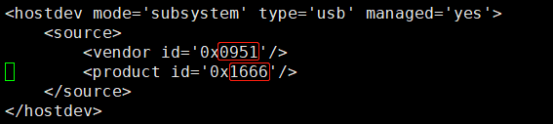
将红色矩形框内的内容修改为查看到的设备硬件ID信息,并保存退出。
#### 2.1.5 在云平台上查看云主机的ID并复制
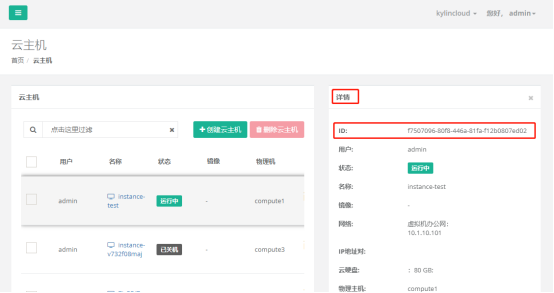
#### 2.1.6 退出容器,执行脚本virsh_attach_usb.sh
`(nova-libvirt)[root@compute1 /]# exit`
`[root@compute1 ~]# bash virsh_attach_usb.sh f7507096-80f8-446a-81fa-f12b0807ed02 usb3`
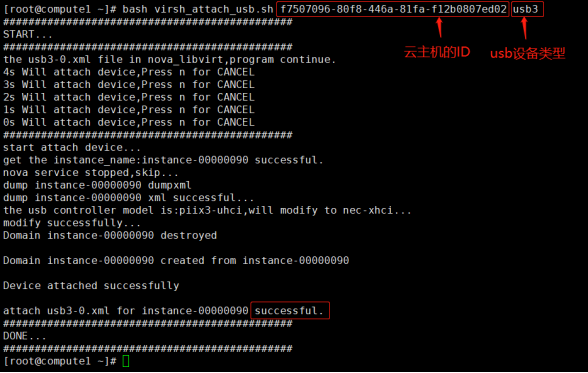
**successful** 表示设备穿透成功
#### 2.1.7 打开云主机,并打开文件资源管理器,可以查看到USB设备
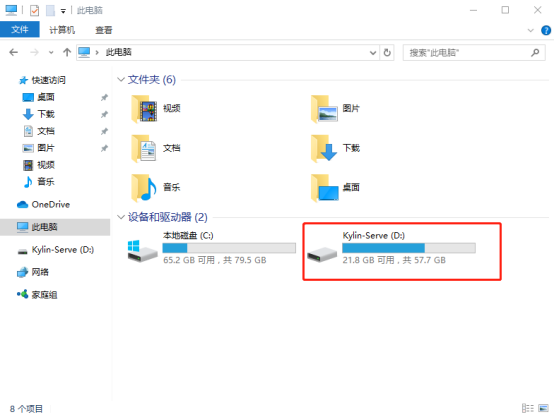
### 2.2 卸载USB设备
`[root@compute1 ~]# bash virsh_detach_usb.sh f7507096-80f8-446a-81fa-f12b0807ed02 usb3`
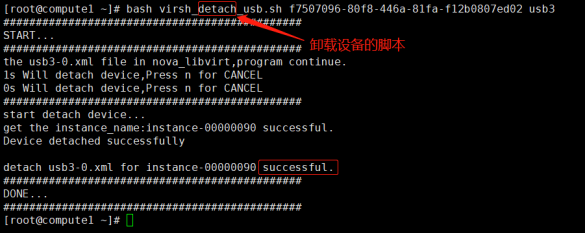
**successful** 表示设备穿透成功
## 3. 注意事项
### 3.1 如果设备穿透成功,但是文件资源管理器中未显示,请先卸载设备,然后拔插USB设备,再次穿透。
### 3.2 注意:USB3.0设备穿透,一个设备只能同时在一台云主机上进行穿透,如需穿透到其他云主机,请先卸载设备,再进行穿透操作。
- 常见问题
- 进入救援模式
- 进入单用户模式
- grub引导修复
- V10SP1-biosdevname解析
- 外设挂载和卸载
- audit关闭解决方案
- 终端无法切换
- 救援模式取数据
- 网卡更名操作
- 问题复现解决类
- xgboost复现解决步骤
- 激活类
- 麒麟服务器激活常用命令
- 服务器故障激活问题--须知
- 激活权限获得方式
- V10-SP系列服务器激活
- 银河麒麟高级服务器操作系统V7&V10激活手册
- shell脚本类
- 多网卡队列绑定CPU脚本
- 服务器健康检查脚本
- 服务安装配置类
- 银河麒麟高级服务器操作系统V10(sp1)安装手册
- LVM创建
- Chrony时间同步配置
- 搭建网络yum源
- PXE部署实施
- Man手册安装
- 部署VNC服务
- Kylin-Server-V10-SP1-0711-DNS服务单机部署文档
- 麒麟ks文件定制-封装iso文件
- iptables端口配置
- V10-SP1-aarch64安装jdk1.7
- 工具使用类
- cyclictest测试工具
- e2fsprogs工具介绍
- Logrotate工具说明
- nmon工具安装与使用
- 升、降级类
- rsyslog升级报告
- 性能优化类
- 日志轮转
- 大页内存与透明大页详解
- 优化磁盘IO调度方式
- core文件设置
- 分析报告类
- bond模式4协商不通排查
- audit内存泄露问题分析报告
- mate-indicators内核占用过高问题分析报告
- ansible问题-hostname以及lvol报错
- 关于Linux内存计算的说明
- 磁盘IO调度算法
- 硬件相关类
- 串口
- 网络相关类
- bond创建
- 在已配置好网络情况下添加路由
- 网卡配合网桥实现内网互通KVM虚拟机
- Bond模式4协商不通排查过程
- HA高可用
- kylin HA shell实践
- kylin HA概念性及shell使用
- 虚拟化
- KVM创建虚拟机(图形化操作)
- KVM创建虚拟机(命令操作)
- 容器类
- docker-runc升级
- docker基础镜像制作-服务器版
- 麒麟云平台
- USB3.0设备穿透方法(针对win10云主机穿透)
- 麒麟云平台开关机操作说明
- 技术演练