
# visual studio code
**如何设置成中文**
按键盘上的快捷键 Ctrl+shift+p,出现命令框,如图:
输入configure language
# launch.json 简介
launch.json 是 VSCode 在当前开发目录自动生成的一个配置文件。开发时,根据所在项目类型,进行**程序启动的路径**和**运行环境**配置,如下图,描述的是当前需要调试的文件路径为
"${workspaceFolder}/scripts/debug.js",程序采用node进行调试。
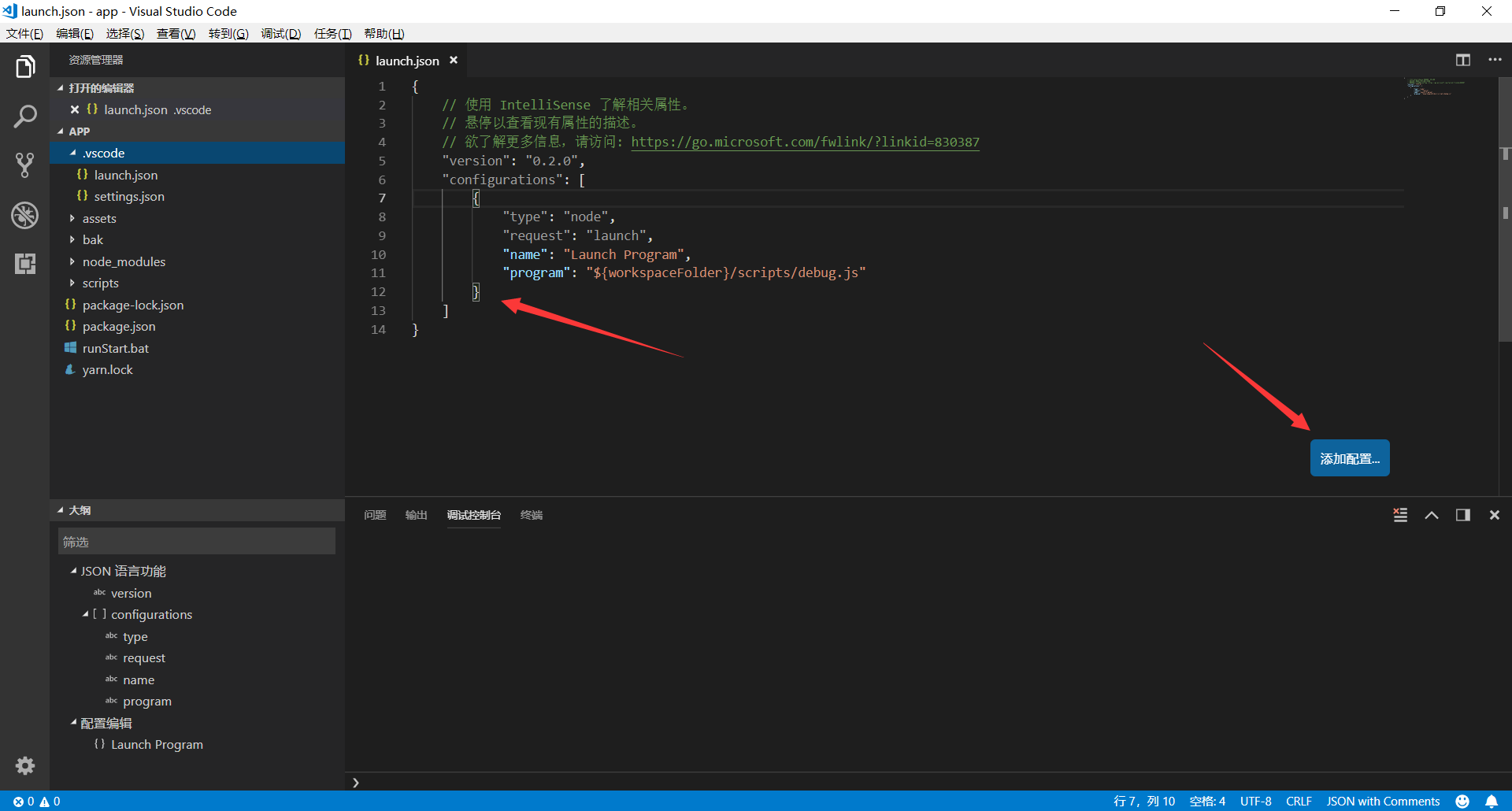
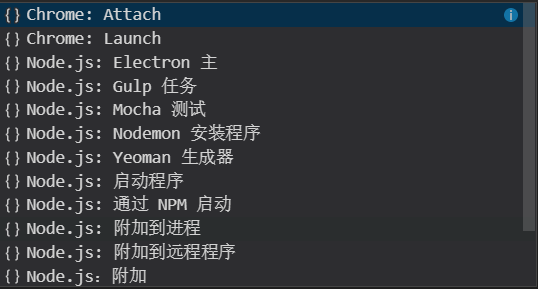
点击添加配置按钮,可以看到更多配置的选项,选项列表与当前安装的拓展有关,比如安装了Chrome之后。
在launch.json中一些预定变量的具体含义如下
${workspaceRoot} VSCode中打开文件夹的路径
原文 :the path of the folder opened in VS Code
${workspaceRootFolderName} VSCode中打开文件夹的路径, 但不包含"/"
原文:the name of the folder opened in VS Code without any solidus (/)
${file} 当前打开的文件
原文: the current opened file
${relativeFile} 当前打开的文件(相对于workspaceRoot)
原文:the current opened file relative to workspaceRoot
${fileBasename} 当前打开文件的文件名, 不含扩展名
原文:the current opened file's basename
${fileDirname} 当前打开文件的目录名
原文: the current opened file's dirname
${fileExtname} 当前打开文件的扩展名
原文:the current opened file's extension
${cwd} 当前运行任务的工作目录(启动目录)
原文:the task runner's current working directory on startup
- 程序优化
- vtune
- linux性能监控软件Perf
- 系统级性能分析工具perf的介绍与使用
- perf的二级命令
- 全局性概况
- 全局细节
- 最常用功能perf record
- 可视化工具perf timechart
- perf引入的overhead
- perf stat
- gprof
- 三种Linux性能分析工具的比较
- perf+gprof+gprof2dot+graphviz进行性能分析热点
- 英特尔多核平台编程优化大赛报告
- 内存操作
- mmap
- mmap的分类
- 深入理解内存映射mmap
- 计算机底层知识拾遗(九)深入理解内存映射mmap
- 内核驱动mmap Handler利用技术(一)
- Windows内存管理机制及C++内存分配实例
- Linux内存管理初探
- Windows CPU信息查看
- Linux CPU信息查看
- 预留大内存
- Linux下试验大页面映射
- /dev/mem
- Linux中通过/dev/mem操控物理地址
- /dev/mem分析
- 用法举例
- Linux下直接读写物理地址内存
- 查看内存信息
- Cache Memory
- 页面缓存
- 查看各级cache信息的方法
- dmidecode命令查看cache size
- CPU Cache 机制以及 Cache miss
- ARM体系关闭mmu和cache
- CR0-4寄存器介绍
- 查看CR0,CR2,CR3的值
- Linux 下如何禁用CPU cache
- 7个示例科普CPU Cache
- 第一个例子的C代码
- 其中之一
- Linux 从虚拟地址到物理地址
- 内存测试例子
- 每个程序员都应该了解的内存
- Part 1
- 程序员能够做什么
- 3 CPU caches
- 6 What Programmers Can Do
- VirtualAlloc
- Large-Page Support
- Some remarks on VirtualAlloc and MEM_LARGE_PAGES
- DMA
- MOV和MOVS的效率问题?如何高效的拷贝内存 中的数据
- how to use movntdqa to avoid cache pollution
- 计算机底层知识拾遗(一)理解虚拟内存机制
- How to access the control registers cr0,cr2,cr3 from a program
- 细说Cache-L1/L2/L3/TLB
- what-is-the-meaning-of-non-temporal-memory-accesses-in-x86
- How can the L1, L2, L3 CPU caches be turned off on modern x86/amd64 chips?
- UA list
- GDB
- 程序运行参数
- Linux下GDB的多线程调试
- CMake
- CMake快速入门教程:实战
- cmake打印变量值
- function
- source_group
- cmake_parse_arguments
- 编译.S文件
- add_definitions
- CMake添加-g编译选项
- Debug模式下启动
- Mysql
- Mysql联合查询union和union all的使用介绍
- MySQL数据库导入错误:ERROR 1064 (42000) 和 ERROR at line xx: Unknown command '\Z'.
- 解决MYSQL数据库 Table ‘xxx’ is marked as crashed and should be repaired 145错误
- C/C++
- c语言中static的作用
- strlen和sizeof有什么区别?
- printf
- Libuv中文文档之线程
- RapidJSON
- gcc/g++ 实战之编译的四个过程
- __thread
- TARGET_LINK_LIBRARIES
- MAP_HUGETLB
- 使用Intel格式的汇编
- __m128i
- emmintrin.h
- _mm_stream_si128
- _mm_stream_load_si128
- _mm_load_si128
- _mm_xor_si128
- _mm_store_si128
- _mm_cvtsi128_si64
- Intel SSE指令集
- _mm_set_epi64x
- _mm_aesenc_si128
- _umul128
- _mm_malloc
- reinterpret_cast
- strlen
- 读取UTF-8的txt文件发现开头的多三个字节的问题
- PHP
- php计算函数执行时间的方法
- 框架
- Json Rpc远程调用框架
- PHP多进程
- PHP CLI模式下的多进程应用
- php多进程总结
- 优化
- PHP7 优化
- 让你的PHP7更快(GCC PGO)
- PHP的性能演进(从PHP5.0到PHP7.1的性能全评测)
- PHP字符串全排列算法
- 获取服务器基本信息
- cookie
- phpstudy2018 安装xdebug扩展
- 软件下载
- PHP mysqli_error() 函数
- PHP Session 变量
- curl
- curl_getinfo
- 获取请求头
- PHP使用CURL获取302跳转后的地址实例
- PHP基于cURL实现自动模拟登录
- PHP获取远程图片大小(CURL实现)
- CURL模拟登录
- curl模拟登录提交(从目录中获取文件)
- CURL HTTPS
- curl帮v
- rename
- copy
- JSON
- json_encode
- json_decode
- json_last_error_msg
- json_last_error
- PHP json_encode中文乱码解决方法
- var_dump
- PHPStorm与Xdebug设置
- Xdebug原理以notepad为例
- str_pad
- pack
- PHP二进制与字符串之间的相互转换
- PHP执行系统命令(简介及方法)
- 函数
- 十进制转二进制
- 字符串到ASSCI
- 字符串转二进制
- 合并两个表
- 图像识别
- Tesseract
- 虚拟机
- vmware下Kali 2.0安装VMware Tools
- 安装 VMware tools出现“正在进行简易安装时,无法手动启动VMware tools安装”
- 爬虫
- 有哪些好的数据来源或者大数据平台?
- Cygwin
- Git 常用命令
- 排列组合
- 含重复元素序列的全排列
- 全排列的非递归和递归实现(含重复元素)
- GitBook
- 编辑环境
- visual studio code
- 2名数学家或发现史上最快超大乘法运算法,欲破解困扰人类近半个世纪的问题
- 系统预定义常量
- 指令集
- SSE
- _MSC_VER
- msys2
- 安装cmake
- MSYS2 更新源
- 讲Cmake msys32使用问题解答 CXX CMAKE_C_COMPILER配置详解
- VirtualBox
- 解决virtualbox只能安装32位系统的问题
- Ubuntu
- 使用AES-NI的编译参数
- debian下安装内核源码的方法
- tar.xz结尾的文件的解压方法
- Linux命令
- insmod
- fatal error: openssl/bio.h
- 准备module的编译环境(kali)
- Ubuntu/Debian 之内核模块开发准备
- dmesg的详细用法
- Linux系统开机自动加载驱动module
- linux /Module 浅析(转载)
- Kali
- 找回gpedit
- Enable the Lock Pages in Memory Option (Windows)
- TLA
- 双系统
- 显卡
- 显示no CUDA的解决过程