
# GoCD Version: 19.8.0,本项目pipelines分三步,
第一、编译及推送镜像到仓库
第二、发布到pionex-dev
第三、如果pionex-dev没有问题,再推送到pionex-prod
1. 首先创建pipline group---pionex
admin->pipelines->ADD NEW PIPELINE GROUP->pionex
2. 创建pipeline
在对应 pipline group->Create a new pipeline within this group,先简单建立一个,然后点击修改。
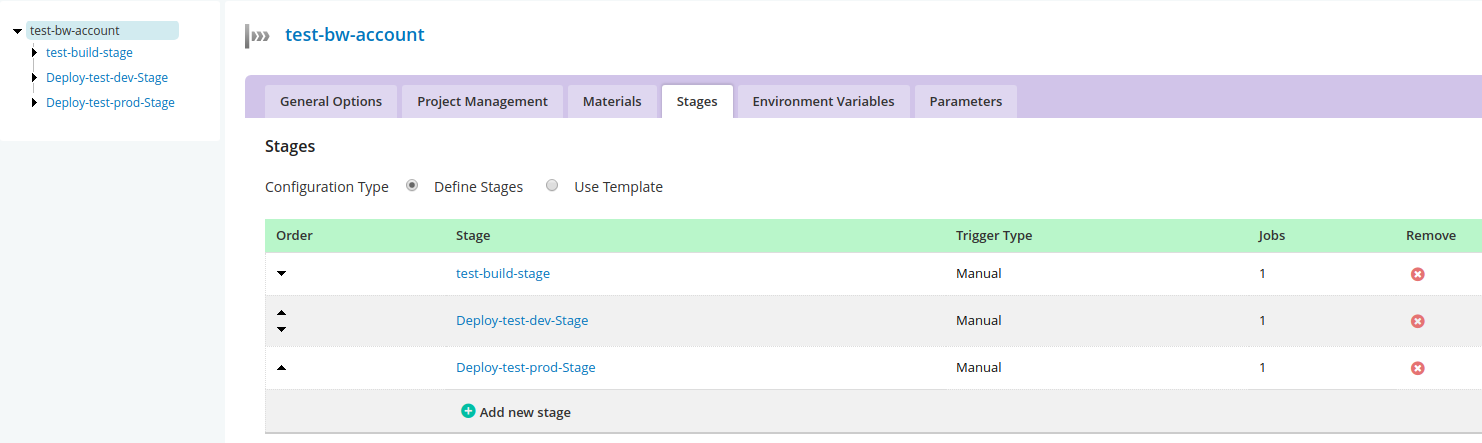
# **添加了计划的三个步骤**
原图片
General-->Automatic pipeline scheduling,不勾选。如果未选中,此管道将仅安排响应手动/API/计时器触发器。 取消选中此框与制作第一阶段手动相同。
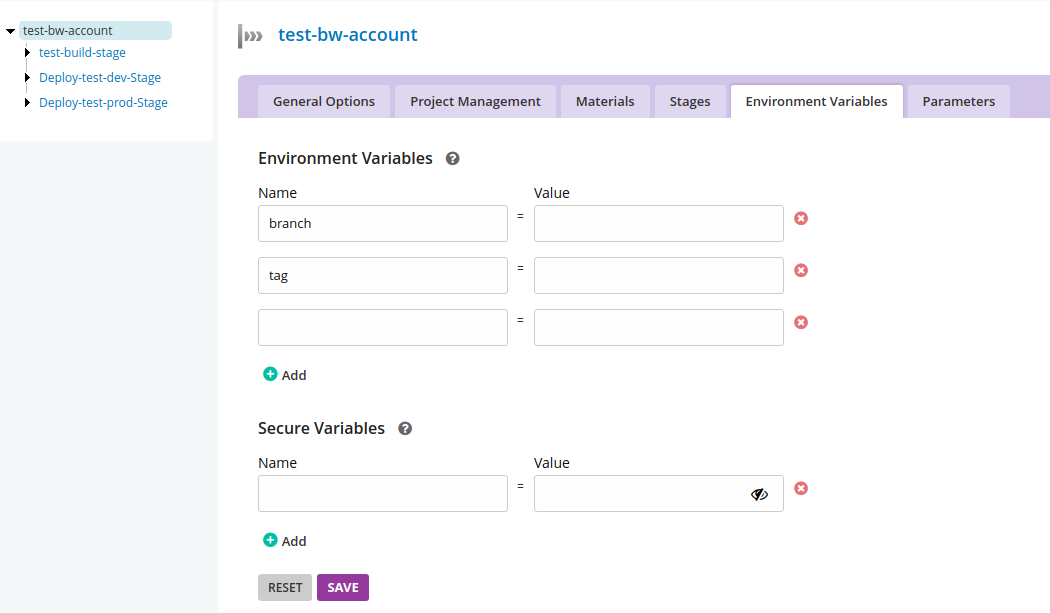
# **添加环境变量**
原图片
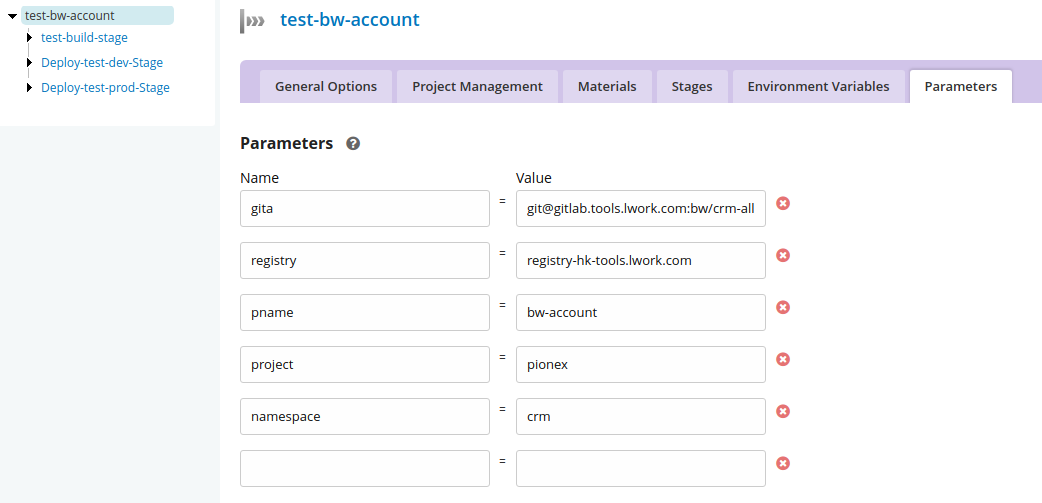
# **添加参数**
原图片
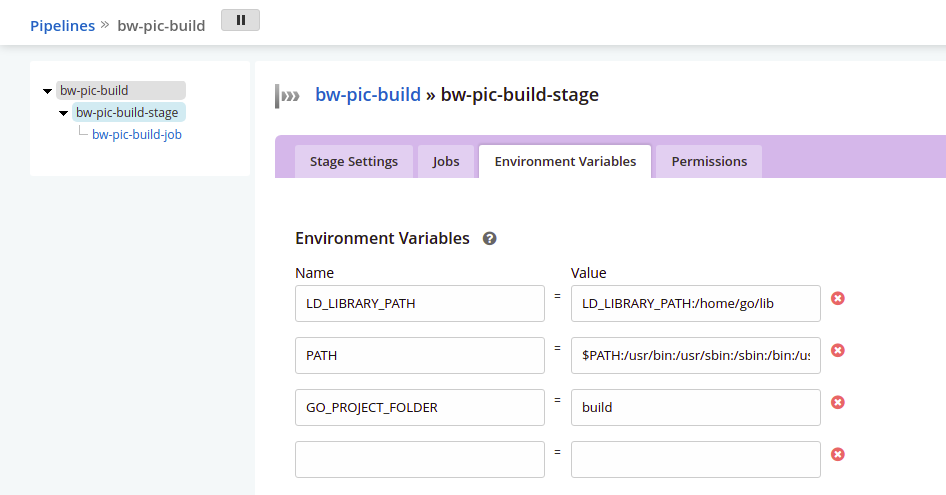
# **每个Stage修改**
修改名字,
选择Manual(上一阶段成功后,下阶段手动点击),
取消Fetch Materials,
选择Clean Working Directory,然后保存。
# **每个Job**
原图片
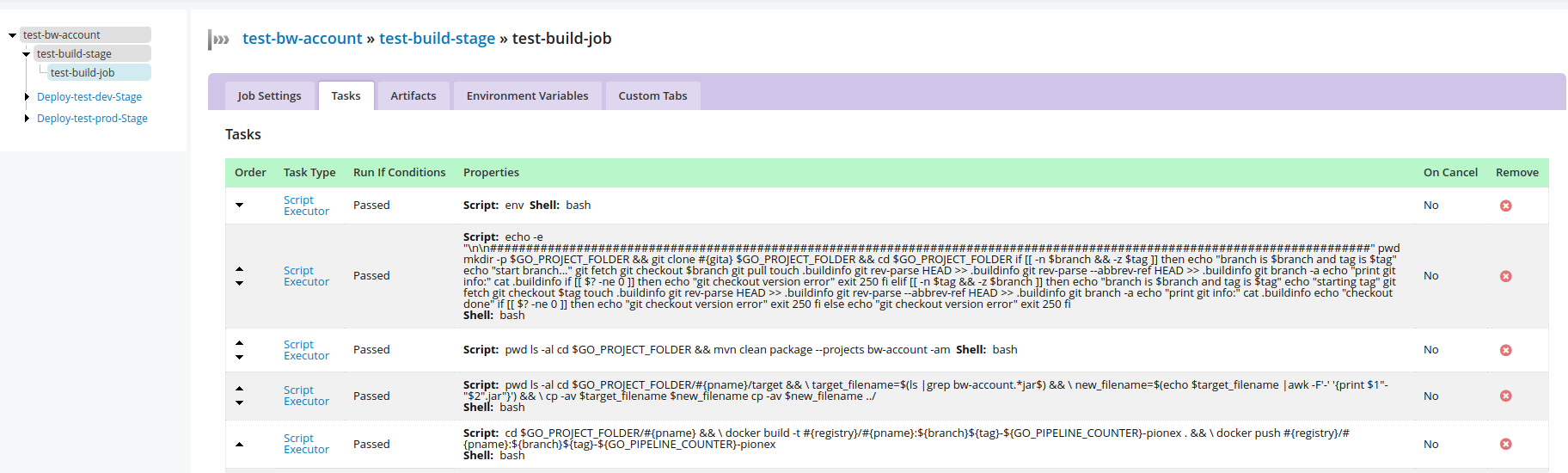
多个piplines之间如果用到依赖的话,**Managing dependencies**
引用https://docs.gocd.org/current/configuration/managing_dependencies.html
# Creating a dependency
Say we have two pipelines - upstream_pipeline and downstream_pipeline . We want downstream_pipeline to automatically trigger following the successful completion of the stage AutoStage1 in pipeline upstream_pipeline. Here’s how we’d achieve this:
Navigate to the Admin section.
On the Pipelines screen, locate the downstream_pipeline pipeline and Edit it.
Click on the Materials tab.
Add a new pipeline dependency material by clicking Add Material and then selecting Pipeline .
You’ll be presented with an Add Material popup (see screenshot)
Enter upstream_pipeline [AutoStage1] in the Pipeline [stage] field (it can also auto-complete)
Now, when the stage “AutoStage1” of “upstream_pipeline” completes, the pipeline “downstream_pipeline” will start building.
**Fetching artifacts from an upstream pipeline**
引用https://docs.gocd.org/current/configuration/managing_dependencies.html
- 笔记
- shell
- 如何才能学好Shell编程之“老鸟”经验谈
- scripts
- 迁移脚本
- centos_install.sh
- https.support.lwork.com.conf
- newbroker.default.lwork.com.conf
- bwnginx.conf
- twnginx.conf
- pre.default.lwork.com.conf
- zabbix_agentInstall
- getcc.sh
- shell脚本调试
- shell学习
- 第一章shell脚本入门
- shell脚本开发的基本规范及习惯
- 脚本规范示例
- 第三章变量的核心知识与实践
- 第四章变量知识进阶和实践
- 4.3 shell变量子串知识及实践
- 4.4 shell特殊扩展变量的知识与实践
- 第五章 变量的数值计算实践
- 第六章 shell脚本的条件测试
- 第七章 if条件的知识与实践
- 第8章 shell函数的基础实践
- 第13章 Shell数组的应用实践
- 经验
- for和while读行的区别
- 一个文件取2个参数
- 重定向正确及错误输出
- linux常用命令
- awk
- 详解
- 例子
- 内置变量
- 实例2
- 实例3
- find/grep
- iostat
- java启动脚本
- ln -s
- nmap
- passwd
- sed
- 详解
- 例子
- ssh-copy-id
- vim
- linux systemd详解
- 常用命令实列
- ss
- rz,sz小文件上传下载
- 文件的合并,排序和分割
- sort,uniq
- sort
- uniq
- cut
- paste
- tr
- curl
- cpu
- scp
- 批量添加注释
- nc
- yarn
- lsof
- tar
- cat
- openssl自签名证书
- pwgen
- logrotate
- 中间件
- mongo
- mongo配置文件详解
- mongo安装
- mongo常用命令
- mongo导入导出
- 导出数据的mongojs
- mongo shell
- mongo异常关闭
- mongo的缺点
- mysql
- 安装
- Gitd
- 主从同步
- 常用命令
- 日志清理
- 连接数,最大并发数,超时
- 错误
- 错误1872
- 错误1236
- 错误1-gitd主从报错
- 一些优化
- 服务器硬件优化
- 编译安装
- mysql配置文件优化
- 根据status优化
- 优化思路
- index
- 查询数据库大小
- ubuntu18.04mysql启动脚本
- pure-ftpd
- rabbitmq
- consul
- redis
- 安装
- 配置
- redis-sentinel
- 常用命令
- supervisor启动redis
- freeipa
- ftp
- 错误530根本原因和解决方法
- vsftp
- sftp
- JDK
- java参数
- zabbix
- 安装
- nginx
- 基础
- 1.基础web配置
- 2.nginx的日志格式
- 3.Nginx的请求限制
- 4.Nginx访问控制
- 进阶
- 1.静态资源web服务
- 2.Nginx作为代理服务
- 3.负载均衡
- 4.rewrite模块
- 5.Geoip
- location与proxy_pass
- proxy_set_header参数
- add_header
- 安装
- 4XX5XX重定向
- Nginx resolver explained
- 关于防止自己网页内容被别人iframe的问题
- nginx全局变量
- nginx错误代码
- 平滑升级nginx
- nginx相关资料网站
- nginx配置下载目录
- 反向代理并发数
- php
- 安装centos6,7
- xtrabackup
- apache
- 常用工具
- SSL证书在线工具SSL
- wordpress
- kafka
- nssm
- GoCD
- gocd简介
- gocd一些概念
- gocd客户端环境变量
- 建立一个piplines
- gocd添加nodejs
- supervisor
- mongo,mysql,hadoop比较
- screen
- python
- minio-私有存储桶
- kubernetes
- YAML格式简单说明
- k8s集群常用命令
- 概念
- k8s组件
- 对象
- workloads
- pods
- overview
- pod lifecycle
- init containers
- env向容器暴露pod信息
- controllers
- rs
- deployments
- daemonset
- StatefulSet
- service
- ingress
- volumes及configmap
- pv和pvc
- serviceaccount及认证
- dashboard及分级授权
- flannel&calico
- 调度器,预选策略及优先函数
- 资源指标API及自定义指标API
- helm
- k8s最佳实践
- 配置kubelet
- 简单命令定位问题
- k8s中日志收集-1
- k8s中日志收集-2
- lxcfs
- v1.24以后镜像问题
- 单控制节点集群v1.24以后适用
- 单控制节点集群v1.24前适用
- K8s.1.11.x阿里云安装HA版
- 国内k8s安装指定版本
- 发布及回滚
- 检查yaml文件格式
- pod分配到指定节点
- k8s跨集群访问
- 在docker中查看对应k8s容器日志
- cert-manager
- 问题定位技巧:容器内抓包
- 为容器设置启动时要执行的命令及其入参
- deploy.yaml文件实例
- kube/config
- 系统守护进程预留资源
- k8s集群证书pki过期处理
- pod跑java时内存的运用
- 从外部访问k8s中的pod
- HPA实战
- Docker
- Docker常用命令
- 基本概念
- 镜像
- 容器
- 仓库
- 安装 Docker
- Ubuntu
- Centos
- 镜像加速器
- 使用镜像
- 获取镜像
- 使用 Dockerfile 定制镜像
- Dockerfile 指令详解
- COPY 复制文件
- CMD 容器启动命令
- ENTRYPOINT 入口点
- ENV
- 其他命令
- 参考文档
- Alpine制作JDK8镜像
- Dockerfile示例
- 访问仓库
- nexus
- 最佳实践
- 镜像删除
- 清理docker磁盘空间
- docker容器日志管理
- 镜像基础上构建镜像
- git
- 公钥私钥免登
- 常用命令
- git pull
- git升级
- jenkins
- jenkins使用git
- 设置构建作业
- General
- Source Code Management
- Build Traggers
- Build Environment
- Build
- Post-build Actions
- 高级构建
- 参数化构建作业
- prometheus
- 监控原则
- 第一章 采集数据
- HPA
- meterics-server
- custom metrics
- kube-state-metrics
- node-exporter
- 第二章 prometheus
- prometheus概述
- prometheus基本架构
- prometheus安装
- prometheus的配置和服务发现
- scrape_configs
- kubernetes_sd_config
- relabel_config
- relabel_config例子
- 服务发现配置
- alertmanager_config
- alerting
- configuration
- route
- receivers
- inhibits_rules
- 第三章 展示与告警
- 第四章 PromQL
- rate,irate和delta的区别
- prometheus-operator
- maven
- maven命令
- maven仓库配置
- openstack
- 网络基础
- 计算机网络原理
- 一个URL请求的过程
- 2.记录
- 3.数据链路层
- 4.网络层
- 网络常用命令
- 命令
- iptables
- nc
- ipset
- mtr
- ss
- lsof
- ip
- 抓包
- tcpdump
- 网络排错与观察
- netstat
- traceroute
- dig与nslookup
- 计算机网络协议
- 负载均衡总结性说明
- NAT
- Tinc
- ubuntu
- ubuntu-var-log-下各个日志文件
- apt和dpkg
- systemctl详解
- 关闭系统更新,有些更新可能影响运行的程序
- ubuntu常用命令
- 基础工具journalctl命令
- za
- 恢复阿里云物理备份
- 域名证书申请和更换
- 正则表达式常用
- 服务器上排查问题得头5分钟
- windows
- winserver关闭事件跟踪程序
- windows常用命令
- win10企业LTSC版激活
- windows通过网卡只开80端口
- debug-tools
- win10-1903及以上版本Realtek高清晰音频管理器
- 彻底解决WPS Office Expansion tool弹出问题
- services延迟启动时间修改
- windows服务器定时重启
- windows sc命令
- 防火墙概述
- iptables
- 简单说明
- 例子
- 项目一
- DevOps简介
- 项目介绍
- 高并发内核优化
- gitlab
- gitlab社区和企业版本区别
- gitlab社区版安装
- gitlab指定版本安装
- gitlab安全设置
- gitlab的备份和恢复
- gitlab容器化安装
- jenkins
- jenkins安装
- ubuntu 16.04 install jenkins
- ubuntu 20.04 install jenkins
- jenkins使用git
- jenkins配置第一个项目
- jenkins发布及制作jar镜像
- jenkins安全策略
- gocd
- gocd安装
- k8s中gocd的server和agent模板
- gocd配置第一个项目
- 脚本
- gocd+ldap
- nexus
- 安装和配置
- freeipa
- 介绍
- 安装
- freeipa集成ocserv
- VPN
- 原理
- vpn部署ocserv
- k8s
- k8s高可用集群
- DNSmasq
- SNIproxy
- Tinc
- prometheus
- 简介
- helm安装prometheus
- 采集数据概览
- 采集数据node-exporter
- 采集数据kube-state-metrics
- 采集数据cadvisor和apiservers
- 指标汇总展示
- 监控
- nginx+lua+waf
- 项目二
- 简介
- nacos
- 简介
- nacos配置管理功能
- tengine
- java
- java参数说明及优化
- github快速访问
- amd和arm区别
- AWS
- 负载均衡ALB