
引用自https://docs.gocd.org/current/introduction/concepts_in_go.html#resources
**Automatic pipeline scheduling**
“自动管道调度”。实际上,这与将第一阶段标记为手动相同(On Success , Manual)
**Environment Variables**
此处定义的环境变量是在agent上设置的,可以在您的job的tasks中使用。
可以在多个级别上定义环境变量:在环境内,管道内,阶段内和作业内。它们遵循级联系统,其中在“环境”级别定义的环境变量被在管道级别定义的环境变量覆盖,依此类推。
原来的图片
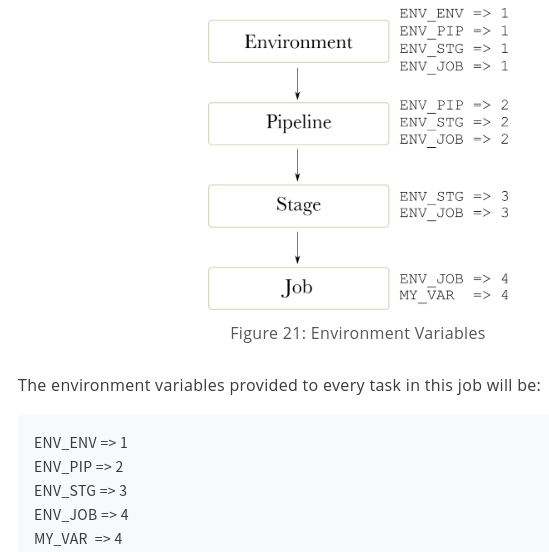
**最终是job级别的环境变量优先**
----------
**Parameters**
参数有助于减少配置中的重复,并与模板结合使用可让您设置复杂的配置。
**Artifacts**
Pipeline的各个环节本质上是在验证构建出的artifact,是否符合质量标准,这就要求pipeline能够正确识别和传递artifact.
GoCD provides a special task called a “Fetch Artifact Task”, which allows artifacts to be fetched and used, from any ancestor pipeline - that is, any pipeline that is upstream of the current pipeline. GoCD will ensure that the correct version of the artifact is fetched, irrespective of anything else that might be going on in the system.如果是获取的jar包之类的是很有用的,能保证后面的stage都用的是build阶段构建出来的包。使用镜像的时候,可以使用声明一个文件
```
dimages=registry-hk-tools.lwork.com/bw-report-service:master-9
deploy=bw-report-service
```
下游获取到这个文件,**然后根据文件内容再来进行k8s发布。**
**上游构建stage将artifact到gocd自带的artefact repository**
原来的图片
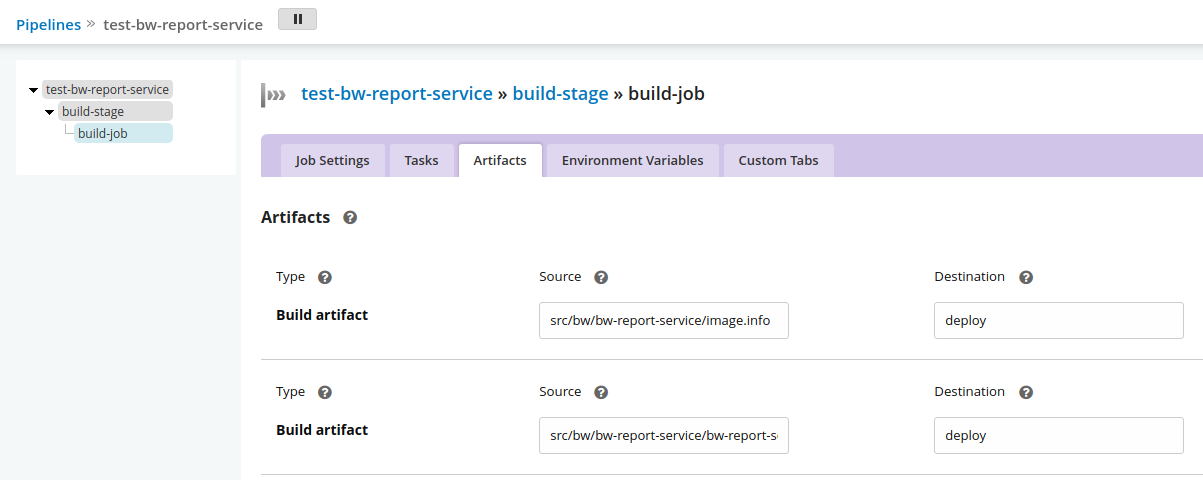
**下游部署stage从构建stage抓取artifact**
原来的图片

**Materials**
Pipeline dependency material
Materials really start becoming powerful when a stage in a pipeline is used as a material for another pipeline.
In the image shown below, Stage 2 of Pipeline 1 is configured as a material for Pipeline 2. Whenever Stage 2 of Pipeline 1 finishes successfully, Pipeline 2 triggers. In a setup such as this, Pipeline 1 is called the Upstream Pipeline and Pipeline 2 is called the Downstream Pipeline. Stage 2 of Pipeline 1 is called the Upstream Dependency of Pipeline 2.
**Fetch Materials**
仅在完全不关心Artifacts的情况下,才应关闭“Fetch Materials”选项。在某些情况下,您只希望管道的计时器触发器-不在乎已检出物料的修订版-或出于某种原因想要自己检出物料。然后,您将关闭“获取材料”。
Pipeline可由若干个stage组成,stage之间可以设置依赖关系,默认上游stage失败的时候不会触发下游stage。stage可由多个job组成,但多个job一般用在并行任务的用例中(例如并行构建多个模块),它们之间是没有依赖关系的,所以如果你希望某个stage执行一系列有依赖关系的动作,应该使用单个job并为其设置多个task
**Managing dependencies**
引用https://docs.gocd.org/current/configuration/managing_dependencies.html
**Fetching artifacts from an upstream pipeline**
引用https://docs.gocd.org/current/configuration/managing_dependencies.html
- 笔记
- shell
- 如何才能学好Shell编程之“老鸟”经验谈
- scripts
- 迁移脚本
- centos_install.sh
- https.support.lwork.com.conf
- newbroker.default.lwork.com.conf
- bwnginx.conf
- twnginx.conf
- pre.default.lwork.com.conf
- zabbix_agentInstall
- getcc.sh
- shell脚本调试
- shell学习
- 第一章shell脚本入门
- shell脚本开发的基本规范及习惯
- 脚本规范示例
- 第三章变量的核心知识与实践
- 第四章变量知识进阶和实践
- 4.3 shell变量子串知识及实践
- 4.4 shell特殊扩展变量的知识与实践
- 第五章 变量的数值计算实践
- 第六章 shell脚本的条件测试
- 第七章 if条件的知识与实践
- 第8章 shell函数的基础实践
- 第13章 Shell数组的应用实践
- 经验
- for和while读行的区别
- 一个文件取2个参数
- 重定向正确及错误输出
- linux常用命令
- awk
- 详解
- 例子
- 内置变量
- 实例2
- 实例3
- find/grep
- iostat
- java启动脚本
- ln -s
- nmap
- passwd
- sed
- 详解
- 例子
- ssh-copy-id
- vim
- linux systemd详解
- 常用命令实列
- ss
- rz,sz小文件上传下载
- 文件的合并,排序和分割
- sort,uniq
- sort
- uniq
- cut
- paste
- tr
- curl
- cpu
- scp
- 批量添加注释
- nc
- yarn
- lsof
- tar
- cat
- openssl自签名证书
- pwgen
- logrotate
- 中间件
- mongo
- mongo配置文件详解
- mongo安装
- mongo常用命令
- mongo导入导出
- 导出数据的mongojs
- mongo shell
- mongo异常关闭
- mongo的缺点
- mysql
- 安装
- Gitd
- 主从同步
- 常用命令
- 日志清理
- 连接数,最大并发数,超时
- 错误
- 错误1872
- 错误1236
- 错误1-gitd主从报错
- 一些优化
- 服务器硬件优化
- 编译安装
- mysql配置文件优化
- 根据status优化
- 优化思路
- index
- 查询数据库大小
- ubuntu18.04mysql启动脚本
- pure-ftpd
- rabbitmq
- consul
- redis
- 安装
- 配置
- redis-sentinel
- 常用命令
- supervisor启动redis
- freeipa
- ftp
- 错误530根本原因和解决方法
- vsftp
- sftp
- JDK
- java参数
- zabbix
- 安装
- nginx
- 基础
- 1.基础web配置
- 2.nginx的日志格式
- 3.Nginx的请求限制
- 4.Nginx访问控制
- 进阶
- 1.静态资源web服务
- 2.Nginx作为代理服务
- 3.负载均衡
- 4.rewrite模块
- 5.Geoip
- location与proxy_pass
- proxy_set_header参数
- add_header
- 安装
- 4XX5XX重定向
- Nginx resolver explained
- 关于防止自己网页内容被别人iframe的问题
- nginx全局变量
- nginx错误代码
- 平滑升级nginx
- nginx相关资料网站
- nginx配置下载目录
- 反向代理并发数
- php
- 安装centos6,7
- xtrabackup
- apache
- 常用工具
- SSL证书在线工具SSL
- wordpress
- kafka
- nssm
- GoCD
- gocd简介
- gocd一些概念
- gocd客户端环境变量
- 建立一个piplines
- gocd添加nodejs
- supervisor
- mongo,mysql,hadoop比较
- screen
- python
- minio-私有存储桶
- kubernetes
- YAML格式简单说明
- k8s集群常用命令
- 概念
- k8s组件
- 对象
- workloads
- pods
- overview
- pod lifecycle
- init containers
- env向容器暴露pod信息
- controllers
- rs
- deployments
- daemonset
- StatefulSet
- service
- ingress
- volumes及configmap
- pv和pvc
- serviceaccount及认证
- dashboard及分级授权
- flannel&calico
- 调度器,预选策略及优先函数
- 资源指标API及自定义指标API
- helm
- k8s最佳实践
- 配置kubelet
- 简单命令定位问题
- k8s中日志收集-1
- k8s中日志收集-2
- lxcfs
- v1.24以后镜像问题
- 单控制节点集群v1.24以后适用
- 单控制节点集群v1.24前适用
- K8s.1.11.x阿里云安装HA版
- 国内k8s安装指定版本
- 发布及回滚
- 检查yaml文件格式
- pod分配到指定节点
- k8s跨集群访问
- 在docker中查看对应k8s容器日志
- cert-manager
- 问题定位技巧:容器内抓包
- 为容器设置启动时要执行的命令及其入参
- deploy.yaml文件实例
- kube/config
- 系统守护进程预留资源
- k8s集群证书pki过期处理
- pod跑java时内存的运用
- 从外部访问k8s中的pod
- HPA实战
- Docker
- Docker常用命令
- 基本概念
- 镜像
- 容器
- 仓库
- 安装 Docker
- Ubuntu
- Centos
- 镜像加速器
- 使用镜像
- 获取镜像
- 使用 Dockerfile 定制镜像
- Dockerfile 指令详解
- COPY 复制文件
- CMD 容器启动命令
- ENTRYPOINT 入口点
- ENV
- 其他命令
- 参考文档
- Alpine制作JDK8镜像
- Dockerfile示例
- 访问仓库
- nexus
- 最佳实践
- 镜像删除
- 清理docker磁盘空间
- docker容器日志管理
- 镜像基础上构建镜像
- git
- 公钥私钥免登
- 常用命令
- git pull
- git升级
- jenkins
- jenkins使用git
- 设置构建作业
- General
- Source Code Management
- Build Traggers
- Build Environment
- Build
- Post-build Actions
- 高级构建
- 参数化构建作业
- prometheus
- 监控原则
- 第一章 采集数据
- HPA
- meterics-server
- custom metrics
- kube-state-metrics
- node-exporter
- 第二章 prometheus
- prometheus概述
- prometheus基本架构
- prometheus安装
- prometheus的配置和服务发现
- scrape_configs
- kubernetes_sd_config
- relabel_config
- relabel_config例子
- 服务发现配置
- alertmanager_config
- alerting
- configuration
- route
- receivers
- inhibits_rules
- 第三章 展示与告警
- 第四章 PromQL
- rate,irate和delta的区别
- prometheus-operator
- maven
- maven命令
- maven仓库配置
- openstack
- 网络基础
- 计算机网络原理
- 一个URL请求的过程
- 2.记录
- 3.数据链路层
- 4.网络层
- 网络常用命令
- 命令
- iptables
- nc
- ipset
- mtr
- ss
- lsof
- ip
- 抓包
- tcpdump
- 网络排错与观察
- netstat
- traceroute
- dig与nslookup
- 计算机网络协议
- 负载均衡总结性说明
- NAT
- Tinc
- ubuntu
- ubuntu-var-log-下各个日志文件
- apt和dpkg
- systemctl详解
- 关闭系统更新,有些更新可能影响运行的程序
- ubuntu常用命令
- 基础工具journalctl命令
- za
- 恢复阿里云物理备份
- 域名证书申请和更换
- 正则表达式常用
- 服务器上排查问题得头5分钟
- windows
- winserver关闭事件跟踪程序
- windows常用命令
- win10企业LTSC版激活
- windows通过网卡只开80端口
- debug-tools
- win10-1903及以上版本Realtek高清晰音频管理器
- 彻底解决WPS Office Expansion tool弹出问题
- services延迟启动时间修改
- windows服务器定时重启
- windows sc命令
- 防火墙概述
- iptables
- 简单说明
- 例子
- 项目一
- DevOps简介
- 项目介绍
- 高并发内核优化
- gitlab
- gitlab社区和企业版本区别
- gitlab社区版安装
- gitlab指定版本安装
- gitlab安全设置
- gitlab的备份和恢复
- gitlab容器化安装
- jenkins
- jenkins安装
- ubuntu 16.04 install jenkins
- ubuntu 20.04 install jenkins
- jenkins使用git
- jenkins配置第一个项目
- jenkins发布及制作jar镜像
- jenkins安全策略
- gocd
- gocd安装
- k8s中gocd的server和agent模板
- gocd配置第一个项目
- 脚本
- gocd+ldap
- nexus
- 安装和配置
- freeipa
- 介绍
- 安装
- freeipa集成ocserv
- VPN
- 原理
- vpn部署ocserv
- k8s
- k8s高可用集群
- DNSmasq
- SNIproxy
- Tinc
- prometheus
- 简介
- helm安装prometheus
- 采集数据概览
- 采集数据node-exporter
- 采集数据kube-state-metrics
- 采集数据cadvisor和apiservers
- 指标汇总展示
- 监控
- nginx+lua+waf
- 项目二
- 简介
- nacos
- 简介
- nacos配置管理功能
- tengine
- java
- java参数说明及优化
- github快速访问
- amd和arm区别
- AWS
- 负载均衡ALB