
# APD扩展(过时)
# PHP 效能分析工具
APD是高级PHP调试器。它的目的是为PHP代码提供分析和调试功能,并提供打印完整堆栈回溯的能力。APD支持交互式调试,但在默认情况下,它将数据写入跟踪文件。它还提供了基于事件的日志记录,因此可以为各个脚本打开或关闭不同级别的信息(包括函数调用、传递的参数、计时等)
> APD是一个Zend扩展,它修改了PHP内部处理函数调用的方式,因此可能与其他Zend扩展(例如Zend Optimizer)兼容,也可能不兼容
> **已经不再维护了 请使用Xdebug**
ini配置:
名字默认可修改范围描述apd.dumpdirNULLPHP\_INI\_ALL设定 APD 写入调试输出文件的目录。可以指定绝对路径或相对路径,可以在[apd\_set\_pprof\_trace()](https://www.php.net/manual/zh/function.apd-set-pprof-trace.php)中以参数指定一个不同目录apd.statement\_tracing"0"PHP\_INI\_ALL指定是否进行每行的跟踪。将此项打开(设为 1)将影响到程序的性能开启:
1、首先去[package](http://pecl.php.net/package/apd) 下载对用的apd包解压或者git clone <https://github.com/ZeWaren/pecl-apd>
```
<pre class="calibre10">```
cd pecl<span class="token1">-</span>apd<span class="token1">/</span>
phpize
configure
make <span class="token1">&&</span> make install
<span class="token">//安装好以后显示 Installing shared extensions: /usr/lib/php5/20131226/</span>
chmod <span class="token6">644</span> <span class="token1">/</span>usr<span class="token1">/</span>lib<span class="token1">/</span>php5<span class="token1">/</span><span class="token6">20131226</span><span class="token1">/</span>apd<span class="token3">.</span>so
```
```
2、配置php.ini
```
<pre class="calibre10">```
<span class="token3">[</span>apd<span class="token3">]</span>
zend_extension<span class="token1">=</span><span class="token1">/</span>usr<span class="token1">/</span>lib<span class="token1">/</span>php5<span class="token1">/</span><span class="token6">20131226</span><span class="token1">/</span>apd<span class="token3">.</span>so
# 将log写进<span class="token1">/</span>tmp<span class="token1">/</span>apd<span class="token1">/</span>trace文件夹里
apd<span class="token3">.</span>dumpdir <span class="token1">=</span> <span class="token1">/</span>tmp<span class="token1">/</span>apd<span class="token1">/</span>trace
apd<span class="token3">.</span>statement_tracing <span class="token1">=</span> <span class="token6">0</span>
```
```
> zend\_extension=...而不死extension=...
> apd.dumpdir 是日志地址
> 3、
```
<pre class="calibre10">```
mkdir <span class="token1">-</span>p <span class="token1">/</span>tmp<span class="token1">/</span>apd<span class="token1">/</span>trace
chmod <span class="token1">-</span>R <span class="token6">777</span> <span class="token1">/</span>tmp<span class="token1">/</span>apd<span class="token1">/</span>
php5enmod apd # 啟用 apd
service apache2 reload
```
```
# 预定义常量
ConstantValueDescription**`FUNCTION_TRACE`**(integer)1**`ARGS_TRACE`**(integer)2**`ASSIGNMENT_TRACE`**(integer)4**`STATEMENT_TRACE`**(integer)8**`MEMORY_TRACE`**(integer)16**`TIMING_TRACE`**(integer)32**`SUMMARY_TRACE`**(integer)64**`ERROR_TRACE`**(integer)128**`PROF_TRACE`**(integer)256**`APD_VERSION`**(string)example:*1.0.2-dev*函数:
apd\_breakpoint — Stops the interpreter and waits on a CR from the socket
apd\_callstack — Returns the current call stack as an array
apd\_clunk — Throw a warning and a callstack
apd\_continue — Restarts the interpreter
apd\_croak — Throw an error, a callstack and then exit
apd\_dump\_function\_table — Outputs the current function table
apd\_dump\_persistent\_resources — Return all persistent resources as an array
apd\_dump\_regular\_resources — Return all current regular resources as an array
apd\_echo — Echo to the debugging socket
apd\_get\_active\_symbols — Get an array of the current variables names in the local scope
apd\_set\_pprof\_trace — Starts the session debugging
apd\_set\_session\_trace\_socket — Starts the remote session debugging
apd\_set\_session\_trace — Starts the session debugging
apd\_set\_session — Changes or sets the current debugging level
override\_function — Overrides built-in functions
rename\_function — Renames orig\_name to new\_name in the global function table
用法:
1、在PHP脚本的第一行,调用apd\_set\_pprof\_trace()函数来启动跟踪,虽然可以在脚本中任何一行插入这一行,但是如果不是从脚本开头开始跟踪的话,则丢失了部分数据,有可能造成性能上的瓶颈
2、浏览器或者cli运行脚本。转储输出将被写入ap .dumpdir/pprof\_pid.ext,如果运行的是 CGI 版的 PHP,需要加入 '-e' 标记启用扩展信息以使 APD 正常工作。例如: **`php -e -f script.php`**
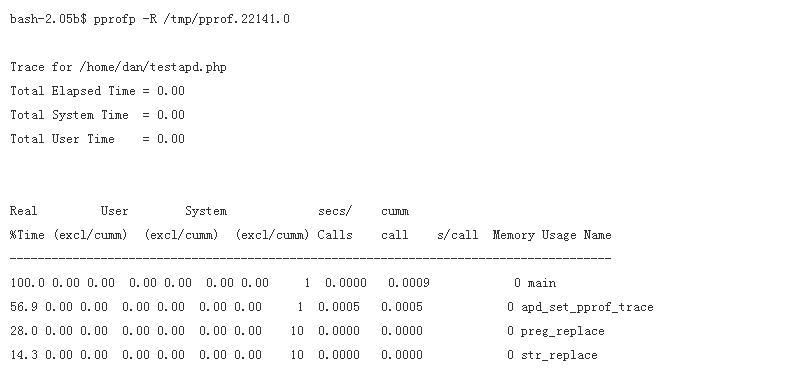
运行脚本后会产生pprof.xxxxx.0,然后再使用 pprofp xxx 來查看即可
分析日志的方法 手册里这样写到
```
<pre class="calibre10">```
pprofp <span class="token1">-</span>R <span class="token1">/</span>tmp<span class="token1">/</span>pprof<span class="token3">.</span><span class="token6">22141.0</span>
```
```
注意这里的pprofp 在你编译好的 apd的源码目录 其实就是一个php文件
这里你要修改pprofp文件开头的 php路径 才可以正常执行
php 以cgi方式运行的时候 据说 记着 -e参数
- php更新内容
- 其他
- empty、isset、is_null
- echo 输出bool值
- if真假情况
- 常量
- define与const(php5.3) 类常量
- 递归
- 单元测试
- 面向对象
- 全局变量域超全局变量
- php网络相关
- 支持的协议和封装协议(如http,php://input)
- 上下文(Context)选项和参数
- 过滤器
- http请求及模拟登录
- socket
- streams
- swoole
- 超全局变量
- $_ENV :存储了一些系统的环境变量
- $_COOKIE
- $_SESSION
- $_FILES
- $_SERVER
- 正则
- php正则函数
- 去除文本中的html、xml的标签
- 特殊符号
- \r\n
- 模式修正符
- 分组
- 断言
- 条件表达式
- 递归表达式 (?R)
- 固化分组
- 正则例子
- 框架
- 自动加载spl_autoload_register
- 时间函数
- 文件操作
- 文件的上传下载
- 常见的mimi类型
- 文件断点续传
- 下载文件防盗链
- 破解防盗链
- 无限分类
- 短信验证码
- 短信宝
- 视频分段加载
- phpDoc注释
- 流程控制代替语法
- 三元运算
- @错误抑制符
- 字符编码
- PHP CLI模式开发
- 配置可修改范围
- CGI、FastCGI和PHP-FPM关系图解
- No input file specified的解决方法
- SAPI(PHP常见的四种运行模式)
- assert断言
- 类基础
- 类的三大特性:封装,继承,多态
- 魔术方法
- 辅助查询(*)
- extends继承
- abstract 抽象类
- interface 接口(需要implements实现)
- 抽象类和接口的区别
- 多态
- static
- final
- serialize与unserialize
- instanceof 判断后代子类
- 类型约束
- clone克隆
- ::的用法
- new self()与new static()
- this、self、static、parent、super
- self、static、parent:后期静态绑定
- PHP的静态变量
- php导入
- trait
- 动态调用类方法
- 参数及类型申明
- 方法的重载覆盖
- return $a && $b
- 设计思想
- 依赖注入与依赖倒置
- 创建型模式(创建类对象)
- (*)单例模式
- (*)工厂模式
- 原型模式(在方法里克隆this)
- 创建者模式
- 结构型模式
- 适配器模式(Adapter)
- 桥接模式
- 装饰模式
- 组合模式
- 外观模式(门面(Facade)模式)
- 享元模式
- 代理模式
- 行为型模式
- (*)观察者模式
- (*)迭代器模式(Iterator)
- 模板方法模式 Template
- 命令模式(Command)
- 中介者模式(Mediator)
- 状态模式(State)
- 职责链模式 (Chainof Responsibility)
- 策略模式(Strategy)
- 已知模式-备忘录模式(Memento)
- 深度模式-解释器模式(Interpreter)
- 深度模式-访问者模式(Visitor)
- (*)注册树(注射器、注册表)模式
- 函数参考
- 影响 PHP 行为的扩展
- APC扩展(过时)
- APCu扩展
- APD扩展(过时)
- bcompiler扩展(过时)
- BLENC扩展 (代码加密 实验型)
- Componere扩展(7.1+)
- 错误处理扩展(PHP 核心)
- FFI扩展
- htscanner扩展
- inclued扩展
- Memtrack扩展
- OPcache扩展(5.5.0内部集成)
- Output Control扩展(核心)
- PHP Options/Info扩展(核心)
- phpdbg扩展(5.6+内部集成)
- runkit扩展
- runkit7扩展
- scream扩展
- uopz扩展
- Weakref扩展
- WinCache扩展
- Xhprof扩展
- 音频格式操作
- ID3
- KTaglib
- oggvorbis
- OpenAL
- 身份认证服务
- KADM5
- Radius
- 针对命令行的扩展
- Ncurses(暂无人维护)
- Newt(暂无人维护)
- Readline
- 压缩与归档扩展
- Bzip2
- LZF
- Phar
- Rar
- Zip
- Zlib
- 信用卡处理
- 加密扩展
- Crack(停止维护)
- CSPRNG(核心)
- Hash扩展(4.2内置默认开启、7.4核心)
- Mcrypt(7.2移除)
- Mhash(过时)
- OpenSSL(*)
- 密码散列算法(核心)
- Sodium(+)
- 数据库扩展
- 数据库抽象层
- 针对各数据库系统对应的扩展
- 日期与时间相关扩展
- Calendar
- 日期/时间(核心)
- HRTime(*)
- 文件系统相关扩展
- Direct IO
- 目录(核心)
- Fileinfo(内置)
- 文件系统(核心)
- Inotify
- Mimetype(过时)
- Phdfs
- Proctitle
- xattr
- xdiff
- 国际化与字符编码支持
- Enchant
- FriBiDi
- Gender
- Gettext
- iconv(内置默认开启)
- intl
- 多字节字符串(mbstring)
- Pspell
- Recode(将要过时)
- 图像生成和处理
- Cairo
- Exif
- GD(内置)
- Gmagick
- ImageMagick
- 邮件相关扩展
- Cyrus
- IMAP
- Mail(核心)
- Mailparse
- vpopmail(实验性 )
- 数学扩展
- BC Math
- GMP
- Lapack
- Math(核心)
- Statistics
- Trader
- 非文本内容的 MIME 输出
- FDF
- GnuPG
- haru(实验性)
- Ming(实验性)
- wkhtmltox(*)
- PS
- RPM Reader(停止维护)
- RpmInfo
- XLSWriter Excel操作(*)
- 进程控制扩展
- Eio
- Ev
- Expect
- Libevent
- PCNTL
- POSIX
- 程序执行扩展(核心)
- parallel
- pthreads(*)
- pht
- Semaphore
- Shared Memory
- Sync
- 其它基本扩展
- FANN
- GeoIP(*)
- JSON(内置)
- Judy
- Lua
- LuaSandbox
- Misc(核心)
- Parsekit
- SeasLog(-)
- SPL(核心)
- SPL Types(实验性)
- Streams(核心)
- Swoole(*)
- Tidy扩展
- Tokenizer
- URLs(核心)
- V8js(*)
- Yaml
- Yaf
- Yaconf(核心)
- Taint(检测xss字符串等)
- Data Structures
- 其它服务
- 网络(核心)
- cURL(*)
- Event(*)
- chdb
- FAM
- FTP
- Gearman
- Gopher
- Gupnp
- Hyperwave API(过时)
- LDAP(+)
- Memcache
- Memcached(+)
- mqseries
- RRD
- SAM
- ScoutAPM
- SNMP
- Sockets
- SSH2
- Stomp
- SVM
- SVN(试验性的)
- TCP扩展
- Varnish
- YAZ
- YP/NIS
- 0MQ(ZeroMQ、ZMQ)消息系统
- ZooKeeper
- 搜索引擎扩展
- mnoGoSearch
- Solr
- Sphinx
- Swish(实验性)
- 针对服务器的扩展
- Apache
- FastCGI 进程管理器
- IIS
- NSAPI
- Session 扩展
- Msession
- Sessions
- Session PgSQL
- 文本处理
- BBCode
- CommonMark(markdown解析)
- Parle
- PCRE( 核心)
- POSIX Regex
- ssdeep
- 字符串(核心)
- 变量与类型相关扩展
- 数组(核心)
- 类/对象(核心)
- Classkit(未维护)
- Ctype
- Filter扩展
- 函数处理(核心)
- quickhash扩展
- 反射扩展(核心)
- Variable handling(核心)
- Web 服务
- OAuth
- SCA(实验性)
- SOAP
- Yar
- XML-RPC(实验性)
- Windows 专用扩展
- COM
- win32ps
- win32service
- XML 操作
- DOM(内置,默认开启)
- libxml(内置 默认开启)
- SDO(停止维护)
- SDO-DAS-Relational(试验性的)
- SDO DAS XML
- SimpleXML(内置,5.12+默认开启)
- WDDX
- XMLDiff
- XML 解析器(Expat 解析器 默认开启)
- XMLReader(5.1+内置默认开启)
- XMLWriter(5.1+内置默认开启)
- XSL(内置)
- 图形用户界面(GUI) 扩展
- UI
- 预定义类
- PHP SPL(PHP 标准库)
- 数据结构
- SplDoublyLinkedList(双向链表)
- SplStack(栈 先进后出)
- SplQueue(队列)
- SplHeap(堆)
- SplMaxHeap(最大堆)
- SplMinHeap(最小堆)
- SplPriorityQueue(堆之优先队列)
- SplFixedArray(阵列【数组】)
- SplObjectStorage(映射【对象存储】)
- 迭代器
- DirectoryIterator类
- 文件处理
- SplFileInfo
- SplFileObject
- SplTempFileObject
- 接口 interface
- Countable
- OuterIterator
- RecursiveIterator
- SeekableIterator
- 异常
- 各种类及接口
- SplSubject
- SplObserver
- ArrayObject(将数组作为对象操作)
- SPL 函数
- 预定义接口
- Traversable(遍历)接口
- Iterator(迭代器)接口
- IteratorAggregate(聚合式迭代器)接口
- ArrayAccess(数组式访问)接口
- Serializable 序列化接口
- JsonSerializable
- Closure 匿名函数(闭包)类
- Generator生成器类
- 生成器(php5.5+)
- 反射
- 一、反射(reflection)类
- 二、Reflector 接口
- ReflectionClass 类报告了一个类的有关信息。
- ReflectionFunctionAbstract
- ReflectionParameter 获取函数或方法参数的相关信息
- ReflectionProperty 类报告了类的属性的相关信息。
- ReflectionClassConstant类报告有关类常量的信息。
- ReflectionZendExtension 类返回Zend扩展相关信息
- ReflectionExtension 报告了一个扩展(extension)的有关信息。
- 三、ReflectionGenerator类用于获取生成器的信息
- 四、ReflectionType 类用于获取函数、类方法的参数或者返回值的类型。
- 五、反射的应用场景
- git
- Git代码同时上传到GitHub和Gitee(码云)
- Git - 多人协同开发利器,团队协作流程规范与注意事项
- 删除远程仓库的文件
- 创建composer项目
- composer安装及设置
- composer自动加载讲解
- phpsdudy的composer操作
- swoole笔记
- 安装及常用Cli操作
- TCP
- 4种回调函数的写法
- phpRedis
- API
- API详细
- redis DB 概念:
- 通用命令:rawCommand
- Connection
- Server
- List
- Set
- Zset
- Hash
- string
- Keys
- 事物
- 发布订阅
- 流streams
- Geocoding 地理位置
- lua脚本
- Introspection 自我检测
- biMap
- 原生
- php-redis 操作类 封装
- redis 队列解决秒杀解决超卖:
- Linux
- Centos8(Liunx) 中安装PHP7.4 的三种方法和删除它的三种方法
- 权限设计
- ACL
- RBAC
- RBAC0
- RBAC1
- RBAC2
- RBAC3
- 例子
- ABAC 基于属性的访问控制
- 总结:SAAS后台权限设计案例分析
- casbin-权限管理框架
- 开始使用
- casbinAPI
- Think-Casbin
- 单点登录(SSO)
- OAuth授权
- OAuth 2.0 的四种方式
- 更新令牌
- 例子:第三方登录
- 微服务架构下的统一身份认证和授权
- 杂项
- SSL证书
- sublime Emmet的快捷语法
- 免费翻译接口
- 免费空间
- xss过滤
- HTML Purifier文档
- xss例子
- 实用小函数
- PHP操作Excel
- 架构师必须知道的26项PHP安全实践
- 模版布局
- smarty模版
- blade
- twig
- 大佬博客
- 优化
- 缓存
- opcache
- memcache
- 数据库
- 主从分布
- 数据库设计
- 笔记
- 配置
- nginx 主从配置
- nginx 负载均衡的配置
- 手动搭建Redis集群和MySQL主从同步(非Docker)
- Redis Cluster集群
- mysql主从同步
- 用安卓手机搭建 web 服务器
- 软件选择
- 扩展库列表
- 代码审计
- 漏洞挖掘的思路
- 命令注入
- 代码注入
- XSS 反射型漏洞
- XSS 存储型漏洞
- 本地包含与远程包含
- sql注入
- 函数
- 注释
- 步骤
- information_schema
- sql注入的分类
- 实战
- 防御
- CSRF 跨站请求伪造
- 计动态函数执行与匿名函数执行
- unserialize反序列化漏洞
- 覆盖变量漏洞
- 文件管理漏洞
- 文件上传漏洞
- 跳过登录
- URL编码对照表
- 浏览器插件开发
- 插件推荐
- 扩展文件manifest.json
- 不可视的background(常驻)页面
- 可视页面browser actions与page actions及八种展示方式
- 使用chrome.xxx API
- Google Chrome扩展与Web页面/服务器之间的交互
- Google Chrome扩展中的页面之间的数据通信
- inject-script
- chromeAPI
- pageAction
- alarms
- chrome.tabs
- chrome.runtime
- chrome.webRequest
- chrome.window
- chrome.storage
- chrome.contextMenus
- chrome.devtools
- chrome.extension
- 分类
- homepage_url 开发者或者插件主页
- 5种类型的JS对比及消息通信
- 其它补充
- 前端、移动端
- html5
- meta标签
- flex布局
- javascript
- 获取js对象所有方法
- dom加载
- ES6函数写法
- ES6中如何导入和导出模块
- 数组的 交集 差集 补集 并集
- bootstrap
- class速查
- 常见data属性
- 开源项目
- 会员 数据库表设计
- 程序执行
- 开发总结
- API接口
- API接口设计
- json转化
- app接口