
>[info]**功能: 适用于配送区域具体、明确的客户使用。如当客户的配送区域需明确指定为某个学校的某栋楼,某个小区的某栋楼等时,该插件即可满足此需求。**
应用-指定区域
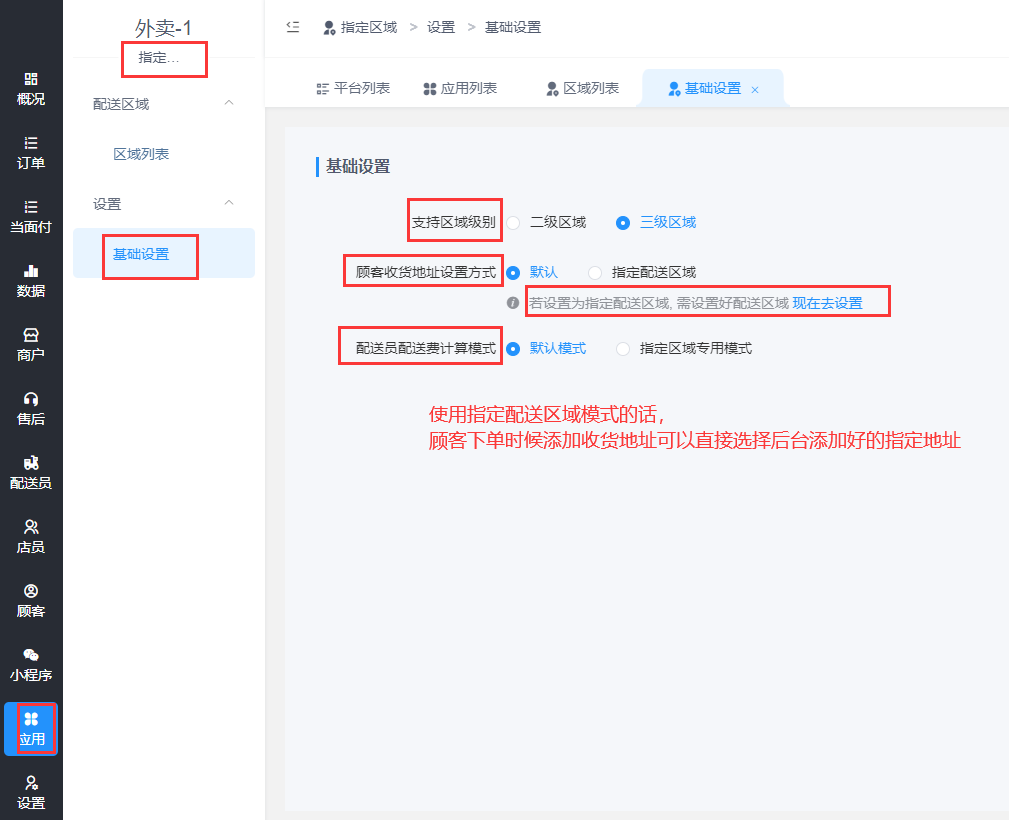
# **1.基础设置**
# **2.添加区域**
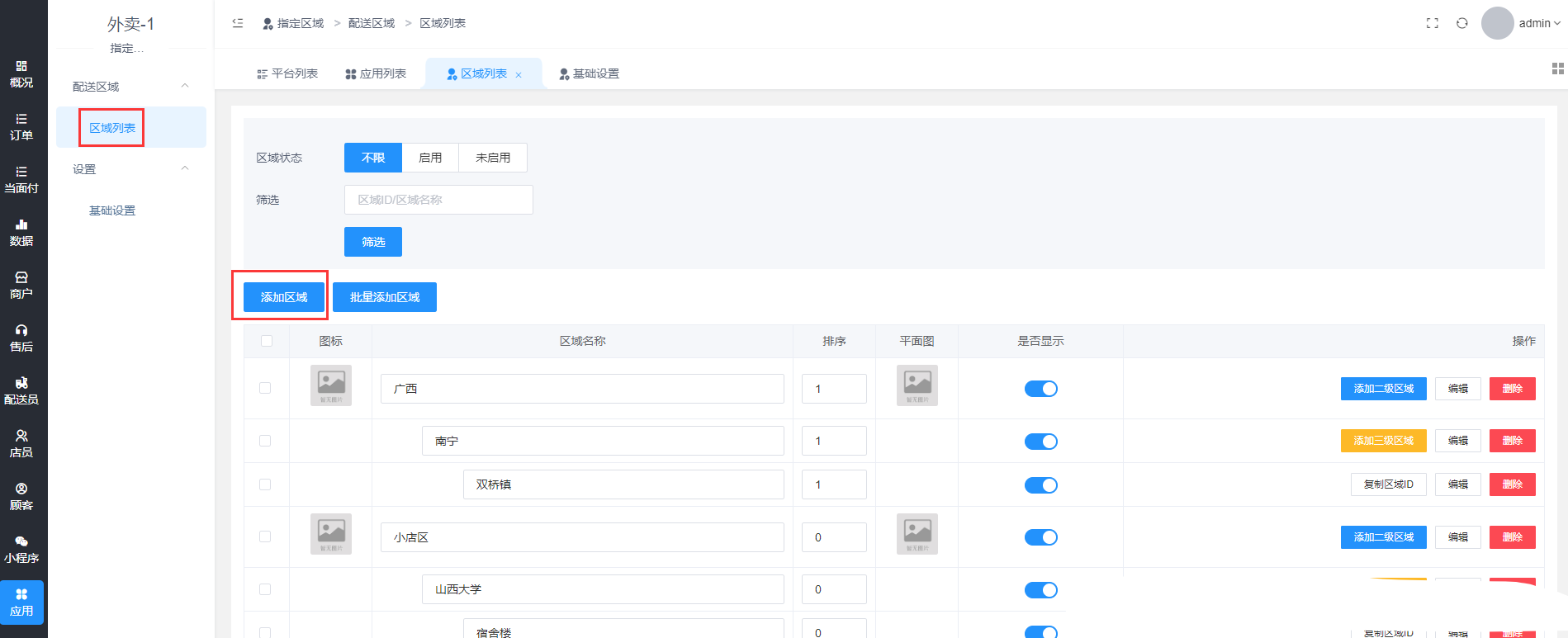
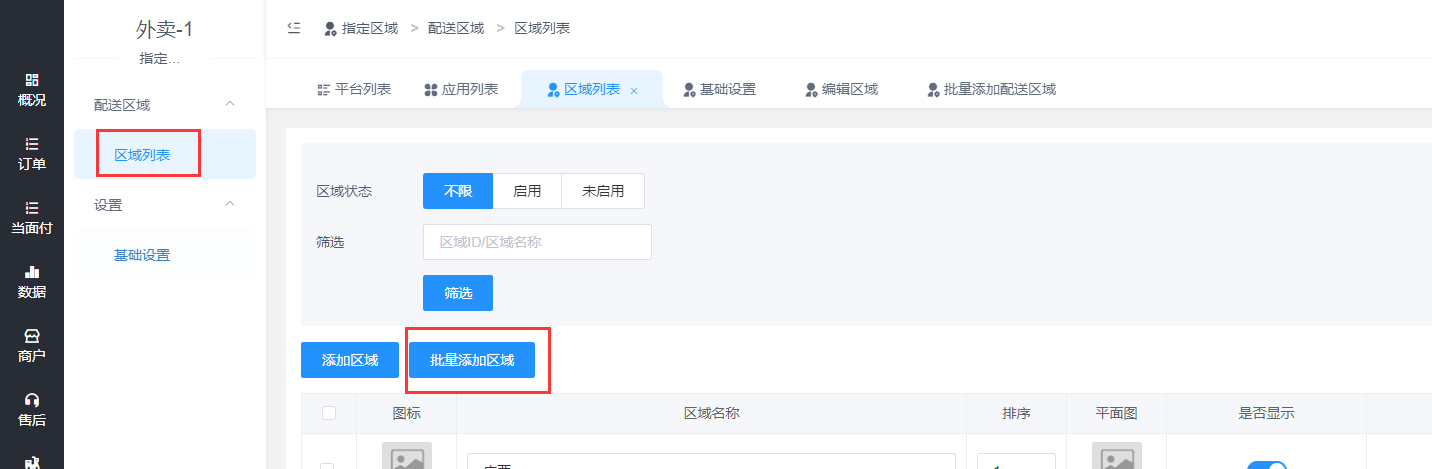
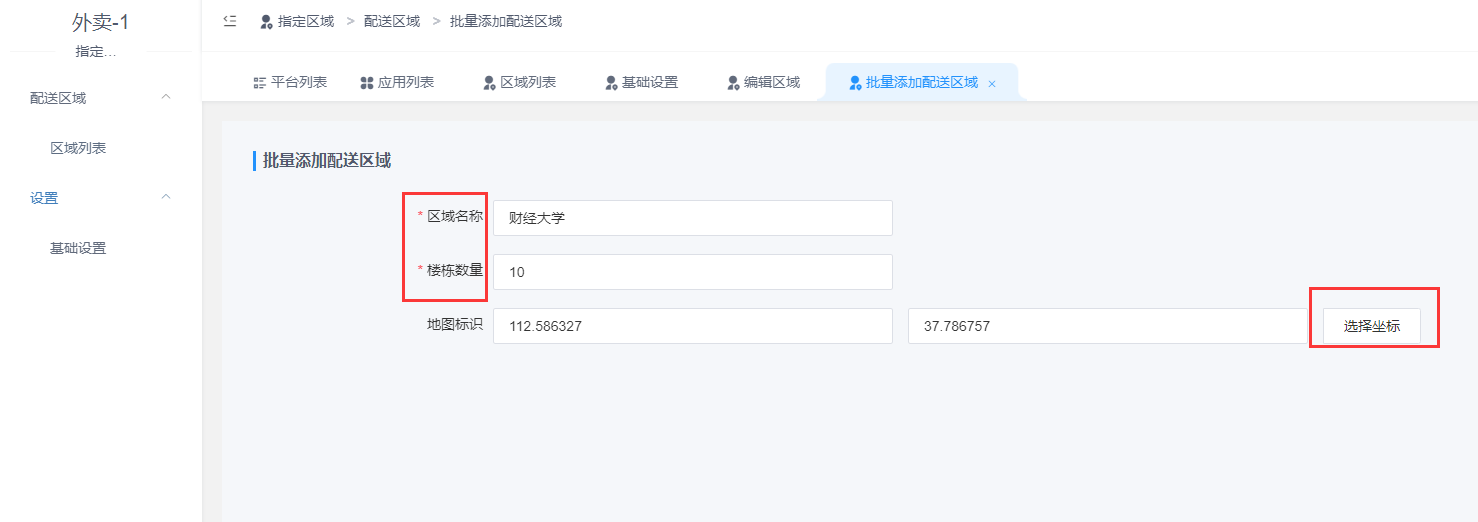
可以手动添加或者批量添加
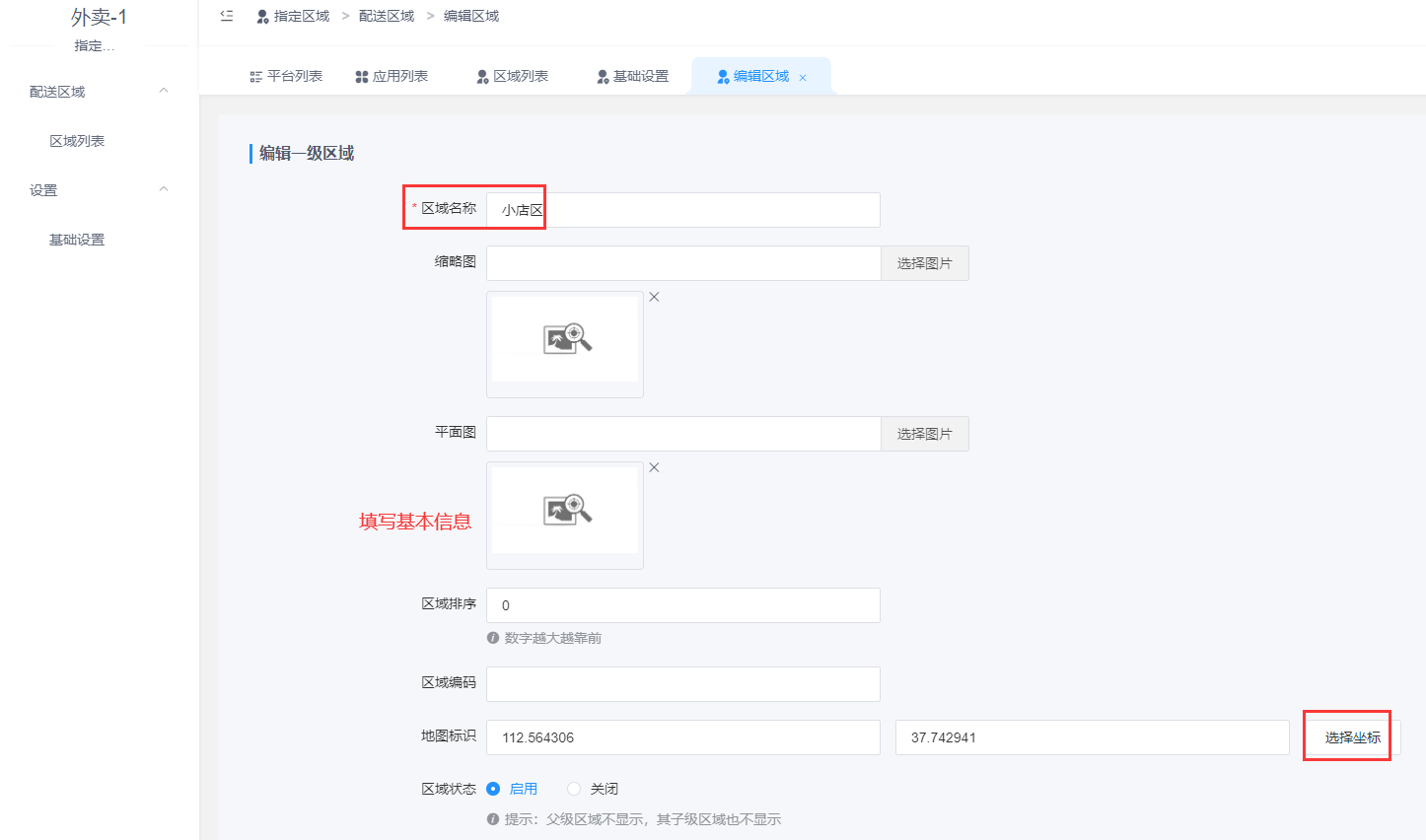
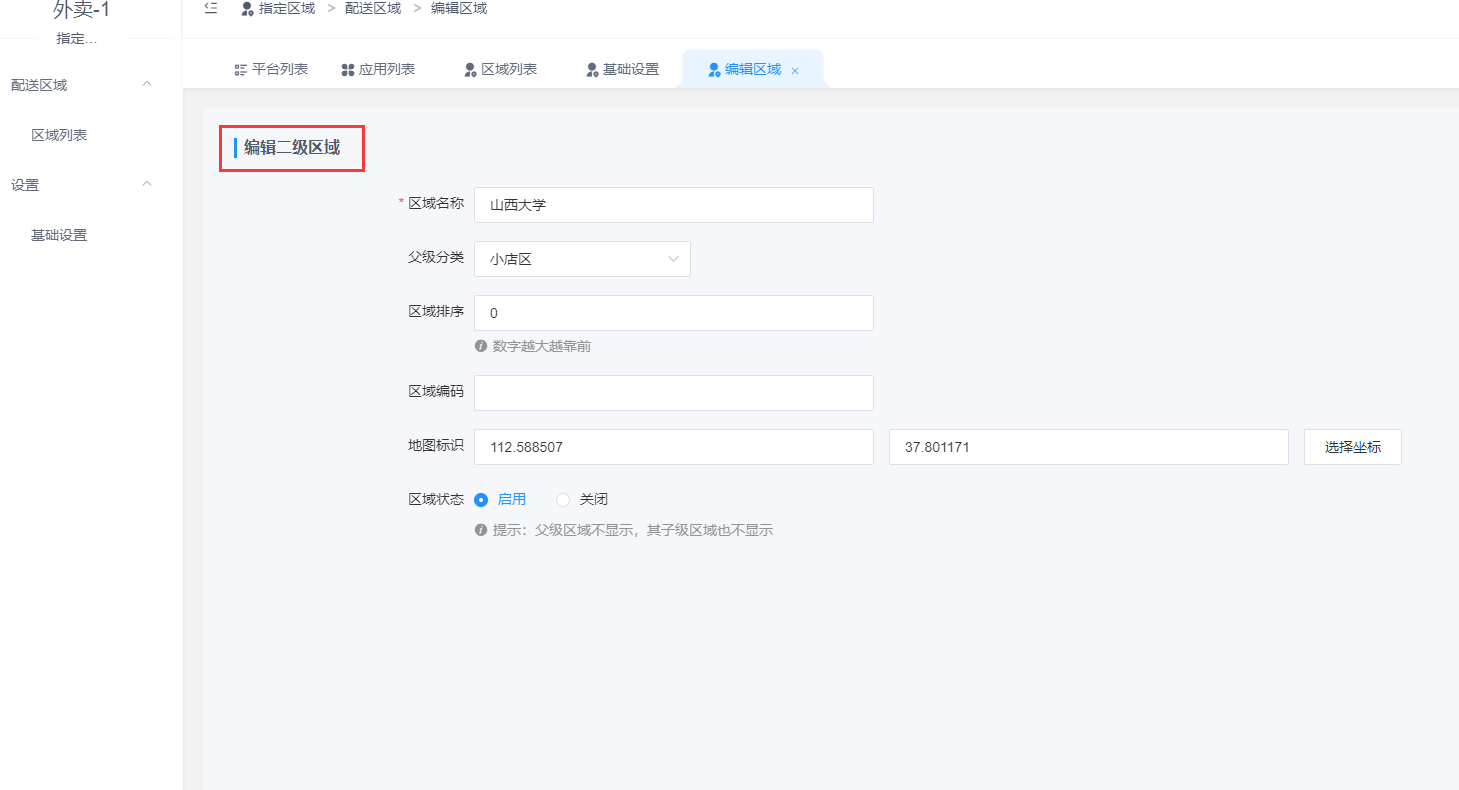
## **2.1 添加区域**
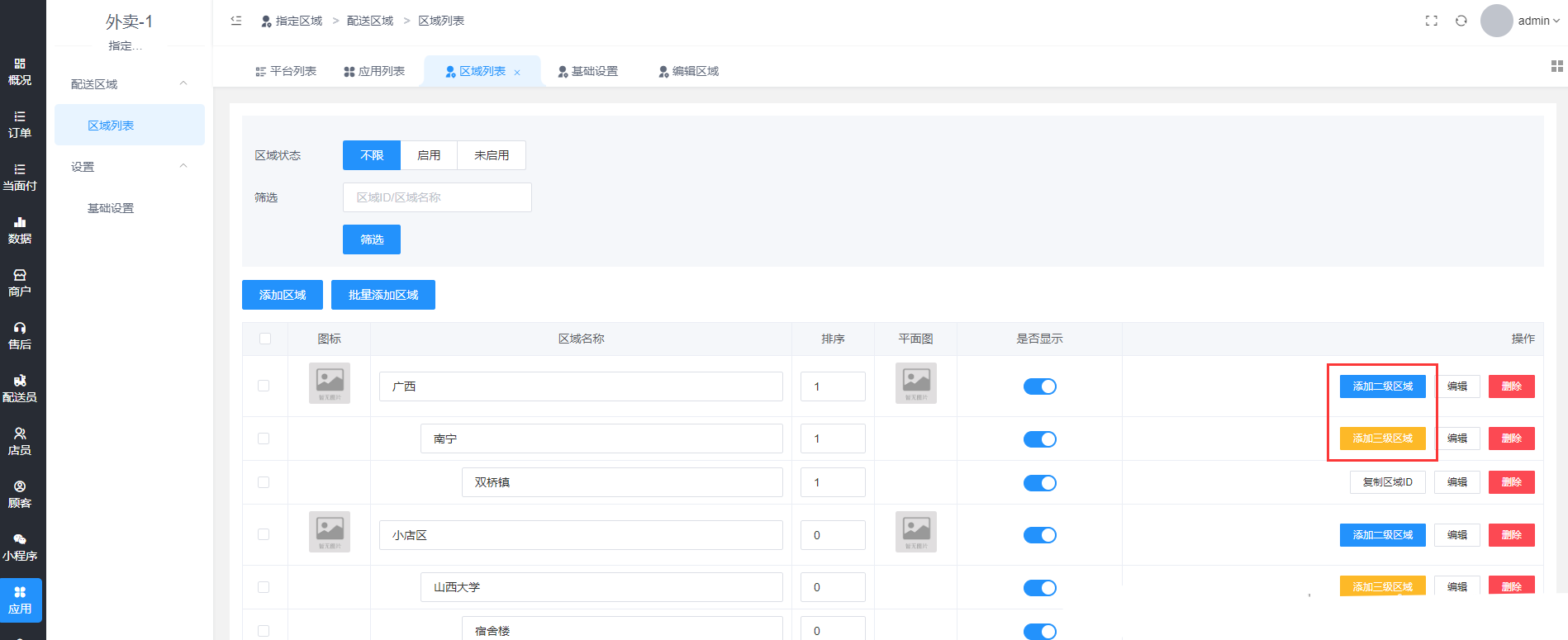
设置二级或者三级区域的话,可以添加二级或三级区域
## **2.2 批量添加区域**
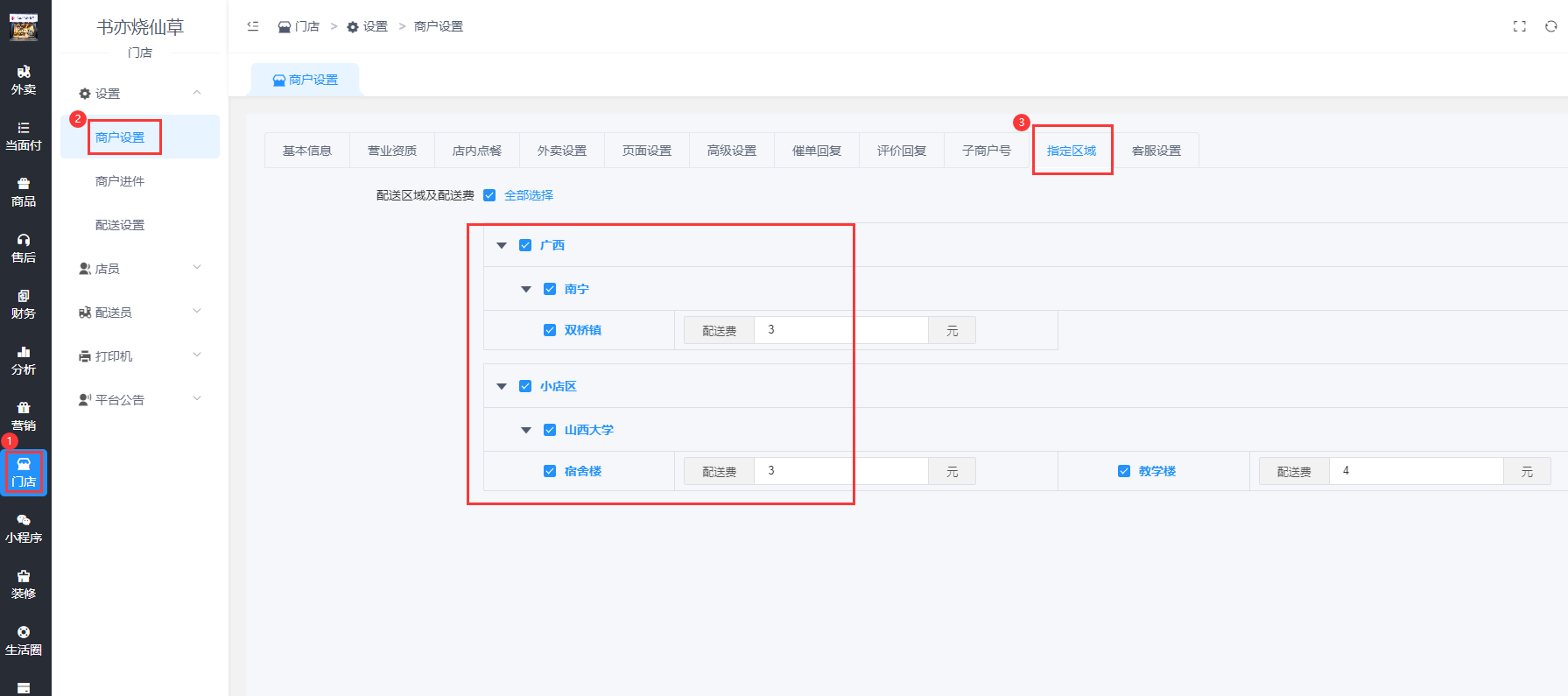
# **3.同步到商户**
点击一键同步到商户

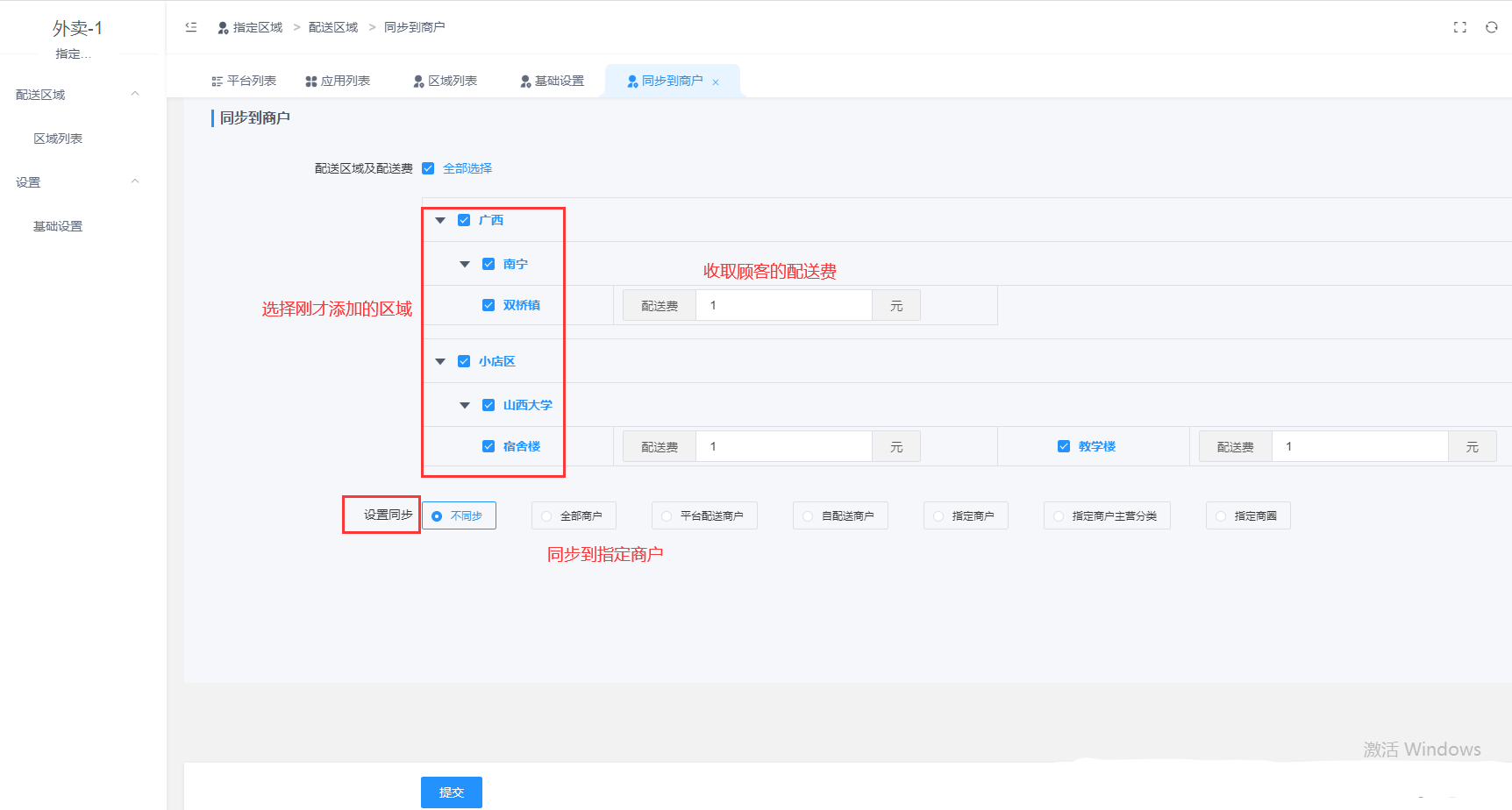
进入商户电脑端后台,查看有没有同步
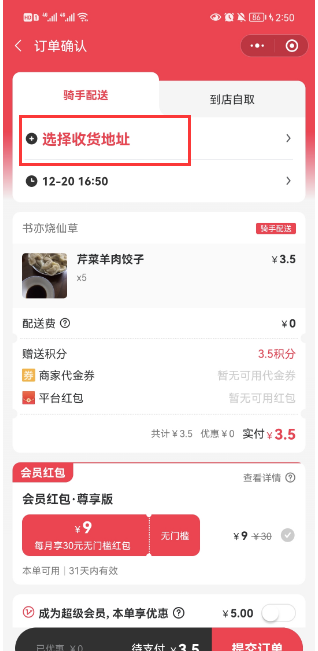
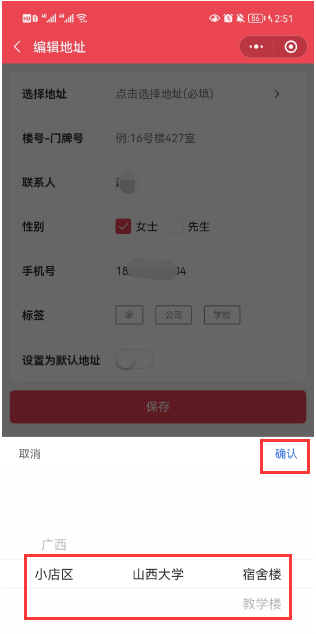
# **4.顾客下单选择指定区域地址**
- 温馨提示
- 概况
- 运营
- 公共设置
- 资讯
- 图文
- 平台商品分类
- 订单
- 外卖订单
- 调度中心
- 店内单
- 订单报备
- 数据
- 外卖系统
- 商户商圈
- 指定区域
- 配送统计
- 店内统计
- 营业统计
- 财务统计
- 顾客统计
- 订单分账
- 售后
- 顾客评价
- 顾客
- 顾客概况/顾客列表
- 顾客地址/代金券/红包
- 充值/积分/余额记录
- 充值卡
- 代理顾客
- 区域划分
- 常见问题
- 如何进入新版后台
- 开启隐私号后,商家配送员APP里拨打顾客电话没反应
- 进入小程序报错提示"undefined is not an object (evaluating 's.page.title')" 的解决办法
- 飞鹅打印机的设置
- 进入小程序首页提示 invalid code 的解决办法
- 微信登录失败,redirect_uri域名与后台配置不一致,错误码:10003报错解决方法
- 绑定使用新域名去运营外卖平台的设置
- 门店无法修改预计送达时间的解决方法
- 下单后显示没有有效的支付方式解决方法
- 如何查看公众号的uniacid
- 购买插件后应用中心没有显示插件的解决办法
- 提示暂时不支持商户入驻的解决办法
- 平台顾客可以获得积分的设置
- 如何设置商品海报
- 首页广告跳转某个商户或者某个商品的地址链接
- 商户没有自动开启营业的解决办法
- “下单提示必须选择某个分类下的商品才可以下单”的解决办法
- “门店状态异常,暂时无法下单”的解决办法
- 插件功能
- 外卖插件功能详解
- 任务红包
- 下单奖励
- QQ小程序上传提交审核
- 聚合配送
- 麦芽田聚合配送对接
- 顺丰同城对接
- UU跑腿对接
- 点我达对接
- 达达配送
- 云喇叭配送
- 发现好菜
- 固定配送时段
- 工具包
- 场景码
- 云喇叭通知
- 商户考核
- 配送考核
- 运营工具
- 商户会员卡
- 超值换购
- 生活圈
- 设置
- 生活圈首页
- 砍价/拼团/抢购
- 同城信息
- 好店
- 大转盘
- 云商品库
- 云商品库添加商品
- 商户商品审核
- 超级代金券
- 积分商城
- 分享有礼
- 下单有礼
- 配送会员卡
- 霸王餐
- 第二份半价
- 天天特价
- 准时宝
- 隐私号
- 阿里云隐私号设置
- 华为云隐私号设置
- 乐外卖采集
- 商户广告通
- 基础设置
- 为您优选/商家置顶/幻灯片推广
- 商户排行榜
- 多段配送
- 基础设置·
- 配送站/配送路线
- 取餐柜对接
- 配送考核设置
- 指定区域·
- 跑腿
- ·设置
- 跑腿页面
- 跑腿场景
- 跑腿首页
- 指定跑腿场景的收货地址
- 配送费策略及预计送达时间策略
- 跑腿商户发单
- 订单/调度中心/数据
- 麦芽田对接
- 超级会员
- 设置·
- 超级会员套餐
- 会员特权
- 超级红包
- 发放红包
- 天降红包
- 领取红包
- 专享红包
- 分享红包
- 商家代金券
- 会员红包
- 添加会员红包
- 购买会员红包
- 区域代理
- ·设·置
- 添加代理
- 申请提现·
- 多模板
- 平台装修
- 自定义页面
- 自定义底部菜单
- 打印机模板
- 店铺业务员
- 基础·设置
- 添加绑定业务员
- 申请提现
- 推广
- 设·置
- 推广员等级
- 推广员提现
- 拼好饭
- ·基础设置
- 商户后台添加拼好饭商品
- 拼好饭自定义页面
- 商户相关设置
- 商户全部分类页面
- 商户商品列表页的模板设置
- 店铺装修-门店首页的设置
- 预订单的使用
- 商户外卖订单电脑端语音提示设置
- 商户如何手动设置商品已售份数
- 商户入驻
- 商户保证金设置
- 添加商户商品
- 采集美团商品
- 如何采集美团饿了么商品
- 商户绑定店员
- 商圈设置
- 商户提现
- 商户营销活动
- 活动承担策略
- 配送策略/服务费策略/配送费优惠
- 商户附加费设置
- 服务费率/佣金/提现设置
- 商户标签/商户投诉
- 商户资讯/广告/公告
- 配送相关设置
- 配送员注册后默认有接单权限的解决办法
- 顾客的配送费和配送员的配送费提成
- 如何区分店内配送员和平台配送员
- 配送分组
- 配送员注册
- 配送员提成及提现设置
- 配送策略
- 服务策略
- 待出餐订单设置/排行榜设置/APP登录
- 消息通知
- 购买小程序版,店员配送员如何使用公众号的模板消息通知
- 商户/配送员小程序收不到订阅消息通知的解决办法
- 顾客小程序下单收不到公众号模板消息通知的解决方法
- 顾客下单后商户接收不到模板消息推送的解决方式
- 配送员接收不到模板消息通知的解决方式
- 云喇叭语音电话/短信/彩信通知
- 阿里云语音电话通知
- 阿里云短信接入
- 微信模板消息
- 公众号模板消息(最新)
- APP配置
- App自启动管理
- 平台管理App准备资料
- 顾客App包名签名设置
- 配送/商户/顾客App打包
- 配送员App设置
- 商户APP下载
- 支付对接
- 服务商分账
- 关于微信支付的相关说明
- 商户/配送员/代理提现打款
- 打款到银行卡提示“此IP地址不允许调用接口”的解决方法
- 商户提现提示“未获取到商户账户针对公众号的openid”的解决方法
- 商户打款未成功错误信息:OPENID_ERROR:openid与商户appid不匹配,解决办法
- 商户打款未成功错误信息:PARAM_ERROR,解决办法
- 绑定提现账户时搜索不到微信昵称解决办法
- 配送员提现提示“未获取到配送员针对小程序的openid”的解决方法
- 配送员账户不完善,无法提现的解决办法
- 提现通知微信打款提示:NO_AUTH的解决方法
- 提示exec错误,请确认exec函数已启用 报错的解决方法
- 提现报错,错误码的具体内容
- 电商收付通支付提示“sud_mch_id与sub_appid不匹配的问题”
- H5微信支付报错提示“商家存在未配置的参数”的解决办法
- 微信支付提示商户号该产品权限未开通的解决办法
- 随行付
- 随行付后台及外卖后台配置
- 随行付如何在手机端操作商户进件·
- 随行付商户如何对账
- 商家转账到零钱开通
- 微信电商收付通配置
- 支付宝支付配置
- 微信支付配置
- 支付宝小程序
- 配置上传代码提交审核
- 支付宝小程序门店订单同步操作
- 云验收
- 微信小程序
- 微信/支付宝小程序聚合码
- 跳转其他小程序的设置
- 如何配置企业微信客服
- 小程序客服中心
- 绑定/删除小程序开发者
- 如何设置小程序的业务域名
- 小程序和公众号数据同步
- 小程序服务类目及接口权限申请
- 小程序基础设置
- 代码上传及提交审核
- 订阅消息
- 微信公众号
- 公众号迁移或者换公众号需要注意的问题
- 公众号和小程序同步数据
- 公众号自动回复 该公众号提供的服务出现故障 的解决办法
- 绑定公众号开发者
- 模板消息配置
- 自动回复/关键字回复/关注回复
- 自定义菜单设置
- 基础设置··
- ·设置·
- 平台基础设置
- ·基础·设置
- 高德地图key
- 服务协议
- 分享及关注
- 平台状态
- oAuth设置
- 开发平台
- 外卖
- 服务范围
- 订单相关
- 高级设置
- 顾客·
- 优惠活动相关
- 常见问题设置
- 平台入口/商家管理入口/商家入驻入口/配送员入口
- 权限
- 添加操作员
- 操作日志