
欢迎关注我的公众号:
# Java IO 知识
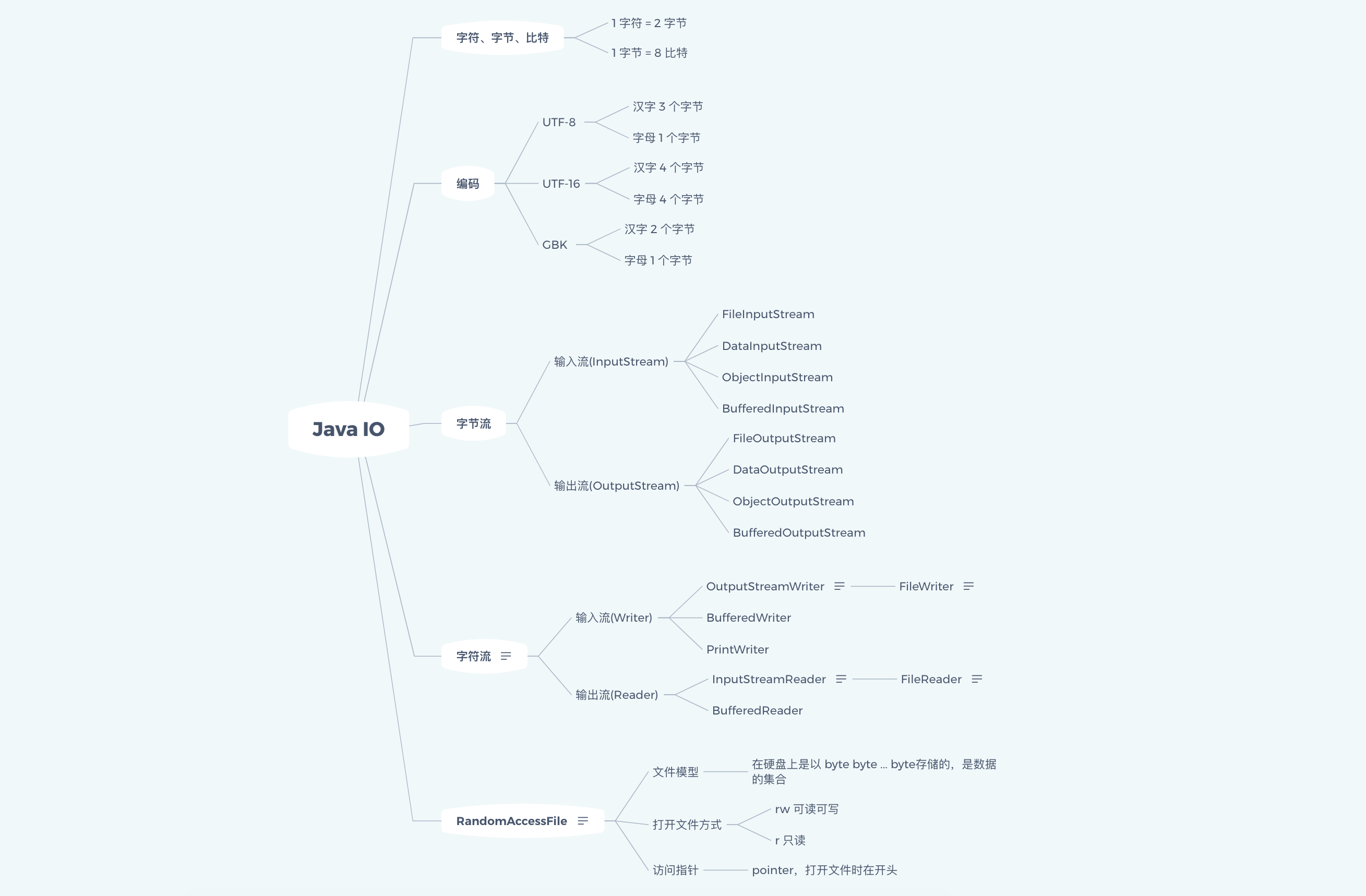
思维导图
## 一、字符、字节、位(bit)
1 字符占用的字节数是不一定的,如果是 UTF-8 编码:
1 字符 = 2 字节
1 字节 = 8 位
基本数据类型关系如下:
|类型 |占用字节 | 占用位数|
|---|---|---|
|byte |1| 8|
|short |2 |16|
|int |4 |32|
|long| 8 |64|
|float |4 |32|
|double |8| 64|
|char| 2 |16|
|boolean| 1 |8|
## 一、UTF-8、UTF-16、GBK 编码
java 使用的字符集是 unicode,但是编码格式是不确定的,在不同的系统上,编码格式是不一样,比如我的 mac 上 java 默认的编码格式是 UTF-8 的。
下面通过代码看一下 String 类型的汉字、字母分别在三种不同编码下占用的字节长度:
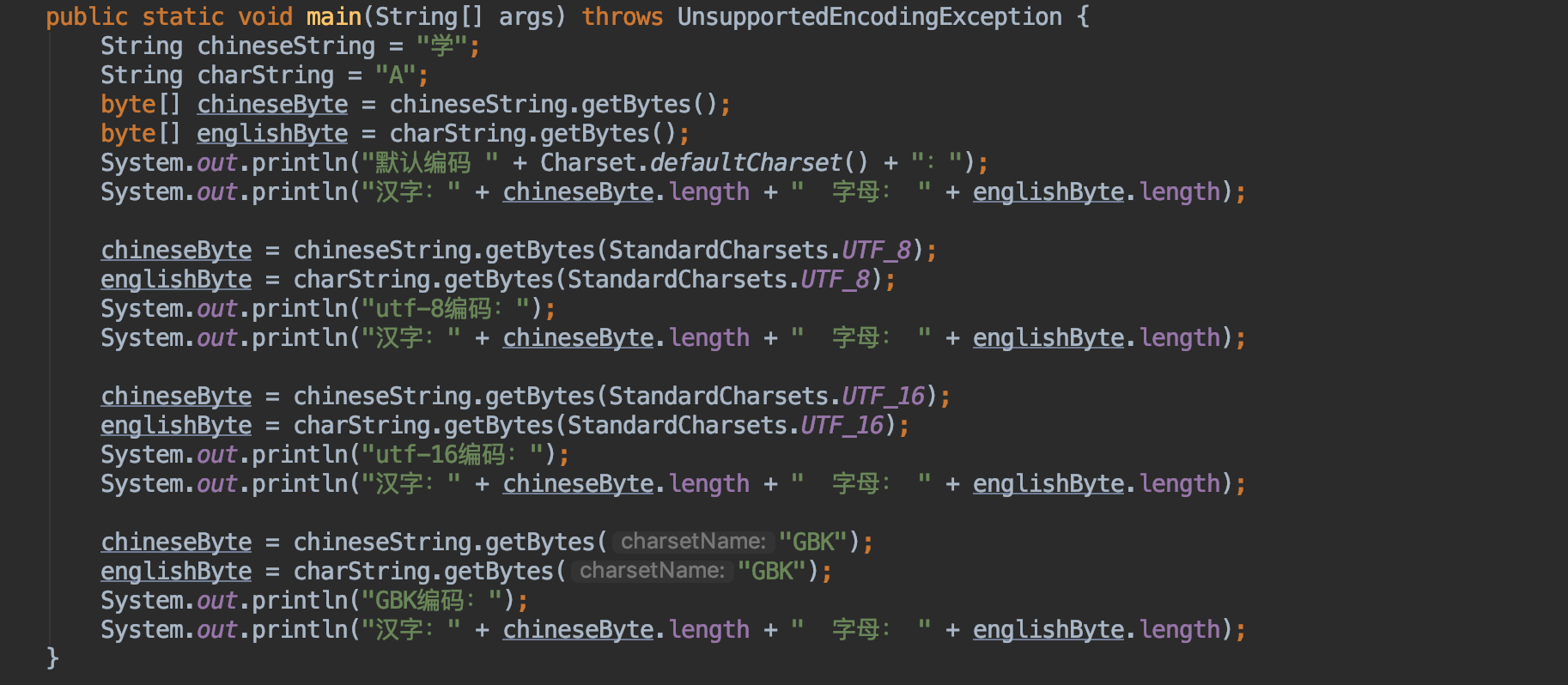
结果:
```java
默认编码 UTF-8:
汉字:3 字母: 1
utf-8编码:
汉字:3 字母: 1
utf-16编码:
汉字:4 字母: 4
GBK编码:
汉字:2 字母: 1
```
可以看到虽然使用的 unicode 字符集,但是采用不同的编码方式,占用的字节数是不同的,所以单独的讲某个字符占用多大的长度意义不是很大,需要在讨论特定环境下讨论。
java 中的 io 流主要分为:
- 字节流
- 字符流
## 一、字节流
字节流又分为
- 输入流 InputStream
- 输出流 OutputStream
输入流负责从 **源(可以是文件)** 读取数据到 **Java程序** 中。
输出流负责把 **Java程序** 中数据写入到 **源(可以是文件)** 中。
### 1.1 输入流 InputStream
InputStream 是一个抽象类,抽象了应用程序读取数据的方式。
输入流基本方法:
- int b = in.read();读取一个字节无符号填充到int低八位.-1是 EOF
- in.read(byte[] buf)
- in.read(byte[] buf,int start,int size)
常用的实现类有以下三个
#### 1.1.1 FileInputStream
FileInputStream 用于从文件读取数据,可以通过 new 关键字构造,比如:
```java
File file = new File(文件路径);
FileInputStream inputStream = new FileInputStream(file);
```
也可以:
```java
FileInputStream inputStream = new FileInputStream(文件路径);
```
使用示例:
本示例从项目根目录的 test.txt 读取内容并打印,
```java
public class FileInputStreamDemo {
public static void main(String[] args) throws IOException {
FileInputStream inputStream = new FileInputStream("test.txt");
int len;
byte[] bytes = new byte[8 * 1024];
while ((len=inputStream.read(bytes,0,bytes.length))!=-1){
String s = new String(bytes,0,len,"utf-8");
System.out.println(s);
}
inputStream.close();
}
}
```
#### 1.1.1 DataInputStream
DataInputStream 对"流"功能的扩展,可以更加方便的读取 int, long,字符等类型数据。
使用 Demo 如下:
```java
public class DataInputStreamDemo {
public static void main(String[] args) throws IOException {
FileInputStream inputStream = new FileInputStream("test.txt");
DataInputStream dataInputStream = new DataInputStream(inputStream);
int len;
byte[] buffer = new byte[8 * 1024];
while ((len = dataInputStream.read(buffer, 0, buffer.length)) != -1) {
System.out.println(new String(buffer,0,len));
}
inputStream.close();
dataInputStream.close();
}
}
```
#### 1.1.3 BufferedInputStream
BufferedInputStream 为 IO 提供了带缓冲区的操作,一般打开文件进行写入
或读取操作时,都会加上缓冲,这种流模式提高了IO的性能。
使用如下:
```java
public class BufferedInputStreamDemo {
public static void main(String[] args) throws IOException {
BufferedInputStream bufferedInputStream = new BufferedInputStream(new FileInputStream("test.txt"));
int len;
byte[] buffer = new byte[8*1024];
while ((len=bufferedInputStream.read(buffer,0,buffer.length))!=-1){
System.out.println(new String(buffer,0,len));
}
bufferedInputStream.close();
}
}
```
### 1.2 输出流 OutputStream
OutputStream 也是一个抽象类,抽象了应用程序写数据的方式。
输出流基本方法:
- out.write(int b) 写出一个byte到流,b的低8位
- out.write(byte[] buf)将buf字节数组都写入到流
- out.write(byte[] buf,int start,int size)
同样,常用的输出流实现类有下面三个:
#### 1.2.1 FileOutputStream
FileOutputStream 用于写入数据到文件中,可以通过 new 关键字很轻松的创建
```java
File file = new File(文件路径);
FileOutputStream outputStream = new FileOutputStream(file);
```
或者
```java
FileOutputStream outputStream = new FileOutputStream(文件路径);
```
使用示例:
本示例是写文字到项目根目录的文件 test.txt。
```java
public class FileOutputStreamDemo {
public static void main(String[] args) throws IOException {
FileOutputStream outputStream = new FileOutputStream("test.txt");
String s = "测试FileOutputStreamDemo";
outputStream.write(s.getBytes("utf-8"));
outputStream.close();
}
}
```
#### 1.2.2 DataOutputStream
DataOutputStream 对"流"功能的扩展,可以更加方便的**写入** int, long,字符等类型数据。
使用 demo 如下:
```java
public class DataOutputStreamDemo {
public static void main(String[] args) throws IOException {
FileOutputStream outputStream = new FileOutputStream("test.txt");
DataOutputStream dataOutputStream = new DataOutputStream(outputStream);
dataOutputStream.writeInt(123321);
dataOutputStream.writeBoolean(true);
dataOutputStream.writeUTF("DataOutputStreamDemo测试");
outputStream.close();
dataOutputStream.close();
}
}
```
如果按照上面执行是会发现,只能在 test.txt 文件中看到
```
DataOutputStreamDemo测试
```
前面写入的 123321 和 true 都是乱码,比如我这边看到的是
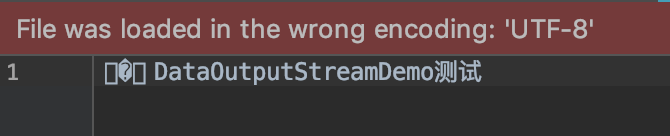
那是因为 DataOutputStream 是一种格式化的数据输出方式,而并非都是字符流,如果写到文件中他的数据格式就和在内存中一样,这样他读出来是会很方便,我们打开文件看到的内容是字符编码的,int、boolean 不是字符编码的,所以会乱码。
然后使用 dataOutputStream.writeUTF 可以正确显示 是因为 UTF-8的字符编码是对的。
**注意:**
用 DataOutputStream 输出的数据并不是为了用记事本打开看的而是为了储存数据的 一般来保存为.dat文件区别开文本本件。
#### 1.2.3 BufferedOutputStream
BufferedOutputStream 为 IO 写操作提供了带缓冲区的操作,提高了IO的性能。
使用如下:
```java
public class BufferedOutputStreamDemo {
public static void main(String[] args) throws IOException {
BufferedOutputStream bufferedOutputStream = new BufferedOutputStream(new FileOutputStream("test.txt"));
bufferedOutputStream.write("BufferedOutputStreamDemo测试".getBytes("utf-8"));
bufferedOutputStream.close();
}
```
字节流先写这么多,还有很多 InputStream 和 OutputStream 的实现类,有兴趣的可以去看下。
接下来我们通过一个实例,看看使用哪种方式操作更快。
```java
public class IoUtil {
/**
* 文件拷贝,单字节、不带缓冲进行文件拷贝
*
* @param srcFile
* @param destFile
* @throws IOException
*/
public static void copyFileByByte(File srcFile, File destFile) throws IOException {
if (!srcFile.exists()) {
throw new IllegalArgumentException("srcFile is not exists!");
}
if (!srcFile.isFile()) {
throw new IllegalArgumentException("srcFile is not files");
}
FileInputStream in = new FileInputStream(srcFile);
FileOutputStream out = new FileOutputStream(destFile);
int len;
while ((len = in.read()) != -1) {
out.write(len);
out.flush();
}
in.close();
out.close();
}
/**
* 文件拷贝,字节批量读取
*
* @param srcFile
* @param destFile
* @throws IOException
*/
public static void copyFile(File srcFile, File destFile) throws IOException {
if (!srcFile.exists()) {
throw new IllegalArgumentException("srcFile is not exists!");
}
if (!srcFile.isFile()) {
throw new IllegalArgumentException("srcFile is not files");
}
FileInputStream in = new FileInputStream(srcFile);
FileOutputStream out = new FileOutputStream(destFile);
byte[] buf = new byte[8 * 1024];
int len;
while ((len = in.read(buf, 0, buf.length)) != -1) {
out.write(buf, 0, len);
out.flush();//最好加上
}
in.close();
out.close();
}
/**
* 文件拷贝,使用带缓冲的字节流进行
*
* @param srcFile
* @param destFile
*/
public static void copyFileByBuffer(File srcFile, File destFile) throws IOException {
if (!srcFile.exists()) {
throw new IllegalArgumentException("srcFile is not exists!");
}
if (!destFile.isFile()) {
throw new IllegalArgumentException("srcFile is not files");
}
BufferedInputStream bufferedInputStream = new BufferedInputStream(new FileInputStream(srcFile));
BufferedOutputStream bufferedOutputStream = new BufferedOutputStream(new FileOutputStream(destFile));
int len;
while ((len = bufferedInputStream.read()) != -1) {
bufferedOutputStream.write(len);
bufferedOutputStream.flush();
}
bufferedOutputStream.close();
bufferedOutputStream.close();
}
}
```
接下来我们分别使用三种方式拷贝一份文件,看看用时分别多少
测试代码:
```java
public class Main {
public static void main(String[] args) throws IOException {
long start1 = System.currentTimeMillis();
IoUtil.copyFileByByte(new File("alfred.dmg"), new File("alfred1.dmg"));
long end1 = System.currentTimeMillis();
System.out.println("使用单字节、不带缓冲拷贝文件用时:" + (end1 - start1));
long start2 = System.currentTimeMillis();
IoUtil.copyFile(new File("alfred.dmg"), new File("alfred2.dmg"));
long end2 = System.currentTimeMillis();
System.out.println("使用字节批量读取拷贝文件用时:" + (end2 - start2));
long start3 = System.currentTimeMillis();
IoUtil.copyFileByBuffer(new File("alfred.dmg"), new File("alfred3.dmg"));
long end3 = System.currentTimeMillis();
System.out.println("使用使用带缓冲的字节流拷贝文件用时:" + (end3 - start3));
}
}
```
运行看看:
```
使用单字节、不带缓冲拷贝文件用时:28138
使用字节批量读取拷贝文件用时:8
使用使用带缓冲的字节流拷贝文件用时:22406
```
是不是很恐怖,使用字节批量读取的速度快的不可思议,所以拷贝文件时使用哪种方式,心里应该有数了。
总结下:
可以看到,字节流的实现类一般都是成对出现的,上面讲了三对:
- FileInputStream 和 FileOutputStream
- DataInputStream 和 DataOutputStream
- BufferedInputStream 和 BufferedOutputStream
## 二、字符流
字符流又分为
- 输入流 Writer
- 输出流 Reader
输入流负责从 **源(可以是文件**) **读取**数据到 **Java程序** 中。
输出流负责把 **Java程序** 中数据**写入**到 **源(可以是文件)** 中。
字节流和字符流很类似,Writer 和 Reader的实现类一般也是成对出现的。
### 2.1 OutputStreamWriter 和 InputStreamReader
使用如下:
```java
public class IsrAndOswDemo {
public static void main(String[] args) throws IOException {
OutputStreamWriter outputStreamWriter = new OutputStreamWriter(new FileOutputStream("test1.txt"));
outputStreamWriter.write("IsrAndOswDemo测试");
outputStreamWriter.close();
InputStreamReader inputStreamReader = new InputStreamReader(new FileInputStream("test1.txt"));
while (inputStreamReader.ready()) {
System.out.print((char) inputStreamReader.read());
}
int len;
char[] bytes = new char[8 * 1024];
//批量读取,放入bytes这个字符数组,从第0个位置开始放置,最多放bytes.length个
//返回的是读到的字符的个数
while ((len = inputStreamReader.read(bytes, 0, bytes.length)) != -1) {
String s = new String(bytes, 0, len);
System.out.println(s);
}
inputStreamReader.close();
}
}
```
输出:
```
IsrAndOswDemo测试
```
### 2.2 BufferedReader 、BufferedWriter、PrintWriter
下面的例子是通过 BufferedReader 读取 test1.txt 中的内容,然后分别写入到 test4.txt 和 test5.txt 中。
```java
public class BrAndBwAndPwDemo {
public static void main(String[] args) throws IOException {
BufferedReader bufferedReader = new BufferedReader(new InputStreamReader(new FileInputStream("test1.txt")));
BufferedWriter bufferedWriter = new BufferedWriter(new OutputStreamWriter(new FileOutputStream("test4.txt")));
PrintWriter printWriter = new PrintWriter("test5.txt");
String line;
//一次读一行,不识别换行
while ((line=bufferedReader.readLine())!=null){
System.out.println(line);
// 这里是BufferedWriter的写操作
bufferedWriter.write(line);
bufferedWriter.flush();
bufferedWriter.newLine();//单独写出换行操作
// 这里是PrintWriter的写操作
printWriter.print(line);//不换行
printWriter.println(line);//换行
}
bufferedReader.close();
bufferedWriter.close();
printWriter.close();
}
}
```
## 三、RandomAccessFile 随机访问文件
RandomAccessFile 是 Java 提供的对文件内容的访问,既可以读文件,也可以写文件
RandomAccessFile 支持随机访问文件,可以访问文件的任意位置。
### Java 文件模型
在硬盘上的文件是 byte byte byte 存储的,是数据的集合
### 打开文件方式
访问文件的两种方式:
- 读写(rw)
- 只读 (r)
比如创建一个可读写的 RandomAccessFile
```java
RandomAccessFile raf = new RandomAccessFile(file,"rw");
```
创建好的时候, RandomAccessFile 的指针 pointer = 0,可以通过`void seek(long pos)`函数设置访问位置。通过`long getFilePoint()` 获得指针的位置
RandomAccessFile 包含 InputStream 的三个 read 方法,也包含 OutputStream 的三个 write 方法。同时 RandomAccessFile 还包含一系列的 readXxx 和 writeXxx 方法完成输入输出。
### RandomAccessFile常用方
RandomAccessFile常用方法如下:
#### void write(int d)
该方法会根据当前指针所在位置处写入一个字节,是将参数int的”低8位”写出
#### int read()
如果返回-1表示读取到了文件末尾EOF(EOF:End Of File)! 每次读取后自动移动文件指针, 准备下次读取。
#### void write(byte[] d)
根据当前指针所在位置处连续写出给定数组中的所有字节
#### void write(byte b[], int off, int len)
根据当前指针所在位置处连续写出给定数组中的部分字节,这个部分是从数组的 off 处开始,连续 len 个字节
#### int read(byte[] b)
从文件中尝试最多读取给定数组的总长度的字节量,并从给定的字节数组第一个位置开始,将读取到的字节顺序存放至数组中,返回值为实际读取到的字节量
#### int read(byte b[], int off, int len)
根据当前指针所在位置连续读给定字节数据中的部分字节,这部分是从数组的 off 位置开始,连续读 len 个字节,最终放入字节数组中。
#### void close()
RandomAccessFile在对文件访问的操作全部结束后,要调用close()方法来释放与其关联的所有系统资源
其实 RandomAccessFile 的使用还是非常简单的,这里就不在实例展示了。
欢迎关注我的公众号:

# Java IO 知识
思维导图

## 一、字符、字节、位(bit)
1 字符占用的字节数是不一定的,如果是 UTF-8 编码:
1 字符 = 2 字节
1 字节 = 8 位
基本数据类型关系如下:
|类型 |占用字节 | 占用位数|
|---|---|---|
|byte |1| 8|
|short |2 |16|
|int |4 |32|
|long| 8 |64|
|float |4 |32|
|double |8| 64|
|char| 2 |16|
|boolean| 1 |8|
## 一、UTF-8、UTF-16、GBK 编码
java 使用的字符集是 unicode,但是编码格式是不确定的,在不同的系统上,编码格式是不一样,比如我的 mac 上 java 默认的编码格式是 UTF-8 的。
下面通过代码看一下 String 类型的汉字、字母分别在三种不同编码下占用的字节长度:

结果:
```java
默认编码 UTF-8:
汉字:3 字母: 1
utf-8编码:
汉字:3 字母: 1
utf-16编码:
汉字:4 字母: 4
GBK编码:
汉字:2 字母: 1
```
可以看到虽然使用的 unicode 字符集,但是采用不同的编码方式,占用的字节数是不同的,所以单独的讲某个字符占用多大的长度意义不是很大,需要在讨论特定环境下讨论。
java 中的 io 流主要分为:
- 字节流
- 字符流
## 一、字节流
字节流又分为
- 输入流 InputStream
- 输出流 OutputStream
输入流负责从 **源(可以是文件)** 读取数据到 **Java程序** 中。
输出流负责把 **Java程序** 中数据写入到 **源(可以是文件)** 中。
### 1.1 输入流 InputStream
InputStream 是一个抽象类,抽象了应用程序读取数据的方式。
输入流基本方法:
- int b = in.read();读取一个字节无符号填充到int低八位.-1是 EOF
- in.read(byte[] buf)
- in.read(byte[] buf,int start,int size)
常用的实现类有以下三个
#### 1.1.1 FileInputStream
FileInputStream 用于从文件读取数据,可以通过 new 关键字构造,比如:
```java
File file = new File(文件路径);
FileInputStream inputStream = new FileInputStream(file);
```
也可以:
```java
FileInputStream inputStream = new FileInputStream(文件路径);
```
使用示例:
本示例从项目根目录的 test.txt 读取内容并打印,
```java
public class FileInputStreamDemo {
public static void main(String[] args) throws IOException {
FileInputStream inputStream = new FileInputStream("test.txt");
int len;
byte[] bytes = new byte[8 * 1024];
while ((len=inputStream.read(bytes,0,bytes.length))!=-1){
String s = new String(bytes,0,len,"utf-8");
System.out.println(s);
}
inputStream.close();
}
}
```
#### 1.1.1 DataInputStream
DataInputStream 对"流"功能的扩展,可以更加方便的读取 int, long,字符等类型数据。
使用 Demo 如下:
```java
public class DataInputStreamDemo {
public static void main(String[] args) throws IOException {
FileInputStream inputStream = new FileInputStream("test.txt");
DataInputStream dataInputStream = new DataInputStream(inputStream);
int len;
byte[] buffer = new byte[8 * 1024];
while ((len = dataInputStream.read(buffer, 0, buffer.length)) != -1) {
System.out.println(new String(buffer,0,len));
}
inputStream.close();
dataInputStream.close();
}
}
```
#### 1.1.3 BufferedInputStream
BufferedInputStream 为 IO 提供了带缓冲区的操作,一般打开文件进行写入
或读取操作时,都会加上缓冲,这种流模式提高了IO的性能。
使用如下:
```java
public class BufferedInputStreamDemo {
public static void main(String[] args) throws IOException {
BufferedInputStream bufferedInputStream = new BufferedInputStream(new FileInputStream("test.txt"));
int len;
byte[] buffer = new byte[8*1024];
while ((len=bufferedInputStream.read(buffer,0,buffer.length))!=-1){
System.out.println(new String(buffer,0,len));
}
bufferedInputStream.close();
}
}
```
### 1.2 输出流 OutputStream
OutputStream 也是一个抽象类,抽象了应用程序写数据的方式。
输出流基本方法:
- out.write(int b) 写出一个byte到流,b的低8位
- out.write(byte[] buf)将buf字节数组都写入到流
- out.write(byte[] buf,int start,int size)
同样,常用的输出流实现类有下面三个:
#### 1.2.1 FileOutputStream
FileOutputStream 用于写入数据到文件中,可以通过 new 关键字很轻松的创建
```java
File file = new File(文件路径);
FileOutputStream outputStream = new FileOutputStream(file);
```
或者
```java
FileOutputStream outputStream = new FileOutputStream(文件路径);
```
使用示例:
本示例是写文字到项目根目录的文件 test.txt。
```java
public class FileOutputStreamDemo {
public static void main(String[] args) throws IOException {
FileOutputStream outputStream = new FileOutputStream("test.txt");
String s = "测试FileOutputStreamDemo";
outputStream.write(s.getBytes("utf-8"));
outputStream.close();
}
}
```
#### 1.2.2 DataOutputStream
DataOutputStream 对"流"功能的扩展,可以更加方便的**写入** int, long,字符等类型数据。
使用 demo 如下:
```java
public class DataOutputStreamDemo {
public static void main(String[] args) throws IOException {
FileOutputStream outputStream = new FileOutputStream("test.txt");
DataOutputStream dataOutputStream = new DataOutputStream(outputStream);
dataOutputStream.writeInt(123321);
dataOutputStream.writeBoolean(true);
dataOutputStream.writeUTF("DataOutputStreamDemo测试");
outputStream.close();
dataOutputStream.close();
}
}
```
如果按照上面执行是会发现,只能在 test.txt 文件中看到
```
DataOutputStreamDemo测试
```
前面写入的 123321 和 true 都是乱码,比如我这边看到的是

那是因为 DataOutputStream 是一种格式化的数据输出方式,而并非都是字符流,如果写到文件中他的数据格式就和在内存中一样,这样他读出来是会很方便,我们打开文件看到的内容是字符编码的,int、boolean 不是字符编码的,所以会乱码。
然后使用 dataOutputStream.writeUTF 可以正确显示 是因为 UTF-8的字符编码是对的。
**注意:**
用 DataOutputStream 输出的数据并不是为了用记事本打开看的而是为了储存数据的 一般来保存为.dat文件区别开文本本件。
#### 1.2.3 BufferedOutputStream
BufferedOutputStream 为 IO 写操作提供了带缓冲区的操作,提高了IO的性能。
使用如下:
```java
public class BufferedOutputStreamDemo {
public static void main(String[] args) throws IOException {
BufferedOutputStream bufferedOutputStream = new BufferedOutputStream(new FileOutputStream("test.txt"));
bufferedOutputStream.write("BufferedOutputStreamDemo测试".getBytes("utf-8"));
bufferedOutputStream.close();
}
```
字节流先写这么多,还有很多 InputStream 和 OutputStream 的实现类,有兴趣的可以去看下。
接下来我们通过一个实例,看看使用哪种方式操作更快。
```java
public class IoUtil {
/**
* 文件拷贝,单字节、不带缓冲进行文件拷贝
*
* @param srcFile
* @param destFile
* @throws IOException
*/
public static void copyFileByByte(File srcFile, File destFile) throws IOException {
if (!srcFile.exists()) {
throw new IllegalArgumentException("srcFile is not exists!");
}
if (!srcFile.isFile()) {
throw new IllegalArgumentException("srcFile is not files");
}
FileInputStream in = new FileInputStream(srcFile);
FileOutputStream out = new FileOutputStream(destFile);
int len;
while ((len = in.read()) != -1) {
out.write(len);
out.flush();
}
in.close();
out.close();
}
/**
* 文件拷贝,字节批量读取
*
* @param srcFile
* @param destFile
* @throws IOException
*/
public static void copyFile(File srcFile, File destFile) throws IOException {
if (!srcFile.exists()) {
throw new IllegalArgumentException("srcFile is not exists!");
}
if (!srcFile.isFile()) {
throw new IllegalArgumentException("srcFile is not files");
}
FileInputStream in = new FileInputStream(srcFile);
FileOutputStream out = new FileOutputStream(destFile);
byte[] buf = new byte[8 * 1024];
int len;
while ((len = in.read(buf, 0, buf.length)) != -1) {
out.write(buf, 0, len);
out.flush();//最好加上
}
in.close();
out.close();
}
/**
* 文件拷贝,使用带缓冲的字节流进行
*
* @param srcFile
* @param destFile
*/
public static void copyFileByBuffer(File srcFile, File destFile) throws IOException {
if (!srcFile.exists()) {
throw new IllegalArgumentException("srcFile is not exists!");
}
if (!destFile.isFile()) {
throw new IllegalArgumentException("srcFile is not files");
}
BufferedInputStream bufferedInputStream = new BufferedInputStream(new FileInputStream(srcFile));
BufferedOutputStream bufferedOutputStream = new BufferedOutputStream(new FileOutputStream(destFile));
int len;
while ((len = bufferedInputStream.read()) != -1) {
bufferedOutputStream.write(len);
bufferedOutputStream.flush();
}
bufferedOutputStream.close();
bufferedOutputStream.close();
}
}
```
接下来我们分别使用三种方式拷贝一份文件,看看用时分别多少
测试代码:
```java
public class Main {
public static void main(String[] args) throws IOException {
long start1 = System.currentTimeMillis();
IoUtil.copyFileByByte(new File("alfred.dmg"), new File("alfred1.dmg"));
long end1 = System.currentTimeMillis();
System.out.println("使用单字节、不带缓冲拷贝文件用时:" + (end1 - start1));
long start2 = System.currentTimeMillis();
IoUtil.copyFile(new File("alfred.dmg"), new File("alfred2.dmg"));
long end2 = System.currentTimeMillis();
System.out.println("使用字节批量读取拷贝文件用时:" + (end2 - start2));
long start3 = System.currentTimeMillis();
IoUtil.copyFileByBuffer(new File("alfred.dmg"), new File("alfred3.dmg"));
long end3 = System.currentTimeMillis();
System.out.println("使用使用带缓冲的字节流拷贝文件用时:" + (end3 - start3));
}
}
```
运行看看:
```
使用单字节、不带缓冲拷贝文件用时:28138
使用字节批量读取拷贝文件用时:8
使用使用带缓冲的字节流拷贝文件用时:22406
```
是不是很恐怖,使用字节批量读取的速度快的不可思议,所以拷贝文件时使用哪种方式,心里应该有数了。
总结下:
可以看到,字节流的实现类一般都是成对出现的,上面讲了三对:
- FileInputStream 和 FileOutputStream
- DataInputStream 和 DataOutputStream
- BufferedInputStream 和 BufferedOutputStream
## 二、字符流
字符流又分为
- 输入流 Writer
- 输出流 Reader
输入流负责从 **源(可以是文件**) **读取**数据到 **Java程序** 中。
输出流负责把 **Java程序** 中数据**写入**到 **源(可以是文件)** 中。
字节流和字符流很类似,Writer 和 Reader的实现类一般也是成对出现的。
### 2.1 OutputStreamWriter 和 InputStreamReader
使用如下:
```java
public class IsrAndOswDemo {
public static void main(String[] args) throws IOException {
OutputStreamWriter outputStreamWriter = new OutputStreamWriter(new FileOutputStream("test1.txt"));
outputStreamWriter.write("IsrAndOswDemo测试");
outputStreamWriter.close();
InputStreamReader inputStreamReader = new InputStreamReader(new FileInputStream("test1.txt"));
while (inputStreamReader.ready()) {
System.out.print((char) inputStreamReader.read());
}
int len;
char[] bytes = new char[8 * 1024];
//批量读取,放入bytes这个字符数组,从第0个位置开始放置,最多放bytes.length个
//返回的是读到的字符的个数
while ((len = inputStreamReader.read(bytes, 0, bytes.length)) != -1) {
String s = new String(bytes, 0, len);
System.out.println(s);
}
inputStreamReader.close();
}
}
```
输出:
```
IsrAndOswDemo测试
```
### 2.2 BufferedReader 、BufferedWriter、PrintWriter
下面的例子是通过 BufferedReader 读取 test1.txt 中的内容,然后分别写入到 test4.txt 和 test5.txt 中。
```java
public class BrAndBwAndPwDemo {
public static void main(String[] args) throws IOException {
BufferedReader bufferedReader = new BufferedReader(new InputStreamReader(new FileInputStream("test1.txt")));
BufferedWriter bufferedWriter = new BufferedWriter(new OutputStreamWriter(new FileOutputStream("test4.txt")));
PrintWriter printWriter = new PrintWriter("test5.txt");
String line;
//一次读一行,不识别换行
while ((line=bufferedReader.readLine())!=null){
System.out.println(line);
// 这里是BufferedWriter的写操作
bufferedWriter.write(line);
bufferedWriter.flush();
bufferedWriter.newLine();//单独写出换行操作
// 这里是PrintWriter的写操作
printWriter.print(line);//不换行
printWriter.println(line);//换行
}
bufferedReader.close();
bufferedWriter.close();
printWriter.close();
}
}
```
## 三、RandomAccessFile 随机访问文件
RandomAccessFile 是 Java 提供的对文件内容的访问,既可以读文件,也可以写文件
RandomAccessFile 支持随机访问文件,可以访问文件的任意位置。
### Java 文件模型
在硬盘上的文件是 byte byte byte 存储的,是数据的集合
### 打开文件方式
访问文件的两种方式:
- 读写(rw)
- 只读 (r)
比如创建一个可读写的 RandomAccessFile
```java
RandomAccessFile raf = new RandomAccessFile(file,"rw");
```
创建好的时候, RandomAccessFile 的指针 pointer = 0,可以通过`void seek(long pos)`函数设置访问位置。通过`long getFilePoint()` 获得指针的位置
RandomAccessFile 包含 InputStream 的三个 read 方法,也包含 OutputStream 的三个 write 方法。同时 RandomAccessFile 还包含一系列的 readXxx 和 writeXxx 方法完成输入输出。
### RandomAccessFile常用方
RandomAccessFile常用方法如下:
#### void write(int d)
该方法会根据当前指针所在位置处写入一个字节,是将参数int的”低8位”写出
#### int read()
如果返回-1表示读取到了文件末尾EOF(EOF:End Of File)! 每次读取后自动移动文件指针, 准备下次读取。
#### void write(byte[] d)
根据当前指针所在位置处连续写出给定数组中的所有字节
#### void write(byte b[], int off, int len)
根据当前指针所在位置处连续写出给定数组中的部分字节,这个部分是从数组的 off 处开始,连续 len 个字节
#### int read(byte[] b)
从文件中尝试最多读取给定数组的总长度的字节量,并从给定的字节数组第一个位置开始,将读取到的字节顺序存放至数组中,返回值为实际读取到的字节量
#### int read(byte b[], int off, int len)
根据当前指针所在位置连续读给定字节数据中的部分字节,这部分是从数组的 off 位置开始,连续读 len 个字节,最终放入字节数组中。
#### void close()
RandomAccessFile在对文件访问的操作全部结束后,要调用close()方法来释放与其关联的所有系统资源
其实 RandomAccessFile 的使用还是非常简单的,这里就不在实例展示了。
欢迎关注我的公众号:

- Java 面试题
- String、StringBuffer、StringBuilder 的区别?
- Java 中的四种引用
- 接口和抽象类的本质区别
- 集合框架
- 集合概述
- ArrayList 源码分析
- LinkedList 源码分析
- HashMap 源码分析
- LinkedHashMap 源码分析
- Android提供的 LruCache 的分析
- LinkedList 和 ArrayList 的区别
- 多线程
- 实现多线程的几种方式
- 线程的几种状态
- Thread 的 start() 和 run() 的区别
- sleep() 、yield() 和 wait() 的区别 ?
- notify() 和 notifyAll() 的区别?
- 保证线程安全的方式有哪几种?
- Synchronized 关键字
- volatile 和 synchronized 的区别?
- 如何正确的终止一个线程?
- ThreadLocal 原理分析
- 线程池
- 多线程的三个特征
- 五种线程池,四种拒绝策略,三种阻塞队列
- 给定三个线程如何顺序执行完以后在主线程拿到执行结果
- Java 内存模型
- 判定可回收对象算法
- equals 与 == 操作符
- 类加载机制
- 类加载简单例子
- 算法
- 时间、空间复杂度
- 冒泡排序
- 快速排序
- 链表反转
- IO
- 泛型
- Kolin 面试题
- Android 面试题
- Handler 线程间通信
- Message、MessageQueue、Looper、Handler 的对象关系
- Handler 使用
- Handler 源码分析
- HandlerThread
- AsyncTask
- IntentService
- 三方框架
- Rxjava
- rxjava 操作符有哪些
- 如何解决 RxJava 内存泄漏
- Rxjava 线程切换原理
- map和 flatmap 的区别
- Databinding引起的 java方法大于 65535 的问题
- Glide
- Glide 的缓存原理
- Glide 是如何和生命周期绑定的?不同的Context 有什么区别?
- Glide 、Picasso 、的区别,优劣势,如何选择?
- Jetpack
- 源码分析
- EventBus
- EventBus 源码分析
- RxBus 替代 EventBus
- OkHttp
- OkHttp 源码分析
- OkHttp 缓存分析
- RxPermission
- RxPermission 源码分析
- Retrofit
- create
- Retrofit 源码分析
- 优化
- 启动优化
- 布局优化
- 绘制优化
- 内存优化
- 屏幕适配
- 组件
- Activity
- Frgment
- Service
- ContentProvider
- BroadcastReceiver
- 进程间通信
- Binder机制和AIDL
- AILD 中的接口和普通的接口有什么区别
- in、out、inout 的区别
- Binder 为什么只需要拷贝一次
- 在android中,请简述jni的调用过程
- 生命周期
- Activity 生命周期
- Fragment 生命周期
- Service 生命周期
- onSaveInstanceState() 与 onRestoreIntanceState()
- 前沿技术
- 组件化
- 模块化
- 插件化
- 热更新
- UI - View
- Android 动画
- 事件分发机制
- WebView
- 系统相关
- 谈谈对 Context 的理解
- Android 版本
- App应用启动流程
- App 的打包
- App 的加固
- App 的安装
- Activity 启动流程
- ClassLoader
- Lru 算法加载 Bitmap 三级缓存原理
- Parcelable 和 Serializable 的区别
- Activity的启动流程
- 相关概念
- 网络相关
- Http
- Https
- Http 和 Https 的区别
- 为什么要进行三次握手和四次挥手?
- OkHttp使用Https访问服务器时信任所有证书
- 设计模式
- 单例模式
- 构建者模式
- 工厂模式
- 外观模式
- 代理模式