
[TOC]
# Ingress-nginx 使用示例
### 使用 HelloWolrd 镜像测试
```
apiVersion: apps/v1
kind: Deployment
metadata:
name: hello-world-1
labels:
app: hello-world-1
spec:
replicas: 1
selector:
matchLabels:
app: hello-world-1
template:
metadata:
labels:
app: hello-world-1
spec:
containers:
- name: hello-world-1
image: nginx
ports:
- containerPort: 80
---
apiVersion: apps/v1
kind: Deployment
metadata:
name: hello-world-2
labels:
app: hello-world-2
spec:
replicas: 1
selector:
matchLabels:
app: hello-world-2
template:
metadata:
labels:
app: hello-world-2
spec:
containers:
- name: hello-world-2
image: nginx
ports:
- containerPort: 80
```
### 编写 SVC 的 YAML
```
apiVersion: v1
kind: Service
metadata:
name: hello-world-1-svc
labels:
spec:
ports:
- port: 80
targetPort: 80
protocol: TCP
name: http
selector:
app: hello-world-1
---
apiVersion: v1
kind: Service
metadata:
name: hello-world-2-svc
labels:
spec:
ports:
- port: 80
targetPort: 80
protocol: TCP
name: http
selector:
app: hello-world-1
```
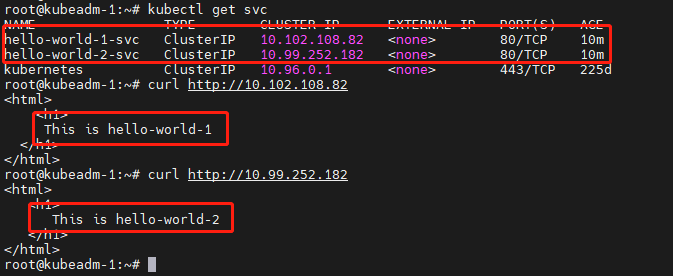
### 分别向两个 Pod 写入不同的页面
### 编写 Ingress
> 每个版本的编写方式可能会有变动
> 所以实际编写的时候要查看版本当时的写法
```
apiVersion: networking.k8s.io/v1
kind: Ingress
metadata:
name: test-ingress
spec:
ingressClassName: nginx
# 这个 ingressClassName 通过 kubectl get ingressclasses 来查看需要指定的名称
rules:
- host: "hello-world-1.com"
http:
paths:
- path: /
pathType: Prefix
backend:
service:
name: hello-world-1-svc
port:
number: 80
- host: "hello-world-2.com"
http:
paths:
- path: /
pathType: Prefix
backend:
service:
name: hello-world-2-svc
port:
number: 80
```
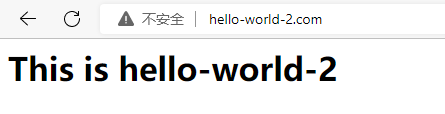
### 验证访问
##### 访问地址写入 hosts 中

##### 验证

- 一、K8S的安装
- 1.1 安装环境
- 1.2 问题汇总
- 1.3 事前准备
- 1.4 安装配置负载均衡
- 1.5 安装K8S软件
- 1.6 初始化kubeadm
- 1.7 添加控制节点
- 1.8 添加计算节点
- 1.9 安装故障问题处理
- 1.10 安装管理dashboard
- 1.11 编写测试Pod
- 1.12 从外部访问集群中的Pod
- 1.13 部署metrics-server指标采集
- 二、Pod管理
- 2.1 Pod 资源需求和限制
- 2.2 Init 容器
- 2.3 Pod 健康检查(探针)和重启策略
- 2.4 Pod 生命周期(钩子Hook)
- 2.5 静态Pod
- 2.6 初始化容器(init container)
- 2.7 资源限制
- 三、资源控制器
- 3.1 Deployment
- 3.2 StatefulSet
- 3.3 DaemonSet
- 3.4 Job
- 3.5 定时任务
- 3.6 准入控制器
- 3.7 自动伸缩
- 3.8 ReplicaSet
- 四、存储
- 4.1 Secret 管理敏感信息
- 4.2 ConfigMap 存储配置
- 4.3 Volume
- 4.4 PV
- 4.5 PVC
- 4.6 StorageClass
- 4.7 暴露宿主机信息给Pod
- 五、服务Service
- 5.1 Service 资源
- 5.2 服务发现
- 5.3 服务暴露
- 5.4 Ingress 资源
- 5.5 Ingress 专题
- 5.6 traefik 2.X版本使用
- 六、认证、授权、准入控制
- 6.1 服务账户
- 6.2 LimitRange资源与准入控制器
- 6.3 ResourceQuota 资源与准入控制器
- 七、Helm
- 7.1 Helm 安装
- 八、 istio
- 8.1 istio 介绍
- 8.2 iotis 安装
- 九、calico
- 9.1 两种网络模式
- 9.2 全互联模式 与 路由反射模式
- 9.3 BGP跨网段(大型网络)
- 十、Ingress
- 10.1 安装 LoadBalancer
- 10.2 部署 ingress-nginx
- 10.3 Ingress-nginx 的使用
- 10.4 开启TCP和UDP
- 使用中的问题
- CSI Node问题