
[TOC]
# Horizontal Pod Autoscaling
**HPA**使Pod水平自动缩放,不再需要手动扩容,实现自动化,还可以自定义指标。
Horizontal Pod Autoscaling仅适用于Deployment和ReplicaSet,由API server和controller共同实现。
`Horizontal Pod Autoscaling,kubernetes`能够根据监测到的 CPU 利用率(或者在 alpha 版本中支持的应用提供的 metric)自动的扩容 replication controller,deployment 和 replica set。
### 收集指标插件
收集指标信息的插件有metrics-server和heapster,`heapster`不久就会被遗弃,所以我选择使用`metrics-server`
> 注意: 通过 Metrics API,只能获取 node 或 pod 当前的使用情况。k8s并不会存储这个数据,因此想要获取10分钟前的资源使用量是不行的。
### 安装
首先安装metrics 在 k8s 官网上找到metrics的项目地址:[metrics项目地址](https://github.com/kubernetes-incubator/metrics-server)
将项目下载到本地并安装
~~~
git clone https://github.com/kubernetes-incubator/metrics-server.git
#进入1.8+目录,查看所需镜像
cat ./* | grep image
~~~

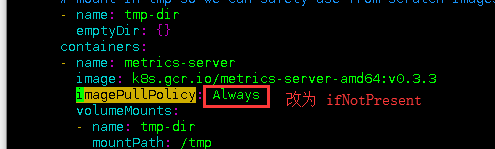
由于`metrics-server`部署的时候,其中镜像下载的规则设置为了`Always`,因为墙的原因,不管本地是否存在有该镜像,都会从远端重新pull一次,导致部署`pull error`失败。
修改 metrics-server-deployment.yaml 设置为`IfNotPresent`
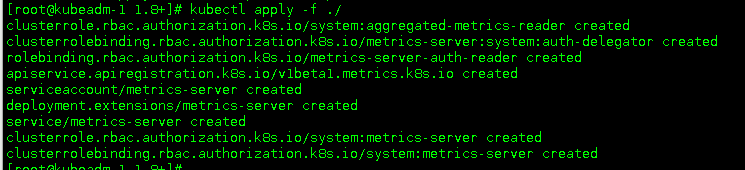
安装
#### 验证
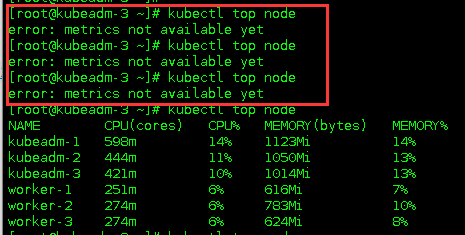
可能会出现红框中的提示信息,出现这种情况有两种可能
* `metrics-server`还在启动中,等待一会儿就好(如下图)
* `metrics-server`中的地址解析有问题(如下图)
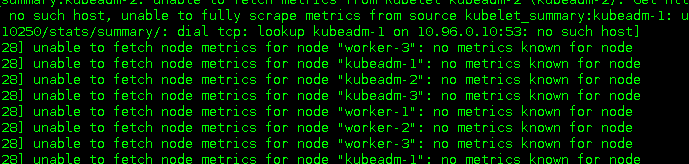
如果出现了无法解析的情况,需要在`metrics-server-deployment.yaml`文件中添加以下信息
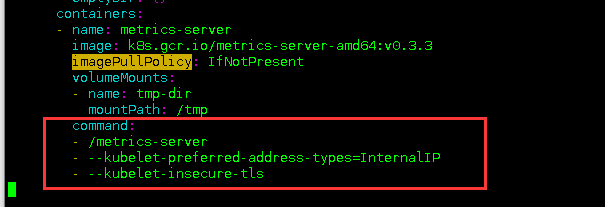
使用IP地址进行通信,同时忽略443端口造成的证书问题[参考issue](https://github.com/kubernetes-incubator/metrics-server/issues/143)
### Metrics支持的指标
* CPU 指标
* 内存 指标
* 自定义 指标 (我不懂这个啊,找不到什么资料,以后再添加)
### 查看资源使用情况
~~~
kubectl top node
kubectl top pod
~~~
### autoscale命令
~~~
kubectl autoscale (-f FILENAME | TYPE NAME | TYPE/NAME) [--min=MINPODS] --max=MAXPODS
[--cpu-percent=CPU] [flags] [options]
~~~
### 示例
#### 基于 CPU 和内存使用的自动缩放
为Deployment foo创建一个autoscaler,当Pod的CPU利用率达到80%的时候,RC的replica数量在2到5之间。
~~~
kubectl autoscale deployment foo --min=2 --max=5 --cpu-percent=80
~~~
定义一个保持最少两个副本的 HPA ,如果 CPU 平均使用量超过 80% 或内存超过 200Mi,则最高可扩展到 10 个副本
~~~
apiVersion: autoscaling/v2beta1
kind: HorizontalPodAutoscaler
metadata:
name: podinfo
spec:
scaleTargetRef:
apiVersion: extensions/v1beta1
kind: Deployment
name: podinfo
minReplicas: 2
maxReplicas: 10
metrics:
- type: Resource
resource:
name: cpu
targetAverageUtilization: 80
- type: Resource
resource:
name: memory
targetAverageValue: 200Mi
~~~
#### 基于自定义指标的自动扩容
(这段是在网上转载的,留着以后复盘用)
##### 开启自定义功能
* 将kube-controller-manager的启动参数中--horizontal-pod-autoscaler-use-rest-clients设置为true,并指定--master为API server地址,如`--master=http://172.20.0.113:8080`
* 修改kube-apiserver的配置文件apiserver,增加一条配置--requestheader-client-ca-file=/etc/kubernetes/ssl/ca.pem --requestheader-allowed-names=aggregator --requestheader-extra-headers-prefix=X-Remote-Extra- --requestheader-group-headers=X-Remote-Group --requestheader-username-headers=X-Remote-User --proxy-client-cert-file=/etc/kubernetes/ssl/kubernetes.pem --proxy-client-key-file=/etc/kubernetes/ssl/kubernetes-key.pem,用来配置aggregator的CA证书。
##### 使用示例
~~~
$ kubectl get --raw "/apis/custom.metrics.k8s.io/v1beta1/namespaces/default/pods/*/http_requests" | jq .
~~~
~~~
{
"kind": "MetricValueList",
"apiVersion": "custom.metrics.k8s.io/v1beta1",
"metadata": {
"selfLink": "/apis/custom.metrics.k8s.io/v1beta1/namespaces/default/pods/%2A/http_requests"
},
"items": [
{
"describedObject": {
"kind": "Pod",
"namespace": "default",
"name": "podinfo-6b86c8ccc9-kv5g9",
"apiVersion": "/__internal"
},
"metricName": "http_requests",
"timestamp": "2018-01-10T16:49:07Z",
"value": "901m" #m表示毫秒,例如,901m 表示 901 毫次/每秒。
},
{
"describedObject": {
"kind": "Pod",
"namespace": "default",
"name": "podinfo-6b86c8ccc9-nm7bl",
"apiVersion": "/__internal"
},
"metricName": "http_requests",
"timestamp": "2018-01-10T16:49:07Z",
"value": "898m"
}
]
}
~~~
创建一个 HPA,如果请求数超过每秒 100 次将扩大 podinfo 副本数,,最大10个,最少2个:
~~~
apiVersion: autoscaling/v2beta1
kind: HorizontalPodAutoscaler
metadata:
name: podinfo
spec:
scaleTargetRef:
apiVersion: extensions/v1beta1
kind: Deployment
name: podinfo
minReplicas: 2
maxReplicas: 10
metrics:
- type: Pods
pods:
metricName: http_requests
targetAverageValue: 100
~~~
### HAP的滚动更新
目前在Kubernetes中,可以通过直接管理 replication controller 或使用 deployment 对象来执行 滚动更新,该 deployment 对象为您管理基础 replication controller。
Horizontal Pod Autoscaler 仅支持后一种方法:Horizontal Pod Autoscaler 被绑定到 deployment 对象,它设置 deployment 对象的大小,deployment 负责设置底层 replication controller 的大小。
Horizontal Pod Autoscaler 不能使用直接操作 replication controller 进行滚动更新,即不能将 Horizontal Pod Autoscaler 绑定到 replication controller,并进行滚动更新(例如使用kubectl rolling-update)。
这不行的原因是,当滚动更新创建一个新的 replication controller 时,Horizontal Pod Autoscaler 将不会绑定到新的 replication controller 上。
- 一、K8S的安装
- 1.1 安装环境
- 1.2 问题汇总
- 1.3 事前准备
- 1.4 安装配置负载均衡
- 1.5 安装K8S软件
- 1.6 初始化kubeadm
- 1.7 添加控制节点
- 1.8 添加计算节点
- 1.9 安装故障问题处理
- 1.10 安装管理dashboard
- 1.11 编写测试Pod
- 1.12 从外部访问集群中的Pod
- 1.13 部署metrics-server指标采集
- 二、Pod管理
- 2.1 Pod 资源需求和限制
- 2.2 Init 容器
- 2.3 Pod 健康检查(探针)和重启策略
- 2.4 Pod 生命周期(钩子Hook)
- 2.5 静态Pod
- 2.6 初始化容器(init container)
- 2.7 资源限制
- 三、资源控制器
- 3.1 Deployment
- 3.2 StatefulSet
- 3.3 DaemonSet
- 3.4 Job
- 3.5 定时任务
- 3.6 准入控制器
- 3.7 自动伸缩
- 3.8 ReplicaSet
- 四、存储
- 4.1 Secret 管理敏感信息
- 4.2 ConfigMap 存储配置
- 4.3 Volume
- 4.4 PV
- 4.5 PVC
- 4.6 StorageClass
- 4.7 暴露宿主机信息给Pod
- 五、服务Service
- 5.1 Service 资源
- 5.2 服务发现
- 5.3 服务暴露
- 5.4 Ingress 资源
- 5.5 Ingress 专题
- 5.6 traefik 2.X版本使用
- 六、认证、授权、准入控制
- 6.1 服务账户
- 6.2 LimitRange资源与准入控制器
- 6.3 ResourceQuota 资源与准入控制器
- 七、Helm
- 7.1 Helm 安装
- 八、 istio
- 8.1 istio 介绍
- 8.2 iotis 安装
- 九、calico
- 9.1 两种网络模式
- 9.2 全互联模式 与 路由反射模式
- 9.3 BGP跨网段(大型网络)
- 十、Ingress
- 10.1 安装 LoadBalancer
- 10.2 部署 ingress-nginx
- 10.3 Ingress-nginx 的使用
- 10.4 开启TCP和UDP
- 使用中的问题
- CSI Node问题