
# 简介
> 本章节主要介绍如何在移动端引入图形系统。以 **农田管护** 移动端、**公共平台** 微信端为示例
# 项目引入gis模块
## 1. 导入gis模块代码
在项目components内checkout(若无法checkout,可在components内创建同名文件夹再checkout)以下地址
> gis-mobile-base地址:https://www.ztgis.com:2443/svn/java%E9%A1%B9%E7%9B%AE%E4%BB%A3%E7%A0%81_%E6%A1%86%E6%9E%B6/gis-boot-front-core/mobile-components/gis-mobile-base
> gis-mobile-map地址:https://www.ztgis.com:2443/svn/java%E9%A1%B9%E7%9B%AE%E4%BB%A3%E7%A0%81_%E6%A1%86%E6%9E%B6/gis-boot-front-core/mobile-components/gis-mobile-map
程序目录结构示例:
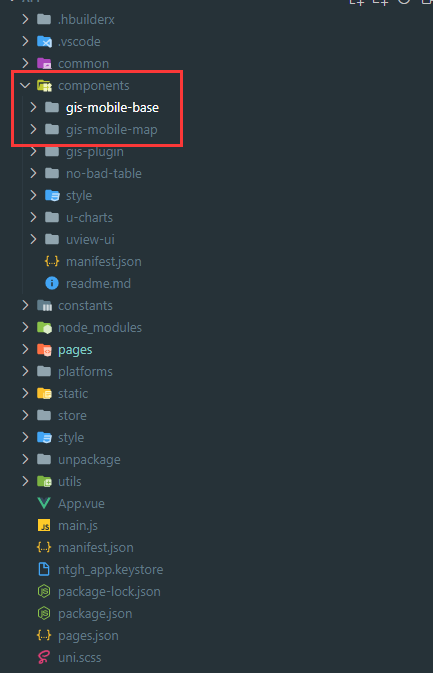
## 2. 项目配置
> **全局常量** 文件
```
// arcgis api路径,app请配置成全路径
export const arcgisApiUrl = '/4.21';
// 代理路径,app端 无固定地址,需要配置
export const arcgisProxyUrlPrefix = []
export const arcgisProxyUrl = ''
// arcgis 图片资源,app请配置成全路径
export const arcgisImgUrl = "/assets/img"
// 系统编码
export const sysCode = '系统编码'
// 坐标系编码
export const srCode = "坐标系编码"
```
> **mian.js** 文件
```
// 引入全局配置
import {
arcgisApiUrl,
arcgisProxyUrl,
arcgisProxyUrlPrefix,
arcgisImgUrl
} from "@/common/config/index.js"
// 往uni中注入全局配置
uni.$sysConfig = {
arcgisApiUrl,
arcgisProxyUrl,
arcgisProxyUrlPrefix,
arcgisImgUrl
}
// 引入lodash, gis中有使用lodash
import lodash from 'lodash'
Vue.use(lodash)
// 封装请求
// 增加固定sysCode,srCode标识 http.interceptor.gis.js此文件可在gis-mobile-map/api内寻找
import httpInterceptor from "@/utils/request/http.interceptor.gis.js";
import httpApi from "@/utils/request/http.api.js";
Vue.use(httpInterceptor.install, app)
Vue.use(httpApi.install, app)
```
> **store** 引入gis组件状态管理
```
//FIXME:gis
import map from '@/components/gis-mobile-map/store/map'
Vue.use(Vuex)
const store = new Vuex.Store({
state: {},
mutations: {},
actions: {},
modules: {
map
}
})
export default store
```
> **request** 引入需要使用的gis组件接口
```
// 专题图相关接口
import tmap from "@/components/gis-mobile-map/api/tmap.js";
// 底图
import baseLayer from "@/components/gis-mobile-map/api/base-layer.js";
// gis系统配置相关接口
import mapConfig from "@/components/gis-mobile-map/api/config.js";
// gis查询相关
import mapQuery from "@/components/gis-mobile-map/api/query.js";
//标绘
import marker from "@/components/gis-mobile-map/api/marker"
//文件
import gisFile from "@/components/gis-mobile-map/api/file"
export default {
tmap,
baseLayer,
mapConfig,
mapQuery,
marker,
gisFile
}
```
# 代码使用
## 1. renderjs模式 => app端
> app端为降低逻辑层和视图层的通信损耗,提高视图交互能力,不支持动态引用类库
> 需要自己写通信及视图
> 地址:https://uniapp.dcloud.io/frame?id=renderjs
示例:
> 视图页面及调用页面
```
<template>
<map-renderjs ref="GIS" class="jz-map-renderjs" v-on="listeners"></map-renderjs>
</template>
<script>
import mapRenderjs from './map-renderjs.vue'
export default {
name: 'jz-map',
components: {
mapRenderjs
},
data () {
return {
listeners: {
mapInit: () => { this.$emit("mapInit"); },
}
},
methods: {
/**
* 地图初始化函数
* @param {Object} defaultBaseLayer 默认底图
* @param {Object} baseLayers 底图
* @param {Object} baseZj 注记
*/
mapInit (defaultBaseLayer, baseLayers, baseZj) {
this.$refs.GIS.handleMsg({
action: 'gisInit',
param: {
extent: this.mapConfig.mapExtent,
wkid: this.mapConfig.wkid,
wkt: this.mapConfig.wkt,
isLoadCountry: this.mapConfig.isLoadCountry,
widgets: this.mapConfig.widgets,
defaultBaseLayer,
baseLayers,
baseZj
}
})
},
// 获取底图
getBaseLayer () {
// 获取底图
this.$u.api.baseLayer.getAll().then((res) => {
// 将底图数据转化为前端格式
const base = res.result
.map((item, i) => {
return {
...item,
id: 'xm_' + item.layerType + i,
opacity: Number(item.opacity),
checked: false,
group: 'xm',
token: item.tokenValue,
visible: item.layerType === MAP_PARAM.defaultMapType,
}
})
.sort((a, b) => {
// 进行排序,顺序为矢量、规划、影像
const diff = this.mapTypeSort[a.layerType] - this.mapTypeSort[b.layerType]
if (diff == 0) {
// 若类型相同,按照是否注记排序
return new Number(a.isTagLayer) - new Number(b.isTagLayer)
}
return diff
})
// 基础底图
const baseLayers \= base.filter((v) \=> {
return v.isTagLayer != '1'
})
// 注记图层
const baseZj \= base.filter((v) \=> {
return v.isTagLayer \== '1'
})
// 默认加载
const defaultBaseLayer \= base.filter((v) \=> {
return v.isDefault \== '1'
})
// 设置全局地图信息
this.$store.commit('setBaseLayer', base)
this.mapInit(defaultBaseLayer, baseLayers, baseZj)
})
},
},
created () { },
mounted () {
this.getBaseLayer()
},
}
</script>
```
> renderjs页面
```
<template>
<div class="jz-map-renderjs" :change:msg="jzGis.gisHandle" :msg="msg"></div>
</template>
<script>
export default {
name: 'jz-map',
data() {
return {
msg: {},
}
},
props: {},
methods: {
//向renderjs发送消息
handleMsg(msg) {
msg.config = uni.$sysConfig
this.msg = msg
},
// 分发地图事件
gisEmitAction(args) {
this.$emit(...args)
},
},
mounted() {},
created() {},
}
</script>
<!--
1、与正文视图只能传递普通json,含方法对象传递时,方法会丢失;
2、无法使用mixins
-->
<script module="jzGis" lang="renderjs">
import GIS from "@/components/gis-mobile-map/GIS.js";
import MAP_PARAM from '@/components/gis-mobile-map/params/views/map-param'
import GIS_ICON_PARAM from "@/components/gis-mobile-map/params/gis/gis-icon-param"
import drawLineRenderjs from '@/components/gis-mobile-map/mixins/renderjs/draw-line'
import mapSwitchRenderjs from '@/components/gis-mobile-map/mixins/renderjs/map-switch'
export default {
name: "jz-map-renderjs",
data () {
return {
gis: null,
config:{},
mapSwitchUtils:null,
drawLineUtils:null,
directFuncMap: {
//初始化加载
gisInit: this.handleGisInit
},
};
},
computed:{
widgetKey() {
return MAP_PARAM.widgetKey
},
},
methods: {
//通信,接收处理消息
gisHandle ({ action, param, config }) {
if (!action) {
console.warn("通知消息缺少action,无效")
return false;
}
try {
this.config = config;
this.directFuncMap[action](param, config);
} catch (e) {
console.error(e)
}
},
// 初始化加载
// 初始化
handleGisInit (param, config) {
// 初始化渲染
GIS.initArcGisJsApi(config.arcgisApiUrl).then(() => {
// 地图代理(如果需要的话)
if (config?.arcgisProxyUrlPrefix?.length > 0) {
config?.arcgisProxyUrlPrefix?.map(urlPrefix => {
this.gis.withProxyRule({
urlPrefix: urlPrefix,
proxyUrl: config.arcgisProxyUrl
});
});
}
this.gis.initMapView({
container: this.$el,
tileInfo: true,
extent: param.extent,
wkid: param.wkid || 4490,
wkt: param.wkt,
// 国家底图DOM
country: param.isLoadCountry !== "0" ? MAP_PARAM.defaultMapType : 0,
widgets: param.widgets ?? {
Zoom: true
},
layerList: param.defaultBaseLayer
}).then((me) => {
//向上请求函数,传递的数据内函数会丢失
this.$ownerInstance.callMethod("gisEmitAction", ['mapInit'])
// 加载所有底图
this.loadBaseLayers(param.baseLayers, param.baseZj);
});
});
},
// 加载所有底图
loadBaseLayers (baseLayers, baseZj) {
if (!baseLayers) {
return
}
// 底图
let list = [...baseLayers, ...baseZj].map(v => {
return {
...v,
group: `xm`,
priority: 2,
visible: MAP_PARAM.defaultMapType === v.layerType
}
})
this.gis.addMany(list);
this.mapSwitchUtils = new mapSwitchRenderjs(this.gis,list)
},
},
mounted () { this.gis = new GIS()},
created () {}
};
```
## 2. mixins模式 => 微信端
```
<template>
<div class="map-view">
<map-view-div :mapConfig="mapConfig" @callbackGis="getGis"></map-view-div>
</div>
</template>
<script>
import mapViewDiv from '@/components/gis-mobile-map/views/map/index'
import { mapMixin } from '@/components/gis-mobile-map/mixins/map'
export default {
name: "map-view",
components: { mapViewDiv },
mixins: [mapMixin],
data () {
return {
};
},
watch: {},
methods: {
getGis (g) {
if (!this.gis) {
this.$emit('update:gis', g);
// window.gis = g;
g.on('init', () => { this.$emit('gisInit', true) })
}
}
},
created () { },
mounted () { },
};
</script>
```
- 一、 开发环境
- 二、系统开发规范
- 1. 工程目录规范
- 1.1根目录规范
- 1.2.通用组件目录规范
- 1.3.自定义模块、项目目录规范
- 1.4.资源目录规范
- 1.5.文件命名规范
- 1.6.变量命名规范(小写驼峰)
- 1.7.函数命名规范(小写驼峰)
- 1.8.代码规范
- 1.9.参考文档
- 2. 前端编码规范
- 2.1.代码检查工具及常见规范
- 2.2.结构规范及编码逻辑
- 3. 后端编码规范
- 3.1.代码检测工具及常见规范
- 3.2.结构规范及编码逻辑
- 4. 数据库设计规范
- 4.1.参考文档
- 4.2.主流数据库字段命名长度限制
- 4.3.命名规范
- 4.4.使用规范
- 5. 系统运维规范
- 6. 安装部署规范
- 7. 组件版本规范
- 1.目标
- 2.组件概念
- 3.文件格式
- 4.组件规范
- 5.Vue 中函数的使用
- 6.提供组件 API 文档
- 7.使用 mixins
- 8、表单设计规范
- 三、自定义表单组件
- 1.设计思路
- 1.1 解决了哪些痛点
- 1.2 核心思路
- 2.1全局配置
- 2.2双向绑定
- 1.3 如何快速上手
- 2.gis-plugin基础使用说明
- 2.1 观前须知
- 2.2 基础配置
- 3. Form组件
- 3.1 基本使用
- 3.2 API说明
- 2.1 props
- 2.2 events
- 3.3 示例代码
- 3.4 常见问题
- 4.1 gis-tag-form的使用
- 4.2 gis-form配套组件的使用
- 4.2.1 gis-form-table 表单内置表格
- 4.2.2 gis-form-editor 表单内置富文本编辑器
- 4.2.3 gis-form-upload 表单内置上传组件
- 4.3 表单初始化常见问题
- 4.Table组件
- 4.1 基本使用
- 4.2 API说明
- 2.1 props
- 2.2 events
- 4.3 示例代码
- 4.4 常见问题
- 4.1 我有隐藏的查询条件,不在查询框上显示,该怎么办?
- 4.2 通过接口获取到的数据我要进一步做处理,该怎么办?
- 4.3 我使用了render,为什么字典值(dict)就无效了?
- 5.Model组件
- 5.1 基本使用
- 5.2 API说明
- 2.2 prop
- 2.2 events
- 5.3 示例代码
- 5.4 常见问题
- 6.附件上传
- 6.1 附件上传组件
- 6.2 图片上传组件
- 7. 文档处理
- Excel组件(基于POI实现)
- Word组件(基于POI实现)
- Pdf组件(基于POI实现)
- 8. 级联选择表单
- 四、自定义ArcGIS通用工具Exe
- 01. EXE接口说明
- 02. CAD转JSON接口
- 03. SHAPE转JSON接口
- 04. 从工作空间中导出文件
- 05. 从ESRIJSON导出文件
- 06. 坐标转换-ESRIJSON
- 07. 坐标转换-文件
- 08. 数据编辑-ESRIJSON
- 09. 数据编辑-新增-从CAD文件导入
- 10. 数据编辑-删除
- 11. 数据编辑-编辑-从CAD文件编辑
- 12. 面积&长度计算
- 13. 空间分析-ESRIJSON
- 14. 空间分析-工作空间
- 15. 数据编辑-从工作空间中导入
- 16. 空间分析-地图服务(一维)
- 17. 空间分析-地图服务(二维)
- 18. 空间分析-地图服务(多个)
- 19.数据编辑-从CAD文件导入(92坐标系CAD,双图层)
- 20.空间分析-验证是否闭合、是否自相交
- 21.WMF转PDF
- 22.数据统计-地图服务
- 五、项目建设规范
- 六、注意事项
- 七、常见问题
- 八、 WebGIS核心组件库
- 01.后台管理端
- 02.图形端
- 03.移动端
- 04.接口
- 九、工作流开发
- 1.前期工作
- 1.1 禁用Activiti自带登录验证
- 1.2 设置应用部署域名
- 2.流程审批步骤
- 2.1.创建模型
- 2.2.在线流程设计
- 2.3.部署发布
- 2.4.流程配置
- 2.5.流程申请
- 2.6.流程审核
- 3.流程设计demo
- 3.1.一般流程
- 3.2.带条件流程
- 3.3.会签流程
- 4.其他一些开发详解
- 4.1.关于内嵌Activiti在线流程设计器
- 4.2.关于对原框架中流程设计代码的调优
- 4.3.关于DelegateExecution对象的常用方法
- 5.工作流接入文档
- 十、框架更新日志
- 其它
- 代码生成器
- 短信平台管理与接口
- 单据编码管理与接口
- 定时任务管理与接口
- 文件管理与接口
- 地图打印管理与接口
- Excel文件导出接口
- 经典SQL语句
- 多实例运行Redis
- 多数据库操作
- 消息通知管理与接口
- 工作流数据清理
- 其他技术总结
- 发布/订阅功能使用说明
- 学习资料
- 十一、多数据源-dynamic-datasource
- 基础必读
- 连接池集成
- 连接池必读
- 集成Druid
- 集成HikariCP
- 集成BeeCP
- 集成DBCP2
- 集成Jndi
- 第三方集成
- 集成MybatisPlus
- 集成P6spy
- 集成Quartz
- 集成ShardingJdbc
- 进阶使用
- 动态添加移除数据源
- 动态解析数据源
- 数据库加密
- 启动初始化执行脚本
- 自动读写分离
- 懒启动数据源
- 无数据源启动
- 手动切换数据源
- 自定义
- 自定义注解
- 自定义数据源来源
- 自定义负载均衡策略
- 自定义切面
- 事务专栏
- 基础知识
- 本地事务
- seata事务
- 调试源码
- 常见问题
- 不可用版本
- 注意事项
- dynamic-datasource参考资料