
GisTable 示例代码
``` vue
<template>
<Card>
<gis-table ref="gisTable" :column="tableColumns" :searchRule="searchRule" height="400" v-on="listener"
:buttons="buttons" :fetchName="fetchName" :config="config" v-model="data" />
</Card>
</template>
<script>
export default {
data () {
return {
// 接口名称
fetchName: "",
// 配置信息
config: {
// 是否可拖拽
draggable: false,
// 斑马纹
stripe: true,
// 显示分页
showPage: true,
// 显示查询框
showSearch: true
},
// 表格列配置
tableColumns: [
{
type: 'expand', // 二级菜单
width: 50,
render: (h, params) => {
return h(this.$gisFuncTable(this.subColumns, `fetchName/${params.row.parma}`, {
'on-row-dblclick': (e, index) => {
alert(index)
}
}))
}
},
{
type: 'index', // 序号
width: 40, align: 'center'
},
{
title: '申请编号', // 列名 必填
key: 'slh', // 对应字段 必填
width: 150, // 默认宽度 选填
align: 'center', // 排布位置 选填
tooltip: true // 超出宽度以省略号显示,并用气泡提示 选填
},
{
title: '用海面积',
key: 'yhzmj',
width: 130,
align: 'right',
format: '.000000' // 格式化 支持(1、数字eg .0000 2、经纬度 lat 3、日期 eg yyyy年MM月dd日) 选填
},
{
title: '业务类型', key: 'ywlxMc', width: 250, dict: "ywlx" // 读字典 值为前端缓存的字典名称 选填
},
{ title: '项目名称', key: 'xmmc', width: 250, tooltip: true }, // minWidth
{ title: '申请人', key: 'sqr', width: 150, align: 'center', tooltip: true },
{ title: '项目位置', key: 'zl', minWidth: 250, tooltip: true },
{
title: '批准日期',
key: 'yhpzrq',
width: 120,
align: 'center',
format: 'yyyy年MM月dd日'
},
{ title: '用海批准机关', key: 'yhpzjg', width: 180, align: 'center' }
],
// 双向绑定,当前table的值
data: [],
subColumns: [
{ title: '海籍管理号', key: 'hjglh', align: 'center', width: 120 },
{
title: '项目名称',
key: 'xmmc',
align: 'center',
width: 200,
render: (h, params) => {
return h('span', {
style: {
color: '#4599eb',
cursor: 'pointer'
},
}, params.row.xmmc)
}
},
{ title: '是否临时', key: 'sflsyh', width: 70, align: 'center', dict: 'sflsyh' },
{ title: '项目性质', key: 'xmxz', width: 70, align: 'center', dict: 'xmxz' },
{
title: '用海类型',
key: 'yhlx',
width: 180,
align: 'center',
render: (h, params) => {
const yhlxa = params.row.yhlxa ? $dict('yhlxa').find(v => v.value === params.row.yhlxa).label : ''
const yhlxb = params.row.yhlxb ? $dict('yhlxb').find(v => v.value === params.row.yhlxb).label : ''
const text = `${yhlxa}(${yhlxb})`
return h('span', text)
}
},
{ title: '用海面积', key: 'zhmj', width: 100, align: 'right' },
{ title: '使用金总额', key: 'syjze', width: 100, align: 'right' },
{ title: '缴纳方式', key: 'syjjnfs', width: 80, align: 'center', dict: 'syjjnfs' },
{
title: '宗海状态',
key: 'zt',
width: 70,
align: 'center',
// fixed: 'right',
render: (h, params) => {
return h('code', {
class: Number(params.row.ywblZt) === 0 ? 'warning-color' : 'success-color'
}, Number(params.row.ywblZt) === 0 ? '无效' : '有效')
}
}
],
/**
* gis-table的事件
* 1、按钮事件: `handleBtn${btn.key}` 首字母大写
* eg. 按钮 add 的事件名 => handleBtnAdd
* 2、表格自带事件: `handleRow${evnetName}`
* eg. 双击事件 => handleRowDbClick
*
*/
listener: {
handleBtnAdd: this.handleBtnAdd,
handleBtnShow: this.handleBtnShow,
handleBtnDraw: this.draw,
handleBtnTag: this.tag
},
// 右侧按钮
buttons: [
{
key: 'add',
title: '新增',
icon: "md-add"
},
{
key: 'show',
title: '查看',
icon: "md-book"
},
{
key: 'draw',
title: '抽屉',
icon: "md-exit"
},
{
key: 'tag',
title: '多标签',
icon: "ios-pricetags-outline"
},
{
key: 'refresh',
title: '刷新',
icon: "md-refresh"
},
],
// 查询条件
searchRule: [
{
type: "input",
title: "地块名称",
field: "dkmc",
},
{
type: "select",
title: "地表地下",
field: "dbdx",
options: [
{
label: '地表',
value: 1
},
{
label: '地下',
value: -1
}
]
},
{
type: "select",
title: "用地用海",
field: "ydyh",
}
]
}
}
}
</script>
<style>
</style>
```
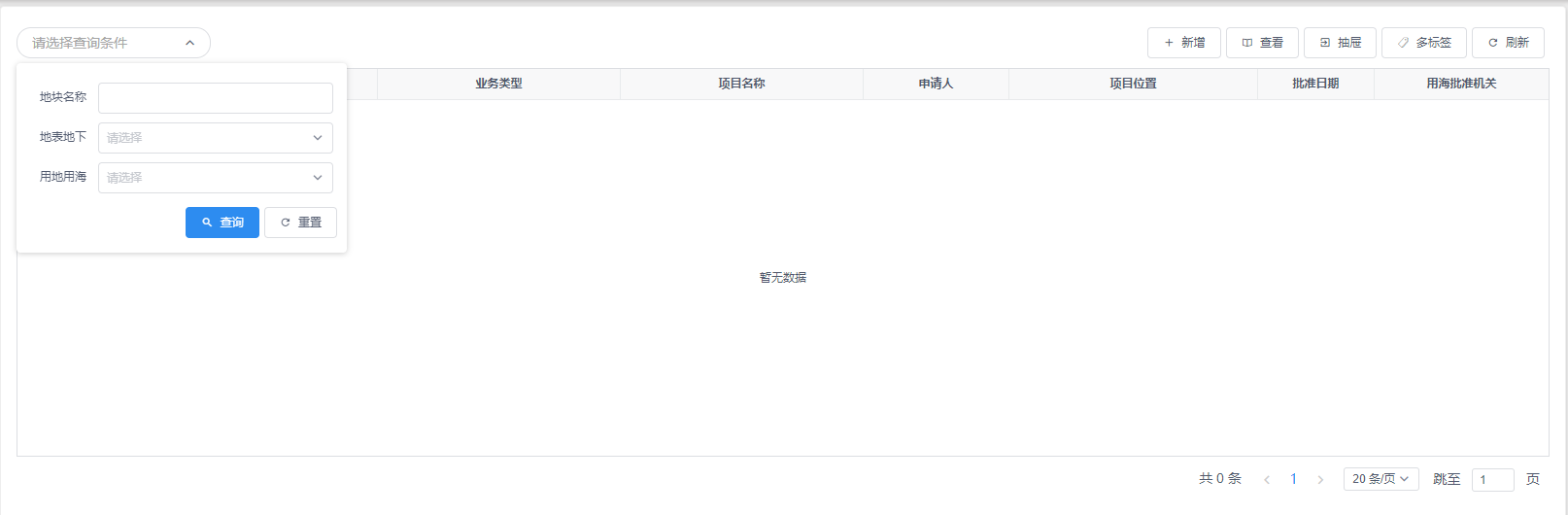
效果图
- 一、 开发环境
- 二、系统开发规范
- 1. 工程目录规范
- 1.1根目录规范
- 1.2.通用组件目录规范
- 1.3.自定义模块、项目目录规范
- 1.4.资源目录规范
- 1.5.文件命名规范
- 1.6.变量命名规范(小写驼峰)
- 1.7.函数命名规范(小写驼峰)
- 1.8.代码规范
- 1.9.参考文档
- 2. 前端编码规范
- 2.1.代码检查工具及常见规范
- 2.2.结构规范及编码逻辑
- 3. 后端编码规范
- 3.1.代码检测工具及常见规范
- 3.2.结构规范及编码逻辑
- 4. 数据库设计规范
- 4.1.参考文档
- 4.2.主流数据库字段命名长度限制
- 4.3.命名规范
- 4.4.使用规范
- 5. 系统运维规范
- 6. 安装部署规范
- 7. 组件版本规范
- 1.目标
- 2.组件概念
- 3.文件格式
- 4.组件规范
- 5.Vue 中函数的使用
- 6.提供组件 API 文档
- 7.使用 mixins
- 8、表单设计规范
- 三、自定义表单组件
- 1.设计思路
- 1.1 解决了哪些痛点
- 1.2 核心思路
- 2.1全局配置
- 2.2双向绑定
- 1.3 如何快速上手
- 2.gis-plugin基础使用说明
- 2.1 观前须知
- 2.2 基础配置
- 3. Form组件
- 3.1 基本使用
- 3.2 API说明
- 2.1 props
- 2.2 events
- 3.3 示例代码
- 3.4 常见问题
- 4.1 gis-tag-form的使用
- 4.2 gis-form配套组件的使用
- 4.2.1 gis-form-table 表单内置表格
- 4.2.2 gis-form-editor 表单内置富文本编辑器
- 4.2.3 gis-form-upload 表单内置上传组件
- 4.3 表单初始化常见问题
- 4.Table组件
- 4.1 基本使用
- 4.2 API说明
- 2.1 props
- 2.2 events
- 4.3 示例代码
- 4.4 常见问题
- 4.1 我有隐藏的查询条件,不在查询框上显示,该怎么办?
- 4.2 通过接口获取到的数据我要进一步做处理,该怎么办?
- 4.3 我使用了render,为什么字典值(dict)就无效了?
- 5.Model组件
- 5.1 基本使用
- 5.2 API说明
- 2.2 prop
- 2.2 events
- 5.3 示例代码
- 5.4 常见问题
- 6.附件上传
- 6.1 附件上传组件
- 6.2 图片上传组件
- 7. 文档处理
- Excel组件(基于POI实现)
- Word组件(基于POI实现)
- Pdf组件(基于POI实现)
- 8. 级联选择表单
- 四、自定义ArcGIS通用工具Exe
- 01. EXE接口说明
- 02. CAD转JSON接口
- 03. SHAPE转JSON接口
- 04. 从工作空间中导出文件
- 05. 从ESRIJSON导出文件
- 06. 坐标转换-ESRIJSON
- 07. 坐标转换-文件
- 08. 数据编辑-ESRIJSON
- 09. 数据编辑-新增-从CAD文件导入
- 10. 数据编辑-删除
- 11. 数据编辑-编辑-从CAD文件编辑
- 12. 面积&长度计算
- 13. 空间分析-ESRIJSON
- 14. 空间分析-工作空间
- 15. 数据编辑-从工作空间中导入
- 16. 空间分析-地图服务(一维)
- 17. 空间分析-地图服务(二维)
- 18. 空间分析-地图服务(多个)
- 19.数据编辑-从CAD文件导入(92坐标系CAD,双图层)
- 20.空间分析-验证是否闭合、是否自相交
- 21.WMF转PDF
- 22.数据统计-地图服务
- 五、项目建设规范
- 六、注意事项
- 七、常见问题
- 八、 WebGIS核心组件库
- 01.后台管理端
- 02.图形端
- 03.移动端
- 04.接口
- 九、工作流开发
- 1.前期工作
- 1.1 禁用Activiti自带登录验证
- 1.2 设置应用部署域名
- 2.流程审批步骤
- 2.1.创建模型
- 2.2.在线流程设计
- 2.3.部署发布
- 2.4.流程配置
- 2.5.流程申请
- 2.6.流程审核
- 3.流程设计demo
- 3.1.一般流程
- 3.2.带条件流程
- 3.3.会签流程
- 4.其他一些开发详解
- 4.1.关于内嵌Activiti在线流程设计器
- 4.2.关于对原框架中流程设计代码的调优
- 4.3.关于DelegateExecution对象的常用方法
- 5.工作流接入文档
- 十、框架更新日志
- 其它
- 代码生成器
- 短信平台管理与接口
- 单据编码管理与接口
- 定时任务管理与接口
- 文件管理与接口
- 地图打印管理与接口
- Excel文件导出接口
- 经典SQL语句
- 多实例运行Redis
- 多数据库操作
- 消息通知管理与接口
- 工作流数据清理
- 其他技术总结
- 发布/订阅功能使用说明
- 学习资料
- 十一、多数据源-dynamic-datasource
- 基础必读
- 连接池集成
- 连接池必读
- 集成Druid
- 集成HikariCP
- 集成BeeCP
- 集成DBCP2
- 集成Jndi
- 第三方集成
- 集成MybatisPlus
- 集成P6spy
- 集成Quartz
- 集成ShardingJdbc
- 进阶使用
- 动态添加移除数据源
- 动态解析数据源
- 数据库加密
- 启动初始化执行脚本
- 自动读写分离
- 懒启动数据源
- 无数据源启动
- 手动切换数据源
- 自定义
- 自定义注解
- 自定义数据源来源
- 自定义负载均衡策略
- 自定义切面
- 事务专栏
- 基础知识
- 本地事务
- seata事务
- 调试源码
- 常见问题
- 不可用版本
- 注意事项
- dynamic-datasource参考资料