
#### Windows开发环境搭建
测试搭建环境为:Windows 11 教育版
#### 软件
JDK 1.8 [官网](https://www.oracle.com/cn/java/technologies/downloads/#java8-windows)
Maven [官网](https://maven.apache.org/download.cgi)
Nodejs [官网](https://nodejs.org/en)
Git [官网](https://git-scm.com/download/win)
#### 基础设施
~~~shell
MySQL 5.7.35
~~~
参考文档
[MySQL 安装文档](https://blog.csdn.net/qq_39715000/article/details/123534326)
#### 搭建后台
1. 下载项目
`git clone [https://gitee.com/zzdevelop/lenosp.git](https://gitee.com/zzdevelop/lenosp.git)`
2. 导入数据库,sql文件在db目录中。
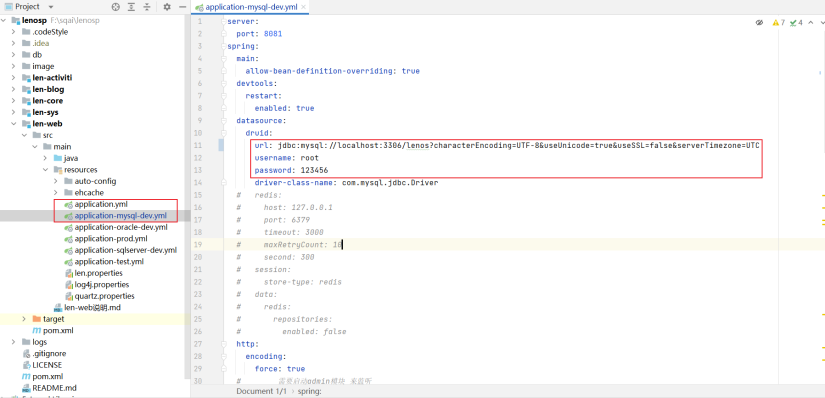
3. 修改配置文件,修改len-web模块下的 application.yml、application-mysql-dev.yml文件
4. 启动
5. 访问查看情况
#### 搭建前台
1. 下载项目
`git clone [https://gitee.com/zzdevelop/lenosp.git](https://gitee.com/zzdevelop/lenosp.git)`
2. 安装模块
~~~shell
npm install | yarn install
# 下载过慢时可更改镜像源
npm config set registry https://registry.npm.taobao.org
yarn config set registry https://registry.npm.taobao.org
~~~
3. 修改后台API访问地址
4. 启动 `npm run dev`
- 郑州程序员组织简介
- 组织期望
- 组织计划
- 组织细则
- 组织问题
- lenosp
- 简介
- 任务
- 本地开发
- 部署篇章
- 如何提交PR?
- 部署启动lenosp
- 工具集
- 问题记录
- freemarker 找不到模板
- div改为iframe
- 会议记录
- 郑州程序员开源组织-组织介绍和计划
- 2023-04-01郑州程序员组织,成员会议讨论内容
- 郑州程序员开源组织第一期里程碑会议
- 2023-04-08 成员讨论内容
- 知识库
- 里程碑教程
- 组织管理人员和成员规范
- idea使用阿里代码格式
- idea2023.1 pojie
- 测试Pull Request
- idea使用阿里代码约束检查
- 提交代码规范
- 组织成员约束
- 里程碑
- 代码生成
- 工作流引擎
- 功能模块
- 多数据源
- 国密支持