
# 搜索
## 元数据
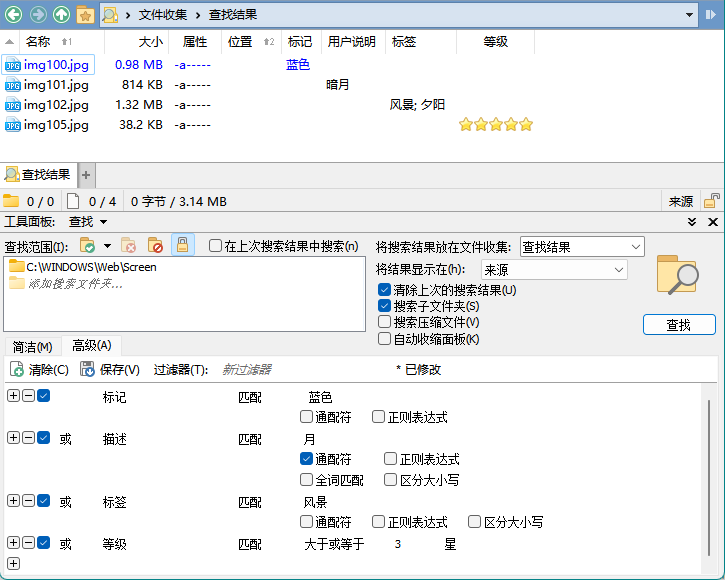
DOpus 的四项扩展属性,标记、描述、标签、评分,都可以通过查找窗格的高级模式进行搜索:
此外,Everything [v1.5.0.1276 以上](https://www.voidtools.com/forum/viewtopic.php?f=12&t=9787)也支持了搜索 DOpus 的描述、标签和评分 [^everything],不过目前没有中文语言,只能使用 v1.4 的语言包汉化一部分界面。若要开启支持,需要在安装后按照以下步骤设置:
1. 在 Everything 搜索框中输入 `/opus_meta_information=1` 并回车,此时状态栏会显示 `opus_meta_information=1`
2. 输入 `/restart` 并回车来重启 Everything
3. 右键列表表头,在 `Add Columns...` 中添加 `Comment`、`Tags` 和 `Rating` 三列(注意不是 Windows Property System 中的 `标签` 和 `描述`),如图:
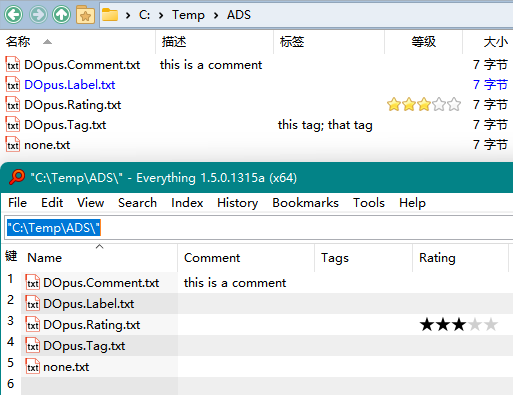
(图中由于 DOpus 版本较旧,Everything 未能正确读取标签)
可以通过使用 `comment:` 、`tags:` 和 `rating:` 来搜索指定元数据(可以通过右键相应表头,选择 `Search for ...` 来自动输入相应前缀),例如:
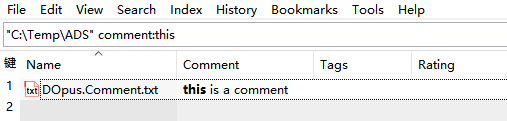
另外,Everything 默认不会索引扩展属性,而是会在搜索时按需读取,如果想要建立索引可以手动在 `Options → Indexes → Properties` 中添加要索引的属性。
[^everything]: [Ability to Search Tags - voidtools forum](https://www.voidtools.com/forum/viewtopic.php?f=4&t=9877)
## 通过 Everything 搜索
- [Everything 搜索](https://github.com/Chaoses-Ib/IbDOpusScripts/blob/main/Buttons/EverythingSearch.zh-Hans.cmd.dcf)
通过 [Everything](https://www.voidtools.com/) 在当前文件夹下搜索文件。
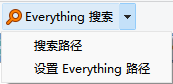
默认热键 <kbd><kbd>Ctrl</kbd>+<kbd>E</kbd></kbd>。
- 主页
- 文件浏览
- 文件窗口
- 工具栏
- 收藏栏
- 多文件夹
- 单窗口模式
- 标签页
- 分栏
- 关联文件夹
- 来源和目标
- 查看
- 列表
- 列
- 排序
- 分组
- 视图
- 详细视图
- 缩略图
- 平面视图
- 标记
- 选择
- 复选框
- 即时查找
- 信息提示
- 查看器
- 文件夹格式
- 导航
- 地址栏
- 文件夹树
- 收藏夹
- 别名
- 文件对话框
- 文件搜索
- 文件操作
- 文件创建
- 文件移动
- 文件复制
- 重命名
- 剪贴板
- 上下文菜单
- 拖放
- 安全
- 文件类型
- 元数据
- 压缩包
- 图片
- 文档
- 纯文本
- 代码
- Markdown
- Word 文档
- 网页
- 表格
- Excel 表格
- 数据库
- 幻灯片
- 模型
- 种子
- 邮件
- Directory Opus
- 配置
- 主题
- 命令
- 命令
- 修饰符
- 内置命令
- 脚本
- 变量
- 官方手册
- 目录
- 版权
- 许可证
- 最终用户许可条件
- 批量许可条件
- 致谢
- 简介
- 基本概念
- 启动 Opus
- 文件窗口
- 打开文件窗口
- 默认文件窗口
- 导航
- 主文件夹
- 上、前进、后退
- 文件树
- 地址栏
- 路径字段
- 驱动按钮和下拉菜单
- 收藏夹
- 智能收藏夹
- 最近和历史列表
- 别名
- 成对文件夹
- 标签
- 标签切换器
- 锁定标签页
- 关联标签页
- 标签组
- 视图模式
- 双栏
- 导航锁定
- 工具栏
- 默认工具栏
- 菜单工具栏
- 操作工具栏
- 收藏栏
- 文件列表工具栏
- “图像”工具栏
- 动态工具栏
- 工具栏集
- 即时查找字段
- 查看器窗格
- 元数据窗格
- 实用程序面板
- 布局
- 样式
- 主题
- 创建自己的主题
- 状态栏
- 资源管理器替换模式
- 源目录和目标目录
- 选择文件
- 使用鼠标和键盘进行选择
- 单击模式
- 复选框模式
- 简单通配符选择
- 高级选择
- 选择单元格
- 搜索和过滤
- 过滤栏
- 显示所有内容
- 工具栏过滤项
- 快速搜索
- 查找文件
- 简易查找
- 高级查找
- 排序和分组
- 手动排序
- 文件夹格式
- 文件夹格式对话框
- 列
- 冻结列
- 排序
- 分组
- 显示
- 过滤器
- 已保存文件夹格式
- 自动记住格式
- 内容类型
- 确定当前格式
- 锁定格式
- 可展开文件夹
- 平面视图
- 文件夹大小
- 虚拟文件系统
- 系统虚拟文件夹
- 文件集合
- 存储的查询
- 库
- 压缩包
- FTP
- MTP
- 文件操作
- 复制、移动和删除文件
- 复制和粘贴
- 拖放
- 使用工具栏按钮进行复制
- 复制时使用通配符
- 复制队列
- 复制覆盖和幽灵文件
- 无人值守操作
- 作业栏
- 确认文件替换对话框
- 复制已更新文件
- 同步
- Deleting Files
- 安全删除
- 重命名文件
- 内联重命名
- 简单通配符重命名
- 高级重命名
- 重命名预设
- 重命名模式
- 标准通配符重命名
- 查找和替换
- 正则表达式
- 正则表达式 + 查找并替换
- 重命名操作
- 文件编号
- 重命名宏
- 重命名选项
- 使用元数据重命名
- 重命名脚本
- 创建文件夹
- 创建压缩包
- 添加到压缩包文件
- 添加到压缩包对话框
- Zip 选项
- 7z 选项
- RAR 选项
- TAR BZip2 选项
- TAR GZip 选项
- Zip 文件
- Zip 注释
- 只读模式
- 自解压 Zip 文件
- 跟踪和撤销文件操作
- 更改属性
- 标记和状态图标
- 编辑元数据
- 文档属性
- 图片属性
- 音乐属性
- 添加封套插图
- 视频属性
- 扩展属性
- 元数据的编程设置
- 时间偏移
- 文件说明
- 过滤操作
- 过滤条款
- 添加、删除和编辑子句
- 过滤条款类型
- 文本过滤器
- UAC 和管理员模式
- FTP
- FTP 地址簿
- 默认设置
- 站点页
- 网络页面
- Display Page
- 索引页面
- 声音页面
- 杂项页面
- 速度页面
- 特殊页面
- 转账页面
- 代理页面
- 添加新站点
- FTP 连接
- 站点属性
- FTP 日志
- FTP 路径
- 附加功能
- 查看图像
- 查看器鼠标、键和工具栏
- 图像标记
- 文件窗口关联查看器
- 播放声音
- 图像转换
- 自动化图像转换任务
- 打印文件夹
- 重复文件查找器
- 拆分文件
- 拼接文件
- 制作链接和连接点
- 浮动工具栏
- 控制浮动工具栏
- 系统级热键
- 导出到 USB
- 与 Everything 集成
- 擦除所有空白
- 文件类型概览
- 更新检查器
- CLI
- 崩溃日志
- 配置
- 备份和恢复配置
- 配置类别
- 色彩和字体
- 暗黑模式
- 主题
- 颜色混合
- Directory Opus 颜色
- Windows 颜色
- 图像
- 字体
- 文件列表
- 文件夹展开
- 鼠标
- 背景事件
- 导航
- 选项
- 信息提示
- Tab键
- 状态栏
- 标题栏
- 文件列表列
- 外观
- 求值器列
- 求值器分组
- 文件名
- 图标
- 选项
- Shell 属性
- 文件列表模式
- 详细信息
- 增强模式
- 外观
- 按钮
- 缩略图
- 文件夹
- 性能
- 样式
- 平铺模式
- 文件操作
- 文件复制
- 属性
- 确认
- 元数据
- 安全
- 删除文件
- 双击文件
- FTP
- 日志记录
- 元数据
- 元数据编辑器
- 音乐类型
- 选项
- 进度指示器
- 统计文件
- 作业栏
- 重命名文件
- 控制键
- 过滤和排序
- 过滤
- 过滤栏
- 即时查找
- 过滤模式
- 查找模式
- 文件夹模式
- 全局过滤器
- 快速键
- 排序
- 文件夹
- 自动读取
- 文件夹格式
- 自动格式
- 文件夹图像
- 文件夹大小
- 交接点和链接
- 网络服务器
- 特殊文件夹
- 虚拟文件夹
- 桌面
- 文件系统
- 此电脑
- 文件夹标签页
- 尺寸
- 边缘颜色
- 文件夹标签栏
- 分组
- 锁定
- 选项
- 文件夹树
- 外观
- 内容
- 展开/折叠
- 图钉
- 选项
- 选择事件
- 常用路径
- 收藏夹列表
- 文件夹别名
- 主文件夹
- 配对文件夹
- 最近列表
- 智能收藏夹
- Internet
- 电子邮件
- 更新
- 标记
- 标记 定义
- 标记分配
- 在特定文件夹中
- 选项
- 启动 Opus
- 资源管理器替换
- 来自桌面
- 任务栏图标
- 来自 Win + E 热键
- 启动
- 布局和样式
- 默认文件窗口
- 布局
- 样式
- 地址栏
- 选项
- 路径字段
- 外观
- 菜单
- 路径补全
- 工具栏
- 其它
- 高级选项
- 外部工具
- 隐私
- Shell 扩展
- 声音
- Windows 集成
- 跳跃列表
- Windows 启动延迟
- 工具栏
- 外观
- 文件夹工具栏
- 图标
- 选项
- 工具栏组
- 视图工具条
- 用户界面
- 语言
- Spacing
- 过渡动画
- 查看器
- 独立查看器
- Options
- 尺寸和位置
- 鼠标按钮
- 已标记图片
- 幻灯片放映
- 查看器窗格
- 查看器插件
- Zip 和其它压缩包文件
- 压缩包与 VFS 插件
- 压缩包选项
- 上下文菜单
- Zip 文件
- 自定义
- 自定义对话框
- 工具栏
- 上下文菜单
- 按键
- 命令
- User Commands
- 默认工具栏
- 创建您自己的按钮
- Editing the Toolbar
- 启动选项
- 工具栏上下文菜单
- 多功能按钮
- 下拉按钮和菜单
- 动态按钮
- 驱动器按钮配置
- Field Buttons
- 路径字段配置
- 过滤器字段配置
- 驱动器下拉配置
- 与他人分享功能
- 命令编辑器
- 简单命令编辑器
- 高级命令编辑器
- 使用热键控件
- 用户自定义命令
- 同步和异步函数
- 内部命令参数
- 将文件传递到外部程序
- 命令修饰符
- MS-DOS 批处理命令
- WSL 命令
- 嵌入重命名脚本
- DDE 函数
- 嵌入式功能
- 文件类型
- Directory Opus 文件类型
- 文件类型组
- 使用方式编辑器
- 文件类型编辑器
- Actions
- 事件
- 上下文菜单
- 下拉菜单
- 替换菜单
- Info Tip
- 平铺模式
- 脚本
- 重命名脚本
- Custom Fields in the Rename Dialog
- 脚本函数
- 脚本插件
- 包括文件
- 模块
- 脚本包
- 脚本安装器文件
- Script Management
- 创建新脚本
- 脚本安装器
- 脚本编辑器
- 脚本资产**
- 编辑器
- 代码编辑器
- 对话框编辑器
- 对话框编辑器命令
- Adding Dialog Controls
- 尺寸和定位对话框控件
- 使用布局命令
- 对话框控件制表顺序
- 对话框控制助记符
- 语言覆盖
- 对话框控件属性
- 常见对话框属性
- 对话框属性 若要编辑对话框的属性,请在任意控件外部单击对话框。适用于对话框的具体属性是:
- 静态文本属性
- 标记文本属性
- 编辑控件属性
- 按钮属性
- 复选框属性
- 单选按钮属性
- 组合框属性
- 列表框属性
- 列表视图属性
- 标签页控件属性
- 组框属性
- 字符串编辑器
- 片段
- 脚本对话框
- 创建脚本对话框
- 对话消息循环
- 简单对话框
- 分离对话框
- 读取对话框控件值
- 与对话框控件交互
- 资源
- 字符串资源
- 脚本日志
- 示例脚本
- 示例重命名脚本
- 简单脚本函数
- 添加新内部命令
- 添加新列
- 使用 Shell 属性添加新列
- 拓展即时查找领域
- 简单对话框和弹出菜单
- 脚本对话框示例
- 响应事件
- 求值器
- 求值器语法
- 求值器变量
- Applicable Contexts
- 求值器列
- 求值员组
- 过滤器和查找
- 文件信息提示和平铺
- 按钮和功能
- 求值器按钮标签
- 求值器按钮图标
- Tooltips
- Dynamic State
- Conditional Behavior
- 函数中的求值子句
- 求值插入代码
- 求值器生成的命令行
- 重命名
- 重命名控制键
- 状态栏
- 列上下文菜单
- 标签上下文菜单
- Examples
- 参考
- 通配符参考
- 模式匹配语法
- 正则表达式语法
- 状态栏代码
- 文件和文件夹计数代码
- 磁盘空间代码
- 音乐和视频时长代码
- 图形元素代码
- 其它代码
- 条形图和百分比
- 隐藏状态栏中的部分内容
- 状态栏上的填充部分
- 命令参考
- 参数类型
- 内部命令
- CLI
- Clipboard
- Close
- ContextMenu
- Copy
- CreateFolder
- Delete
- Favorites
- FileType
- Find
- GetSizes
- Go
- Help
- Image
- Join
- Marker
- Play
- Prefs
- Properties
- Recent
- Rename
- Select
- Set
- SetAttr
- Show
- Split
- Toolbar
- Undo
- 外部控制代码
- 用于传递文件名代码
- 有关路径的代码
- 对话框显示代码
- 日期和时间的代码
- Codes for clipboard and variables
- 命令修饰符参考
- 脚本参考
- 脚本对象
- 关于 AboutData**
- Activate文件窗口Data
- ActivateTabData
- AddCmdData
- AddColData
- AfterFolderChangeData
- 别名
- 别名
- Args
- AudioCoverArt
- AudioMeta
- BeforeFolderChangeData
- Blob
- BusyIndicator
- ClickData
- CloseListerData
- CloseTabData
- 列
- ColumnValue
- Command
- ConfigChangeData
- 控件
- CustomFieldData
- 日期
- Dialog
- DialogListColumn
- DialogListColumns
- DialogListGroup
- DialogListItem
- DialogOption
- DisplayModeChangeData
- 停靠窗口
- DocMeta
- DOpus
- DOpusFactory
- DoubleClickData
- DPI
- Drive
- ExeMeta
- 收藏**
- 收藏夹
- File
- FileAttr
- FileGroup
- FileOperationCompleteData
- FileSize
- FilesystemChangeData
- FiletypeGroup
- FiletypeGroups
- 过滤器
- FilterParseError
- FlatViewChangeData
- FolderEnum
- FontMeta
- Format
- FSUtil
- Func
- GlobalFilters**
- GetCopyQueueNameData
- GetCustomFieldData
- GetNewNameData
- HighlightedColumns
- 图像
- ImageMeta
- IncludeFileInitData
- Item
- 项
- Lister
- 列出对象
- ListerResizeData
- ListerUIChangeData
- 映射
- 元数据**
- Msg
- Open文件窗口Data
- OpenTabData
- OtherMeta
- PairedFolder
- Path
- 进度
- 快速过滤器
- Rect
- 结果
- 脚本
- ScriptColorPair
- ScriptColumn
- ScriptColumnData
- ScriptCommand
- ScriptCommandData
- ScriptFAYTCommand
- ScriptFAYTCommandData
- ScriptConfig
- ScriptInitData
- ScriptStrings
- ShellProperty
- ShutdownData
- SmartFavorite
- 智能收藏夹
- SortOrder
- SourceDestData
- StartupData
- StringSet
- StringTools
- StyleSelectedData
- SysInfo
- SystemSettingChangeData
- Tab
- TabClickData
- TabGroup
- TabGroups
- TabGroupTabEntry
- TabGroupTabList
- TabStats
- 工具栏
- 工具栏
- UnorderedSet
- Var
- Vars
- Vector
- 版本**
- VideoMeta
- Viewer
- 查看器
- ViewerEventData
- 工具
- WinVer
- 脚本事件
- OnAboutScript
- OnActivateLister
- OnActivateTab
- OnAddColumns
- OnAddCommands
- OnAfterFolderChange
- OnBeforeFolderChange
- OnClick
- OnCloseLister
- OnCloseTab
- OnDisplayModeChange
- OnDoubleClick
- OnFilesystemChange
- OnFileOperationComplete
- OnFlatViewChange
- OnGetCopyQueueName
- OnGetCustomFields
- OnGetNewName
- OnInit
- OnInitIncludeFile
- OnListerResize
- OnListerUIChange
- OnOpenLister
- OnOpenTab
- OnScriptColumn
- OnScriptCommand
- OnScriptConfigChange
- OnScriptFAYTCommand
- OnShutdown
- OnSourceDestChange
- OnStartup
- OnStyleSelected
- OnSystemSettingChange
- OnTabClick
- OnViewerEvent
- 求值器函数
- AbortFunc
- Abs
- Age
- Arg
- As
- Asc
- Atan
- Capitalize
- Cbrt
- Ceil
- Chr
- Cos
- Clip
- ClipFormat
- Count
- DateDiff
- DatePart
- DegToRad
- DisplayName
- Elapsed
- Exists
- FileCount
- FileExt
- FilePart
- Floor
- Format
- Hypot
- InStr
- IsAlpha
- IsChecked
- IsDigit
- IsEnabled
- IsLower
- IsParent
- IsPath
- IsPunct
- IsSelected
- IsSet
- IsSpace
- IsUpper
- KeyDown
- LanguageStr
- LCase
- Left
- Len
- MakeLegal
- Match
- Max
- Mid
- Min
- Now
- Output
- Parent
- PathType
- Pow
- RadToDeg
- RegEx
- RegExS
- Replace
- Resolve
- Reverse
- Right
- Root
- Round
- Running
- Select
- Sin
- Space
- Stem
- StrCmp
- String
- Sqrt
- Swap
- SysInfo
- Tan
- Trim
- Truncate
- TypeOf
- UCase
- URLEncode
- Val
- DOpusRT 参考手册
- 文件集合外部操作
- 检索文件和文件夹信息
- 元数据关键字
- Column 关键字
- SetAttr META 的关键字
- 文本过滤器
- 图标集
- 图标集 XML 定义文件
- 图标大小
- 图标名称
- 图标显示名称
- 图标类别
- DPI aware Icon Sets
- 本地化
- 图标图像
- 重命名宏语言