
# 1、登录功能
# 登录功能
1.为登录按钮添加**点击事件**
2.获取用户在文本框中**输入**的**用户名和密码**
3.**验证用户**是否输入了用户名和密码,如果没有输入,**阻止程序向下执行**,提示用户输入用户名和密码
4.调用实现登**录功能的接口**,登录成功,**跳转到数据管理的首页**,登录**失败**,**提示用户名或密码错误**
~~~
登录页内 书写的js
引入jq
<script src=". ./assets/vendors/ jquery/ jquery.min.js"></script>
<script type="text/ javascript">
//选择登录按钮并为其添加点击事件
$(' #loginBtn' ).on('click', function () {
//获取用户输入的邮箱地址
var email = $('#email' ).val();
//获取用户输入的密码
var password = $( ' #password') .val();
//判断用户是否输入了邮箱地址
if (email.trim().length == 0) {
alert('请输入邮箱')
return ;
//判断用户是否输入了密码
if (password. trim().length == 0) {
alert('请输入密码');
return ;
}
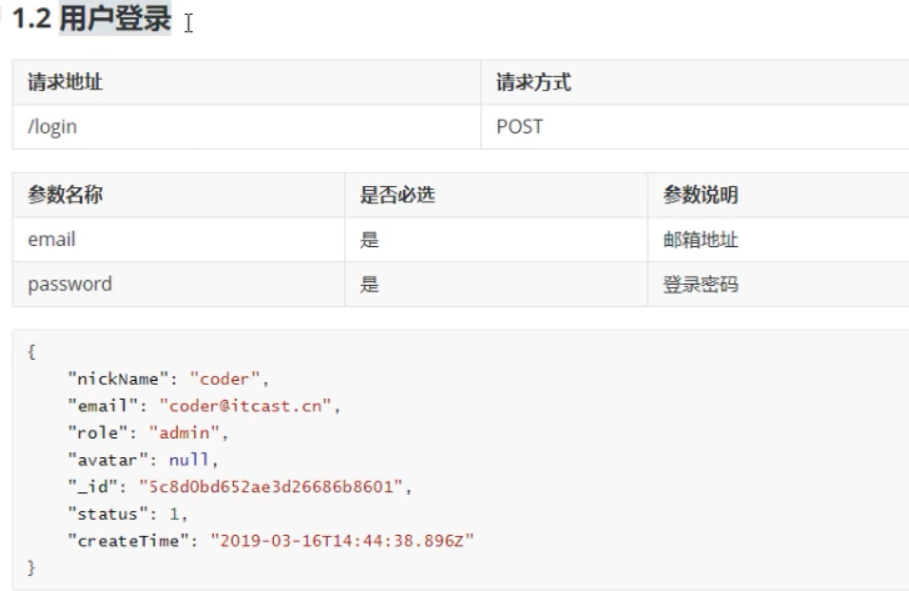
//对应下面图片接口 验证登录
$ .ajax({
type:'post',
url :' /login',
data: {
email: email,
password: password
},
success: function (response) {
//console .log(response)
//登录成功跳转到数据管理的首页面
location.href ='index.html' ;
},
error: function () {
//console. log( '登录失败')
//登录失败
alert('用户名或者密码错误')
}
})
~~~
接口
# 登录拦截
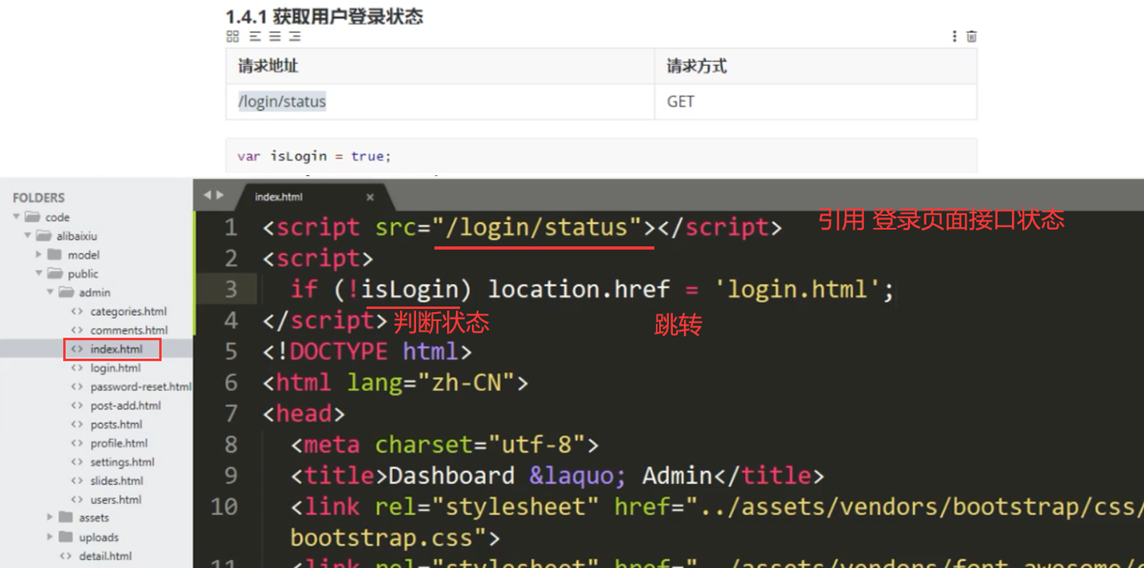
1.使用script标签加载服务器端提供的接口地址
2.判断isLogin变量的值,如果值为false, 跳转到登录页面
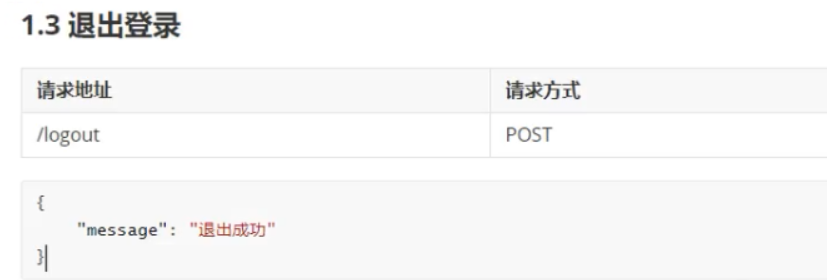
# 退出登录 返回登录界面
退出登录接口
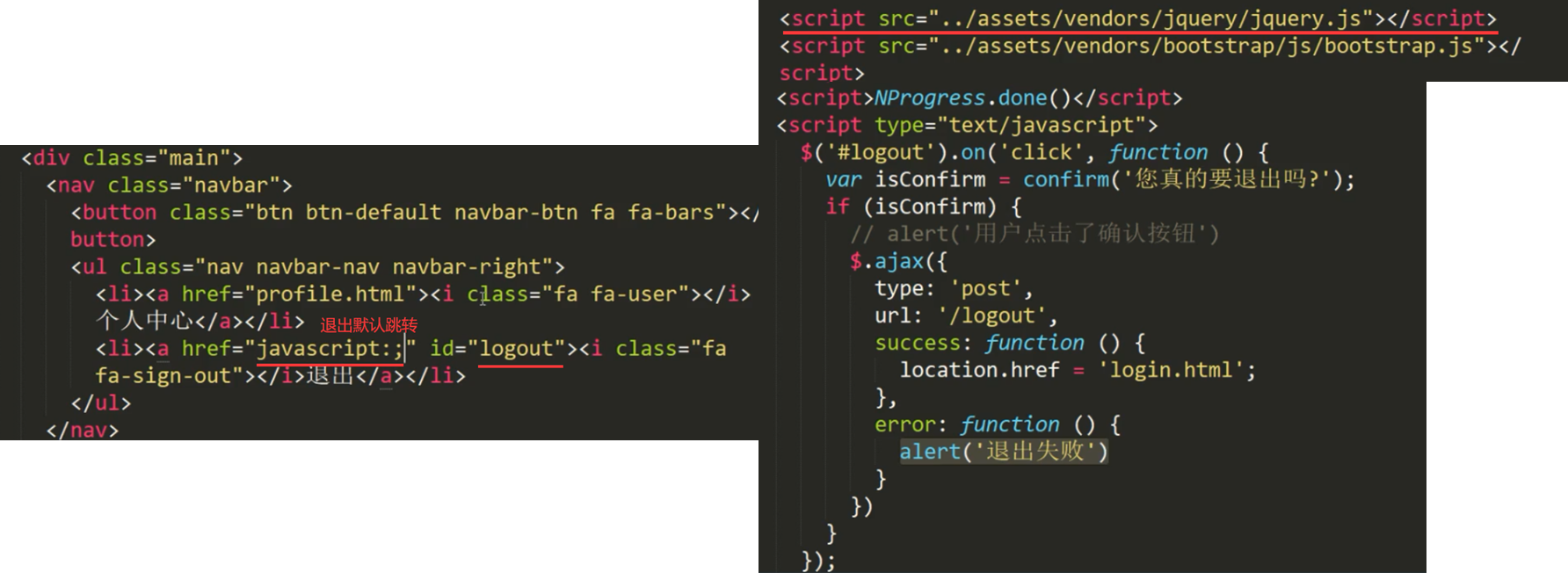
最后把下面代码单独创建一个js文件
其他页面直接引用即可`<script src=". . /assets/ js/common. js"></script>`
~~~
<script type="text/ javascript">
$( ' #logout' ).on('click', function () {
var isConfirm = confirm( '您真的要退出吗?');
if (isConfirm) {
// alert('用户点击了确认按钮')
$.ajax({
type :'post'
url:' / logout',
success: function () {
location.href = ' login.html' ;
},
error: function () {
alert('退出失败')
}
})
});
~~~
- web前端概念
- web前端工程师
- 什么是前端开发
- 前端开发需要学习什么技能
- 学习技能的介绍和知识点的掌握
- 资源
- 考证
- API
- 考试
- java规则
- 华为鲲鹏考试HCIP
- 软件
- ps切图
- VS cold 开发软件
- 插件
- 背景
- 第一阶段:html+css+js
- html
- html简介
- html骨架 &特殊符号
- img图片标签
- a标签 超链接
- 表格&列表
- 表单
- 思维导图
- css
- css
- css 过程
- css 使用方法
- css样式&运用方法
- css 选择器
- css 字体
- css 复合选择器
- css 显示
- display 标签显示 (重点)
- background 背景(重点)
- div 盒子
- 盒子 边框
- 盒子 内边距
- 盒子 外边距
- 盒子 模型布局
- 盒子 文字&插入图片
- 盒子 边框变圆角边框
- 盒子布局
- 浮动
- 定位
- 定位.
- 相对定位
- 绝对定位
- 固定定位
- 定位 水平居中
- 定位的、层叠顺序
- 定位小结
- css 思维导图
- css 技巧
- display 元素显示与隐藏
- cursor鼠标样式-用户界面样式
- 行内图片与文字垂直对齐
- 去除图片与盒子缝隙 vertical-align:middle
- 文字溢出
- css 精灵背景图
- 自动门-(背景图自动拉伸)
- 重叠边框不会加粗 margin:
- css 尖尖小三角
- 操作
- css 书写规范
- ps 工具
- ps 切片
- 清理浮动
- 背景图片水平居中&背景图半透明
- 样式继承
- 代码快捷键
- 代码简写
- CSS 3
- CSS3总结
- CSS3 动画过渡 transition:
- css 3 焦点选择器 (表单)
- css3 2D
- css3 动画
- css 3 3D动画
- 浏览器私有前缀
- html 5
- html5标签
- html5 新增input表单属性
- html5 css3属性选择器
- 第二阶段:移动web网页开发
- 移动端
- 手机基本属性
- 流式布局
- flex布局 主流
- rem布局
- rem-less
- rem开发方案
- rem开发案2
- 响应式布局
- Bootstrap前端开发框架
- 框架功能简介
- 移动端布局总结
- 实验.
- 实验
- 导航栏
- css 导航栏 (重点)
- 定位小广告
- css 页面制作
- 导航栏a 标签
- 新闻水平居中
- 内容展示 li
- 浮动导航栏
- 侧边栏给li 定高 & 行高测量
- 常用实验:内容 li块太大把另一块挤掉
- 盒子底部
- 导航栏.
- a标签导航栏
- 导航栏。
- 微信点击凹凸导航栏
- css 2D 点击下滑导航栏小三角
- 3D 点击翻转导航栏。
- 响应式开发-导航栏
- 网页内容
- 新闻内容水平居中
- 商品内容展览
- 商品内容布局
- 侧边栏
- 3D点击翻转 翻页
- 3D 点击翻转 导航栏
- 3D 动画旋转木马
- 底部下一页按钮
- css 3D 地图 热点图案
- 3D 页面等待动图
- 3D点击翻页 翻转
- 项目实验
- 网页
- 开发规范
- 页面开发
- 实验..
- 品乐购
- 移动端
- 手机端页面布局-移动京东首页
- flex 布局-携程
- 苏宁网移动端首页 rem适配布局
- 苏宁网移动端首页 rem适配布局 1
- rem适配方案flexible.js
- 框架-响应式-阿里百秀移动端首页
- 开发
- 开发移动端
- 第三阶段:JAVASCRIPT网页编程
- JavaScript
- 一:JavaScript 基础语法
- 解释型语言与编译型语言
- 标识符、关键字、保留字
- js 规范
- js 基本介绍
- js-变量
- 基本数据类型
- 数字类型 Number
- 字符串类型
- 布尔型 Boolean (对错)
- Undefined (未定义)和Null(空值)
- 检测变量的数据类型&自变量
- 数字类型转换 (页面获取转换)
- 运算符
- (判断语句 判断执行)流程控制
- 流程控制
- if 判断语句 (重点)
- 三元表达式
- 分支流程控制switch语句 (选项多个选择判断 可重点)
- JavaScript流程控制-循环
- for 循环
- 双重for循环
- while循环
- do while
- continue break 关键字
- 数组
- 函数 function
- js-作用域
- 解释器
- js对象
- 变量、属性、函数、方法的区别
- JavaScript内置对象.
- Math (数学)对象
- Date 日期对象 (要构造函数 new)
- Array 数组对象
- 字符串对象
- 1.简单类型与复杂类型
- 二:WebAPI 编程
- 1.:DOM简介
- 2. 获取元素
- 3.事件基础
- 4.操作元素
- 4.操作元素-2
- 5、节点操作
- 5.5删除节点
- 5.8 三种创建元素的区别
- 6. DOM重点核心
- 2:DOM事件高级
- 1.注册事件(绑定事件)
- 2.删除事件(解绑事件)
- 3. DOM事件流
- 4.事件对象
- 5.阻止冒泡(面试常见)
- 6.事件委托(代理、委派) (点击对象 他的父亲就响应事件)
- 7.常用的鼠标事件
- 8.常用的键盘事件
- 3:BOM
- 2.窗口加载事件
- 3.定时器
- 3.6 this
- 4. JS执行机制
- 5. location对象
- 6. navigator对象
- 7. history对象
- 4:PC端网页特效
- 三大系列总结
- mouseenter和mouseover的区别 (面试题)
- 1.元素偏移量offset系列
- 2.元素可视区client系列
- 3.元素滚动scroll 系列
- 4.动画函数封装 (轮播图会使用)
- 5.常见网页特效案例—轮播图
- 5.1 节流阀
- 5.常见网页特效案例—返回顶部
- 筋斗云
- 5:移动端网页特效
- 1.触屏事件
- classList属性 (添加类) classList属性
- 移动端:轮播图
- 移动端:返回顶部
- 2.2 click(点击)延时解决方案
- 3.移动端常用开发插件
- 4.移动端常用开发框架
- 1.本地存储 (可以作为历史记录)
- 三:jQuery快速开发
- 1. jQuery快速开发
- 2. jQuery的基本使用
- 2. jQuery常用API
- 1. jQuery选择器
- 2. jQuery样式操作
- 3. jQuery效果(动画效果)
- 5. jQuery属性操作
- 6. jQuery内容文本值
- 6. jQuery元素操作
- 3. jQuery事件
- 1. jQuery事件注册
- 2. jQuery事件处理
- 3. jQuery事件对象
- 4. jQuery对象拷贝
- 5. jQuery多库共存
- 6.jQuery插件
- ToDoList 学习记录
- 7. jQuery尺寸、位置操作
- 1.5链式编程
- 四:JavaScript高级(含ES6)
- 一:面向对象和类的继承
- 2. ES6中的类和对象
- 3.类的继承
- 二:构造函数和原型
- 1.构造函数
- 1.11扩展内置对象
- 2.继承
- 3. ES5中的新增方法
- 三:函数进阶
- 1.函数的定义和调用
- 2. this
- 3.严格模式
- 4.高阶函数
- 5.闭包
- 6.递归
- 四:正则表达式
- 2.正则表达式在JavaScript中的使用
- 3.正则表达式中的特殊字符
- 4.正则表达式中的替换
- 五:ES6简介(版本新增语句)
- 声明
- 解构赋值
- 剩余参数
- Array(数组)的扩展方法
- String的扩展方法
- Set数据结构(过滤重复参数)
- 第四阶段:NODE.JS与AJAX
- node.js
- 0、概述
- 1、node 无法运行
- 2、node 使用
- 0、node.js组成
- 1、Node.js模块化开发 (exports 导出) (require 导入)
- 2、系统模块
- 0、读取 fs.reaFile('文件路径文件名称' [, '文件编码'],callback) ;
- 1、写入 fs.writeFile('文件路径/文件名称' ,'数据',callback) ;
- 2、系统模块path路径操作 path.join('路径','路径',...)
- 3、第三方模块
- 4、Node.js中模块的加载机制
- 1、服务器端基础概念
- 0、创建web服务器
- 1、HTTP协议
- 2、HTTP请求与响应处理
- 3、路由 (页面切换路径)
- 4、静态资源
- 5、动态资源(重点)
- 6、Node.js异步编程
- 7、Node.js中的异步API
- 8、异步函数
- 2、前后端交互 MongoDB+Express
- 1.数据库概述及环境搭建
- 数据库操作
- 2、模板引擎的基础概念
- 3、Express框架简介及初体验
- 3、node 项目
- 0、node实战
- 1、登录
- 2、密码加密 修改小不足 数据库密码安全
- 3、用户登录 页面拦截
- 4、新增用户
- 5、Joi JavaScript对象的规则描述语言和验证器。
- 6、json formatter(查看接口数据 插件) 将数据库的多条设置为对象模式方便查看
- 7、数据分页
- 8、用户信息修改
- 9、用户信息删除
- 10、文件图片 上传数据库
- 11、文件读取
- 12、数据分页mongoose-sex-page 项目插件
- 13、mongoDB数据库添加账号
- 14、开发环境与生产环境
- 15、第三方模块config (文件拆分后,便于管理) 项目插件
- 16、文章评论
- 4、前后端交互Ajax
- 0、Ajax基础
- 0、Ajax函数封装
- 1、模板引擎
- 2、案例:验证邮箱地址唯一性 搜索框内容自动提示 省市区三级联动 案例:腾讯天气
- 1、验证邮箱地址唯一性
- 2、搜索框内容自动提示
- 3、省市区三级联动
- 4、案例:腾讯天气
- 3、FormData对象的作用
- 1、FormData对象的实例方法
- 2、FormData二进制文件上传
- 3、FormData文件上传进度展示
- 4、FormData文件上传图片即时预览
- 4、同源政策—Ajax请求限制
- 5、CORS跨域资源共享
- 6、访问非同源数据服务器端解决方案
- 7、cookie复习-Ajax技术发送跨域请求时,请求中携带cookie信息
- 1、$.ajax() 方法概述
- 作用:发送jsonp请求。
- 2、$.get()、$.post()方法概述
- 3、Todo案例
- 4、jQuery中Ajax全局事件
- 5、RESTful风格的API
- 6、XML基础
- 7、Git
- 8、Github
- 9、案例:NODE与AJAX2-阿里百秀
- 0、模板引擎
- 1、模板语法
- 2、项目简介-用户管理
- 1、用户管理 1.功能模块
- 2、开发模式
- 3、项目架构
- 4、项目运行环境搭建 (重点)
- 5、项目功能
- 1、登录功能
- 2、用户管理功能-添加用户
- 3、用户列表展示
- 4、修改用户信息功能 (页面jq渲染 触发事件 委托 父盒子 重点)
- 5、删除用户功能 (页面jq渲染 触发事件 委托 父盒子 重点)
- 6、批量删除用户
- 7、登录用户密码修改
- 6.文章-分类管理
- 1、添加分类
- 2、分类数据展示
- 3、修改分类
- 4、删除分类
- 7、文章-添加(写文章)
- 1、添加文章
- 2、文章列表数据展示
- 3、页面展示-分页
- 4、文章筛选
- 5、文章编辑
- 8、评论
- 1、评论列表展示
- 2、分页模板
- 3、评论删除
- 9、首页仪表盘-文章数量展示
- 10、图片轮播
- 11、网站设置
- 1、检查用户登录状态
- 2、首页展示
- 1、轮播图
- 2、热门推荐
- 3、点赞
- 4、搜索功能
- 5、评论功能
- 第五阶段:VUE.JS项目实战
- 0、vue 下载
- 1、vue基础
- 0、概述
- 1、vue基本使用
- 2、Vue模板语法
- 0、模板语法概览
- 1、指令
- 2、双向数据绑定
- 3、事件绑定
- 4、属性绑定
- 5、样式绑定
- 6、分支循环结构
- 基础案例:tab选择卡
- 3、常用特性概览
- 1、表单操作
- 2、自定义指令
- 3、计算属性
- 4、侦听器
- 5、过滤器 (格式化 数据 时间等)
- 6、生命周期
- 7、案例:补充知识(数组相关API)
- 8、案例:图书管理
- 4、Vue组件化开发
- 0、组件化开发-总结流程
- 1、组件注册
- 2、调试工具安装
- 3、组件间的数据交互方式 (template 模板)
- 1、父组件向子组件传值
- 2、子组件向父组件传值
- 3、非父子组件间传值
- 4、组件插槽
- 4、组件化开发-购物车案例
- 5、Vue全家桶-前后端交互
- 1、前后端交互模式
- 2、Promise用法
- 1、Promise基本用法
- 2、基于Promise处理Ajax请求
- 3、then参数中的函数返回值
- 4、Promise常用的API
- 3、接口调用-fetch用法
- 4、接口调用-axios用法
- 5、接口调用-async/await用法
- 6、基于接口的案例-基于后台接口重构图书管理案例
- 6、Vue全家桶-前端路由
- 1、 vue-router的基本使用
- 2、路由重定向
- 3、vue-router嵌套路由
- 4、动态匹配路由
- 1、动态路由使用
- 2、路由组件传递参数
- 5、vue-router命名路由
- 6、vue-router编程式导航 (页面跳转)
- 7、基于vue-router的案例-后台路由管理
- 2、前端工程化:ES6模块化和webpack打包
- 1、模块化相关规范
- 1、ES6模块化的基本语法
- 2、webpack
- 1、webpack中的加载器
- 3、Vue单文件组件
- 1、webpack中配置vue组件的加载器
- 2、在webpack项目中使用vue
- 3、webpack打包发布
- 4、Vue脚手架
- 1、Vue脚手架的自定义配置
- 5、Element-Ul的基本使用
- 3、Vue实战项目:电商管理系统(Element-UI)
- 项目码云
- 0、项目初始化
- 1、后台项目的环境安装配置
- day01-项目初始化登录功能开发
- 0、删除不要的组件
- 1、登录功能实现
- 1、路由导航首位控制访问权限
- 2、退出功能
- 3、语法警告
- 4、优化 element-ui 按需组件的导入形式.
- 5、提交登录功能代码
- day02-用户列表功能开发
- 1、主页布局
- day03-权限管理功能开发
- day04-分类管理开发
- day04-参数管理
- day05-商品列表功能开发-数据获取配置接口(重点)
- day06-订单管理功能开发
- day06-项目优化_上线-项目优化策略
- day07-项目优化上线
- 1、项目优化
- 1、项目优化策略
- 2、通过externals加载外部CDN资源
- 3、通过CDN优化ElementUl的打包
- 4、首页内容定制
- 5、路由懒加载
- 2、项目上线--项目上线相关配置
- 4、vue 模板
- 5、Vuex项目实战
- 1、Vuex概述
- 2、 Vuex的基本使用
- 3、Vuex的核心概念
- 4、基于Vuex的案例—Todos