
Docker 是一个开源的容器引擎,可以轻松地为任何应用创建一个轻量级的、可移植的和自给自足的容器。它可以帮助我们更快地交付应用。Docker 可将应用程序和基础设施层隔离,并且能将基础设施当作程序一样进行管理。使用 Docker,可更快地打包、测试以及部署应用程序,并可减少从编写到部署运行代码的周期。
我们先从官方提供的 Docker 架构图来讲起。
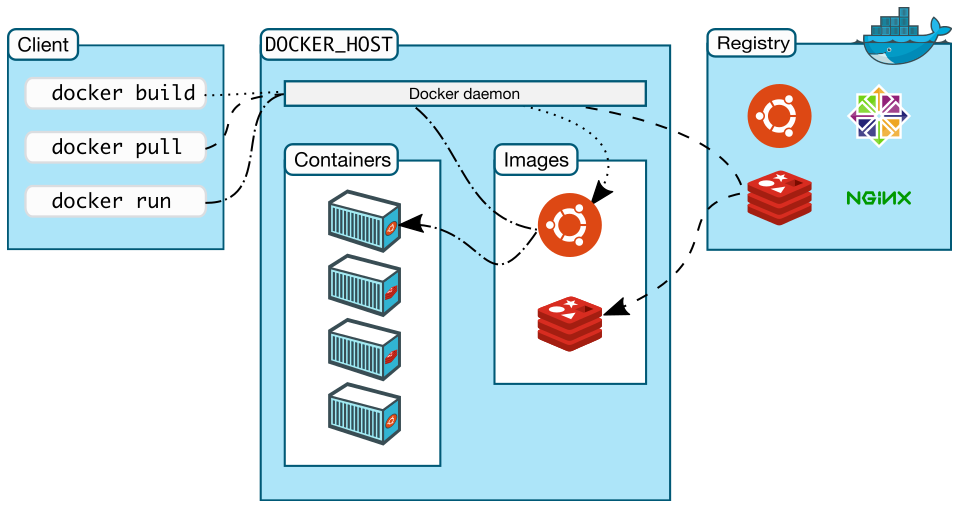
* Docker daemon(Docker 守护进程)
Docker daemon 是一个运行在宿主机(DOCKER\_HOST)的后台进程。我们可通过 Docker 客户端与之通信。
* Client(Docker 客户端)
Docker 客户端是 Docker 的用户界面,它可以接受用户命令和配置标识,并与 Docker daemon 通信。图中,docker build 等都是 Docker 的相关命令。
* Images(Docker 镜像)
Docker 镜像是一个只读模板,它包含创建 Docker 容器的说明。它和系统安装光盘有点像——我们使用系统安装光盘安装系统,同理,我们使用 Docker 镜像运行 Docker 镜像中的程序。
* Container(容器)
容器是镜像的可运行实例。镜像和容器的关系有点类似于面向对象中,类和对象的关系。我们可通过 Docker API 或者 CLI 命令来启停、移动和删除容器。
* Registry
Docker Registry 是一个集中存储与分发镜像的服务。我们构建完 Docker 镜像后,就可在当前宿主机上运行。但如果想要在其他机器上运行这个镜像,我们就需要手动拷贝。此时,我们可借助 Docker Registry 来避免镜像的手动拷贝。
一个 Docker Registry 可包含多个 Docker 仓库;每个仓库可包含多个镜像标签;每个标签对应一个 Docker 镜像。这跟 Maven 的仓库有点类似,如果把 Docker Registry 比作 Maven 仓库的话,那么 Docker 仓库就可理解为某 jar 包的路径,而镜像标签则可理解为 jar 包的版本号。
Docker Registry 可分为公有 Docker Registry 和私有 Docker Registry。最常用的 Docker Registry 莫过于官方的 Docker Hub,这也是默认的 Docker Registry。Docker Hub 上存放着大量优秀的镜像,我们可使用 Docker 命令下载并使用。
#### Docker 安装
安装方式参考[官方文档](https://docs.docker.com/install/linux/docker-ce/ubuntu/)。
* 系统要求: Ubuntu 为例
* 移除非官方软件包
~~~bash
sudo apt-get update && sudo apt-get install \
apt-transport-https \
ca-certificates \
curl \
gnupg-agent \
software-properties-common
~~~
* 添加官方 GPG key
~~~bash
curl -fsSL https://download.docker.com/linux/ubuntu/gpg | sudo apt-key add -
~~~
* 安装 Docker
~~~bash
sudo apt-get update && sudo apt-get install docker-ce docker-ce-cli
~~~
* 在生产系统中,可能需要安装指定版本的 Docker,而不是最新的,先列出可用的 Docker 版本:
~~~bash
apt-cache madison docker-ce
~~~
* 选择版本号,开始安装,比如安装`5:18.09.1~3-0~ubuntu-xenial`版本:
~~~bash
sudo apt-get install docker-ce=5:18.09.1~3-0~ubuntu-xenial docker-ce-cli=5:18.09.1~3-0~ubuntu-xenial
~~~
* 测试是否安装成功,从镜像仓库拉取并运行一个容器:
~~~bash
sudo docker run hello-world
~~~
如果执行完该指令后,控制台打印出如下一些信息并推出,说明 Docker 已经安装成功。
~~~bash
$ docker run hello-world
Unable to find image 'hello-world:latest' locally
latest: Pulling from library/hello-world
1b930d010525: Pull complete
Digest: sha256:92c7f9c92844bbbb5d0a101b22f7c2a7949e40f8ea90c8b3bc396879d95e899a
Status: Downloaded newer image for hello-world:latest
Hello from Docker!
This message shows that your installation appears to be working correctly.
To generate this message, Docker took the following steps:
1. The Docker client contacted the Docker daemon.
2. The Docker daemon pulled the "hello-world" image from the Docker Hub.
(amd64)
3. The Docker daemon created a new container from that image which runs the
executable that produces the output you are currently reading.
4. The Docker daemon streamed that output to the Docker client, which sent it
to your terminal.
To try something more ambitious, you can run an Ubuntu container with:
$ docker run -it ubuntu bash
Share images, automate workflows, and more with a free Docker ID:
https://hub.docker.com/
For more examples and ideas, visit:
https://docs.docker.com/get-started/
~~~
* 你也可以查看安装的版本号:
~~~bash
$ docker version
Client: Docker Engine - Community
Version: 18.09.1
API version: 1.39
Go version: go1.10.8
Git commit: 6247962
Built: Sun Feb 10 04:12:39 2019
OS/Arch: darwin/amd64
Experimental: false
Server: Docker Engine - Community
Engine:
Version: 18.09.1
API version: 1.39 (minimum version 1.12)
Go version: go1.10.6
Git commit: 6247962
Built: Sun Feb 10 04:13:06 2019
OS/Arch: linux/amd64
Experimental: true
~~~
- 微服务开发框架 SpringCloud
- 单体应用
- 如何解决单体应用架构中存在的问题
- 如何实现微服务架构以及技术选型
- Spring Cloud 特点
- 开始使用 Spring Cloud 实战微服务
- 快速搭建开发脚手架
- 编写服务提供者-用户微服务
- 编写服务消费者【电影微服务】
- 整合 Spring Boot Actuator
- 开始整合
- 微服务注册与发现
- 编写服务发现服务
- 注册微服务至 Eureka Server
- 更新服务提供者 (用户微服务)
- 更新服务消费者 (电影微服务)
- 查看注册结果
- Ribbon 客户端负载均衡
- Ribbon 简介
- 引入 Ribbon
- Ribbon 入门
- Feign 声明式 REST 调用
- 改造项目
- Hystrix 容错处理
- 实现容错的手段
- Hystrix 简介
- 开始使用
- 测试
- Zuul 网关
- 网关是什么
- Spring Cloud Zuul 介绍
- Zuul 入门使用
- 网关测试
- Spring Cloud Config 配置管理
- 配置中心的作用
- Spring Cloud Config 简介
- Spring Cloud Config 使用
- Sleuth 与 Zipkin 结合图形化展示
- 分布式追踪相关基础概念
- Spring Cloud Sleuth 介绍及使用
- Zipin 简介
- Docker 入门
- 云原生概念
- Docker 容器介绍
- Docker 常用命令
- 微服务运行在 Docker 之上
- Dockerfile 及其常见指令介绍
- 改造 Eureka Server 微服务
- Docker Compose 编排微服务
- 安装 Compose
- Compose 快速入门
- Compose 编排 SpringCloud微服务
- 将 Eureka 等微服务运行在 Docker 容器中
- Docker-Compose 编排文件的编写
- 通过 Docker Compose 启动、停止
- Compose编排Spring Cloud微服务2
- Docker-Compose 来部署一个双节点的 Eureka 集群