
下面来将前面的例子用 Feign 改写,让其达到与 Ribbon + RestTemplate 相同的效果。
* 创建一个 Maven 项目 microservice-consumer-movie-feign
~~~bash
mvn archetype:generate -DgroupId=com.shiyanlou -DartifactId=microservice-consumer-movie-feign -DarchetypeArtifactId=maven-archetype-quickstart
~~~
* 复制实验四中的项目`microservice-consumer-movie`中的内容 ,将`ArtifactId`修改为`microservice-consumer-movie-feign`。
* 在 pom.xml 中添加依赖:
~~~xml
<dependency>
<groupId>org.springframework.cloud</groupId>
<artifactId>spring-cloud-starter-openfeign</artifactId>
</dependency>
~~~
* 修改`App.java`加注解:启动类上添加`@EnableFeignClients`。
~~~java
package com.shiyanlou;
import org.springframework.boot.SpringApplication;
import org.springframework.boot.autoconfigure.SpringBootApplication;
import org.springframework.context.annotation.Bean;
import org.springframework.web.client.RestTemplate;
import org.springframework.cloud.client.discovery.EnableDiscoveryClient;
import org.springframework.cloud.openfeign.EnableFeignClients;
@SpringBootApplication
@EnableDiscoveryClient
@EnableFeignClients
public class App {
public static void main(String[] args) {
SpringApplication.run(App.class, args);
}
}
~~~
* 编写 Feign Client,`UserFeignClient.java`:
~~~java
package com.shiyanlou;
import org.springframework.cloud.openfeign.FeignClient;
import org.springframework.web.bind.annotation.GetMapping;
import org.springframework.web.bind.annotation.PathVariable;
import com.shiyanlou.User;
@FeignClient(name = "microservice-provider-user")
public interface UserFeignClient {
@GetMapping("/users/{id}")
User findById(@PathVariable("id") Long id);
}
~~~
这样一个 Feign Client 就写完啦!其中,`@FeignClient`注解中的`microservice-provider-user`是想要请求服务的名称,**这是用来创建 Ribbon Client 的(Feign 整合了 Ribbon)**。在本例中,由于使用了 Eureka,所以 Ribbon 会把`microservice-provider-user`解析成 Eureka Server 中的服务。除此之外,还可使用 url 属性指定请求的 URL(URL 可以是完整的 URL 或主机名),例如`@FeignClient(name = "abcde", url = "http://localhost:8000/")`。**此外,name 可以是任意值,但不可省略,否则应用将无法启动**!
* Controller:
~~~java
package com.shiyanlou;
import org.springframework.beans.factory.annotation.Autowired;
import org.springframework.web.bind.annotation.GetMapping;
import org.springframework.web.bind.annotation.PathVariable;
import org.springframework.web.bind.annotation.RequestMapping;
import org.springframework.web.bind.annotation.RestController;
@RequestMapping("/movies")
@RestController
public class MovieController {
@Autowired
private UserFeignClient userFeignClient;
@GetMapping("/users/{id}")
public User findById(@PathVariable Long id) {
return this.userFeignClient.findById(id);
}
}
~~~
只需使用 @Autowire 注解,即可注入上面编写的 Feign Client。
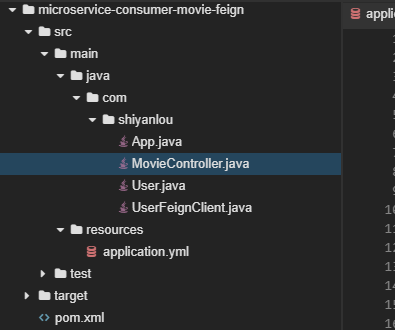
* 最终结构:
- 微服务开发框架 SpringCloud
- 单体应用
- 如何解决单体应用架构中存在的问题
- 如何实现微服务架构以及技术选型
- Spring Cloud 特点
- 开始使用 Spring Cloud 实战微服务
- 快速搭建开发脚手架
- 编写服务提供者-用户微服务
- 编写服务消费者【电影微服务】
- 整合 Spring Boot Actuator
- 开始整合
- 微服务注册与发现
- 编写服务发现服务
- 注册微服务至 Eureka Server
- 更新服务提供者 (用户微服务)
- 更新服务消费者 (电影微服务)
- 查看注册结果
- Ribbon 客户端负载均衡
- Ribbon 简介
- 引入 Ribbon
- Ribbon 入门
- Feign 声明式 REST 调用
- 改造项目
- Hystrix 容错处理
- 实现容错的手段
- Hystrix 简介
- 开始使用
- 测试
- Zuul 网关
- 网关是什么
- Spring Cloud Zuul 介绍
- Zuul 入门使用
- 网关测试
- Spring Cloud Config 配置管理
- 配置中心的作用
- Spring Cloud Config 简介
- Spring Cloud Config 使用
- Sleuth 与 Zipkin 结合图形化展示
- 分布式追踪相关基础概念
- Spring Cloud Sleuth 介绍及使用
- Zipin 简介
- Docker 入门
- 云原生概念
- Docker 容器介绍
- Docker 常用命令
- 微服务运行在 Docker 之上
- Dockerfile 及其常见指令介绍
- 改造 Eureka Server 微服务
- Docker Compose 编排微服务
- 安装 Compose
- Compose 快速入门
- Compose 编排 SpringCloud微服务
- 将 Eureka 等微服务运行在 Docker 容器中
- Docker-Compose 编排文件的编写
- 通过 Docker Compose 启动、停止
- Compose编排Spring Cloud微服务2
- Docker-Compose 来部署一个双节点的 Eureka 集群