
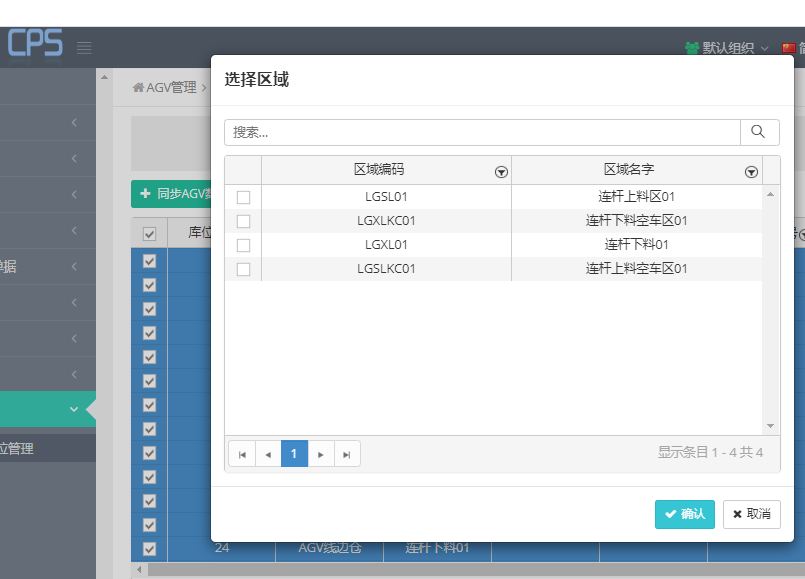
## 弹窗效果
## 作用
列表数据选择,并回调选中数据
## js 端代码
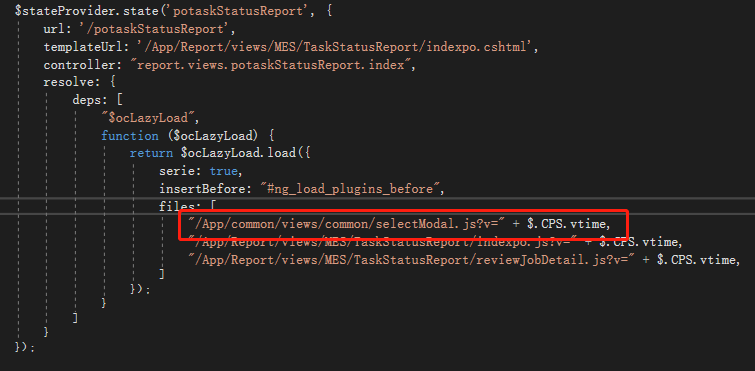
1、routes.js 路由中 添加js引用
```
"/App/common/views/common/selectModal.js?v=" + $.CPS.vtime,
```
2、头部添加 selectModal 对象
~~~
angular.module('app').controller('xxxx', [
'$scope', '$uibModal', 'selectModal',
function ($scope, $uibModal, selectModal) {
~~~
3、添加函数
```
vm.select = function () {
// 打开选择框
selectModal.open({
title: "选择区域",
readMethod: locationService.getRegionPage, //数据源
showFilter: true,
checkbox: true,
singleCheck: true,
parameter: { isDistinct: true }, //传的参数
height: 300,
columns: [
{ title: "区域编码", field: 'regionCode', filterable: true, headerAttributes: { style: "text-align: center;" }, attributes: { style: 'text-align: center;' } },
{ title: "区域名字", field: 'regionName', filterable: true, headerAttributes: { style: "text-align: center;" }, attributes: { style: 'text-align: center;' } },
],
filterColumns: 'regionCode|regionName', //展示信息的列表字段
retProperty: "id,regionCode,regionName", //从选中的回调数据里,选择需要的字段
callback: function (selectedValues) {
var result = selectedValues[0];
console.log(result);
console.log(selectIds);
}
});
}
```
- 命名规范
- baseService类规范
- 类创建规范
- 函数方法创建规范
- Linq规范
- API规范
- 注释规范
- EF数据迁移操作
- 常规更新
- __MigrationHistory 表没了的情况处理
- __MigrationHistory 数据记录被删
- __MigrationHistory 记录和本地更新文件不匹配
- migrate工具做数据迁移
- 同步服务
- 配置
- 错误
- ORA-03115: 不支持的网络数据类型或表示法
- MES平板常用代码
- 栏目说明
- 异步线程
- 委托(模拟触发事件)
- 添加菜单
- 添加按钮
- GridVIew列表使用
- 配置文件读写
- 弹窗提示
- 消息列表控件
- API网络接口配置
- 设置扫描枪钩子
- ScanerHook 的扫码勾子写法
- 当前全局变量
- 定时器,关闭当前窗口
- 单例模式窗口
- 配置参数
- 输入框回车事件
- 修改GridView 指定行背景颜色
- 调用窗口页面
- form窗体继承
- 控件焦点
- 串口
- 自动选择可用串口
- CPS常用代码
- 栏目说明
- 系统管理(基础模块)
- 基础数据(基础模块)
- 资料配置(基础模块)
- 质检管理
- 生产计划
- 库存交易单据(wms)
- Job 管理
- 设备管理
- 报表查询
- SMT查询
- EWI
- 消息推送服务
- 异步线程Task
- 创建权限
- 增删改查操作
- 修改
- 删除
- 添加
- 单个实体类查询
- 分页查询
- 列表查询
- 批量更新
- 发起HTTP请求
- 授权配置
- 文件上传(以excel导入为例)
- 获取当前目录的物理地址
- 使用GET的Query参数(http请求)
- 只传ID参数写法
- 关于前后端分离
- 前端
- 输入框自动大写
- 前端搜索列表页写法
- routes.js
- index.cshtml
- index.js
- 前端列表选择弹窗
- Grid高度自适应
- 弹窗提示
- 时间类型格式化
- 自动填充
- Grid控件多选处理
- 导出csv
- Grid锁定、冻结CheckBox
- 自定义弹出框写法
- 获取项目名词方法
- 获取当前路由信息
- 获取页面分页信息
- Grid 行详情写法
- EF 与 Dapper 同时使用方法
- EF查询扩展
- Dapper查询方式
- ISqlExecuter 查询方式
- 复杂业务处理方法(请求超时)
- 方法1:前端交互优化
- 方法2:后台任务
- 登录页面无法跳转,报错问题解决
- 重要接口
- 关于只传ID一个参数接口写法
- 添加一个单表查询、或简单页面
- 工序排序问题解决
- 数据库配置
- 工序序号排序
- 设置webconfig配置信息和使用
- 添加cookies
- 用户数据权限写法
- 字符串写法
- 日志打印
- 时间戳打印测试
- abp 依赖注入
- 编码转换
- TFS使用规范
- 申请授权
- 错误问题
- 平板提示“Object reference not ...”错误
- VS断点失效
- 对不起,在处理您的请求期间,产生了一个服务器内部错误
- 生成项目的时候没找到dll
- S2017 签名时出错: 未能对 bin\Debug\app.publish*.exe 签名。SignTool Error: No certificates were found
- CPS 提示“The build restored NuGet packages. Build the project again to include these packages in the build”
- 远程连接 报 CredSSP
- Linq 语句 “Unable to create a constant value of type 'System.Object'. ”
- 无法嵌入相互操作类
- Store update,insert,or delete statement affected
- 模块设计和打印功能
- 方式1:winform端标签模板
- 方式2:CPS网页标签模板
- 方式3:CPS打印Html网页内容
- index.cshtml
- index.js
- print.cshtml
- print.js
- CPS弹窗显示打印内容组件(JS)
- 打印代码
- AGV
- CPS端代码
- MES平板端代码
- 数据库表
- 区域类型
- EDI、WMS(U8反写)
- EDI数据库表
- WMS类型
- EDI类型
- CPS后台添加任务相关代码
- 采购到货
- 采购入库
- 领料出库(材料出库)
- 委外出库(材料出库)
- 生产工单出库(材料出库)
- 条码表
- 其他出库
- 销售出库
- 生产倒冲(材料出库)
- 执行任务(JuQuent.GoldServiceExportU8)
- 采购
- 产成品入库
- 材料出库
- SQL
- 规范语句模型
- 常用查询
- 优化案例
- Linq 转 string 输出
- 消息推送
- 基本架构
- 钉钉消息推送配置
- 微信消息推送配置
- 消息模板设置
- 接口
- 码云api