
# Swoole-Crontab(基于Swoole扩展)
## [](https://github.com/osgochina/Donkey#1%E6%A6%82%E8%BF%B0)1.概述
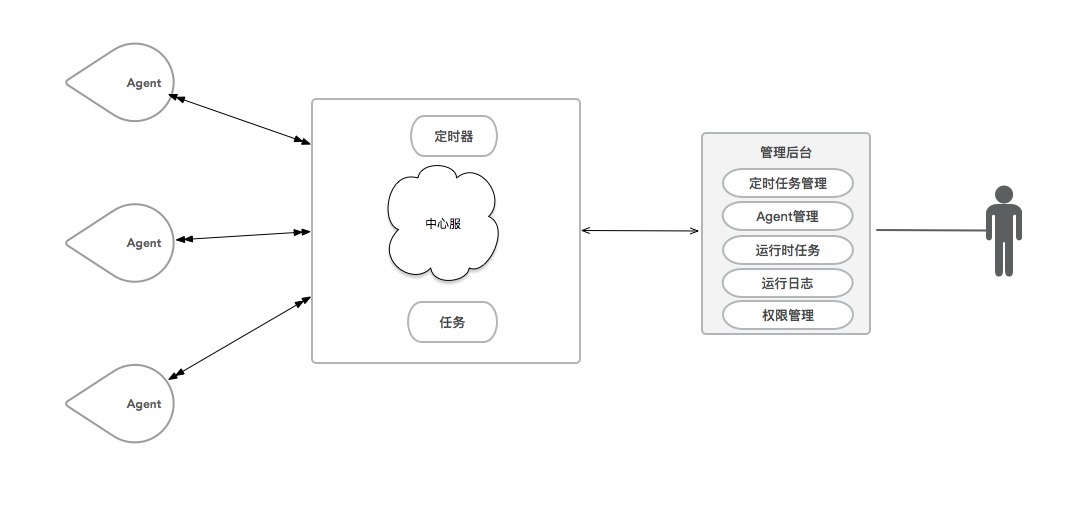
* 基于swoole的定时器程序,支持秒级处理.
* 异步多进程处理。
* 完全兼容crontab语法,且支持秒的配置,可使用数组规定好精确操作时间
* 单中心-多客户端模式,能够横向扩展
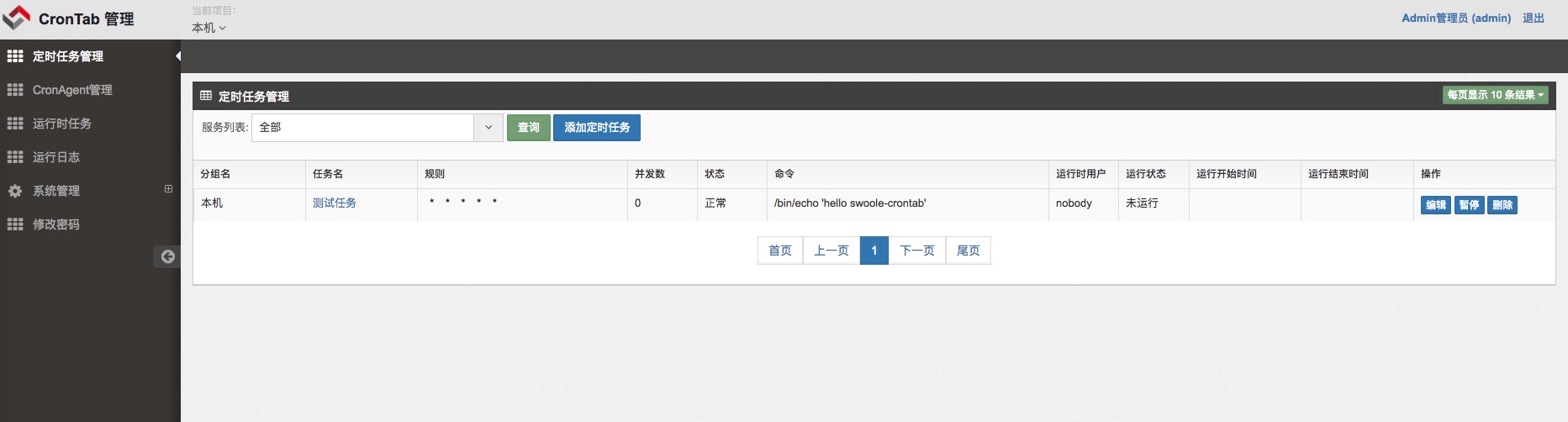
* web界面管理,增删改查任务,完整的权限控制.
* 请使用swoole扩展1.8.0+
* [v0.8版本入口](https://github.com/osgochina/swoole-crontab/tree/v0.8)
## [](https://github.com/osgochina/Donkey#2%E6%9E%B6%E6%9E%84%E5%9B%BE)2.架构图
[](https://raw.githubusercontent.com/osgochina/swoole-crontab/master/doc/x.png)
## [](https://github.com/osgochina/Donkey#3crontab%E9%85%8D%E7%BD%AE)3.Crontab配置
介绍一下时间配置
~~~
0 1 2 3 4 5
| | | | | |
| | | | | +------ day of week (0 - 6) (Sunday=0)
| | | | +------ month (1 - 12)
| | | +-------- day of month (1 - 31)
| | +---------- hour (0 - 23)
| +------------ min (0 - 59)
+-------------- sec (0-59)[可省略,如果没有0位,则最小时间粒度是分钟]
~~~
## [](https://github.com/osgochina/Donkey#4%E5%BC%80%E5%A7%8B%E4%BD%BF%E7%94%A8)4.开始使用
1.修改配置
1.1 中心服配置
~~~
/path/to/src/center/configs/dev/db.php 修改数据库配置
进入mysql数据库执行/path/to/doc/crontab.sql 的sql文件
src/center/_init.php 修改 PUBLIC_PATH swoole framework框架所在的路径
~~~
1.2 admin管理后台的配置文件修改
~~~
src/admin/configs/dev/db.php 修改数据库配置
src/admin/configs/dev/service.php 中心服启动时候监听的ip端口,需要跟中心服通讯
src/public/index.php
修改 WEBROOT 域名
修改 PUBLIC_PATH swoole framework框架所在的路径
~~~
2.下载swoole framework框架到本地/data/www/public/[framework](https://github.com/swoole/framework.git)
3.配置nginx,列子如下:
~~~
server {
listen 80;
server_name crontab.test.com;
root /data/www/wwwroot/swoole-crontab/src/public;
index index.php index.html;
location / {
if (!-e $request_filename) {
rewrite ^/(.*)$ /index.php;
}
}
location ~ \.php$ {
fastcgi_pass 127.0.0.1:9000;
fastcgi_index index.php;
fastcgi_param SCRIPT_FILENAME $document_root$fastcgi_script_name;
include fastcgi_params;
}
}
~~~
4.启动中心服
~~~
/path/to/php /path/to/src/center/center.php start -d -h 127.0.0.1 -p 8901
~~~
5.启动客户端
~~~
-h 是指中心服地址 -p 中心服端口
/path/to/php /path/to/src/agent/agent.php start -d -h 127.0.0.1 -p 8901
~~~
6.web界面访问
> 输入nginx配置的地址访问web界面,默认用户名/密码是admin/admin
7.操作步骤
~~~
请按照以上步骤操作,因为admin后台是通过接口连接上中心服来进行管理.所以必须先启动中心服,再打开admin管理后台
~~~
## [](https://github.com/osgochina/Donkey#4%E4%BD%BF%E7%94%A8%E4%BA%A4%E6%B5%81)4.使用交流
1.后台截图
[](https://raw.githubusercontent.com/osgochina/swoole-crontab/master/doc/demo.png)
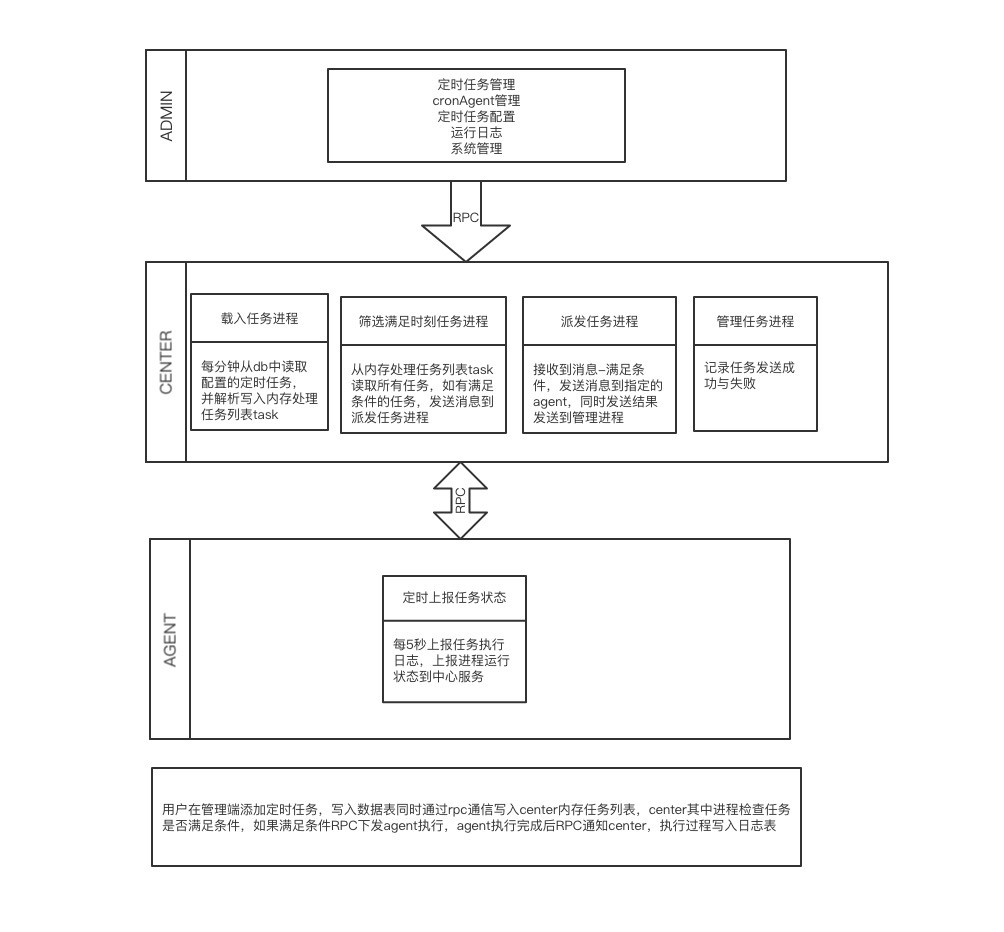
2.更加清晰的架构图.感谢@xufei100
[](https://raw.githubusercontent.com/osgochina/swoole-crontab/master/doc/xufei100.png)
QQ群:560807006
## [](https://github.com/osgochina/Donkey#5todo)5.TODO
* [ ] 去除nginx依赖
* [ ] 配置文件统一
* [ ] 去除swoole framework框架的依赖
* [ ] restful api接口
* [ ] 通过命令行管理任务
* [ ] 无中心服依赖
- 序言
- 数据库操作
- 自定义数据操作
- DBCreate
- DBUpdate
- DBList
- DBDelete
- 事务
- 插入数据
- 更新数据
- 验证场景
- ✦事务队列✦
- DBWhere
- 分页
- 分类
- 新增分类
- 编辑分类
- 删除分类
- 分类数据
- Excel
- 数据验证
- 自定义验证类
- Where技巧
- 标签和文章
- tag数据库
- TagManager
- 标签管理页面
- 标签列表页
- 新增标签
- 编辑标签
- 删除标签
- 标签&文章
- 新建标签文章
- 更新标签文章
- 删除标签文章
- 界面
- 【官方】ME.js
- 【官方】jquery-mini-enjoy.js
- bootstrap
- 前端错误页面模板
- 后台界面
- 后台页面模板框架
- 后台左边菜单
- 后台页面控制
- Search表单
- 基础界面
- Panel-Tab
- Panel-Tab基础
- 前端
- IOS禁止页面滚动
- layer技巧
- JS中通过LayUI弹出文本输入层,多个按钮回调
- 表单-Ajax
- token
- 表单验证+Ajax提交
- 前端验证
- 后端验证
- ajax
- checkbox 全选
- ajaxUploader
- ajaxText
- ajax-get
- ajax-input
- 文章
- CRM
- 用户模块
- User
- LoginData
- UserLogin
- UserUpdate
- 商城
- 商品表+SKU
- 购物车
- 订单
- 创建订单-来至于购物车
- 创建订单-来至于立即购买
- 取消订单
- 卡券
- 卡券数据库
- 插件
- 单图片上传插件
- search 搜索插件
- 富文本编辑器
- 表单零部件
- 单文件上传
- Form表单插件
- 隐藏表单
- 标题文字单行
- 文本
- 下拉框select
- CheckBox
- 单图片
- textarea
- 文件上传
- 颜色选择器
- 标签
- 微信
- jssdk
- 自定义回复
- 网页授权流程
- 网页授权
- 用户信息
- 公众号对接配置
- 第三方类库
- VUE库
- php 第三方
- H5库
- 小程序
- 消息队列 Beanstalkd
- API-3
- chrome-开发
- 采集QueryList
- moment.php
- Helper类库
- PageHistory
- FileWeChat
- Text
- Mini-Enjoy
- TODO-LIST
- 视频
- CSS
- 技术文章
- 【shop】订单延时
- IDE&工具
- system
- 路由
- swoole
- 关闭守护进程
- 基于swoole的定时器程序,支持秒级处理
- 测试
- 客户端
- 服务器端
- 入门篇
- 环境搭建及扩展安装
- Swoole的Task使用以及swoole_client
- Timer定时器、心跳检测及Task进阶实例:mysql连接池
- Swoole多端口监听、热重启以及Timer进阶:简单crontab
- Swoole的自定义协议功能的使用
- 命令行模式
- 控制台命令
- 使用Console命令、快捷方式和内建命令
- 理解控制台参数是如何被操作的
- 如何使用提问
- 如何对命令行进行彩色和样式输出
- ★如何从控制器中调用一个命令★
- 控制台输出(参数和选项)
- 冗长级别
- 自定义命令
- RestAPI
- 设计规范
- API
- 商品分类+数据
- [小程序]-新增用户登录
- 外卖平台
- 设计
- 扩展
- SSL