
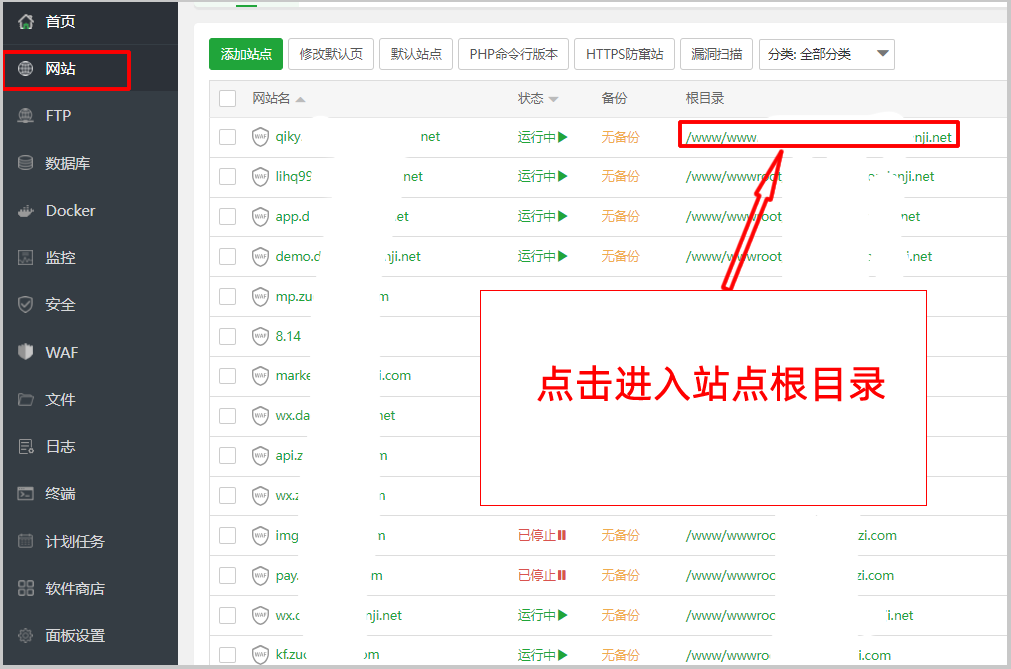
1、打开宝塔面板,点击站点,进入站点根目录
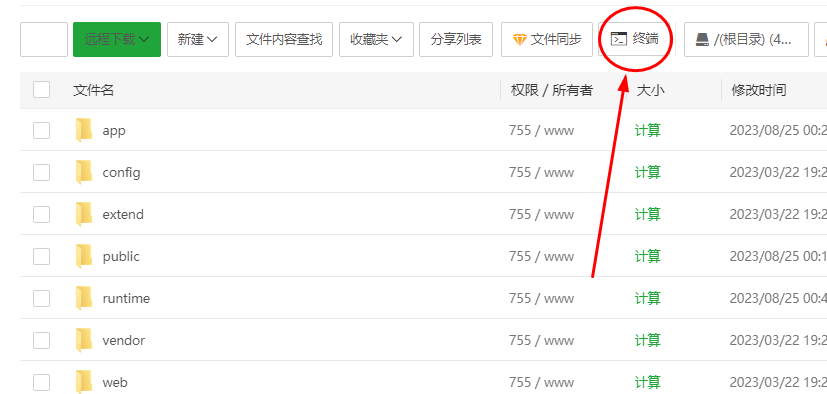
2、点击终端按钮
3、然后在宝塔终端面板,输入:php think worker:server -d
4、然后点击键盘回车键,即可开启服务
#### **备注:**
#### 一般启动方式
php think worker:server
停止服务 php think worker stop
#### 守护进程启动开启服务:
php think worker:server -d
修改代码就要重启服务
~~~powershell
php think worker:server stop 或者 php think stop
php think worker:server -d
~~~
- 安装环境
- 伪静态设置
- 绑定云服务
- 订阅模板
- 微信
- 抖音
- 发布小程序
- 必须接口
- 小程序类目
- 添加插件
- 合法域名
- 上传小程序白名单
- 上传抖音小程序
- 隐私协议
- 抖音小程序隐私协议
- 如何更新应用
- 更新后台版本
- 更新小程序前端
- 其他接口
- 腾讯地图key
- 身份实名认证
- 企业认证
- 过审说明
- 蚂蚁星球
- 抖音支付
- SSL证书安装
- 腾讯云SSL证书
- 腾讯地图无法使用
- 短信配置
- 腾讯云短信
- 阿里云短信
- 开启网站 cookies HttpOnly属性
- 快手小程序
- 抖音获取手机号
- 设置宝塔定时任务
- 常见问题
- redirect_uri域名与后台配置不一致解决办法
- 如何查看小程序路径
- 无法登陆
- 获取手机号功能异常
- 分类排序
- 小程序私信(workman即时通讯)
- 开启在线聊天
- 解除禁用函数
- 添加WS端口
- 开启WSS
- 修改配置文件
- 如何开启服务