## **流程图划分**
第三方登录流程主要分为三个阶段,分别是检测登录状态、数据格式处理、状态信息存入
## **检测登录状态**
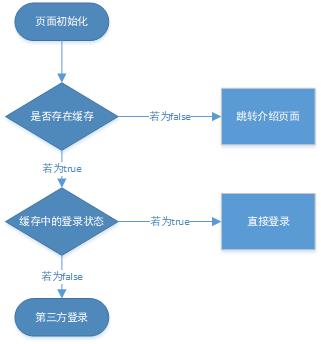
> 当应用页面初始化时,会自动检测本地应用中是否存在缓存,如果不存在缓存(`false`)则跳入到应用的介绍页面;
> 若存在缓存,进行登录状态的判断。如果缓存中存在用户登录过(`true`)的信息,则直接登录;
> 如果用户没有进行过登录或进行过退出登录操作,则第三方登录界面出现
## **数据格式处理**
> 进行第一阶段后,用户可根据自身的实际情况来判断是使用QQ登录还是微信登录;
> 当用户选择其中一方时,会交由`other_login`方法进行数据格式的转换。此方法存在的目的是会识别出用户当前所选择的第三方登录,从而进行不同的数据转换,方便应用将数据提交到数据库当中
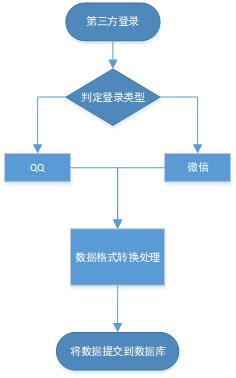
`other_login`方法所接收的参数分别是用户第三方数据(`infoRes`),第三方登录出版商(`tupe`),官方参数(`loginRes`)。当参数存在时,通过`switch`来判断是QQ还是微信登录,
> 当使用QQ登录时,进行数据字段的转换:并提交路径
```
url = '/token/sys/login-wechat';
```
```
'openid': loginRes.authResult.openid,
'nickname': infoRes.userInfo.nickname,
'gender': infoRes.userInfo.gender,
'province': infoRes.userInfo.province,
'city': infoRes.userInfo.city,
'figureurl': infoRes.userInfo.figureurl_qq
```
> 当使用微信登录时,进行数据字段的转换:并提交路径
```
url = '/token/sys/login-wechat';
```
```
'openid': loginRes.authResult.openid,
'nickname': infoRes.userInfo.nickName,
'sex': infoRes.userInfo.gender,
'province': infoRes.userInfo.province,
'city': infoRes.userInfo.city,
'country': infoRes.userInfo.country,
'headimgurl': infoRes.userInfo.avatarUrl,
'unionid': loginRes.authResult.unionid
```
## **状态信息存入**
若成功将用户登录信息提交到数据库,则执行`getRongyToken`方法,发送用户登录信息到后端的`getRongyToken`函数处理,返回的数据存入本地缓存中
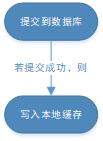
> 注意:写入本地缓存的过程中要注意数据字段的转换
```
'appKey': 'xxxxxxx',
'token': res.token,
'targetIds': res.rongyUserId,
'targetName': res.userName,
'targetAvatar': res.portrait
```
