注意:此处引入了jquery去获取操作元素
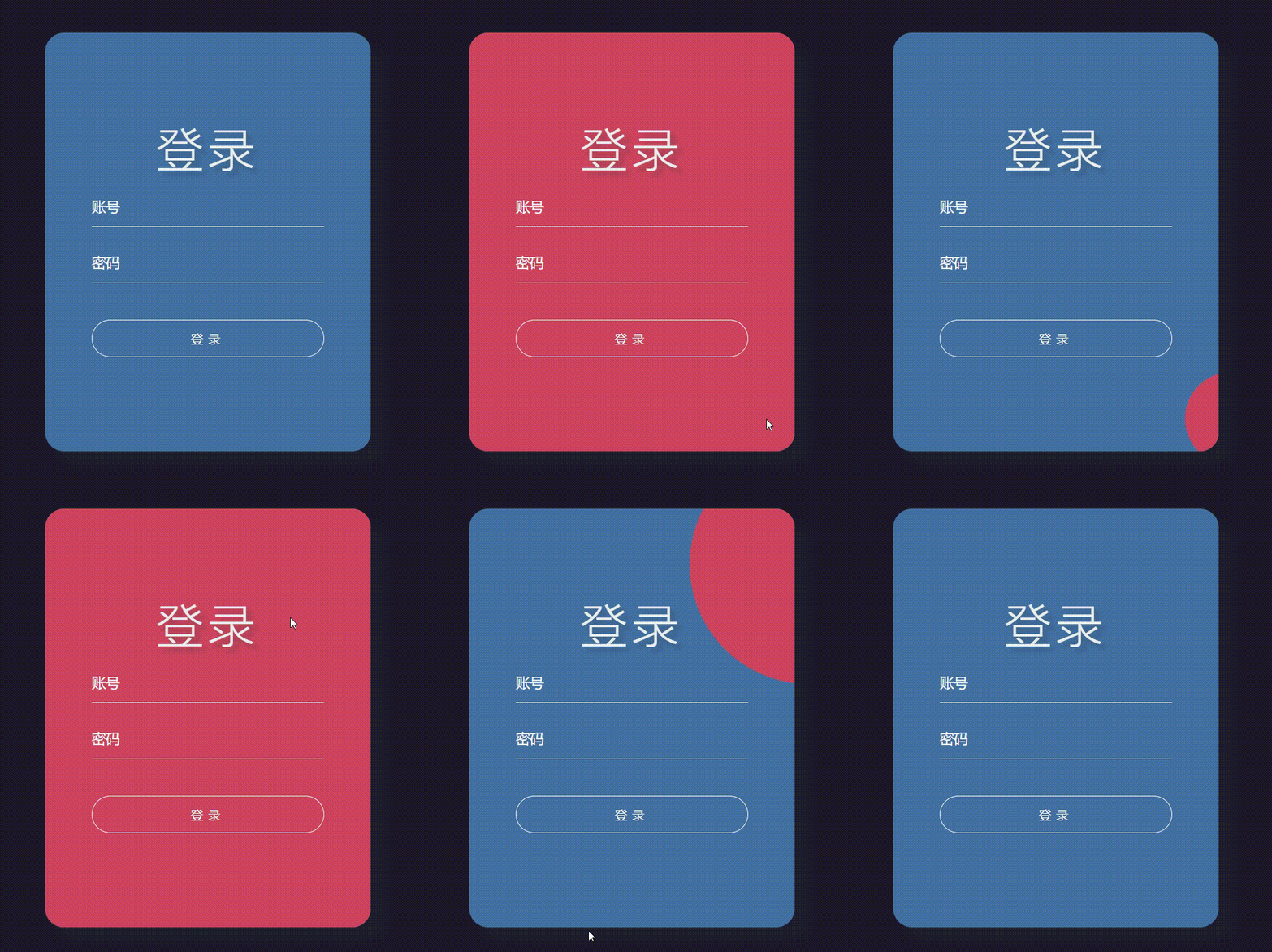
```
<!DOCTYPE html>
<html lang="en">
<head>
<meta charset="UTF-8">
<meta http-equiv="X-UA-Compatible" content="IE=edge">
<meta name="viewport" content="width=device-width, initial-scale=1.0">
<title>Document</title>
<script src="https://cdn.bootcdn.net/ajax/libs/jquery/3.6.1/jquery.js"></script>
</head>
<body>
<div class="container">
<h1>登录</h1>
<form action="">
<input class="tbx" type="text" placeholder="账号">
<input class="tbx" type="password" placeholder="密码">
<input class="sub" type="submit" value="登录">
</form>
</div>
<style>
* {
margin: 0;
padding: 0;
}
body {
/* 设置窗口的高度微100% */
height: 100vh;
/* 弹性盒子模型 */
display: flex;
/* 下面两个属性让body里的子类居中 */
justify-content: center;
align-items: center;
background-color: #1d1928;
}
.container {
display: flex;
justify-content: center;
align-items: center;
flex-direction: column;
width: 350px;
height: 450px;
border-radius: 20px;
background-color: #4471a3;
box-shadow: 15px 15px 10px rgba(33, 45, 58, 0.3);
overflow: hidden;
position: relative;
}
.container form {
width: 350px;
height: 200px;
display: flex;
justify-content: space-around;
flex-direction: column;
align-items: center;
z-index: 1;
}
.container form .tbx {
width: 250px;
height: 40px;
outline: none;
border: none;
border-bottom: 1px solid #fff;
background: none;
color: #fff;
font-size: 15px;
}
/* 设置placeholder */
.container form .tbx::placeholder {
color: #fff;
font-size: 15px;
}
.container form .sub {
width: 250px;
height: 40px;
outline: none;
border: 1px solid #fff;
border-radius: 20px;
letter-spacing: 5px;
color: #fff;
background: none;
cursor: pointer;
margin-top: 20px;
}
.container h1 {
z-index: 1;
color: #ecf0f1;
letter-spacing: 5px;
font-size: 50px;
font-weight: 100;
text-shadow: 5px 5px 5px rgba(33, 45, 58, 0.3);
}
/* 设置鼠标进入的样式 */
.container .in {
position: absolute;
top: 0;
left: 0;
display: block;
width: 0;
height: 0;
border-radius: 50%;
background: #cf455f;
transform: translate(-50%, -50%);
/* 使用in动画,持续0.5秒,缓出的时间函数,停留在最后一帧 */
animation: in 0.5s ease-out forwards;
}
/* 设置鼠标离开的样式 */
.container .out {
position: absolute;
top: 0;
left: 0;
display: block;
width: 1200px;
height: 1200px;
border-radius: 50%;
background: #cf455f;
transform: translate(-50%, -50%);
animation: out 0.5s ease-out forwards;
}
/* 设置鼠标进入时,元素的动画 */
@keyframes in {
/* 初始关键帧 */
0% {
width: 0;
height: 0;
}
/* 结尾关键帧 */
100% {
width: 1200px;
height: 1200px;
}
}
/* 设置鼠标离开时,元素的动画 */
@keyframes out {
/* 初始关键帧 */
0% {
width: 1200px;
height: 1200px;
}
/* 结尾关键帧 */
100% {
width: 0;
height: 0;
}
}
</style>
<script>
// 定义一个con绑定.container
const con = document.querySelector('.container');
// 定义两个函数开关(门)
let isIn = true; // 鼠标进去的门,默认打开
let isOut = false; // 鼠标出去的门,默认关闭
var span; // 给未出生的元素取个名字
// 监听鼠标进去的事件
con.addEventListener('mouseenter', (e) => {
// 如果进去的门是打开的,就可以执行这个函数
if (isIn) {
// 获取进入的鼠标位置
// 生成元素的位置=进入点距离窗口的距离-父盒子距离窗口的距离
let inX = e.clientX - e.target.offsetLeft;
let inY = e.clientY - e.target.offsetTop;
// 创建一个span元素,并且给它对应的出生坐标
let el = document.createElement('span');
el.style.left = inX + 'px';
el.style.top = inY + 'px';
// 添加到con对应的父元素,即container
con.appendChild(el);
$('.container span').removeClass('out'); // 移除出去动画
$('.container span').addClass('in'); // 添加进入动画
span = document.querySelector('.container span');
isIn = false; // 关闭进来的门(本能使用进入的方法)
isOut = true; // 打开出去的门(可以使用出去的方法)
}
})
// 监听鼠标出去的事件
con.addEventListener('mouseleave', (e) => {
if (isOut) {
// 获取出去的鼠标位置
// 生成元素的位置=进入点距离窗口的距离-父盒子距离窗口的距离
let inX = e.clientX - e.target.offsetLeft;
let inY = e.clientY - e.target.offsetTop;
$('.container span').removeClass('in'); // 移除进入动画
$('.container span').addClass('out'); // 添加出去动画
// 添加出去的坐标
$('.out').css('left', inX + 'px');
$('.out').css('top', inY + 'px');
isOut = false; // 关闭出去的门
// 当动画结束后再删除元素
setTimeout(() => {
con.removeChild(span); // 删除元素
isIn = true; // 打开进入的门
}, 500);
}
})
</script>
</body>
</html>
```
