
版本更新教程:
#### > > :-: ****注:版本更新通知,都会发布到官网的更新版本通知里面,如果看到自己买的程序更新版本通知了。即可继续看下去。**
> > **
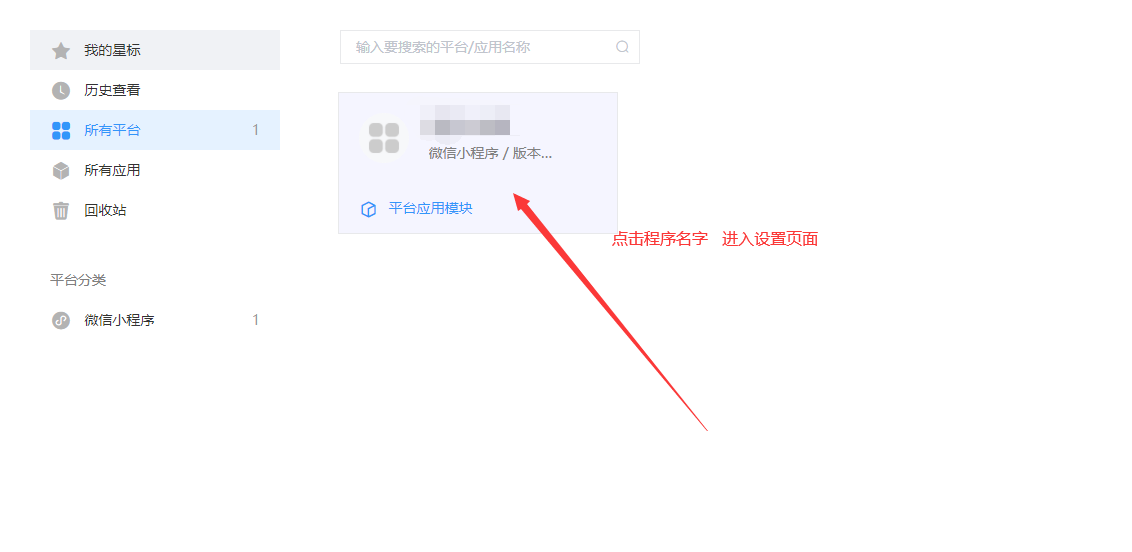
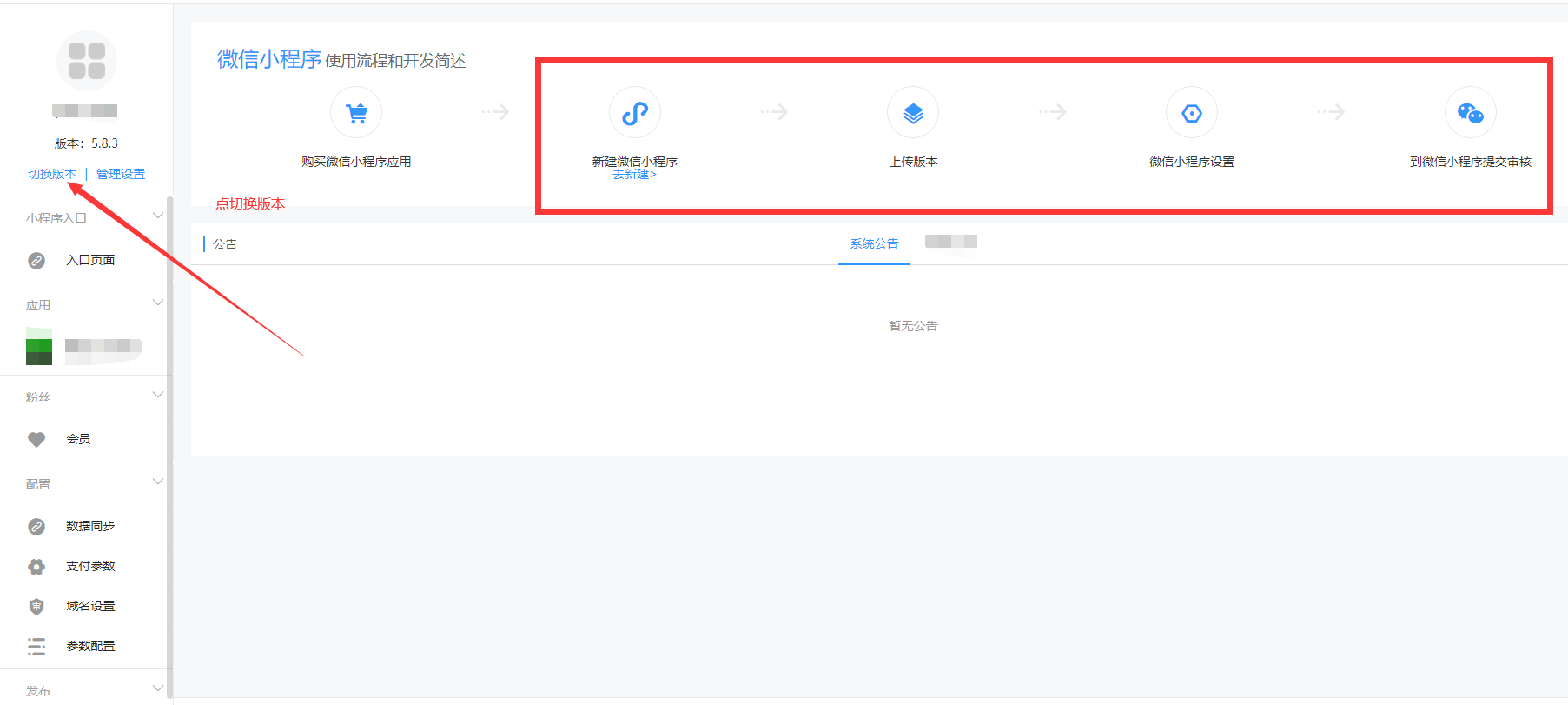
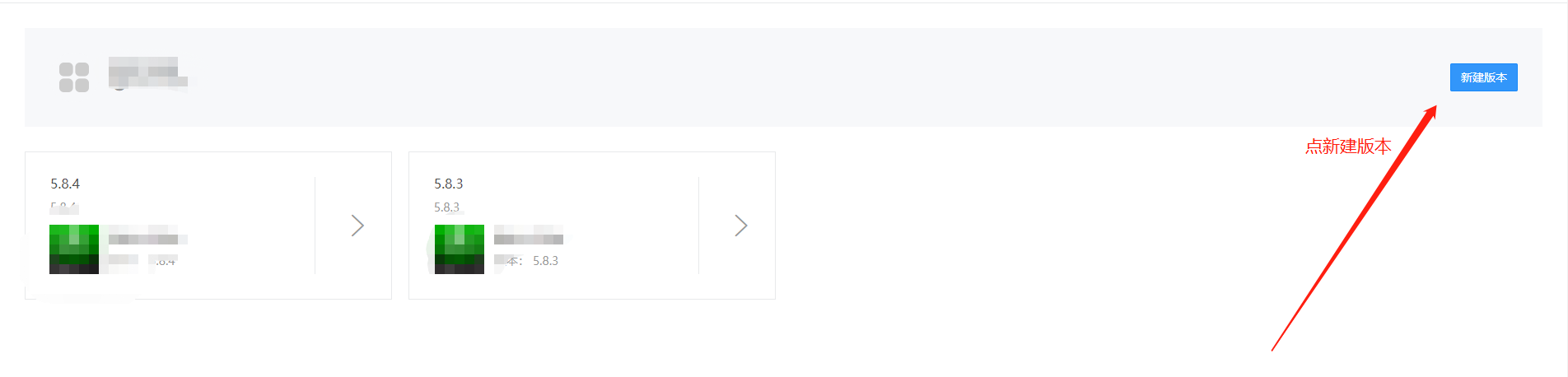
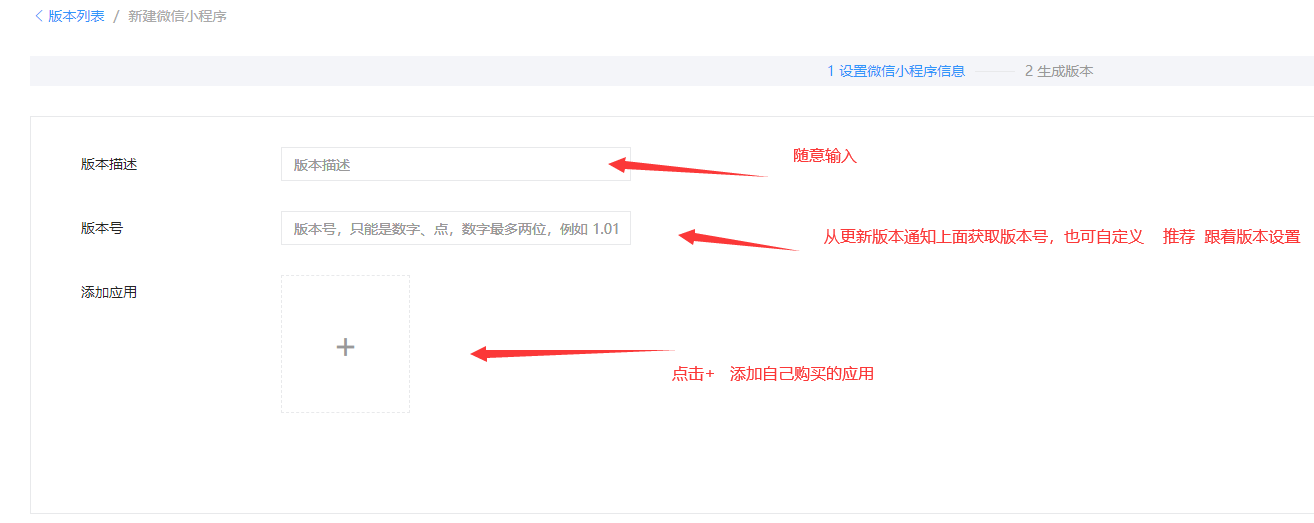
第一步:登录程序后台之后,点击程序名称,进入设置页面{**按下图所示**}
完成页面
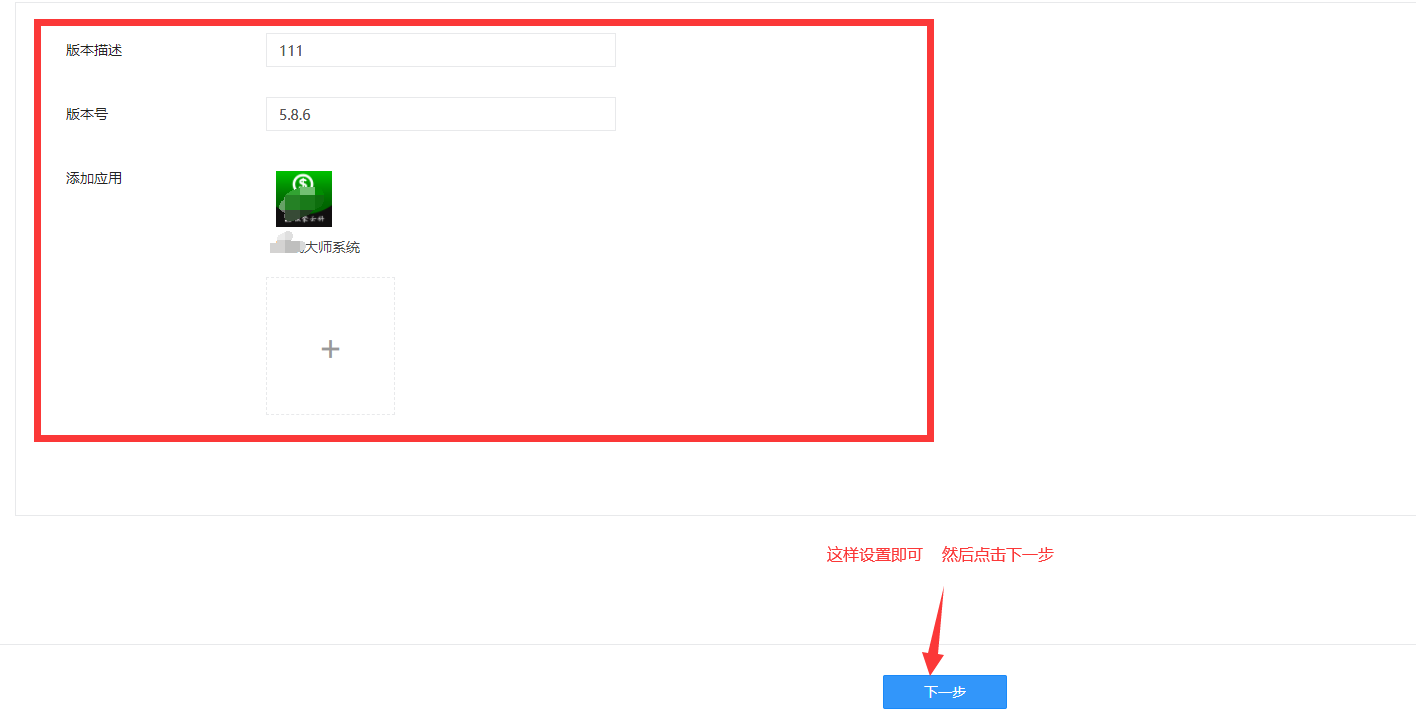
然后继续点 点生成版本

这样新版本 就切换完成了
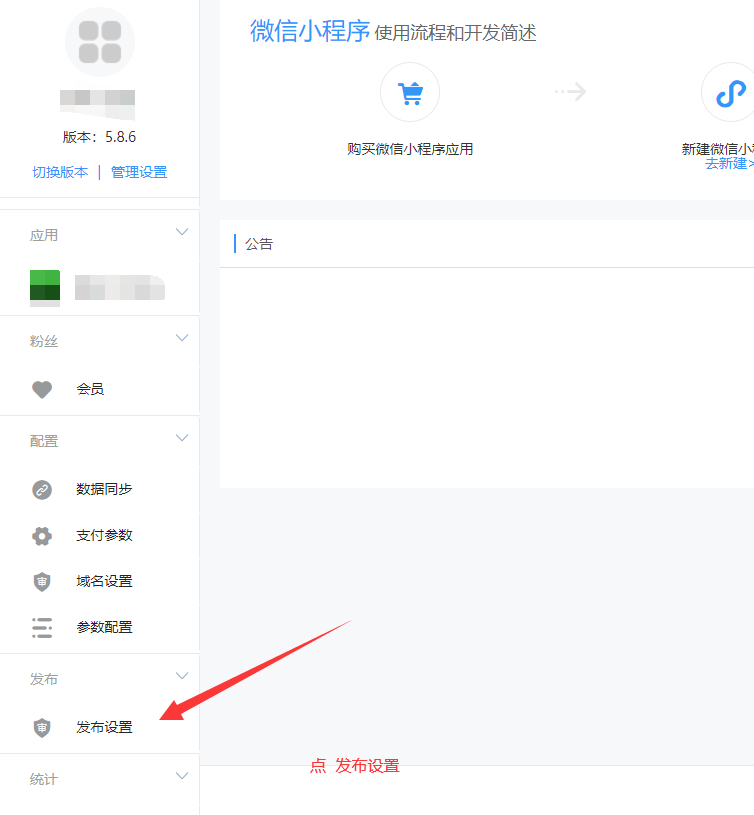
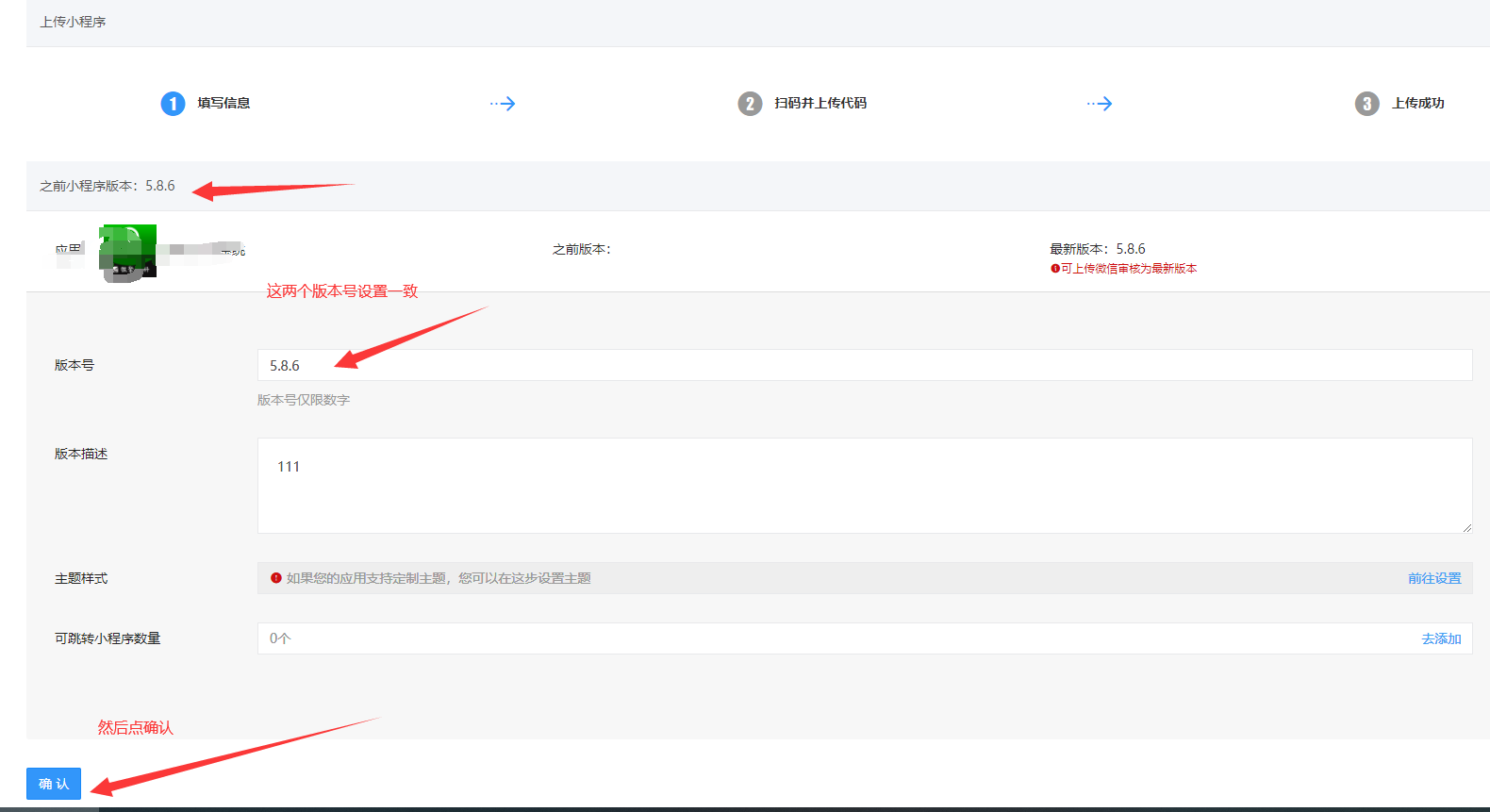
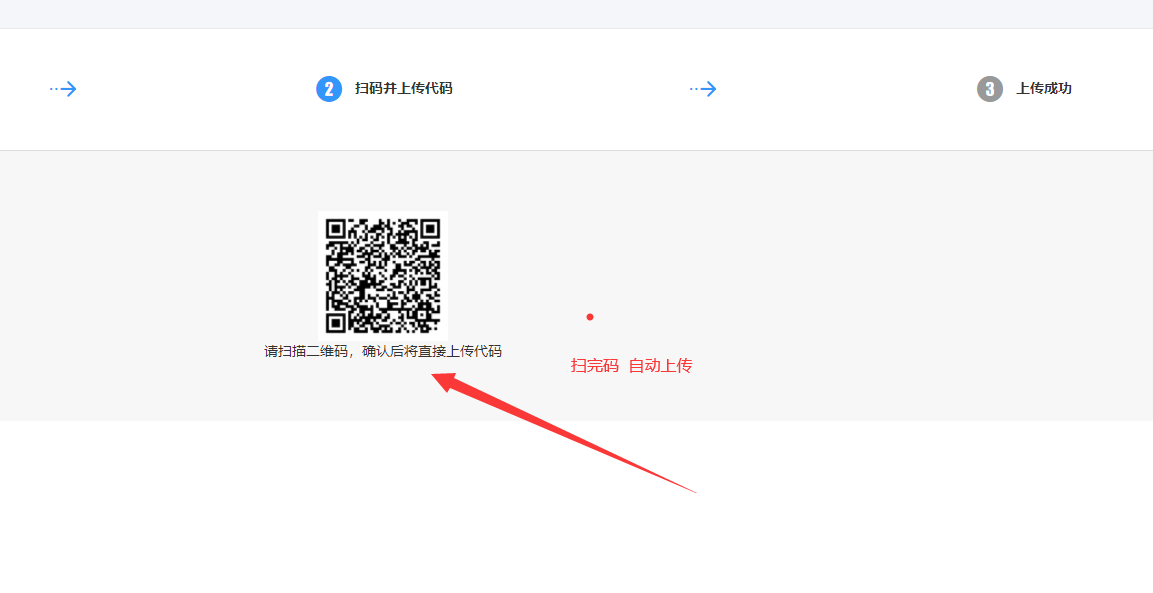
#### **第二步:发布小程序**
*****
*****
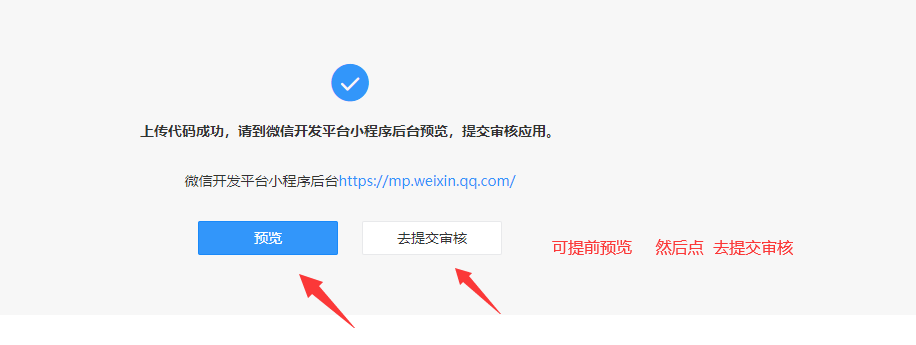
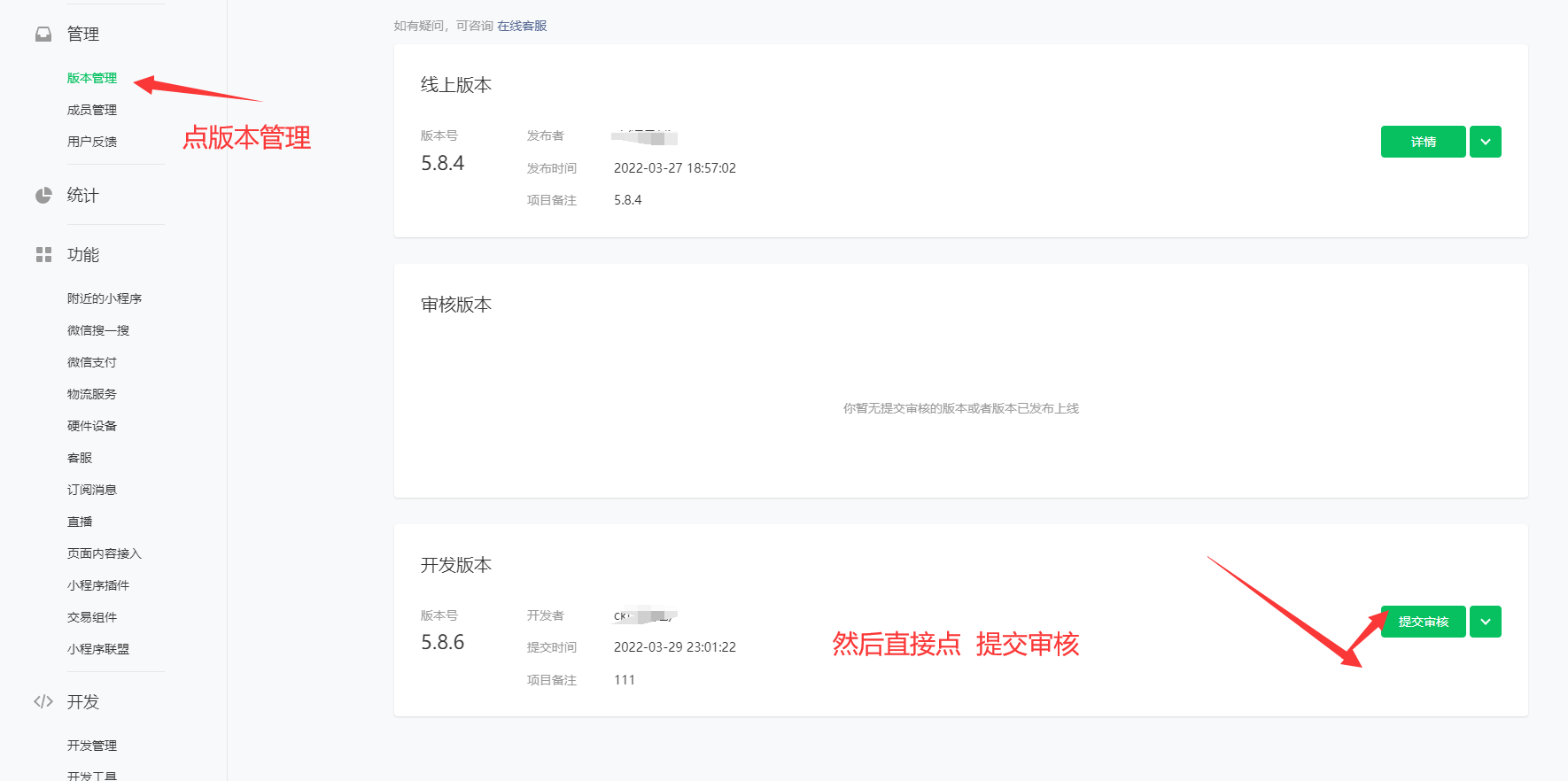
#### **第三步:去微信公众平台 扫码 登录小程序 提交审核小程序**
*****
*****
**重要: 提交审核之前 要打开 后台的审核模式 **
*****
*****
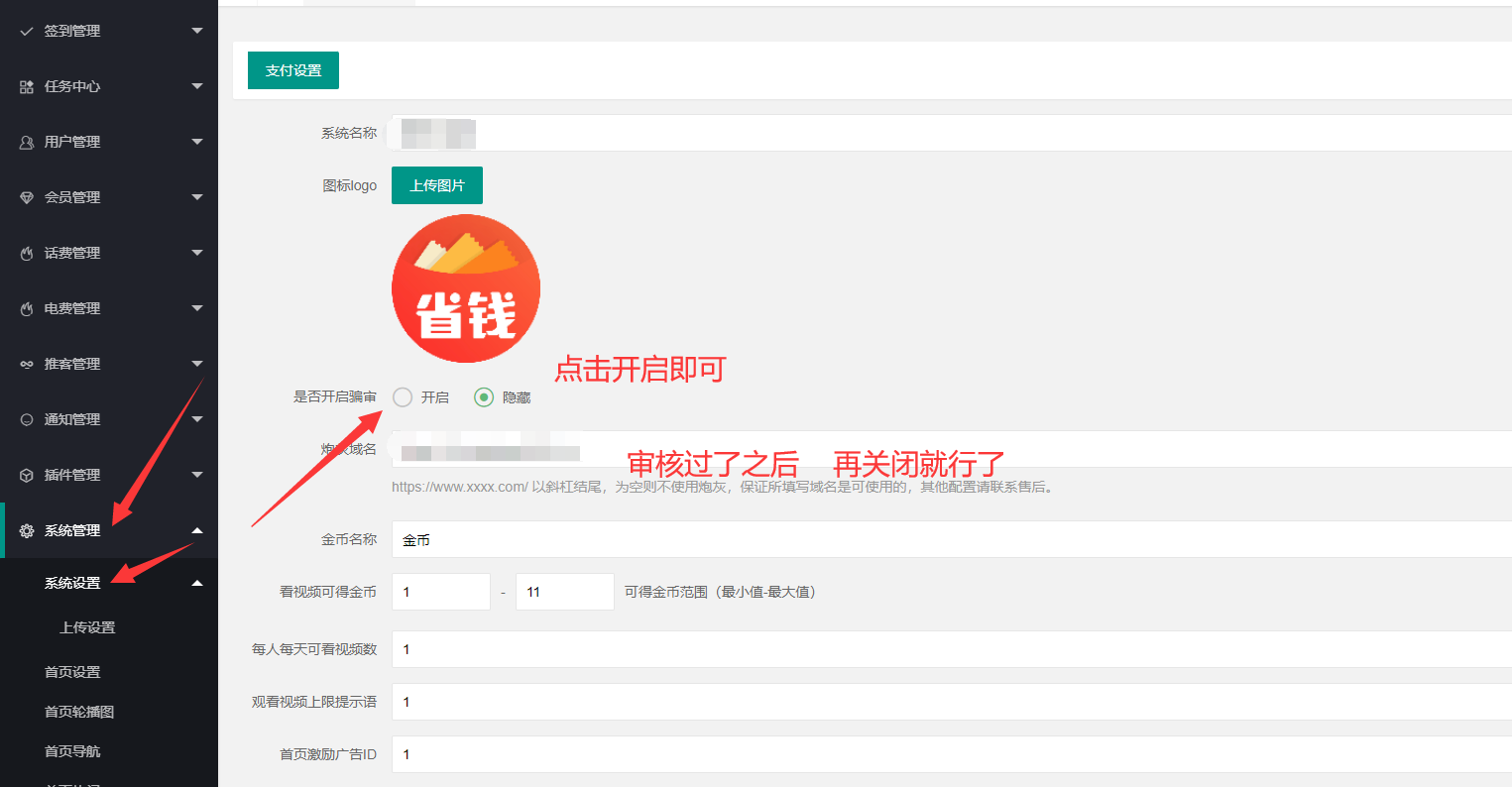
*****
*****
地址:https://mp.weixin.qq.com/
*****
*****
*****
*****
*****
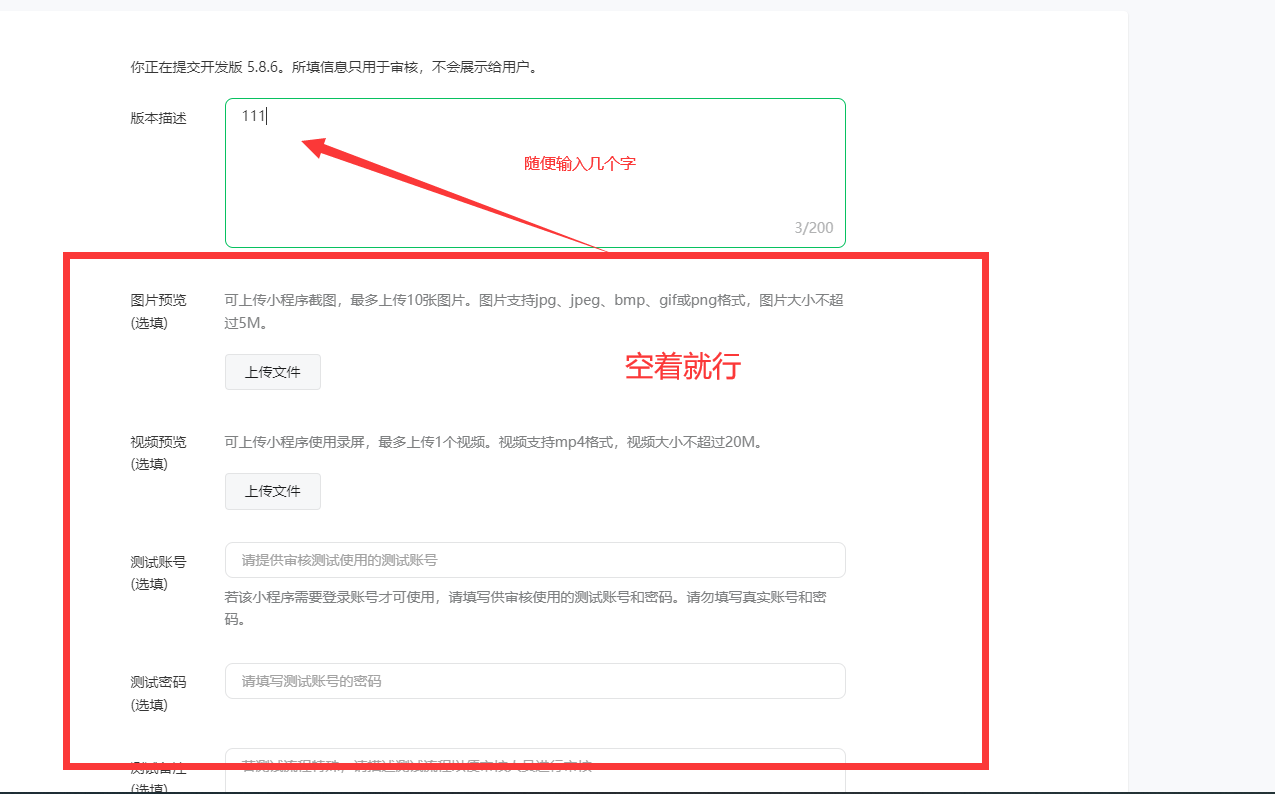
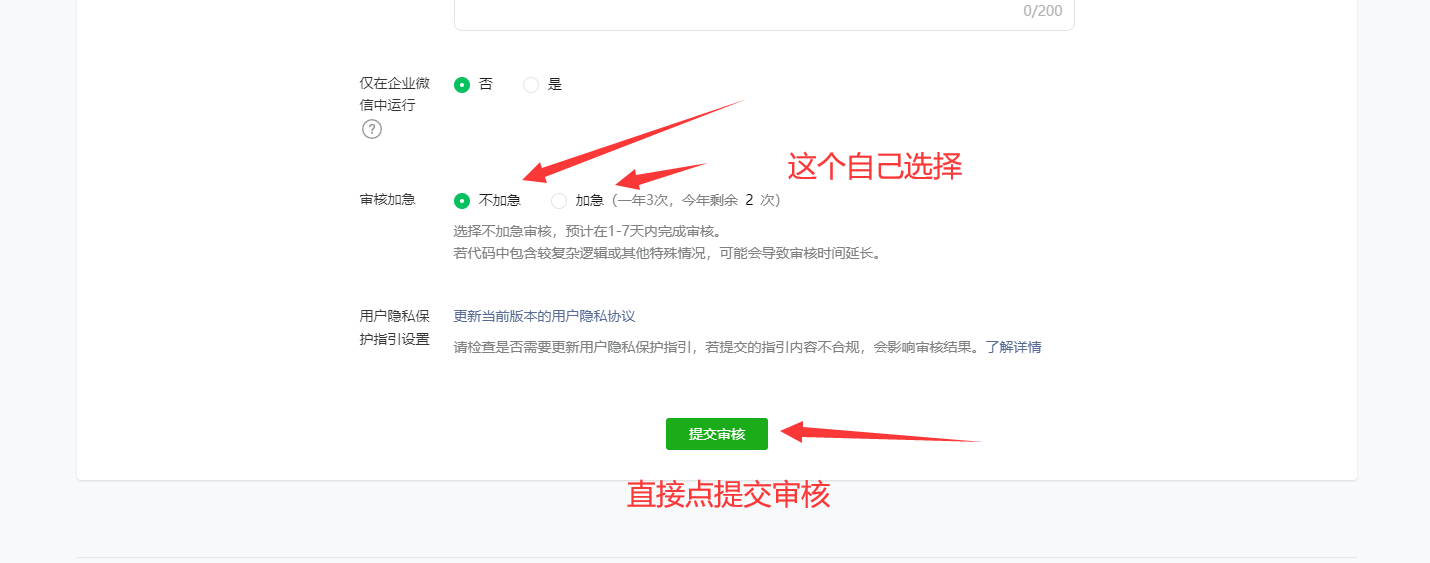
审核过了之后 审核模式 关闭即可
- 青衫淘宝客小程序演示
- 程序演示
- 青衫省钱一号(外卖版本)
- 需要注册的平台地址
- 多合一版本资讯(淘宝客版本)
- 需要注册的平台地址2
- 京东注册
- 拼多多注册
- 首席省钱赚钱专家(淘宝客版本)
- 审核注意事项
- 青衫省钱需要注册平台
- 赚钱大师基本帮助
- 小程序绑定
- 赚钱大师需要注册的平台
- 版本更新教程
- 青衫商城
- 安装文档
- 运行环境
- 程序一键安装
- 宝塔启动命令
- 消息队列
- 宝塔长连接开启方法:
- 开启定时任务方法
- 后台配置
- 前端提交审核
- 客服配置
- 反向代理
- APP打包
- 青衫wifi大师搭建文档
- 1.注册小程序
- 2.小程序设置
- 3.设置后台
- 隐私协议
- 底部设置 和附近页面设置
- 青衫超级挪车码
- 短信申请教程
- 青衫恋爱话术宝典-海王版恋爱话术文档
- 前言
- 1.部署所需资料
- 2.开始配置部署
- 3.上传小程序前端
- 4.提交审核代码及发布
- 5.数据内容同步
- 常见问题
- 绘画ai红包封面搭建教程
- 一:配置云储存服务
- 二.对接小程序
- 后台
- 用户
- 封面
- 封面分类
- 领取记录
- 封面列表
- 相关装修素材
- 头像
- 头像分类
- 头像列表
- 绘画
- 绘画记录
- 绘画风格
- 绘画配置
- 应用
- 套餐管理
- 套餐列表
- 订单管理
- 充值配置
- 跳转管理
- 轮播列表
- 首页菜单
- 绘画轮播
- 头像菜单
- 全民签到
- 邀请有奖
- 天天金币
- 试玩有奖
- 平台
- 平台配置
- 支付
- 设置
- 系统设置
- 微信广告
- 分享设置
- 青衫云享操作文档
- 公共资源
- 资源市场
- 资源市场1
- 消息中心
- 运营推广
- 推广中心
- 主题设置
- 首页布局
- 海报设置
- 社群管理
- 跳转管理
- 卡密管理
- 小程序页面
- 代理管理
- 代理列表
- 提现列表
- 余额明细
- 资源管理
- 主资源库
- 资源列表
- 资源分类
- 资源等级
- 用户管理
- 会员列表
- SVIP设置
- 特权设置
- 用户提现
- 余额明细A
- 广告管理
- 广告位管理
- 广告位设置
- 订单管理
- 全部订单
- 分润记录
- 助力记录
- 任务记录
- 资源记录
- 网站功能
- 文章分类
- 文章管理
- 常见问题2
- 微信小程序服务类目设置
- 微信小程序开发者相关设置
- 微信小程序订阅信息设置
- 微信小程序百度网盘插件申请
- 微信支付相关配置信息
- 青衫进件商户通
- 配置小程序和后台参数
- 支付配置-证书序列号
- 支付不了怎么回事
- 百度ocr识别
- 发布小程序注意事项
- 微信服务商进件配置
- 微信开放平台注册认证
- 创建配置第三方开放平台
- 配置第三方平台参数
- 配置支付宝服务商参数
- 搭建素材
- 青衫聚推联盟
- 搭建前必看
- 系统配置
- 系统配置
- 管理员列表
- 配送方式
- 短信设置
- 操作日志
- 界面设计
- 页面设计
- 底部导航
- 内页导航
- 分享设置
- 如何添加CPS推广链接
- 模板中心
- 自定义表单
- 公众号绑定
- 公众号绑定
- 菜单管理
- 支付设置
- 模板消息设置
- 已添加模板
- 被关注回复
- 关键字回复
- 微信会员卡
- 领取记录
- 会员卡创建
- 微信小程序
- 小程序绑定
- 小程序支付
- 订阅消息设置
- 服务类目
- 会员管理
- 会员列表
- 等级及分销
- 升级申请记录
- 分享海报
- 商城系统
- 商品管理
- 订单管理
- 退款申请
- 商品分类
- 商品海报
- 系统设置
- 商户管理
- 商户管理
- 添加商户
- 商户分类
- 商户商品
- 商户订单
- 余额明细
- 提现记录
- 默认导航
- 参数设置
- 优惠券
- 财务管理
- 佣金记录
- 佣金明细
- 佣金提现
- 发票管理
- 核销记录
- CPS推广系统
- 如何使用
- 推广活动
- 聚合页内容
- 订单管理
- 参数设置
- WiFi码系统
- WiFi管理
- WiFi连接记录
- 参数设置
- 挪车码系统
- 挪车码管理
- 通话计费
- 通话黑名单
- 参数设置
- 接口调用价格
- 挪车阿里云申请方法
- 达人探店
- 参数设置
- 抖音开放平台
- 商户发布探店任务
- 平台审核探店任务
- 达人报名及作品审核
- 费用结算说明
- Ai绘画系统
- 参数配置
- 接口调用价格
- 功能配置加载
- 点击作品一直转圈
- 常见问题解答
- 小程序涉及非官方渠道代充
- 小程序半屏打开海威cps活动
- 腾讯云对象储存配置教程
- 阿里云储存配置
- 小程序对接微信支付教程
- 对接流量主教程
- 微信支付Api密钥获取与配置流程
- 获客人脉文档
- 地图注册
- 2.地图设置对接
- 搭建后台
- 青衫智能问答助手搭建文档
- 公众号对接教程
- qswm公众号版gpt后台对接
- 后台初始化
- 青衫惠赚客文档
- 环境要求
- 域名解析
- 腾讯地图key设置
- 公众号绑定
- 获取链接相关地址
- 登录页面设置
- 模板消息通知
- 首页天气展示设置
- 炮灰域名设置
- 支付配置
- 微信支付
- 电影设置
- 加价比例设置
- 购票须知
- 电影轮播图
- 电影佣金计算
- 签到设置
- 电商管理
- 聚推客接口id秘钥
- 电商排序(隐藏)设置
- 聚推客订单定时任务
- 电商自购返比例设置
- 电商佣金计算
- 客服信息
- 电话费设置
- 话费设置
- 话费加价比例设置
- 阿里云appcode设置
- 话费温馨提示
- 话费佣金计算
- 电费设置
- 电费加价比例设置
- 电费温馨提示
- 电费佣金计算
- 充值页导航
- 会员设置
- 会员套餐设置
- 会员邀请玩法
- 如何添加会员卡密
- 如何购买划拨卡密
- 如何核销会员卡密
- 礼品金设置
- 礼品金基本设置
- 如何添加礼品卡卡密
- 如何购买划拨礼品卡密
- 如何核销礼品金卡密
- 数字商品
- 数字商品加价比例设置
- 数字商品顶部的轮播图
- 分类显示
- 数字商品佣金计算
- 商城设置
- 商城分类设置
- 商品添加
- 门店添加与登录
- 商品佣金计算
- 如何核销商品
- 青衫人脉社群文档
- 小程序配置说明
- 微信支付设置
- 自动更新群配置
- 前端审核管理配置
- wx.getLocation接口申请
- 青衫新版服务商文档
- 配置发布小程序
- 应用配置
- 腾讯云储存配置教程
- 阿里云储存配置教程
- 微信开放平台配置教程
- 小程序过审技巧
- 小程序认证流程
- 服务商助手应用素材
- 微信支付服务商配置教程
- 青衫电影票文档
- 环境要求
- 青衫工商年报大师文档
- 教程一
- 教程二