
## 创建图纸
#### 操作步骤
1. “工具栏”“图纸”“创建图纸”,点击命令按钮。
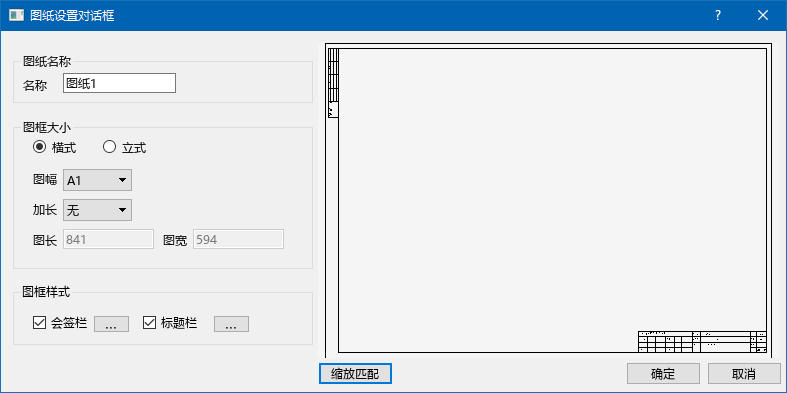
2. 弹出图纸设置对话框,在框内设置图纸名称,图幅,图框样式,设置后点确定按钮。
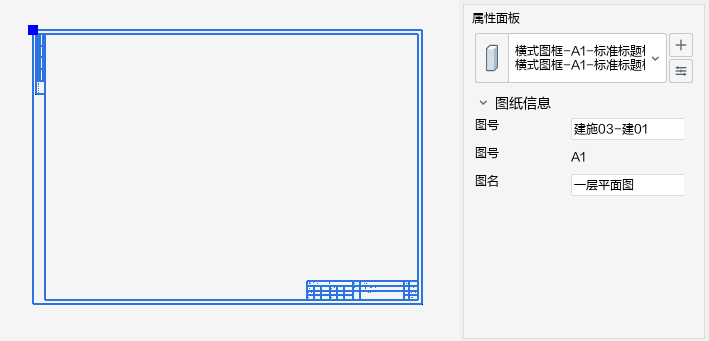
3. 程序按照对话框中设置,创建图纸视图。
- 帮助主页
- 更新说明(0.19.0)
- 更新说明(0.18.0)
- 更新说明(0.17.0)
- 更新说明(0.16.0)
- 更新说明(0.15.0)
- 更新说明(0.14.0)
- 更新说明(0.13.0)
- 更新说明(0.12.0)
- 推荐配置
- 软件安装和卸载
- 工作环境与基本设置
- 启动与退出
- 设计界面
- 项目管理
- 单位设置
- 对象样式
- 视图对象样式
- 视图样板
- 文字样式
- 系统设置
- 快捷键设置
- 捕捉设置
- 模型精度设置
- 机电专业设计
- 给排水系统设计
- 绘制管道
- 横管绘制
- 立管绘制
- 多管绘制
- 管道夹点的使用
- 设备/阀门附件布置
- 增压储水设备
- 给排水设备
- 消防设备
- 喷头
- 消火栓
- 灭火器
- 水泵接合器
- 气体灭火
- 阀门及附件
- 阀门附件
- 组合阀件
- 检查口
- H型通气管
- 管件自由布置
- 管道/设备连接
- 管道连接
- 横立连接
- 水管连接
- 支管连接
- 设备连接
- 卫浴排水连接
- 卫浴给水连接
- 消火栓连接
- 喷头连接
- 喷头自动连接
- 专业计算
- 设备通用连接
- 管道系统坡度调整
- 设计用水量及热水量计算
- 喷淋管径计算
- 检测最远路径
- 最不利作用面积设置
- 喷淋计算
- 给水计算
- 排水计算
- 轴测/系统图
- 给水系统图
- 排水系统图
- 暖通系统设计
- 管道绘制
- 风管
- 水平风管
- 风管立管
- 风管夹点的使用
- 管道
- 水平管道
- 管道立管
- 管道夹点的使用
- 地暖盘管
- 自由绘制
- 矩形区域
- 多管绘制
- 暖通设备布置
- 末端风口
- 空调通风系统
- 风机
- 风机盘管
- 多联机设备
- 空气处理机组
- 室内空气调节设备
- 分体空调
- 空调通风其他设备
- 组合风机盘管
- 组合多联机
- 采暖设备
- 散热器
- 分集水器
- 暖通阀门及附件
- 风管阀门
- 水管阀门
- 消声器
- 静压箱
- 风管其他附件
- 暖通水管其他附件
- 组合阀
- 管件自由布置
- 设备连接
- 风口连接
- 风机盘管连接
- 散热器连接
- 多联机连接
- 地热盘管连接
- 管道连接
- 分歧管连接
- 管道编辑
- 宽高互换
- 风管对正
- 暖通计算
- 风系统计算
- 水系统计算
- 喷口校核计算
- 散热器赋值
- 负荷计算
- 暖通系统图
- 水系统系统图
- 采暖系统图
- 电气系统设计
- 设备布置
- 照明设备
- 供配电设备
- 火灾自动报警设备
- 弱电设备
- 防雷接地设备
- 管线绘制
- 桥架线槽
- 线管
- 导线
- 导线批量连接
- 导线根数赋值
- 系统图
- 配电箱系统
- 综合布线系统
- 专业计算
- 防雷计算
- 电子防雷计算
- 校核
- 保护半径显示
- 保护半径隐藏
- 管线连接
- 桥架连配电箱
- 机电通用工具
- 项目配置管理
- 多人编辑
- 项目构件管理
- 查看构件
- 添加构件
- 删除构件
- 编辑构件
- 同步构件
- 导入CAD
- 导入图纸
- 清除图纸
- 导出CAD
- 导出DWG
- 导出DWG配置
- 套管
- 分支
- 标准连接
- 空间
- 创建空间
- 空间管理
- 时间指派
- 文字
- 创建文字
- 编辑文字
- 文字属性
- 二维线
- 尺寸标注
- 临时尺寸
- 线性尺寸标注
- 线性标注
- 对齐标注
- 弧长标注
- 参数属性
- 径向尺寸标注
- 直径标注
- 半径标注
- 参数属性
- 角度标注
- 标高标注
- 尺寸标注的编辑
- 移动尺寸标注
- 修改尺寸标注
- 增删尺寸界线
- 引出标注
- 标注管理
- 自动标注
- 单个标注
- 平行标注
- 管线文字
- 图纸
- 创建图纸
- 放置视口
- 轴网
- 轴网批量调整
- 明细表
- 创建明细表
- 编辑明细表
- 明细表布图
- 明细表样板
- 项目视图
- 平面视图
- 立面视图
- 剖面视图
- 三维视图
- 使用视图
- 组织视图
- 复制视图
- 视图可见性及图元显示
- 显示模式
- 常用编辑工具
- 通用编辑
- 剪切板
- 显示过滤
- 选择过滤
- 常见问题
- 软件出现崩溃怎么办?
- 磁盘空间不够了怎么办?
- 电脑怎么设置只使用独立显卡?