我们先来看service当中:
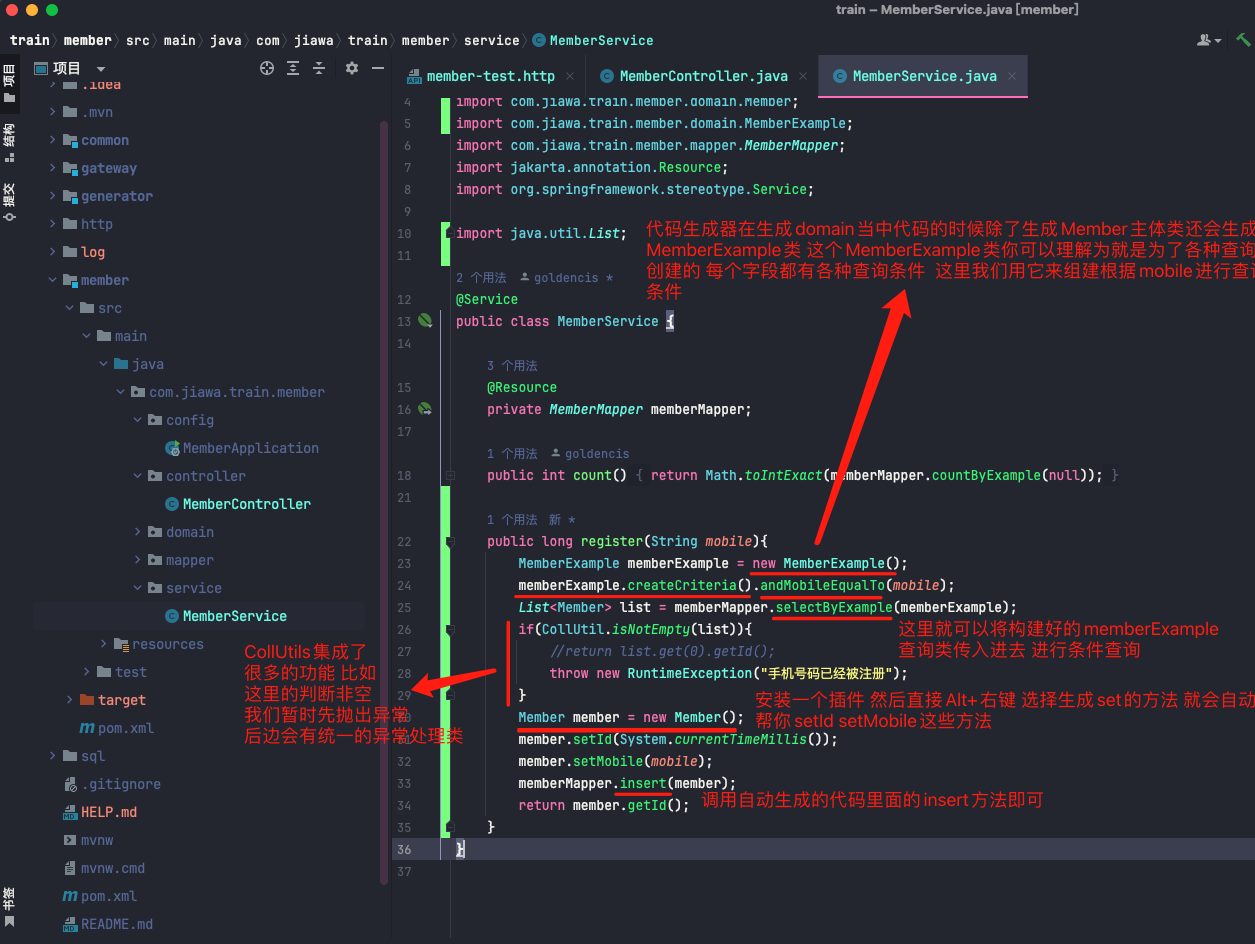
###
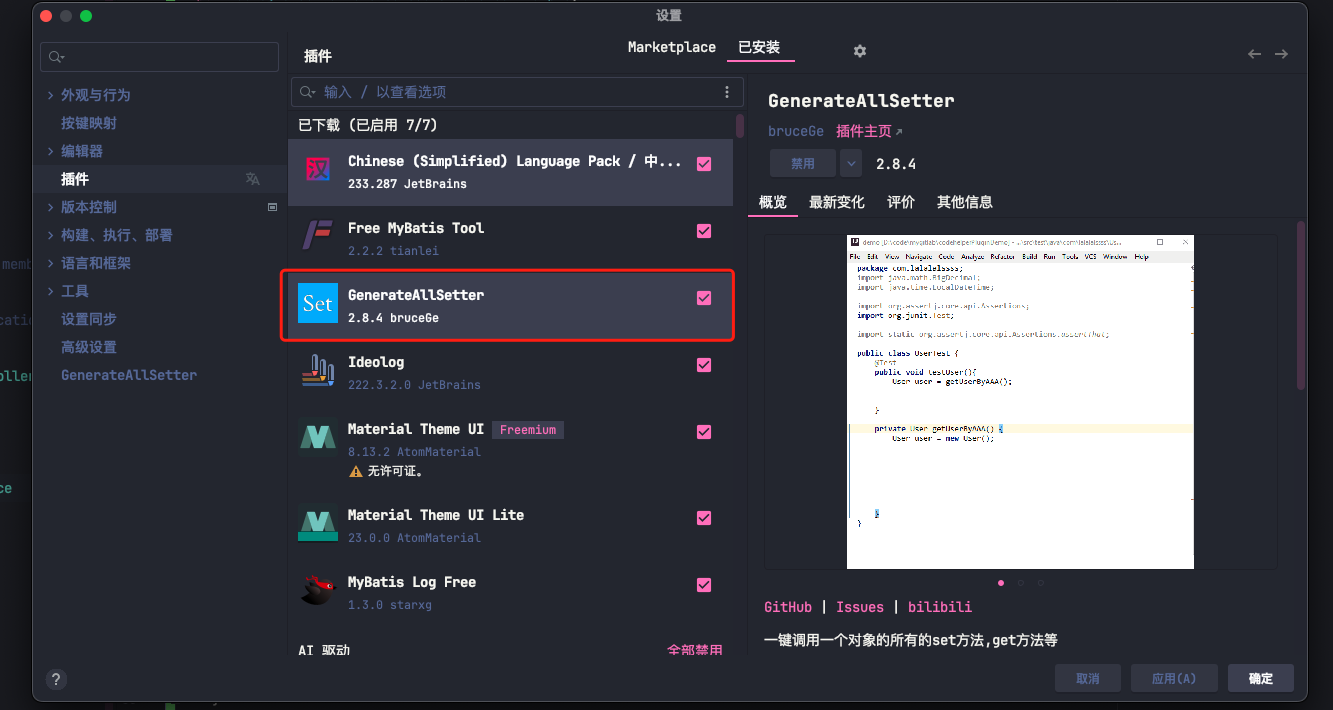
记得去安装这个插件
###
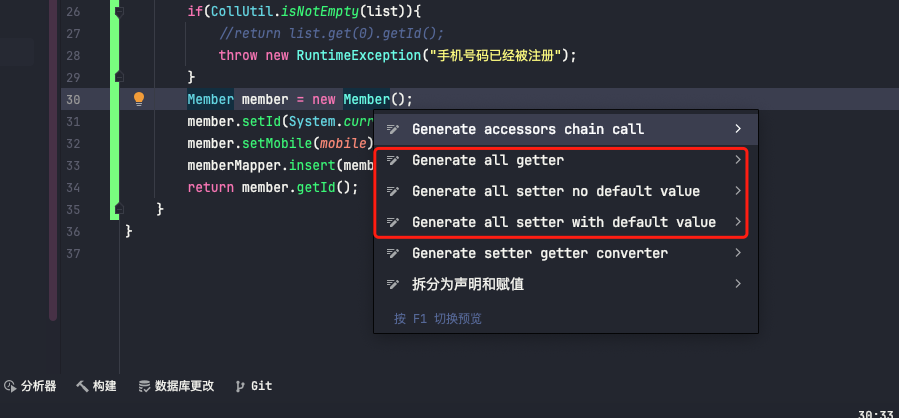
然后Alt+Enter如下图所示
###
可以选择Generate all setter no default value就会自动帮你写好所有字段的set方法 自己往里面填值即可
###
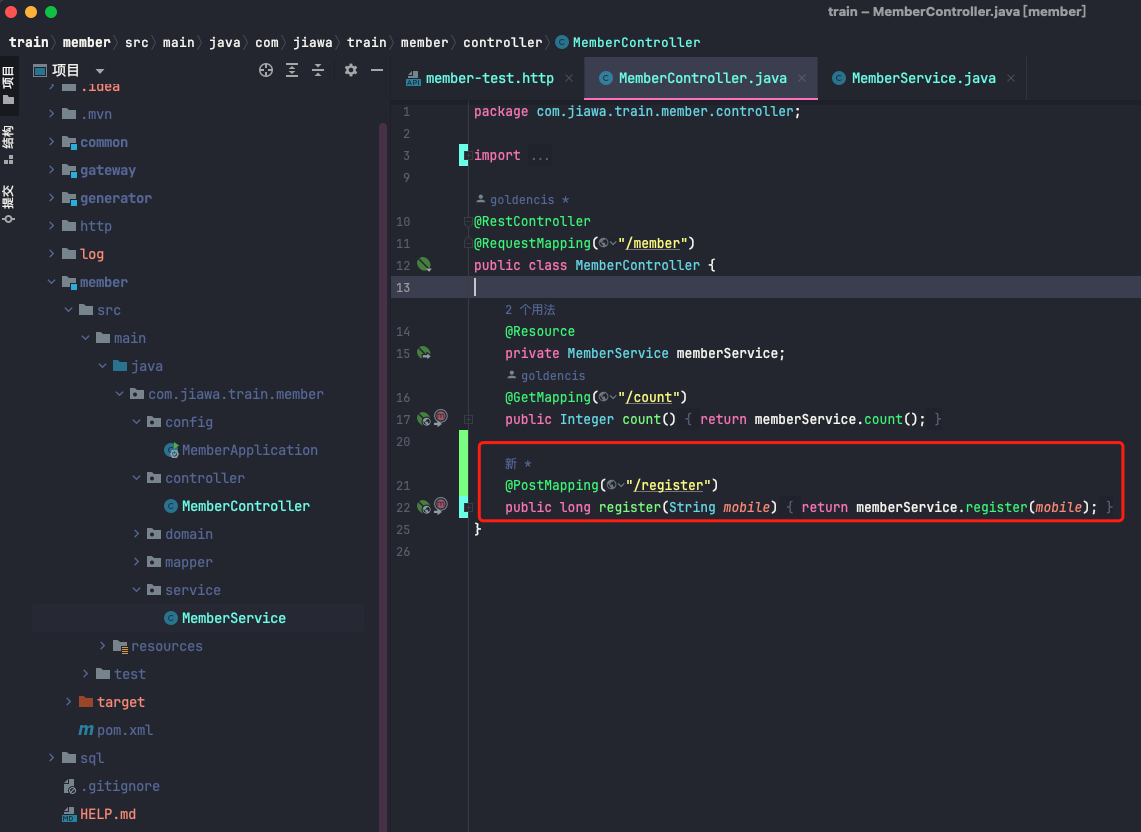
controller当中更简单
###
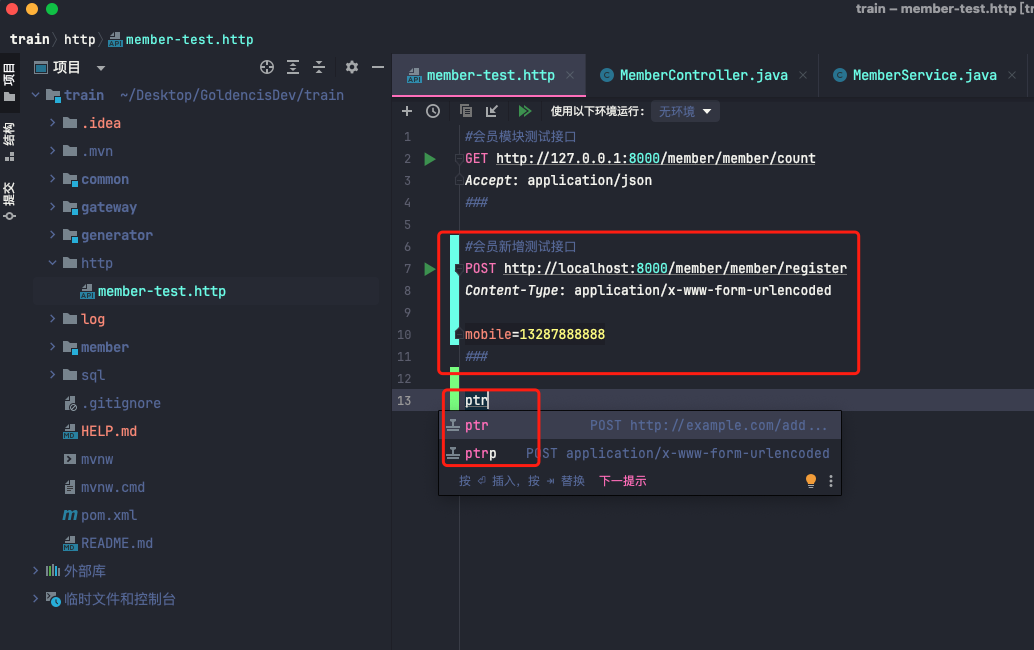
前面我们讲过在项目当中我们创建了http包发送各种模拟请求
如何发送post请求呢?
- 高并发秒杀场景常见的问题
- 项目的技术栈和方向
- 项目收获
- 高并发场景以及为何选择12306
- 12306为何是全球最忙碌的网站之一
- 什么是PV什么是QPS TPS以及如何计算QPS TPS
- 如何保证不超卖不少卖还能承受极高并发
- 核心功能
- 12306的整体架构
- 12306数据库表设计
- 百万人抢一万张票系统如何保证其正常及稳定性
- JIT和AOT的简介和区别
- macos当中部署GraalVM(了解即可)
- 快速完成springcloude alibaba + springboot3框架搭建
- 项目初始化配置
- 1.0项目初始化代码关联Git远程仓库
- 1.1新增会员模块创建Member会员模块
- 1.2增加系统打点日志以及地址前缀和gitignore排除日志文件操作
- 1.3使用HttpClient完成接口测试以及AOP切面记录请求日志
- 1.4公共模块common的创建以及pom.xml当中依赖的整合
- 1.5新增网关模块以及注意事项
- properties和yaml配置文件之间在线相互转换
- 1.5.1为网关配置路由转发以及为gateway网关配置启动参数打印日志
- 阿里云RDS mysql数据库开通流程和细节总结
- idea当中连接远程的RDSmysql数据库
- 1.7集成mybatis打印sql启动文件制定扫描mapper以及配置文件指定xml路径
- 汉化idea
- 1.8集成mybatis官方代码生成器
- 1.9实验代码生成器完成会员注册接口的开发以及httpclient发送post请求
- 2.0封装请求参数以及定义返回结果
- 2.1统一异常处理
- 2.2自定义异常处理
- 2.3参数校验自定义异常处理
- 2.4雪花算法
- 2.5vue本地环境搭建以及web项目创建
- 2.6web模块集成AntDesignVue
- 2.7前端登陆页面开发案例套路介绍
- 2.8短信验证接口开发增加获取会员公共方法
- 2.9登陆接口开发增加resp统一响应类规避敏感字段升级hutool版本
- 3.0修改web模块登陆页面请求接口地址为全路径地址
- 3.1gateway网关当中增加配置解决跨域问题
- 3.2修改会员控制器为接收json格式数据httpclient发送post请求
- 3.3web模块的axios增加拦截器控制台打印请求和返回的全部日志
- 3.4web模块设置不同的开发环境配置不同的请求地址
- 3.5web模块新增控制台主页,登陆成功跳转到控制台
- idea使用小技巧
- 3.6web模块头部和左侧菜单组件开发
- 3.7jwt单点登录之使用hutool在用户登录成功之后生成token返回给前端(未封装)
- 3.8jwt单点登录之使用hutool在用户登录成功之后生成token返回给前端(封装jwt工具类)
- 3.9web模块使用vuex(store)全局变量保存用户登陆信息
- 4.0web模块使用vuex(store)全局变量配合h5的session缓存保存用户信息到Session Storage当中去
- 4.1gateway网关增加多个测试过滤器并设置过滤器顺序
- 4.2gateway网关当中增加登陆拦截器(解决接口被随意访问的问题)
- 4.3web模块新增axios拦截器为所有请求添加上token
- 4.4web模块路由拦截防止越权访问
- 4.5增加乘车人表以及代码生成器生成持久层代码
- 4.6增加乘车人枚举类
- 4.7新增乘车人添加接口进行字段校验(新增无返回值)
- 4.8使用idea自带的httpclient记录登陆信息token
- 4.9新增common公共模块获取拦截器在member模块设置开关是否启用解析token从而通过拦截器设置用户信息MemberLoginResp类到线程本地变量当中去供整个线程调用
- 5.0完善路由以及改造main.vue加载所有子路由登陆成功默认跳转welcome组件当中去
- 5.1增加乘车人模块并实现顶部菜单根据路径自动选中效果
- 5.1.1实现左侧菜单根据当前请求路径自动选中功能
- 5.2完善passenger乘车人模块前端代码实现成功提交功能到后端接口
- 5.3会员模块乘车人列表查询接口开发(有返回值还未做分页)
- 5.4会员模块乘车人列表查询接口开发(有返回值有分页)
- 5.5封装分页请求参数,所有请求类统一继承分页请求参数类统一增加page,size字段并校验
- 5.6封装分页返回结果和统一结果返回类配合使用
- 5.6.3格式化乘车人查询接口返回日志格式,修改乘车人返回类当中日期的格式增加相应注解即可解决
- 5.7web模块新增passenger乘车人管理当中的静态表格(初步集成未对接后台接口)
- 5.8web模块新增passenger乘车人管理对接后台接口展示列表以及分页和刷新功能(已对接后台接口)
- 5.9解决前后端交互后端返回数据Long类型精度丢失的问题(精度丢失导致用户ID不准确ID是通过雪花算法生成的)
- 6.0-改造会员PassengerService当中的save方法同时满足新增和编辑功能(根据ID判断是插入还是更新,涉及到两种更新方式)
- 6.2-web模块乘车人管理表格右侧增加删除编辑按钮并对接后台编辑接口
- 6.3-新增删除乘车人后端接口以及为前端乘车人组件添加注释信息
- 6.5-web模块乘车人页面定义乘车人常量,在新增模态框以及table数据渲染的时候展示对应的文字显示(不再显示123数字)
- 6.6-web模块单独定义enums.js文件存放后端也有的枚举数据,在main.js当中引入并在package.json屏蔽掉报错信息,乘车人组件当中通过window.xxx拿到定义的枚举数据展示乘客类型
- 自制代码生成器初步了解
- RDS Mysql数据库存在的问题
- 自制代码生成器初体验
- 8.1-10.1代码生成器总结
- 代码生成器当中的经验总结
- 11.0-11.1新增admin前端控制台模块的快速实现方式(直接拷贝web前端模块)
- 11.2后端新增子模块business的规范操作
- 11.3阿里云新增RDS-mysql数据库并代码中自动生成business持久层代码
- 11.4记录一次完整的生成business模块后端代码和前端代码的全过程
- 11.5-15.3业务总结
- 15.4springboot当中自带定时任务的使用
- 15.5springboot当中集成quartz调度框架
- 15.6quartz调度框架禁止并发执行任务变成一个一个执行
- 15.7用接口来操作quartz调度框架增加12张用到的数据表测试整体效果
- 15.8-16.0控制台新增页面通过界面化操作quartz调度功能以及改造了前端左侧路由接口和目录结构
- 16.1-16.14业务管理模块生成每日的车次车站车厢座位数据
- 16.5batch调度模块集成Feign并调取business服务
- 16.6-batch模块集成Feign调取business模块的每日车次 自动生成每日的数据
- 16.7-增加手动生成每日车次信息功能并解决前端分页数量切换失效的bug并修改vue.ftl模板进行解决每页数量问题
- 17.4-修改前端vue启动脚本名称方便区分不同的前端服务
- 17.6利用session-storage不同页面数据交互定义前端字段校验以及避免分页跳转条件丢失
- 17.7-利用代码生成器将后端枚举类生成到web前端模块的枚举js当中,然后在order订单页面读取js里面的内容循环放到变量当中去在页面展示
- 19.1-提交数据包含列表新增了SpringMvcConfig.java将登录用户信息写到本地线程变量
- 19.3-创建订单接口增加预减库存并判断余票是否足够(涉及到switch case当中使用枚举类型以及枚举类型值的获取)
- 20.0-涉及到根据主键更新指定字段的值的操作
- 20.1-自动生成代码的前提下又涉及到了自定义mapper以及对应的xml
- nacos的使用
- nacos的初步了解
- springboot当中传统方式读取application.properties配置信息
- 集成Nacos配置中心并实现动态刷新读取配置
- Nacos的多环境配置以及关联Mysql存放配置信息
- Nacos当中命名空间的创建并把配置注册到命名空间下
- Nacos集成服务注册中心并将服务注册到nacos的命名空间下
- GateWay网关集成服务注册中心以及修改路由转发为负载均衡+服务名称
- Feign结合Nacos实现通过服务名称进行远程调用
- Nacos服务挂了会有什么后果?
- 各种缓存讲解
- mybatis的一级缓存
- mybatis的二级缓存
- springboot的内置缓存
- springboot整合redis是实现自定义序列化
- springboot内置缓存和redis整合方案
- springboot内置缓存和redis整合深入理解以及他俩整合是如何防止缓存穿透的
- springboot内置缓存结合redis防止缓存击穿
- springboot内置缓存结合redis防止缓存雪崩
- redis缓存高并发场景中的生产问题分享
- 前端缓存的使用
- seata分布式事务
- 初识seata分布式事务
- 初识seata分布式事务的四种模式
- seata分布式事务实战
- seata和nacos结合
- seata分布式事务对sql的限制要求
- jmeter压力测试
- jmter的安装部署和使用
- 对购票下单接口进行压测
- 使用synchronized解决库存超卖以及局限性
- 使用redis的分布式锁setnx来实现防止超卖
- 对redis分布式锁setnx方案的优化
- 使用redisson看门狗实现分布式锁进行防止超卖
- redisson当中的红锁讲解
- 限流熔断降级实战
- 限流、熔断、降级的基本理解
- 常见的限流算法
- sentinel的初步了解以及代码当中集成限流功能
- sentinel限流控制台的使用
- sentinel直接对某个接口进行限流并通过控制台控制具体限流参数的配置
- sentinel+nacos解决直接对接口限流但是重启服务无法保存限流规则的问题
- Sentinel限流不同的流控效果讲解之WarmUp&排队等待
- Sentinel限流不同的流控模式讲解之关联&链路
- Sentinel+Feign熔段(慢调用比例模式)以及熔断降级处理
- Sentinel+Feign熔段(异常比例模式)以及熔断降级处理
- Sentinel+Feign熔段(异常数模式)以及熔断降级处理
- Sentinel+Feign熔断三种模式总结
- 令牌大闸
- 令牌大闸初步了解
- 自动生成sk_token令牌表持久层以及对应的正删改查代码和vue前端代码
- 自动或者定时生成每日车次信息的时候也生成车次令牌表
- 下单的时候增加校验每次车次的秒杀令牌功能(基于mysql)
- 下单的时候防止机器人刷票(基于redis分布式锁setnx)
- 下单的时候增加校验每次车次的秒杀令牌功能(基于redis缓存)
- 利用验证码削弱瞬时流量高峰
- springcloud alibaba当中集成图形验证码生成功能
- ant design vue当中集成前端图形验证码展示
- springcloud alibaba继承图形验证码之后的验证码校验功能
- 保护后端验证码接口增加纯前端验证码削弱瞬间流量高峰
- RocketMQ消峰
- 关于RocketMQ的初步了解
- RocketMQ的安装部署前的准备工作
- RocketMQ在linux当中部署运行实战
- RocketMQ控制台的部署和简单使用
- springboot3当中集成rocketmq以及排坑总结
- 集成rocketmq之后的下单流程改造(利用起来rocketmq进行消峰处理提高吞吐量)
- (排队出票)集成rocketmq之后提高了吞吐量但是存在可以防止超卖确卖不完的问题,如何解决?
- 最后如何进行并发测试
- 前后端实现排队购票效果
- 关于压力测试的一些概念
- 如何进行整体性能测试呢?
- 要进行多次压力测试,期间rocketmq当中的消息如何清除
- 使用springboot异步线程来代替rocketmq进行出票操作
- 发布阶段
- 阿里云发布简要汇总
- 如何对后端springboot服务打包
- 编写jar包运行脚本
- vue前端web和admin编译打包通过nginx部署
- 前后单请求异常排除之hutool第三方jar包认证失败
- 如何通过阿里云oss发布vue打包好的静态资源网站